
If you have ever wondered how we went from room-sized machines that needed their own air conditioning to a phone that fits in your pocket and talks back to you, you are really asking about the generations of computers. This is one of those topics that shows up in school textbooks, in interviews, and honestly, in casual conversations too, because it explains so much about the technology we use every day.
In this guide, we will walk through all five generations of computers, one by one, in plain English. No jargon dumps, no dry academic tone. Just a clear story of how computing changed, why it changed, and what came next.
What Are Generations of Computers?
A “generation” of computers refers to a distinct period in computing history, marked by a major shift in the core technology used to build the machine. Each generation is defined by the hardware that powered it, whether that was a vacuum tube, a transistor, or a microprocessor.
Think of it like phone generations. Every big jump, from flip phones to touchscreens to AI-powered assistants, changed how the device worked, how much it could do, and how people used it. Computers went through the same kind of leaps.
Why Computers Are Divided Into Generations
Engineers and historians group computers into generations because each shift in core technology changed everything downstream: speed, size, cost, reliability, and even what the computer could be used for. It is a simple way to organize decades of rapid change into a timeline that actually makes sense.
According to the widely cited overview on Wikipedia’s history of computing hardware, this classification system has been used by historians and educators for decades because it maps neatly onto real hardware milestones rather than arbitrary dates.
Objectives of Computer Generations
Each generation tried to solve the same basic problems: make computers faster, smaller, cheaper, and more reliable. The methods changed, but the goal stayed constant. That consistency is actually what makes the story of computer generations so satisfying to follow.
Quick Timeline of the Five Generations
Before we go deep into each era, here is the big picture. This table alone answers most of what people search for when they type “generations of computers” into Google.
| Generation | Time Period | Core Technology | Notable Examples |
|---|---|---|---|
| First | 1940 to 1956 | Vacuum tubes | ENIAC, UNIVAC I |
| Second | 1956 to 1963 | Transistors | IBM 1401, IBM 7090 |
| Third | 1964 to 1971 | Integrated circuits | IBM System/360, PDP-8 |
| Fourth | 1971 to present | Microprocessors | Apple II, IBM PC |
| Fifth | Present and future | Artificial intelligence | AI-enabled devices, smart assistants |
Evolution of Computers Before the Five Generations
Early Calculating Devices
Long before electricity powered anything, people used tools like the abacus to do arithmetic. These were not computers in any real sense, but they set the stage for the idea that a machine could help with calculation.
Mechanical Computers
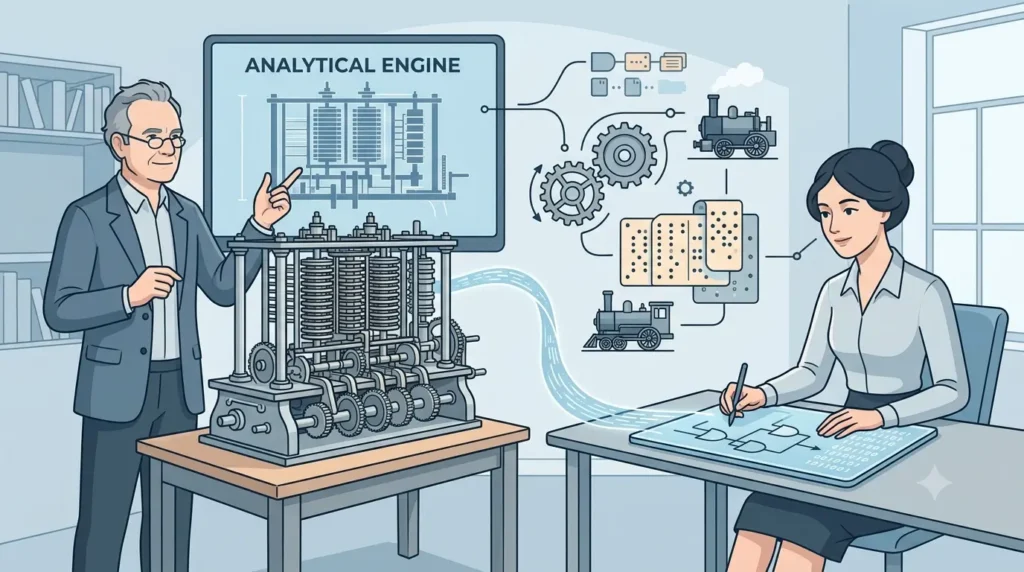
In the 1800s, Charles Babbage designed the Analytical Engine, a mechanical device that is widely considered the conceptual ancestor of the modern computer. Ada Lovelace, who worked alongside Babbage, wrote what many historians regard as the first computer algorithm, making her one of the earliest programmers in history.
Electromechanical Computers
By the early 20th century, machines started combining mechanical parts with electrical relays. These electromechanical computers were faster than purely mechanical ones, but they were still slow, bulky, and prone to breaking down. They did, however, prove that automated computation was possible at scale, which set up everything that followed.
First Generation of Computers (1940 to 1956)
Technology Used: Vacuum Tubes
The first generation of computers ran on vacuum tubes, glass tubes that controlled electric current the way a valve controls water flow. They worked, but they were far from practical by today’s standards.
Characteristics
These machines were massive, often filling entire rooms. They generated enormous amounts of heat, consumed huge amounts of electricity, and needed constant maintenance because vacuum tubes burned out frequently.
Advantages
Despite their flaws, first generation computers were the fastest calculating devices humanity had ever built at the time. They could perform calculations in seconds that would have taken humans days or weeks by hand.
Limitations
The heat problem was serious. Vacuum tubes generated so much warmth that machines needed dedicated cooling systems. They were also unreliable, expensive to run, and limited in what they could actually process.
Programming Languages
Programming happened in machine language, which meant writing in raw binary code. There was no abstraction layer at all. Programmers had to think exactly like the machine did.
Storage and Input/Output Devices
Punch cards and magnetic drums handled data storage and input. Output usually came through printed reports, since there were no screens as we know them today.
Examples
The most famous first generation machines include ENIAC, EDVAC, EDSAC, UNIVAC I, and IBM 701. ENIAC, built in 1945, is often cited as the first general-purpose electronic computer, and it remains a frequent reference point in computing history discussions on forums like AskHistorians on Reddit, where users regularly ask about its role in computing history.
Applications
First generation computers were mostly used for military calculations, scientific research, and government projects. They were not accessible to the public or to businesses in any practical way.
Second Generation of Computers (1956 to 1963)
Transistor Technology
The second generation replaced vacuum tubes with transistors, a technology invented at Bell Labs by scientists including William Shockley. Transistors did the same job as vacuum tubes but were smaller, more reliable, and produced far less heat.
Characteristics
Computers shrank significantly in size compared to the first generation. They were faster, more energy efficient, and broke down less often, which made them practical for a wider range of organizations.
Advantages
Lower heat output meant fewer cooling problems. Lower power consumption meant lower operating costs. And because transistors were more durable, these machines needed far less maintenance.
Limitations
They still generated some heat and required air conditioning in many cases. Cost remained high enough that only large businesses, universities, and government agencies could afford them.
Programming Languages
This generation introduced high-level programming languages like FORTRAN and COBOL. For the first time, programmers could write instructions closer to human language rather than raw binary, which made software development significantly faster.
Examples
Notable machines include the IBM 1401 and IBM 7090, both of which were widely used in business and scientific computing during this era.
Applications
Second generation computers found their way into banking, payroll processing, and scientific research. Businesses started to see real, practical value in computing for the first time.
Third Generation of Computers (1964 to 1971)
Integrated Circuits (ICs)
Jack Kilby and Robert Noyce independently developed the integrated circuit, a way to fit multiple transistors onto a single silicon chip. This invention is widely regarded as one of the most important breakthroughs in computing history.
Characteristics
Computers became noticeably smaller, faster, and more affordable. Reliability jumped significantly because there were fewer individual components that could fail.
Advantages
Integrated circuits reduced manufacturing costs while increasing processing speed. This combination is what finally started to bring computing within reach of mid-sized businesses.
Limitations
While much improved, these systems were still expensive and complex to operate compared to what came later. They also required specialized staff to run and maintain them.
Operating Systems
This generation saw the rise of true operating systems, which allowed multiple programs to run and let multiple users interact with a single machine at the same time. This was a major leap in usability.
Examples
The IBM System/360 is probably the most historically significant machine of this era, since it introduced a family of compatible computers that businesses could scale up or down. The PDP-8 was another influential example, especially in research settings.
Applications
Airlines began using these systems for reservation processing. Businesses adopted them for accounting and inventory. Universities used them for research computing.
Read more: Third Generation Computers
Fourth Generation of Computers (1971 to Present)
Microprocessors
In 1971, Intel engineer Ted Hoff led the development of the Intel 4004, the first commercially available microprocessor. This single chip packed an entire central processing unit onto one piece of silicon, and it changed computing forever.
VLSI Technology
Very Large Scale Integration, or VLSI, allowed engineers to pack thousands and eventually millions of transistors onto a single chip. This is the technology that made personal computers possible.
Characteristics
Computers in this generation became small enough and cheap enough to sit on a desk in someone’s home or office. Processing power kept climbing while prices kept falling, a trend often linked to Gordon Moore’s observation known as Moore’s Law.
Personal Computer Revolution
This is the generation that brought computing to ordinary people. Companies like Apple and IBM released machines that regular families and small businesses could actually afford and use.
Examples
The Intel 4004 kicked things off, followed by consumer machines like the Apple II and the IBM PC. These devices are widely discussed in retro computing communities, including active threads on r/vintagecomputing on Reddit, where enthusiasts still restore and discuss these exact machines today.
Applications
Fourth generation computers spread into homes, schools, small businesses, and eventually into nearly every industry you can think of. This is also the generation that gave rise to the internet as we know it.
Fifth Generation of Computers (Present and Future)
Artificial Intelligence
The fifth generation is defined less by a single piece of hardware and more by a shift in what computers can do. Artificial intelligence allows machines to process language, recognize patterns, and make decisions in ways that used to require a human mind.
Machine Learning
Machine learning lets computers improve at a task through exposure to data, rather than being explicitly programmed for every possible scenario. This is the engine behind everything from recommendation systems to fraud detection.
Natural Language Processing
Natural language processing, or NLP, is what allows computers to understand and generate human language. It is the technology behind chatbots, voice assistants, and translation tools.
Robotics
Robotics has advanced alongside AI, combining physical machines with intelligent software. Modern robots can navigate environments, handle objects, and make real-time decisions, something that would have sounded like science fiction just a few decades ago.
Cloud Computing and Edge AI
Cloud computing lets people access massive computing power over the internet instead of owning it locally. Edge AI, on the other hand, brings intelligent processing directly onto devices like phones and smart cameras, reducing the need to send data back and forth to a server.
Characteristics
Fifth generation systems are defined by adaptability. They learn, they improve, and in many cases they operate with a degree of autonomy that earlier generations never had.
Examples
Modern smartphones, AI assistants like voice-activated helpers, self-driving car systems, and AI-powered laptops all fall under this generation. Professionals discussing enterprise AI adoption often share real case studies on LinkedIn Pulse articles, which offer a practical look at how businesses are applying these tools right now.
Applications
Fifth generation computing shows up in healthcare diagnostics, autonomous vehicles, financial forecasting, customer service automation, and countless other fields. It is genuinely everywhere at this point, often working quietly in the background.
Comparison of All Five Generations of Computers
Seeing the generations side by side makes the differences click faster than reading paragraph after paragraph. Here is a clean comparison.
Generation-wise Comparison Table
| Generation | Technology | Speed | Size | Reliability | Cost |
|---|---|---|---|---|---|
| First | Vacuum tubes | Slow | Room-sized | Low | Very high |
| Second | Transistors | Faster | Large cabinet | Moderate | High |
| Third | Integrated circuits | Fast | Desk-sized | Good | Moderate |
| Fourth | Microprocessors | Very fast | Desktop/laptop | High | Affordable |
| Fifth | AI and machine learning | Extremely fast | Pocket-sized | Very high | Widely accessible |
Technology Comparison
Each generation’s core technology directly shrank the physical hardware while multiplying its processing power. That pattern, smaller components leading to bigger capability, is really the entire story of computing history in one sentence.
Performance Comparison
A modern smartphone processor can perform calculations that would have taken an entire first generation computer room years to complete. That gap is honestly hard to wrap your head around, but it shows just how far this technology has come in under a century.
How Computer Technology Evolved Across Generations
Hardware Evolution
Hardware moved from vacuum tubes to transistors to integrated circuits to microprocessors, with each step shrinking components while boosting performance. This physical miniaturization is the backbone of everything else on this list.
Software Evolution
Software evolved from raw machine code, to high-level languages like FORTRAN and COBOL, to modern operating systems, to today’s AI models that can write and even improve their own code in limited ways. The gap between “typing binary by hand” and “talking to a chatbot” is the whole story of software evolution.
Storage Evolution
Storage moved from punch cards and magnetic drums to magnetic tape, then hard disks, then solid-state drives, and now cloud storage that holds data across remote servers. Each step meant more data in less physical space.
Input and Output Device Evolution
Early computers relied on punch cards for input and printed paper for output. Later generations introduced keyboards, monitors, mice, touchscreens, and now voice commands, which is a pretty remarkable leap in how humans interact with machines.
Processing Speed Improvements
Processing speed has followed a roughly exponential curve for decades, closely tracking Moore’s Law, which predicted that transistor counts on a chip would double approximately every two years. That prediction held up remarkably well for a long stretch of computing history.
Key Technologies Behind Computer Generations
Vacuum Tubes
Glass tubes that controlled electrical signals, used in first generation computers. They worked but ran hot and failed often.
Transistors
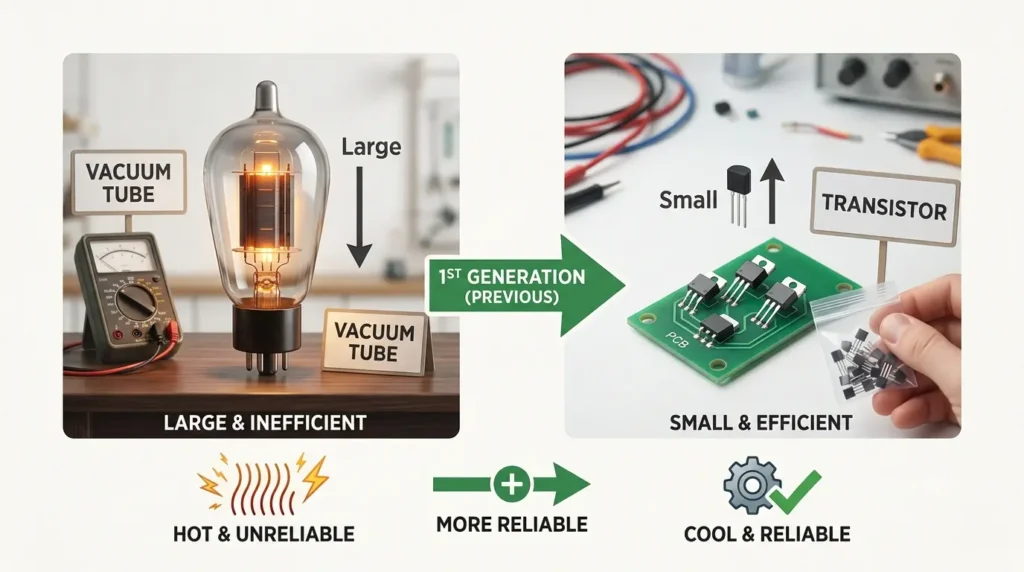
Small semiconductor devices that replaced vacuum tubes in the second generation. They were more efficient, more reliable, and much smaller.
Integrated Circuits
Multiple transistors combined onto a single silicon chip, defining the third generation. This is what made computers dramatically smaller and cheaper.
Microprocessors
An entire processing unit on one chip, the defining technology of the fourth generation. This is the invention that put a computer on every desk and eventually in every pocket.
Artificial Intelligence
Software systems that can learn from data and make decisions, defining the fifth generation. Unlike earlier generations, this shift is driven more by software capability than by a single hardware breakthrough.
Important Scientists and Companies That Shaped Computer Evolution
Charles Babbage
Often called the father of the computer, Babbage designed the Analytical Engine in the 1800s, laying the conceptual groundwork for programmable machines.
Alan Turing
Turing’s theoretical work on computation, including the concept now known as the Turing machine, provided the mathematical foundation that modern computing still rests on.
John Presper Eckert and John Mauchly
These two engineers led the development of ENIAC, the machine widely credited as the first general-purpose electronic computer.
William Shockley
Shockley, along with his colleagues at Bell Labs, co-invented the transistor, a breakthrough that earned the team a Nobel Prize and reshaped the entire electronics industry.
Jack Kilby and Robert Noyce
Working independently, these two engineers each developed early versions of the integrated circuit, a technology now considered one of the most important inventions of the 20th century.
Ted Hoff
Hoff led the team at Intel that designed the 4004, the first commercially available microprocessor, which set off the personal computer revolution.
IBM, Intel, Apple, Bell Labs, Texas Instruments
These companies drove much of the hardware innovation across every generation, from IBM’s mainframes to Intel’s processors to Apple’s role in bringing computers into everyday homes.
Future Beyond the Fifth Generation
Quantum Computing
Quantum computers use principles of quantum mechanics to process information in fundamentally different ways than classical computers. Instead of bits that are either 0 or 1, they use qubits that can represent multiple states at once, which could eventually solve certain problems far faster than any machine we have today.
Neuromorphic Computing
Neuromorphic chips are designed to mimic the structure and function of the human brain. The goal is to make computers that process information more like neurons do, which could dramatically improve efficiency for certain AI tasks.
Optical Computing
Optical computing uses light instead of electricity to process data. In theory, this could allow for much faster data transmission with less energy loss, though the technology is still largely experimental.
AI Accelerators
Specialized chips built specifically to run AI workloads, such as GPUs and TPUs, are already reshaping how computers are designed. These accelerators are optimized for the kind of parallel processing that machine learning models require.
What Could the Sixth Generation Look Like?
Nobody can say for certain what will define the next generation of computers. But quantum computing, neuromorphic chips, and increasingly capable AI systems all seem like strong candidates to define whatever comes next. It is genuinely exciting to think about, especially given how much changed between just the first and fifth generations.
Commonly Asked Questions About Computer Generations
What are the five generations of computers?
The five generations are defined by vacuum tubes, transistors, integrated circuits, microprocessors, and artificial intelligence, in that order.
Why are computers divided into generations?
Computers are grouped into generations because each era is marked by a major shift in core hardware technology, which in turn changed speed, size, cost, and reliability.
Which computer belongs to the first generation?
ENIAC and UNIVAC I are two of the most well-known first generation computers.
What technology was used in the second generation?
The second generation used transistors instead of vacuum tubes, which made computers smaller and more reliable.
Why are microprocessors important?
Microprocessors packed an entire processing unit onto a single chip, which made personal computers possible and affordable for regular people.
What is the fifth generation of computers?
The fifth generation is defined by artificial intelligence, machine learning, and technologies that let computers learn and adapt rather than just follow fixed instructions.
Are AI computers considered fifth-generation computers?
Yes, AI-driven systems and devices are generally classified as fifth generation because they are built around learning and adaptive processing rather than a single new hardware type.
Which generation is currently used?
We are currently in the fifth generation, though most devices still rely on fourth generation microprocessor hardware combined with fifth generation AI software.
What replaced vacuum tubes?
Transistors replaced vacuum tubes, offering better reliability, lower heat output, and smaller size.
Will there be a sixth generation of computers?
It is likely, though what defines it is still an open question. Quantum computing and neuromorphic computing are two of the leading candidates.
Conclusion
Looking back at the generations of computers, one thing stands out clearly: every major leap happened because engineers solved a real, practical problem in the generation before it. Vacuum tubes ran too hot, so transistors replaced them. Transistors took up too much space, so integrated circuits packed them tighter. Circuits were still too bulky for everyday use, so microprocessors shrank everything onto a single chip. And now, instead of just getting smaller and faster, computers are getting smarter.
Understanding this evolution is not just useful trivia for an exam. It gives you a much clearer picture of why the device in your pocket today can do things that would have seemed impossible to the engineers running ENIAC back in 1945. And if the pace of the last five generations of computers is anything to go by, whatever comes next is going to be just as remarkable.