
If you have ever looked at a job listing that has a lot of tools and wondered how one person can know all of them, you are not alone. The number of tools for stack developers has grown really fast over the last few years. It can be hard to figure out what is really important and what is not.
This guide talks about the stack developer tools that are actually useful for a working developer in 2026. It covers things like code editors and deployment platforms and even AI coding assistants. I have grouped these tools into categories. Explained what each one is good for. I have also added some advice on when to use each tool. The guide is straightforward and honest. It only includes tools that actually work, without any stuff or biased recommendations.
What Are Full Stack Developer Tools?
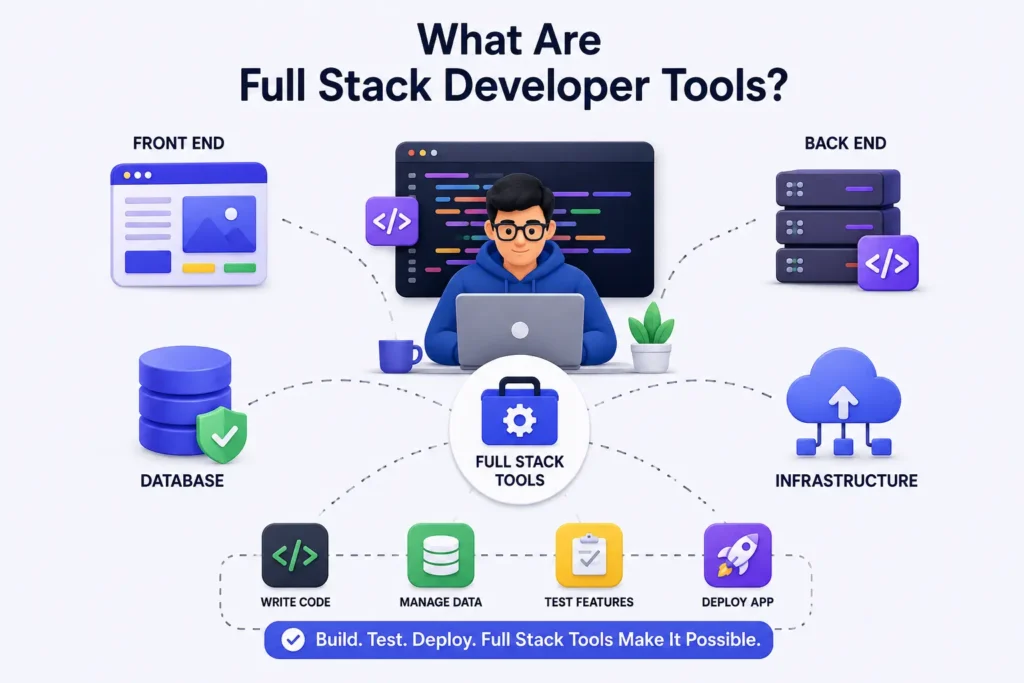
Full stack developer tools are things like software and platforms that help a developer make applications. These applications have parts, such as the front end back end, database and infrastructure. A full stack developer works on all of these parts. So they need tools that help them do lots of things.
They need to write code for the application. They need to manage the data that the application uses. They need to test the features of the application to make sure they work.They need to get the application live so people can use it. Full stack developer tools make all of this possible for a stack developer.
Why They Matter
The right tools do not just make coding faster, they also reduce bugs. Make it easier for people to work together on coding projects. This means that the time between when someone has an idea for a feature and when that feature is actually available to people is a lot shorter. A developer who has the tools to work with will spend less time dealing with configuration issues and more time solving the real problems that need to be solved with the coding project. The right coding tools are really important, for this reason.
How They Fit Into the Development Lifecycle
Every tool in this guide is used at a stage in the software development process. These stages include planning, building, testing, deploying, monitoring or maintaining. Some tools, like Git or Docker are used in every stage.
There are also tools, like Cypress or Sentry. They are specialists that do one job well.
Full Stack Development Workflow at a Glance
Before diving into individual tools, it helps to see how they fit into a typical project timeline.
1. Planning
This stage is about figuring out what we need to do, designing a plan and making a list of tasks. We use things like Jira, Linear and Notion to help us. We also do a lot of whiteboarding and drawing diagrams when we talk about the design of the Jira, Linear and Notion projects.
2. Development
This is where code editors, frameworks and libraries come in. They help with building applications. In the end, people often use React.
In the end some popular choices are Node.js and Django. A database is needed to store and manage data. Options for databases include PostgreSQL and MongoDB. These tools work together to create an application.
3. Testing
Tests that are automated can find problems before the people who use the software do. There are some tools that help with this like Jest, Vitest, Cypress and Playwright. These tools run some checks, such as unit tests, integration tests and end-to-end checks on the software. This means Jest, Vitest, Cypress and Playwright all play a role in making sure the software works correctly.
4. Deployment
When the code passes all the tests it is ready to go. There are platforms like Vercel, Netlify and AWS that take care of the hosting part. Then there are tools like GitHub Actions that help with automating the process of releasing the code. These tools make it easy to get the code live on the website. The code goes live on platforms, like Vercel, Netlify and AWS.
5. Monitoring
When a new thing is launched it is important to find out if something goes wrong. Sentry and Datadog and Grafana help track errors and how well things are working in time.
6. Maintenance
When you have an app you need to keep doing work on it. This means you have to update the things the app depends on and fix security problems. You also have to make the code better. This is what keeps the app healthy for a time after you first launch it. There are tools, like Dependabot and Snyk that can help you do these things automatically.
Quick Comparison Table of Full Stack Developer Tools
Tool Categories
| Category | Examples | Primary Use |
| Code Editors | VS Code, WebStorm | Writing and debugging code |
| Front End | React, Vue.js, Svelte | Building user interfaces |
| Back End | Node.js, Django, Spring Boot | Server logic and APIs |
| Databases | PostgreSQL, MongoDB, Redis | Data storage and retrieval |
| DevOps | Docker, Kubernetes, Terraform | Infrastructure and deployment |
| Testing | Jest, Cypress, Playwright | Quality assurance |
| Monitoring | Sentry, Grafana, Datadog | Observability |
Best Use Cases
Front-end frameworks suit teams building interactive UIs; back-end frameworks suit teams building APIs and business logic; DevOps tools suit teams that need repeatable, automated infrastructure.
Pricing
Most tools in this list offer a generous free tier for individuals or small projects (VS Code, Git, Postman, Jest), with paid tiers kicking in for teams, higher usage, or enterprise features like SSO and audit logs.
Learning Curve
Editors and frameworks like VS Code or React are pretty easy to learn when you are just starting out. Kubernetes and Terraform and things like enterprise Java stacks are a lot harder to figure out.
These things usually make sense once you have worked on real projects and have some experience with production systems.
Best Code Editors and IDEs
1. Visual Studio Code
VS Code is the code editor that most developers use these days. The reason for this is that VS Code is really fast and it has a marketplace for extensions. VS Code also has Git support built in. VS Code is free to use. It does not take up a lot of space on your computer. You can use VS Code for any language or framework when you are working as a full stack developer. VS Code is a tool for people who work with code every day.
2. IntelliJ IDEA
IntelliJ IDEA is a development environment made by JetBrains. It is really good at helping people work with Java and Kotlin. The code completion and refactoring tools, in IntelliJ IDEA are very good. That is why many big companies that use Java still like to use IntelliJ IDEA.
3. WebStorm
WebStorm is a tool that JetBrains made for people who write code in JavaScript and TypeScript. It has tools to help find mistakes in the code and it can automatically complete some parts of the code for React, Vue and Angular. This makes WebStorm a good choice for people who do a lot of end work and also some back end work, with JavaScript and TypeScript.
4. Cursor
Cursor is a code editor built on top of VS Code with AI baked into the core experience not bolted on as a plugin. It lets you chat with your codebase, generate multi-file edits, and refactor with natural language prompts, which is why it’s become popular fast among developers who want AI-first workflows.
5. Visual Studio
Visual Studio, not VS Code, is Microsoft’s development tool. It is widely used for.NET and C# development.
Visual Studio is an option if you work with ASP.NET. It is also great for building Windows applications for businesses.
Best Front-End Development Tools
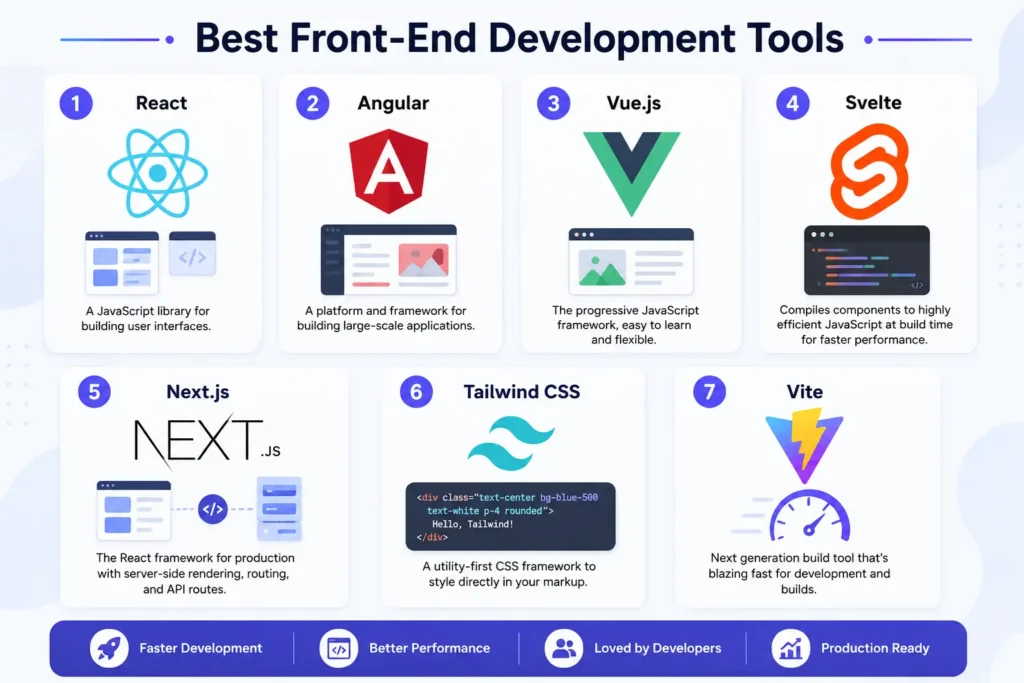
1. React
React is a JavaScript library, for building user interfaces. It is maintained by Meta.
The React component-based model and its huge ecosystem make React the common choice. Many full stack teams use React for their front-end work.
2. Angular
Angular is a front-end framework that Google takes care of. It is made for applications that need to be organized. Angular has a lot of rules that are already built in which’s something that big companies like because it helps keep all the code looking the same. Some teams like this about Angular because it is different from React in this way. Angular is good for applications, with a lot of code.
3. Vue.js
Vue.js is a choice because it is between React and Angular when we think about how it is set up. This means Vue.js is easy for people who are just starting out to learn. It also works well for bigger applications. The fact that Vue.js is not too hard to learn makes it a popular choice for teams that are teaching front-end developers. Teams, like Vue.js because it is easy for new developers to get started with Vue.js.
4. Svelte
Svelte does things a little differently. It does not do most of its work in the browser. Instead Svelte compiles your components into really efficient JavaScript at build time. This means you get bundles and Svelte often gives you faster runtime performance, with Svelte.
5. Next.js
Next.js is a framework for React that includes server-side rendering and routing and API routes. This makes Next.js the top choice for making React apps that people can find online. That load quickly. Next.js is really good, for production React apps that need to be found by search engines and load fast.
6. Tailwind CSS
Tailwind CSS is a way to style things on the web. You can do this in your markup. You do not have to write CSS files. Some developers do not like Tailwind CSS at first.. Most teams that try Tailwind CSS end up using it because it helps them work faster with Tailwind CSS.
7. Vite
Vite is a tool that helps us build and work on our projects. It is really fast. Has become very popular. People like Vite because it can update our projects quickly. This is called reload. Vite also builds our projects fast. We can use Vite with React, Vue, Svelte and plain JavaScript projects. Vite is a choice for many developers because it is so much faster than older tools, like Create React App.
Best Back-End Development Tools
1. Node.js
Node.js helps you run JavaScript outside the browser. This is what makes it possible to do full stack JavaScript development. Node.js is a part of the MERN and MEAN stacks.
2. Express.js
Express.js is a web framework for Node.js. It does not have a lot of features that you may not need. This is why Express.js has been the choice for building Application Programming Interfaces in Node.js for a long time. The reason for this is that Express.js is easy to learn and it can be used for any kind of project. Express.js is very flexible. That is why people like to use it for their projects. They like to use Express.js to build APIs in Node.js because it’s easy to use and it works well.
3. NestJS
NestJS is a framework that has a lot of structure. It is built on top of Node.js and Express or sometimes Fastify. NestJS takes some ideas from Angular. For example it uses dependency injection and modules. This makes NestJS a choice for big teams that work on the back-end. These teams usually want a framework that has a lot of built-in structure. That is exactly what NestJS gives them. NestJS is a fit for larger back-end teams because it has all these built-in structures.
4. FastAPI
FastAPI is a Python framework for building APIs quickly, with automatic interactive documentation and strong support for type hints. It’s become the default recommendation for new Python API projects because of its speed and developer experience.
5. Django
Django is a full-featured Python web framework that comes with an ORM, admin panel, and authentication system built in. It’s a strong choice when you want to move fast without stitching together a dozen separate libraries.
6. Spring Boot
Spring Boot simplifies building Java applications with the Spring framework by cutting down on boilerplate configuration. It remains a dominant choice in enterprise back-end development, especially in finance and large corporate environments.
Best Database Tools
1. PostgreSQL
PostgreSQL is an open-source relational database known for its reliability and strong support for complex queries. It’s often the default recommendation for new projects that need a traditional SQL database.
2. MongoDB
MongoDB is a NoSQL, document-based database that stores data in flexible, JSON-like structures. It fits well with applications where the data shape changes often or doesn’t map cleanly to rows and tables.
3. MySQL
MySQL is another widely used open-source relational database, historically popular in the LAMP stack and still common in WordPress and PHP-based projects.
4. Redis
Redis is an in-memory data store, often used for caching, session storage, and message queues rather than as a primary database. It’s valued for its speed since data lives in memory instead of on disk.
5. Firebase
Firebase is Google’s backend-as-a-service platform, offering a real-time database, authentication, and hosting in one package. It’s popular for prototypes and smaller apps that need a fast backend without managing servers.
6. Supabase
Supabase is often described as an open-source alternative to Firebase, built on top of PostgreSQL. It gives you a real database with SQL support, plus authentication and storage, which appeals to teams who want Firebase’s convenience with more control over their data.
7. PlanetScale
PlanetScale is a serverless MySQL platform built around database branching, letting you test schema changes the way you’d test code changes in Git. It’s a good fit for teams that want database migrations to feel less risky.
8. Neon
Neon is a serverless PostgreSQL platform that separates storage from compute, allowing databases to scale down to zero when idle. It’s gained traction with teams building on serverless architectures who don’t want to manage database infrastructure themselves.
Version Control Tools
1. Git
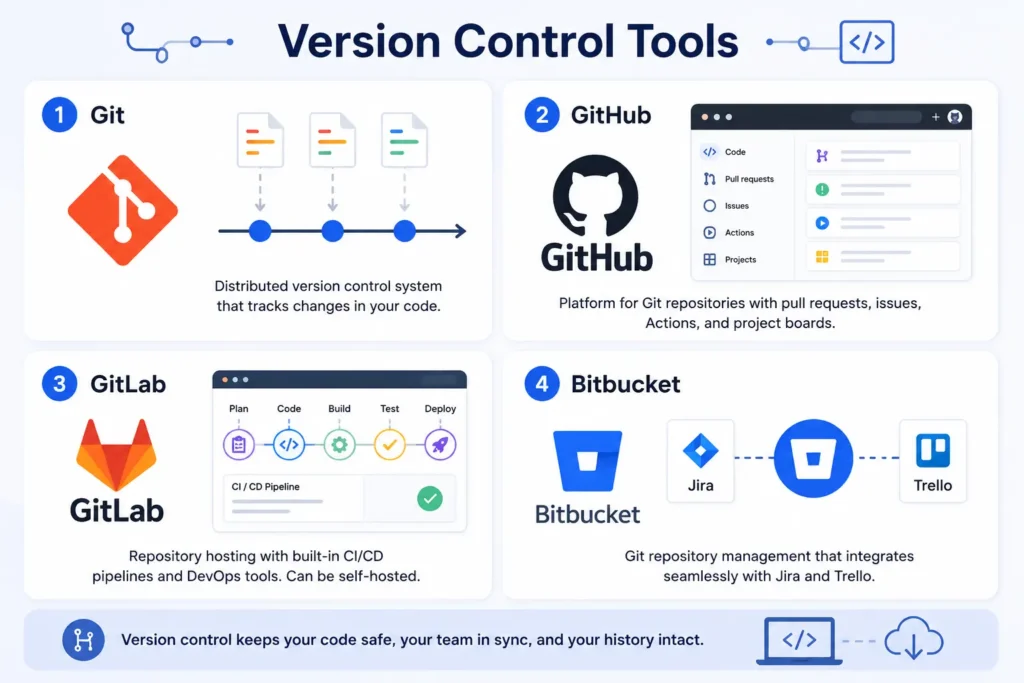
Git is the version control system nearly every developer uses today, tracking changes to code so teams can collaborate without overwriting each other’s work. If you learn one tool from this entire list first, it should be Git.
2. GitHub
GitHub is the most popular platform for hosting Git repositories, and it’s grown into much more than that pull requests, issues, GitHub Actions, and even project boards all live there now. For open-source discussions and community support, r/github on Redditis a useful place to see how real developers troubleshoot workflow issues.
3. GitLab
GitLab offers similar repository hosting to GitHub but bundles in more DevOps tooling out of the box, including built-in CI/CD pipelines. Many enterprises choose GitLab specifically because it can be self-hosted.
4. Bitbucket
Bitbucket, made by Atlassian, integrates tightly with Jira and Trello. Teams already embedded in the Atlassian ecosystem often choose it for that reason alone.
API Development and Testing Tools
1. Postman
Postman is the standard tool for testing and documenting APIs, letting developers send requests, inspect responses, and automate test collections without writing a full client app.
2. Insomnia
Insomnia is a lighter-weight alternative to Postman, popular with developers who want a simpler interface for REST and GraphQL testing.
3. Swagger
Swagger (now largely part of the OpenAPI ecosystem) helps you define and document REST APIs in a standard, machine-readable format. Many teams use it to auto-generate documentation directly from code.
4. GraphQL
GraphQL is a query language for APIs, developed by Meta, that lets clients request exactly the data they need instead of pulling fixed responses from fixed endpoints. It solves the over-fetching and under-fetching problems common with REST.
5. Apollo
Apollo is a set of tools for working with GraphQL, including a client library for the front end and a server library for the back end. It’s the most common way teams actually implement GraphQL in production.
Containerization and DevOps Tools
1. Docker
Docker packages an application and its dependencies into a container, so it runs the same way on your laptop, your teammate’s laptop, and in production. According to Docker’s own documentation on Wikipedia, it uses OS-level virtualization to deliver software in these isolated packages.
2. Docker Compose
Docker Compose lets you define and run multi-container applications with a single YAML file handy when your app needs a database, a cache, and an API server running together locally.
3. Kubernetes
Kubernetes automates the deployment, scaling, and management of containerized applications across clusters of machines. It has a real learning curve, but it’s become the standard for running containers at scale.
4. Helm
Helm is often called “the package manager for Kubernetes.” It lets you define, install, and upgrade complex Kubernetes applications using reusable templates called charts.
5. Terraform
Terraform lets you define infrastructure servers, networks, databases as code, so you can version and reuse your infrastructure setup the same way you version application code. This “infrastructure as code” approach has become standard practice for teams managing cloud resources.
CI/CD Tools
1. GitHub Actions
GitHub Actions is a way to automate things in your GitHub repository. You can use GitHub Actions to run tests and build containers and deploy code whenever you make changes to your GitHub repository. GitHub Actions works well with GitHub so a lot of people use GitHub Actions for their projects. This is because GitHub Actions is good at helping you get your code ready and there which is why many people choose to use GitHub Actions for their GitHub repository.
2. Jenkins
Jenkins is an older, open-source automation server that’s still widely used, especially in larger organizations with custom or legacy pipeline requirements. It’s more flexible than newer tools, but it also takes more setup and maintenance.
3. CircleCI
CircleCI is a cloud-based CI/CD platform known for fast build times and straightforward configuration. It’s a common choice for teams that want CI/CD without hosting their own Jenkins server.
4. GitLab CI/CD
GitLab CI/CD is built directly into GitLab, so if your code already lives there, setting up pipelines doesn’t require adding another external service.
Cloud Platforms and Deployment Tools
1. AWS
Amazon Web Services is the largest cloud platform, offering everything from virtual servers (EC2) to managed databases to serverless functions (Lambda). Its size is both a strength and a weakness, huge flexibility, but a steep learning curve.
2. Azure
Microsoft Azure is a strong choice for organizations already invested in the Microsoft ecosystem, offering deep integration with tools like Active Directory and .NET.
3. Google Cloud
Google Cloud Platform is known for its strength in data analytics and machine learning services, alongside standard cloud infrastructure offerings.
4. Vercel
Vercel is a deployment platform built by the creators of Next.js, optimized for front-end frameworks. Pushing to a connected Git repository triggers an automatic deployment, which makes it a favorite for React and Next.js projects.
5. Netlify
Netlify offers similar git-based deployment for static sites and JAMstack apps, with built-in form handling and serverless functions.
6. Railway
Railway is a newer deployment platform aimed at making it simple to deploy full stack apps, including databases, without deep DevOps knowledge.
7. Render
Render positions itself as a simpler alternative to AWS for deploying web services, background workers, and databases, with a more approachable pricing model for smaller teams.
8. Fly.io
Fly.io focuses on deploying applications close to users by running them across a global network of regions, which can meaningfully reduce latency for geographically distributed audiences.
Authentication and User Management Tools
1. Auth0
Auth0 is a dedicated authentication and identity platform that handles login, social sign-in, and multi-factor authentication so you don’t have to build this from scratch. It’s a common choice for teams that want enterprise-grade security without an in-house security team.
2. Clerk
Clerk is a newer authentication tool built with a strong focus on developer experience for modern front-end frameworks like Next.js and React, including pre-built UI components for sign-in and user profiles.
3. Firebase Authentication
Firebase Authentication provides ready-made login flows email, Google, Facebook, and more tightly integrated with the rest of the Firebase platform.
4. Supabase Auth
Supabase Auth offers similar functionality to Firebase Authentication but built on top of PostgreSQL, giving developers direct access to the underlying user data through standard SQL.
Testing Tools
1. Jest
Jest is a JavaScript testing framework maintained by Meta, widely used for unit and integration testing in React and Node.js projects.
2. Vitest
Vitest is a newer testing framework designed to work seamlessly with Vite-based projects, offering a similar API to Jest but with faster test runs.
3. Cypress
Cypress is an end-to-end testing tool that runs directly in the browser, letting you simulate real user interactions like clicking, typing, and navigating between pages.
4. Playwright
Playwright, built by Microsoft, is another end-to-end testing tool that supports multiple browsers and is known for handling modern, complex web apps reliably.
5. Selenium
Selenium is one of the oldest browser automation tools still in active use, valued for its broad language support and long track record, even though newer tools like Playwright have taken some of its market share.
Monitoring and Observability Tools
1. Sentry
Sentry tracks errors and exceptions in production applications, alerting developers when something breaks and showing the exact stack trace and context.
2. Grafana
Grafana is a visualization tool for metrics and logs, commonly paired with Prometheus to build dashboards that show system health at a glance.
3. Prometheus
Prometheus is an open-source monitoring system that collects and stores metrics as time-series data, widely used alongside Kubernetes deployments.
4. Datadog
Datadog is a comprehensive observability platform covering infrastructure monitoring, application performance, and log management in one product.
5. New Relic
New Relic offers similar application performance monitoring to Datadog, with a strong focus on tracing slow requests back to their root cause in the code.
AI Tools for Full Stack Developers
1. GitHub Copilot
GitHub Copilot is an AI pair programmer that suggests code completions and entire functions as you type, based on the context of your file. It’s built into most major editors, including VS Code.
2. Cursor
As mentioned earlier, Cursor bakes AI directly into the editing experience, letting you generate and edit code across multiple files using natural language.
3. Claude Code
Claude Code is Anthropic’s agentic coding tool, which lets developers delegate coding tasks, writing features, fixing bugs, running tests from the command line, desktop app, or mobile app. It’s designed for developers who want an AI collaborator that can work through multi-step coding tasks rather than just suggesting single lines.
4. ChatGPT
ChatGPT is widely used by developers for explaining error messages, brainstorming architecture, and generating boilerplate code, even outside a dedicated coding tool.
5. Gemini Code Assist
Gemini Code Assist is Google’s AI coding assistant, integrated into tools like VS Code and Google Cloud’s development environment.
6. Amazon Q Developer
Amazon Q Developer is AWS’s AI assistant for developers, offering code suggestions and help navigating AWS-specific services and infrastructure.
7. Windsurf
Windsurf is another AI-native code editor that’s emerged alongside Cursor, aimed at developers who want agentic, multi-step AI assistance built into their daily coding workflow.
Security Tools
1. Snyk
Snyk scans your codebase and dependencies for known vulnerabilities, flagging outdated or risky packages before they become a security incident.
2. OWASP ZAP
OWASP ZAP is a free, open-source tool for finding security vulnerabilities in web applications, maintained by the Open Worldwide Application Security Project — a well-respected authority in the security community. You can read more about their broader security guidance on OWASP’s Wikipedia page.
3. Dependabot
Dependabot, built into GitHub, automatically opens pull requests to update outdated or vulnerable dependencies in your project.
4. Secret Scanning
Secret scanning tools (built into GitHub and available as standalone products) detect accidentally committed API keys, passwords, and tokens before they leak into production or public repositories.
Collaboration and Project Management Tools
1. Jira
Jira, made by Atlassian, is the most common tool for tracking tasks, sprints, and bugs in agile software teams, especially at larger companies.
2. Linear
Linear has become popular with smaller, fast-moving teams as a cleaner, faster alternative to Jira, with a strong focus on keyboard-driven workflows.
3. Slack
Slack remains the default communication tool for most software teams, tying together notifications from GitHub, CI/CD pipelines, and monitoring tools into shared channels.
4. Notion
Notion is widely used for documentation, wikis, and lightweight project tracking, often as a companion to more specialized tools like Jira or Linear.
How to Choose the Right Full Stack Developer Tools
1. Based on Experience Level
Beginners generally do better starting with simpler, well-documented tools — VS Code, React, Node.js, and PostgreSQL cover most needs without overwhelming complexity. Save Kubernetes and Terraform for later, once you understand what problem they actually solve.
2. Based on Project Type
A quick prototype might only need Firebase or Supabase and Vercel. A large enterprise application will likely need a more structured stack with proper CI/CD, containerization, and monitoring from day one.
3. Based on Team Size
Small teams benefit from tools that reduce operational overhead, like Render or Railway. Larger teams often need the extra structure and access controls that come with tools like Jira, GitLab, and Kubernetes.
4. Based on Budget
Most tools in this guide have usable free tiers. Start there, and only pay for premium features once you’ve confirmed the tool actually fits your workflow.
Recommended Full Stack Tech Stacks
1. MERN Stack
MongoDB, Express.js, React, and Node.js a fully JavaScript stack that’s popular for its consistency, since you’re writing one language across the entire application.
2. MEAN Stack
MongoDB, Express.js, Angular, and Node.js similar to MERN but with Angular’s more structured framework on the front end.
3. PERN Stack
PostgreSQL, Express.js, React, and Node.js are good options for teams that want React’s flexibility but prefer a relational database over MongoDB.
4. JAMstack
JavaScript, APIs, and Markup an architecture (not a fixed set of tools) built around pre-rendered static sites that pull in dynamic data through APIs, commonly deployed on Netlify or Vercel.
5. Serverless Stack
A serverless stack relies on managed, event-driven services like AWS Lambda or Vercel functions instead of always-on servers, so you only pay for what you actually use.
6. Enterprise Java Stack
Spring Boot on the back end, paired with a relational database like PostgreSQL and a front end built in Angular or React, remains a common combination in large, established enterprises.
Common Mistakes When Choosing Development Tools
A lot of developers pick tools based on what’s trending on social media rather than what their project actually needs. Chasing the newest framework can slow a team down if it means abandoning a stable, well-understood stack halfway through a project.
Another common mistake is under-investing in testing and monitoring tools early on, treating them as optional. By the time a production incident happens, it’s much more expensive to retrofit proper observability than to have set it up from the start.
Teams also sometimes over-engineer small projects — reaching for Kubernetes and microservices when a single server and a monolith would do the job just fine. Discussions on communities like r/webdev are full of developers admitting they over-built a side project and regretted it later.
Future Trends in Full Stack Development Tools
1. AI-Assisted Coding
AI coding assistants have moved from autocomplete suggestions to full agentic workflows that can plan, write, and test code across multiple files. This trend is likely to keep accelerating as tools like Claude Code and Cursor mature.
2. Cloud-Native Development
More teams are building applications designed from the start to run in containers and scale across cloud infrastructure, rather than retrofitting older architectures for the cloud later.
3. Edge Computing
Running code closer to users at the network edge, rather than a single central data center is becoming more common for reducing latency, especially for global applications.
4. Low-Code Integration
Low-code and no-code tools are increasingly being integrated alongside traditional development, letting non-developers build simple internal tools while engineers focus on more complex work.
5. AI Agents for Software Development
Beyond code completion, AI agents are starting to handle broader tasks writing tests, reviewing pull requests, and even opening their own bug fixes under human review. This is one of the more significant shifts happening in full stack development tooling right now.
Frequently Asked Questions
1. What are the most important full stack developer tools for beginners?
Start with Git, VS Code, a front-end framework like React, Node.js on the back end, and PostgreSQL or MongoDB for your database. That combination covers the full stack without unnecessary complexity.
2. Do I need to learn all 35+ tools in this guide?
No. Most developers use a small, focused subset based on their stack and team. This guide is meant as a reference to help you choose the right tools, not a checklist to complete.
3. Which full stack tech stack is best for beginners?
The MERN stack (MongoDB, Express.js, React, Node.js) is a common starting point because it uses one language, JavaScript , across the whole application.
4. Are AI coding tools replacing full stack developers?
Not currently. AI tools like GitHub Copilot and Claude Code speed up coding tasks, but they still work best under human direction, especially for architecture decisions, debugging complex issues, and understanding business requirements.
5. What full stack developer tools are free to use?
Most tools in this guide including VS Code, Git, React, Node.js, PostgreSQL, Docker, and Postman offer free tiers that are more than enough for individual developers and small projects.
Conclusion
There’s no single “correct” set of full stack developer tools, the right choice depends on your project, your team, and your experience level. If you’re just starting out, resist the urge to learn everything on this list at once. Pick one front-end tool, one back-end tool, one database, and Git, and get comfortable shipping something real before adding more to your stack.
As your projects grow, you’ll naturally reach for more specialized tools, testing frameworks, monitoring platforms, CI/CD pipelines. That’s the normal path most full stack developers follow, and it’s a much better approach than trying to master 35+ tools before writing your first line of production code.