
If you have spent any time around Java applications, you have probably heard the words multithreading and multitasking thrown around like they mean the same thing. They do not. And once you start building anything that needs to feel fast and responsive, that distinction stops being academic and starts mattering a lot.
Modern Java applications rarely do just one thing at a time. A banking app needs to validate input, talk to a database, and update the UI, often all at once. An e commerce backend needs to serve thousands of users simultaneously without grinding to a halt. This is where concurrency comes in, and understanding the difference between multithreading and multitasking in Java is the first step to writing software that actually scales.
In this guide, we will break down both concepts from the ground up. You will learn what multitasking really means, how multithreading works inside the JVM, where the two overlap, where they diverge, and how to put this knowledge to use with real code. We will also cover common mistakes, best practices, and a set of interview questions so you walk away genuinely confident with the topic.
Here is a quick look at what is coming:
- What multitasking actually is and how the operating system handles it
- What multithreading is and how Java implements it
- A full side by side comparison table
- Real Java code examples for both
- Performance considerations and common beginner mistakes
- Interview questions you are likely to face
What Is Multitasking in Java?
Definition
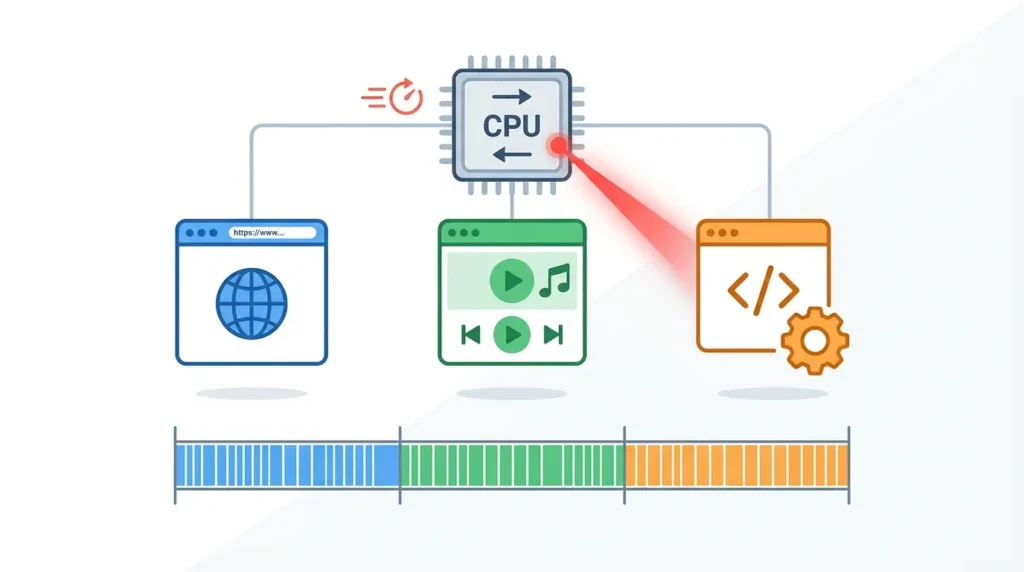
Multitasking is the ability of an operating system to run multiple programs, or processes, at roughly the same time. Your computer is multitasking right now if you have a browser, a music player, and an IDE all open together. The operating system is not actually doing everything simultaneously on a single CPU core; it is switching between tasks so quickly that it feels simultaneous to us.
How Multitasking Works
The operating system uses a scheduler to decide which process gets CPU time and for how long. Each process gets a small slice of time, then the CPU moves on to the next one. This rapid switching, called context switching, is what creates the illusion of everything happening at once.
Types of Multitasking
- Process based multitasking: Multiple independent processes run concurrently, each with its own memory space. Example: running Chrome and IntelliJ at the same time.
- Thread based multitasking: Multiple threads within the same process run concurrently. This is essentially where multitasking and multithreading start to connect.
Characteristics
- Each process has its own memory, file handles, and system resources
- Processes are isolated from one another, so a crash in one rarely affects another
- Switching between processes is relatively expensive in terms of CPU cycles
Advantages
- Lets you run several independent applications at once
- Improves overall system productivity
- Failure in one process generally does not crash the others
Disadvantages
- Higher memory consumption since every process needs its own space
- Context switching between processes is slower than switching between threads
- Communication between processes is more complex and requires special mechanisms
What Is Multithreading in Java?
Definition
Multithreading is the ability of a single process to run multiple threads at the same time. Think of a process as a house and threads as people living inside it. They share the same kitchen and living room, which is the shared memory, but each person can be doing their own thing in their own room at the same time.
How Java Implements Multithreading
Java was built with concurrency in mind from the very beginning, and it gives developers a few different ways to create and manage threads.
1. Thread class
You can extend the built in Thread class and override its run method. This is the most direct way to create a thread, though it is not always the most flexible since Java does not support multiple inheritance.
2. Runnable interface
A more flexible approach is implementing the Runnable interface and passing it to a Thread object. This separates the task you want to run from the thread mechanics itself, which makes your code easier to maintain and test.
3. Executor Framework
For anything beyond a toy example, Java’s Executor Framework is the recommended approach. It manages a pool of reusable threads for you, so you are not constantly creating and destroying threads, which is expensive. We will look at this in more detail in the best practices section.
Thread Lifecycle
Every thread in Java moves through a series of states during its life:
- New: the thread has been created but has not started yet
- Runnable: the thread is ready to run and waiting for CPU time
- Running: the thread is actively executing
- Waiting: the thread is paused, waiting for another thread to signal it
- Blocked: the thread is waiting to acquire a lock held by another thread
- Terminated: the thread has finished executing
If you are building this out as a visual asset for the published post, a simple lifecycle diagram showing these six states connected by arrows works really well here.
Advantages
- Threads share memory, so communication between them is fast and direct
- Creating a thread is far cheaper than creating a new process
- Better responsiveness, since background work does not freeze the UI or main flow
- More efficient use of CPU resources, especially on multi core machines
Disadvantages
- Shared memory means threads can step on each other, leading to race conditions
- Debugging multithreaded code is genuinely harder than debugging sequential code
- Poorly managed threads can lead to deadlocks or starvation
Difference Between Multithreading and Multitasking in Java
Now that we have covered both concepts individually, let us put them side by side. This is the comparison most readers are actually looking for, so we have tried to make it as thorough as possible.
| Feature | Multitasking | Multithreading |
| Definition | Running multiple processes or programs at the same time | Running multiple threads within a single process at the same time |
| Execution Unit | Process | Thread |
| Memory Usage | Higher, since each process has its own memory space | Lower, since threads share the process memory |
| Resource Sharing | Minimal, processes are isolated | High, threads share heap memory and resources |
| Communication | Requires inter process communication, which is slower | Direct, through shared variables and objects |
| Context Switching | Slower and more expensive | Faster and lighter |
| Speed | Generally slower due to process overhead | Generally faster due to shared context |
| CPU Utilization | Good, but limited by process overhead | Excellent, especially on multi core systems |
| Performance | Can degrade with too many processes | Can degrade with too many threads if mismanaged |
| Complexity | Simpler conceptually, harder to coordinate across processes | More complex due to shared state and synchronization |
| Failure Impact | One process crashing usually does not affect others | One thread crashing can affect the whole process |
| Synchronization | Not typically required between processes | Often required to avoid race conditions |
| Scalability | Limited by system resources | Highly scalable within a single process |
| Security | Better isolation, generally more secure | Less isolation, requires careful design |
| Real World Example | Running a browser, an IDE, and a music app together | A browser downloading files while rendering a page |
| Java Support | Achieved through ProcessBuilder or Runtime.exec | Achieved through Thread, Runnable, and the Executor Framework |
| Best Use Cases | Running independent applications or services | Tasks within one application that benefit from parallel execution |
Multithreading vs Multitasking: A Simple Real Life Example
Examples make this click faster than any definition can.
Multitasking example
You are typing in Microsoft Word while Spotify plays music in the background and a file downloads through your browser. These are three separate programs, each running as its own process, and your operating system is juggling all three.
Multithreading example
Inside your browser alone, one thread renders the webpage, another handles your scroll and click events, and another downloads a file in the background. All of this happens within a single browser process, with the threads sharing memory and resources.
How Multitasking Works in Java
Java itself does not control multitasking the way it controls threads. Multitasking happens at the operating system level, and Java programs are just one of many processes the OS is juggling.
- The operating system scheduler decides which process gets CPU time next
- CPU time slicing gives each process a small window to execute before switching
- Each process is isolated, with its own memory space
- Memory allocation for one process does not affect another
A simple way to visualize this is to picture the operating system sitting on top of several independent programs:
OS
├── Chrome
├── VS Code
├── Spotify
└── Java Program
How Multithreading Works in Java
Multithreading, on the other hand, happens inside a single Java process. The JVM creates and manages multiple threads that all live within that one process and share its resources.
- A single process hosts all the threads
- Multiple threads run concurrently within that process
- All threads share the same heap memory
- Each thread still gets its own individual stack for local variables and method calls
Here is what that structure looks like inside a typical Java application:
Java Application
├── Main Thread
├── Worker Thread
├── Network Thread
└── Background Thread
Memory Architecture Comparison
Multitasking Memory Model
Each process gets its own separate memory space. Nothing in one process can directly read or write the memory of another process without going through special operating system mechanisms. This is part of why processes are considered more isolated and, generally, more secure.
Multithreading Memory Model
Threads within the same process share a single heap, which is where objects live. This shared access is what makes communication between threads so fast, but it is also exactly why synchronization becomes necessary. If two threads write to the same object at the same time without coordination, you get unpredictable results.
To understand this fully, it helps to know the four key memory areas involved:
- Heap: shared memory where objects are stored, accessible by all threads in the process
- Stack: a private memory area for each thread, holding local variables and method call frames
- Program Counter: a register that tracks the current instruction each thread is executing
- Thread Stack: another name for the per thread stack, separate from every other thread’s stack
Process vs Thread in Java
Process
A process is an independent, self contained unit of execution. It has its own memory, its own resources, and runs separately from other processes. When you start a Java application, you are technically starting a new process with its own JVM instance.
Thread
A thread is the smallest unit of execution within a process. A single process can contain many threads, all sharing that process’s memory and resources while still executing independently.
The Relationship
Every process starts with at least one thread, usually called the main thread. From there, a developer can spawn additional threads as needed. So a thread always lives inside a process, but a process can exist with just one thread or many.
| Aspect | Process | Thread |
| Memory | Independent memory space | Shares memory with other threads in the process |
| Creation Cost | Expensive | Lightweight |
| Communication | Requires inter process communication | Direct, through shared variables |
| Isolation | Highly isolated | Minimal isolation |
Java Code Example: Multithreading
Let us look at actual code so the theory turns into something practical.
Using the Thread Class
class MyThread extends Thread {
    public void run() {
        for (int i = 1; i <= 5; i++) {
            System.out.println("Thread running: " + i);
        }
    }
}

public class ThreadExample {
    public static void main(String[] args) {
        MyThread t1 = new MyThread();
        t1.start();
    }
}
Here, MyThread extends the built in Thread class and overrides the run method. When you call start, the JVM creates a new thread and executes run on it, separately from the main thread. Notice that we call start and not run directly; calling run directly would just execute the code on the current thread, with no concurrency at all.
Using the Runnable Interface
class MyTask implements Runnable {
    public void run() {
        for (int i = 1; i <= 5; i++) {
            System.out.println("Runnable running: " + i);
        }
    }
}

public class RunnableExample {
    public static void main(String[] args) {
        Thread t1 = new Thread(new MyTask());
        t1.start();
    }
}
Why is Runnable usually preferred over extending Thread? Because Java only allows single inheritance. If your class extends Thread, it cannot extend anything else. Implementing Runnable keeps your task logic separate from the threading mechanics, which makes your code more flexible and easier to reuse, especially when you start working with thread pools.
Java Example Showing Multitasking
It is worth being honest here: Java itself does not create true OS level multitasking on its own. What it can do is launch separate processes through the operating system, which then get scheduled the same way any other OS process would.
Using ProcessBuilder
import java.io.IOException;

public class ProcessExample {
    public static void main(String[] args) throws IOException {
        ProcessBuilder builder = new ProcessBuilder(“notepad.exe”);
        builder.start();
        System.out.println(“Notepad launched as a separate process”);
    }
}
This code asks the operating system to launch Notepad as a completely separate process. Once it starts, that new process runs independently of your Java program, with its own memory, and the OS scheduler now has two processes to manage instead of one. That handoff to the OS is the essence of multitasking.
Advantages of Multithreading
- Better responsiveness: background tasks run without freezing the main application
- Efficient CPU utilization: multiple cores can be used at once, instead of sitting idle
- Resource sharing: threads can share data without expensive communication overhead
- Faster execution: many tasks complete sooner when run in parallel rather than sequentially
- Better scalability: applications can handle more concurrent work as load increases
- Concurrent processing: multiple operations progress at the same time within one program
- Background task execution: long running jobs, like file uploads, do not block the user interface
Advantages of Multitasking
- Lets users run multiple applications simultaneously on the same machine
- Improves overall productivity by allowing several workflows to happen in parallel
- Makes better use of available CPU resources across the whole system
- Provides isolation between applications, so one misbehaving app does not directly damage another
- Adds reliability, since a crash in one process generally will not take down the whole system
Disadvantages of Multithreading
- Race conditions: two threads modifying shared data at the same time can produce incorrect results
- Deadlocks: two or more threads waiting on each other forever, with neither able to proceed
- Starvation: a thread that never gets enough CPU time to make progress
- Synchronization complexity: keeping shared data safe often requires careful, deliberate design
- Difficult debugging: bugs that depend on timing can be nearly impossible to reproduce reliably
Disadvantages of Multitasking
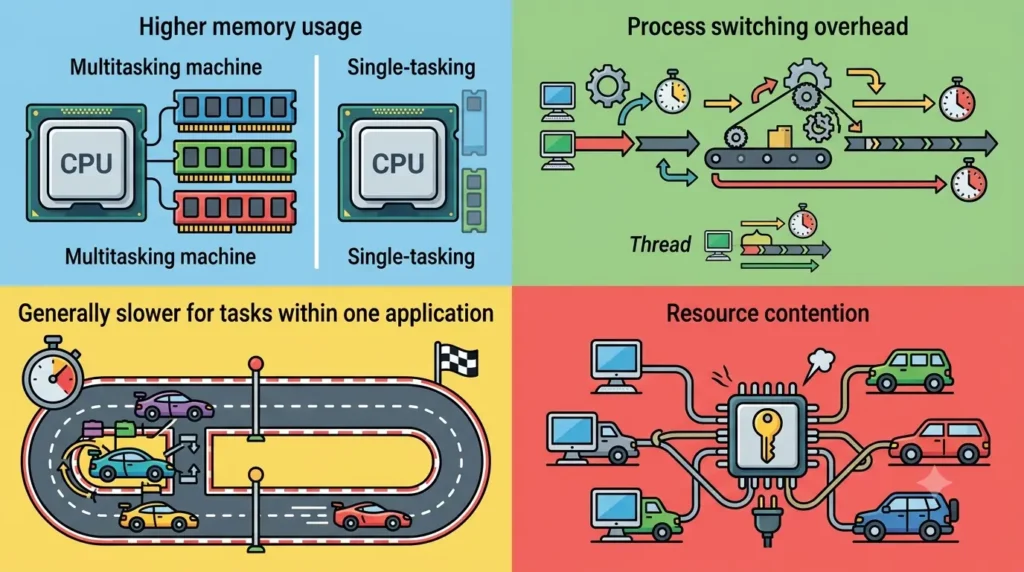
- Higher memory usage, since every process needs its own dedicated space
- Process switching overhead, which is more expensive than switching between threads
- Generally slower than thread based concurrency for tasks within one application
- Resource contention, when many processes compete for the same limited system resources
When Should You Use Multithreading?
Multithreading shines whenever a single application needs to do several related things at once, without the overhead of spinning up entirely new processes. Common examples include:
- Web servers handling many client requests at the same time
- Chat applications managing multiple live conversations
- Games that need to update graphics, physics, and input simultaneously
- Video streaming, where playback and buffering happen in parallel
- Banking software processing multiple transactions concurrently
- File downloads that should not freeze the rest of the application
- Background processing, like syncing data without interrupting the user
- Real time analytics that need to process streams of data as they arrive
When Should You Use Multitasking?
Multitasking is the right call when you need entirely separate, independent programs running side by side. A few common scenarios:
- Running multiple applications on your desktop at the same time
- Working across an IDE, a browser, and a database client simultaneously
- Running Docker containers, each isolated as its own process
- Managing server environments where multiple services need to run independently
- Operating cloud infrastructure that spreads workloads across many processes or machines
Multithreading vs Multitasking: Performance
Performance is usually the deciding factor in how developers choose between the two, so it is worth breaking down each angle.
Memory consumption
Multithreading is lighter on memory, since threads share the same heap. Multitasking is heavier, since every process needs its own memory space.
Context switching
Both approaches can use multiple CPU cores effectively, but multithreading tends to do this more efficiently within a single application.
Scalability
Multithreading scales well within one process, up to a point. Multitasking scales across processes and even across machines, which is why distributed systems often combine both.
Execution speed Beginners Make
- Assuming multitasking and multithreading are interchangeable terms
- Forgetting synchronization when multiple threads access shared data
- Creating far too many threads, which actually hurts performance instead of helping it
- Ignoring thread safety when designing classes that will be used concurrently
- Blocking the main thread with long running operations, which freezes the application
- Manually managing threads instead of using ExecutorService for anything non trivial
Best Practices for Multithreading in Java
- Prefer the Executor Framework over manually creating Thread objects
- Use thread pools so threads are reused instead of constantly created and destroyed
- Minimize synchronized blocks, and keep them as small as possible when you do need them
- Design carefully to avoid deadlocks, especially when a thread needs multiple locks
- Favor immutable objects where possible, since they are inherently thread safe
- Handle exceptions properly inside threads, since an uncaught exception can silently kill a thread
- Use concurrent collections, like ConcurrentHashMap, instead of manually synchronizing standard collections
- Profile performance regularly so you catch threading issues before they reach production
Java Interview Questions on Multithreading and Multitasking
Whether you’re preparing for a Java developer interview or strengthening your understanding of concurrency, these are some of the most commonly asked questions about multithreading and multitasking. The answers below provide concise explanations that are useful for both beginners and experienced developers.
1. What is the Difference Between Multithreading and Multitasking in Java?
Answer:
Multitasking refers to the operating system’s ability to run multiple processes or applications simultaneously. Each process has its own memory space and system resources.
Multithreading, on the other hand, allows multiple threads to execute within a single Java process. Threads share the same memory space, making communication between them faster and more efficient.
Key Difference: Multitasking works with multiple processes, while multithreading works with multiple threads inside one process.
2. Why Is Multithreading Faster?
Answer:
Multithreading is generally faster because threads share the same memory and resources within a process. This reduces the overhead associated with creating and managing separate processes. Threads also communicate more efficiently, and multiple CPU cores can execute different threads simultaneously, improving application performance.
However, the actual performance gain depends on the task. CPU-bound applications benefit from parallel execution on multiple cores, while I/O-bound applications benefit from allowing other threads to continue working while one thread waits for input or output operations.
3. Explain the Thread Lifecycle in Java.
Answer:
A thread in Java passes through several states during its execution:
- New: The thread is created but has not started yet.
- Runnable: The
start()method is called, and the thread is ready to run. - Running: The thread is actively executing on the CPU.
- Blocked/Waiting/Timed Waiting: The thread is temporarily paused, waiting for a resource, lock, or a specified period.
- Terminated: The thread finishes execution or stops due to an exception.
Understanding these states helps developers debug thread-related issues and optimize application performance.
4. What Is Synchronization?
Answer:
Synchronization is a mechanism that controls access to shared resources when multiple threads execute concurrently. It ensures that only one thread can access a critical section of code at a time, preventing inconsistent data and race conditions.
Java provides synchronization using:
synchronizedmethodssynchronizedblocks- Locks from the
java.util.concurrentpackage
Synchronization is essential when multiple threads modify shared variables or objects.
5. What Causes Deadlocks?
Answer:
A deadlock occurs when two or more threads wait indefinitely for each other to release resources, causing the program to stop making progress.
A deadlock commonly happens when:
- Thread A locks Resource 1 and waits for Resource 2.
- Thread B locks Resource 2 and waits for Resource 1.
Since neither thread releases its resource, both remain blocked forever.
Ways to avoid deadlocks include:
- Acquiring locks in a consistent order
- Reducing nested locks
- Using lock timeouts
- Minimizing synchronized code
6. What Is the Difference Between a Process and a Thread?
Answer:
| Process | Thread |
|---|---|
| Independent program in execution | Smallest unit of execution within a process |
| Has its own memory space | Shares memory with other threads in the same process |
| More resource-intensive | Lightweight and efficient |
| Communication is slower | Communication is faster through shared memory |
| Higher context-switching overhead | Lower context-switching overhead |
A process can contain multiple threads that work together to perform different tasks.
7. What Is the Difference Between Runnable and Thread?
Answer:
The Thread class represents a thread of execution, while the Runnable interface defines a task that can be executed by a thread.
| Runnable | Thread |
|---|---|
| Interface | Class |
| Supports multiple inheritance | Cannot extend another class if already extending Thread |
| Separates task from execution | Combines task and execution |
| Preferred for most applications | Suitable for simple programs |
In modern Java development, implementing Runnable is generally recommended because it promotes better code reuse and flexibility.
8. What Is the Difference Between ExecutorService and Thread?
Answer:
Thread is used to create and manage individual threads manually. While simple to understand, creating many threads this way can lead to poor performance and resource exhaustion.
ExecutorService, part of the java.util.concurrent package, provides a higher-level framework for managing thread execution. It uses thread pools to efficiently reuse threads, schedule tasks, and control concurrency.
| Thread | ExecutorService |
|---|---|
| Creates one thread per task | Reuses threads through thread pools |
| Manual lifecycle management | Automatic thread management |
| Less efficient for large applications | Better performance and scalability |
| Limited task scheduling | Supports scheduling, task queues, and futures |
For enterprise applications and production systems, ExecutorService is considered the preferred approach because it improves scalability, resource management, and overall application performance.
FAQs
1. What is the difference between multithreading and multitasking in Java?
Multitasking is running multiple processes at the same time, each with its own memory. Multithreading is running multiple threads within a single process, where all threads share the same memory space.
2. Is multithreading a type of multitasking?
In a broad sense, yes. Multithreading can be thought of as multitasking that happens at the thread level, inside a single process, rather than at the process level.
3. Which is faster: multithreading or multitasking?
For tasks within a single application, multithreading is usually faster because threads share memory and avoid the overhead of inter process communication.
4. Can Java perform multitasking?
Yes, indirectly. Java can launch separate processes using tools like ProcessBuilder, and the operating system then handles the actual multitasking between those processes.
5. Why is multithreading important in Java?
It allows applications to stay responsive, make better use of CPU resources, and handle multiple operations concurrently, which is essential for modern, high performance software.
6. What is the difference between a process and a thread?
A process is an independent program with its own memory space. A thread is a smaller unit of execution that runs inside a process and shares that process’s memory with other threads.
7. Which is better for web applications?
Most web applications rely heavily on multithreading to handle many simultaneous requests efficiently within a single server process, though multitasking still plays a role when running separate services.
8. Is synchronization required in multithreading?
Yes, whenever multiple threads access or modify shared data. Without proper synchronization, you risk race conditions and inconsistent results.
Conclusion
At this point, the difference between multithreading and multitasking in Java should feel a lot clearer. Multitasking happens at the process level, with the operating system juggling separate, independent programs. Multithreading happens within a single process, where multiple threads share memory and work together toward the same goal.
Neither approach is universally better than the other. The right choice depends entirely on what you are building. If you need separate, isolated applications running side by side, multitasking is the natural fit. If you need a single application to handle multiple operations efficiently and responsively, multithreading is almost always the answer.
As you design your next Java application, think honestly about your performance goals, your resource constraints, and how much isolation you actually need. That, more than any rule of thumb, is what should guide your decision between the two.