
From the laptop resting on your desk to the smartphone in your pocket, every computing device you interact with daily is powered by a collection of physical parts working in perfect harmony. These physical parts — collectively known as computer hardware, form the backbone of all modern computing. Without hardware, software would have no platform to run on, and the digital world as we know it simply could not exist.
In this comprehensive guide, we will explore everything you need to know about computer hardware: what it is, why it matters, its major components, types, functions, and real-world examples. Whether you are a student, a tech enthusiast, or a professional looking to sharpen your knowledge, this article will give you a thorough understanding of computer hardware from the ground up.
What Is Computer Hardware?
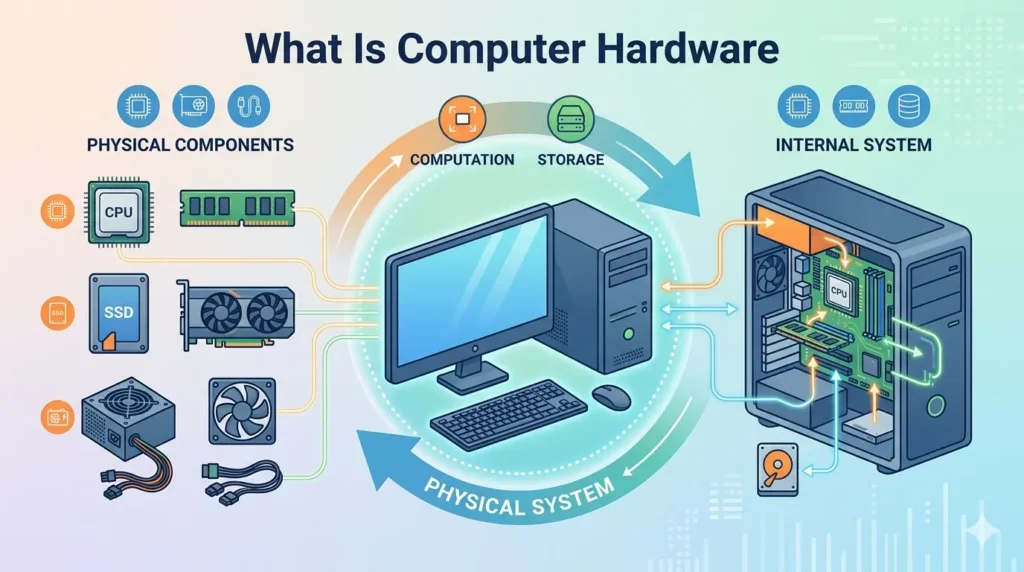
Computer hardware refers to the physical, tangible components of a computer system that you can see and touch. These are the mechanical, electronic, and electrical parts that collectively make up the machine and enable it to perform computations, store data, receive inputs, and produce outputs.
In simpler terms, hardware is the body of a computer, while software is its mind. Just as a human body needs organs to function, a computer needs hardware components to operate. Examples of computer hardware include the central processing unit (CPU), memory chips, hard drives, monitors, keyboards, mice, and many more.
Hardware components communicate with each other and with software through a combination of electrical signals, data buses, and standardized interfaces. Each component plays a specific role, and together they form a complete, functional computing system.
Why Is Computer Hardware Important?
Hardware is the foundation upon which all computing operations are built. Without hardware, there would be no physical medium for software to run on, no way to store or process data, and no mechanism for users to interact with computers. Here is why hardware is so essential:
- Enables Computer Operation: Every instruction a computer executes is ultimately carried out by hardware components. The CPU performs billions of calculations per second, all made possible by physical transistors and circuits.
- Supports Software Execution: Software programs are sets of instructions, but those instructions mean nothing without hardware to execute them. The CPU, RAM, and storage devices work together to load, run, and manage software applications.
- Facilitates Data Processing and Storage: Hardware components like RAM and SSDs allow computers to temporarily hold and permanently save enormous amounts of data, making modern information management possible.
- Allows User Interaction: Input devices like keyboards and mice allow humans to communicate commands to the computer, while output devices like monitors and printers present results back to the user.
- Drives Innovation: Advances in hardware technology, from faster processors to higher-capacity storage, directly enable breakthroughs in artificial intelligence, gaming, scientific research, and beyond.
Main Components of Computer Hardware
Modern computers consist of several core hardware components. Understanding each one helps paint a complete picture of how a computer works.
Central Processing Unit (CPU)
The Central Processing Unit, commonly known as the CPU or processor, is the brain of the computer. It is responsible for executing instructions from software programs by performing arithmetic, logic, control, and input/output operations. The CPU interprets and processes the basic instructions that drive the computer.
Modern CPUs contain billions of transistors packed into a silicon chip smaller than a postage stamp. They operate at clock speeds measured in gigahertz (GHz) and can execute multiple tasks simultaneously using multiple cores. Popular CPU manufacturers include Intel and AMD for personal computers, and Apple for its custom silicon chips.
The CPU’s performance directly impacts how fast a computer can run applications, making it one of the most critical hardware components to consider when building or purchasing a computer.
Motherboard
The motherboard is the main circuit board of a computer. It acts as the central hub that connects all hardware components, allowing them to communicate with one another. The CPU, RAM, storage devices, graphics card, and other peripherals all connect to the motherboard either directly or through expansion slots and ports.
A motherboard contains the chipset, which manages data flow between the CPU, memory, and peripherals. It also houses the BIOS/UEFI firmware, which initializes hardware during startup. The choice of motherboard determines which CPUs and RAM types a system supports, making it a foundational component in any computer build.
Random Access Memory (RAM)
Random Access Memory, or RAM, is the short-term memory of a computer. It temporarily stores data and instructions that the CPU is actively using, allowing for fast access without reading from slower storage devices. The more RAM a computer has, the more data it can handle simultaneously, resulting in smoother multitasking.
RAM is a volatile memory, meaning it loses its contents when power is removed. Common RAM types include DDR4 and DDR5, with capacities ranging from 4GB in budget devices to 64GB or more in high-performance workstations. RAM speed, measured in MHz, also affects system performance.
Storage Devices
Storage devices provide long-term, non-volatile storage for an operating system, software, and user data. Unlike RAM, storage retains information even when the computer is powered off. The main types of storage devices are:
- Hard Disk Drive (HDD): Uses spinning magnetic platters to read and write data. HDDs offer high storage capacity at low cost but are slower and more susceptible to physical damage than modern alternatives.
- Solid State Drive (SSD): Uses flash memory chips for storage. SSDs are significantly faster, more durable, and energy-efficient than HDDs, though they traditionally cost more per gigabyte.
- External Storage Devices: Include USB flash drives, external HDDs, SSDs, and memory cards. These portable devices allow users to carry data between computers and serve as backup solutions.
Power Supply Unit (PSU)
The Power Supply Unit converts the alternating current (AC) from a wall outlet into the direct current (DC) required by computer components. Each component, CPU, GPU, RAM, storage devices, requires a specific voltage, and the PSU regulates and distributes this power accordingly.
A PSU’s capacity is rated in watts. Choosing an appropriately rated PSU is critical: too little power can cause instability and hardware damage, while too much is simply wasteful. High-quality PSUs also include protection circuits against power surges and short circuits.
Graphics Processing Unit (GPU)
The Graphics Processing Unit is a specialized processor designed to handle rendering images, video, and animations. While the CPU handles general-purpose computing, the GPU excels at parallel processing tasks — making it ideal for rendering thousands of pixels simultaneously.
GPUs are essential for gaming, video editing, 3D modeling, and increasingly for artificial intelligence and machine learning workloads. They come in two forms: integrated GPUs (built into the CPU chip) for everyday tasks, and dedicated/discrete GPUs (separate cards) for demanding applications. Leading GPU manufacturers include NVIDIA and AMD.
Types of Computer Hardware
Computer hardware can be classified into different categories based on the functions they perform. One of the most important categories is input devices, which allow users to enter data and instructions into a computer system.
Input Devices
Input devices are hardware components used to send data, commands, and information to a computer. They act as a bridge between the user and the computer, enabling interaction and communication. Without input devices, users would not be able to enter text, control applications, or provide information for processing.
Input devices convert user actions into digital signals that the computer can understand and process. These devices are widely used in homes, offices, schools, and businesses for various computing tasks.
Some common examples of input devices include:
1. Keyboard
A keyboard is one of the most commonly used input devices. It allows users to enter text, numbers, symbols, and commands into a computer. Keyboards are essential for typing documents, browsing the internet, programming, gaming, and performing everyday computer tasks.
2. Mouse
A mouse is a pointing device used to move the cursor and interact with graphical elements on a screen. Users can click, drag, scroll, and select items using a mouse, making navigation easier and more efficient.
3. Scanner
A scanner is an input device that converts physical documents, photographs, or images into digital formats. It captures printed information and stores it electronically, allowing users to edit, share, and archive documents on a computer.
4. Microphone
A microphone is used to capture sound and convert it into digital audio signals. It allows users to record voice, participate in online meetings, communicate through voice chats, and use voice-controlled applications.
5. Webcam
A webcam is a camera designed to capture live video and images for a computer. It is commonly used for video conferencing, online classes, live streaming, and virtual meetings. Webcams help users communicate visually over the internet in real time.
Input devices play a vital role in computer systems by enabling users to provide information and interact effectively with software and hardware components. They are essential for performing everyday tasks and ensuring smooth communication between users and computers.
Output Devices
Output devices are computer hardware components that receive processed data from a computer and present it to users in a readable or understandable form. These devices help users view, hear, or obtain the results of computer operations. Without output devices, users would not be able to see the information processed by a computer.
Some common examples of output devices include:
1. Monitor
A monitor is the most commonly used output device. It displays text, images, videos, and graphical information generated by the computer. Modern monitors come in various sizes and resolutions, providing clear and detailed visual output.
2. Printer
A printer converts digital documents and images into physical copies on paper. Printers are widely used in homes, schools, and offices for printing reports, assignments, photographs, and business documents.
3, Speakers
Speakers are audio output devices that convert digital audio signals into sound. They are used for listening to music, watching videos, playing games, and participating in online meetings.
4. Projector
A projector displays computer-generated images and videos onto a large screen or wall. Projectors are commonly used in classrooms, conference rooms, movie theaters, and business presentations.
Processing Devices
Processing devices are responsible for performing calculations, executing instructions, and controlling computer operations. These components process data received from input devices and generate output that users can understand.
1. CPU (Central Processing Unit)
The CPU is often referred to as the “brain of the computer.” It executes instructions, performs calculations, and manages communication between hardware and software components. Every task performed on a computer depends on the CPU.
2. GPU (Graphics Processing Unit)
A GPU is a specialized processor designed to handle graphics-related tasks. It improves the performance of gaming, video editing, 3D rendering, and graphic-intensive applications. Modern GPUs are also widely used in artificial intelligence and machine learning.
3. Motherboard
The motherboard is the main circuit board that connects all hardware components within a computer. It allows communication between the CPU, RAM, storage devices, graphics card, and other peripherals, ensuring the system functions properly.
Storage Devices
Storage devices are hardware components used to store data, programs, and operating systems. They allow users to save information permanently or temporarily for future use.
1. Hard Disk Drive (HDD)
An HDD is a traditional storage device that stores data on magnetic disks. It offers large storage capacities at an affordable cost and is commonly used in desktop computers and servers.
2. Solid State Drive (SSD)
An SSD stores data using flash memory instead of moving mechanical parts. SSDs are significantly faster than HDDs, providing quicker boot times, faster file transfers, and improved system performance.
3. USB Flash Drive
A USB flash drive is a portable storage device used for transferring and backing up files. It connects to a computer through a USB port and is widely used because of its convenience and portability.
4. Memory Card
A memory card is a compact storage device commonly used in smartphones, cameras, tablets, and other portable electronics. It provides additional storage space for photos, videos, documents, and applications.
Communication Devices
Communication devices enable computers to connect with networks and exchange data with other devices. These devices play a vital role in internet access, networking, and digital communication.
1. Modem
A modem connects a computer or network to an internet service provider (ISP). It converts digital signals into a format suitable for transmission over communication lines and vice versa.
2, Router
A router directs data traffic between devices and networks. It allows multiple devices to share an internet connection and helps manage communication within home and office networks.
3. Network Interface Card (NIC)
A Network Interface Card (NIC) is a hardware component that enables a computer to connect to a network. It can support wired or wireless communication and is essential for accessing local networks and the internet.
Functions of Computer Hardware
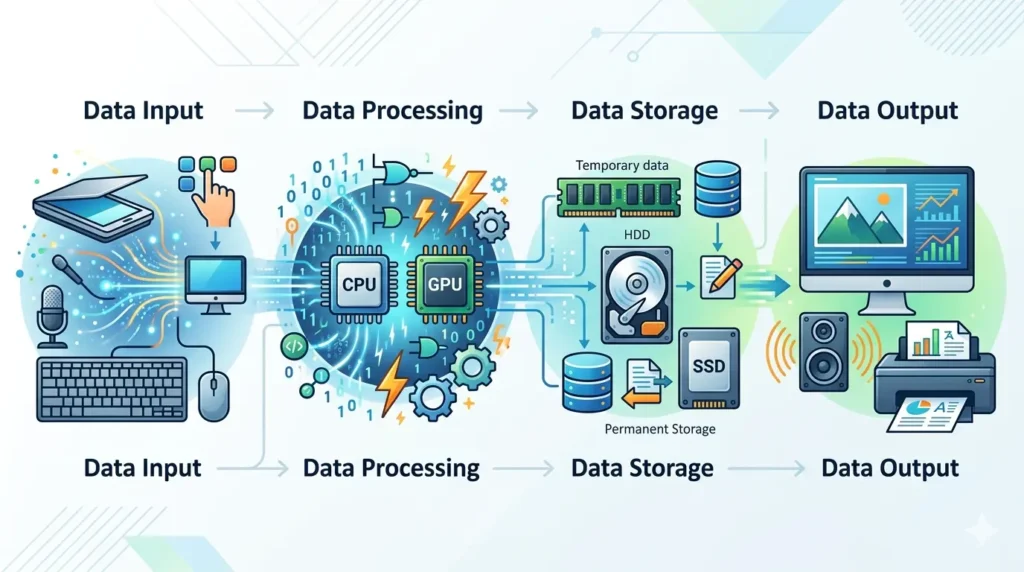
Every piece of computer hardware serves one or more of the following fundamental functions in the computing pipeline:
1 Data Input
The input function involves collecting raw data from the outside world and feeding it into the computer for processing. Input devices such as keyboards, mice, scanners, and microphones gather this data. For example, when you type a document, each keystroke is an input event that the keyboard captures and sends to the CPU for processing.
2 Data Processing
Processing is the core function of a computer — executing instructions and performing calculations on input data to produce meaningful results. The CPU and GPU handle this function. Processing can involve simple arithmetic, logical decisions, complex simulations, or rendering graphics. The speed and efficiency of processing hardware directly determines how quickly a computer can respond and how powerful its applications can be.
3 Data Storage
Storage hardware holds data both temporarily (RAM) and permanently (HDD, SSD). Temporary storage allows the processor to quickly access data it needs right now, while permanent storage retains files, applications, and the operating system for future use. Without adequate storage, computers could not save work, install applications, or maintain user files.
4 Data Output
Output hardware presents the results of computing to the user. This can be visual (monitor, projector), auditory (speakers, headphones), or physical (printer). Output devices translate digital data into forms that humans can understand and interact with.
5 Communication and Networking
Communication hardware enables computers to connect to local and global networks. This function allows data sharing, internet browsing, video conferencing, cloud computing, and countless other networked services. Without communication hardware, every computer would be an isolated island of computing power.
Internal Hardware Components
Internal hardware components are the physical parts located inside a computer case. These components work together to process data, store information, and ensure the computer operates efficiently.
1. CPU
The Central Processing Unit (CPU) is the primary processing component of a computer. Often called the “brain of the computer,” the CPU executes instructions, performs calculations, and manages system operations. Every task, from opening applications to browsing the internet, relies on the CPU.
2. RAM
Random Access Memory (RAM) is temporary storage that holds data currently being used by the computer. RAM allows the CPU to access information quickly, improving system speed and multitasking performance. The more RAM a computer has, the more applications it can run efficiently at the same time.
3. ROM
Read-Only Memory (ROM) is a type of permanent memory that stores essential startup instructions for the computer. Unlike RAM, data in ROM remains intact even when the computer is turned off. ROM helps initialize hardware components during the boot process.
4. Motherboard
The motherboard is the main circuit board that connects all internal hardware components. It enables communication between the CPU, RAM, storage devices, graphics card, and other hardware. Without a motherboard, the computer’s components would not be able to function together.
5. GPU
The Graphics Processing Unit (GPU) is responsible for rendering images, videos, animations, and graphics. GPUs are essential for gaming, video editing, graphic design, and 3D rendering. Modern computers often include dedicated GPUs for enhanced graphical performance.
6. Cooling Fan
A cooling fan helps regulate the temperature of internal hardware components by dissipating heat generated during operation. Effective cooling prevents overheating, improves performance, and extends the lifespan of computer components.
7. Power Supply Unit
The Power Supply Unit (PSU) converts electricity from a wall outlet into usable power for the computer’s internal components. It distributes the correct voltage to the motherboard, CPU, storage devices, and other hardware, ensuring stable system operation.
External Hardware Components
External hardware components are devices connected to the outside of a computer. These components allow users to interact with the system, receive output, and expand storage capabilities.
1. Keyboard
A keyboard is an input device used to enter text, numbers, symbols, and commands into a computer. It is one of the most essential tools for typing, programming, gaming, and general computer use.
2. Mouse
A mouse is a pointing device used to control the cursor on a computer screen. It allows users to click, select, drag, and interact with software applications more efficiently.
3. Monitor
A monitor is an output device that displays text, images, videos, and graphical content generated by the computer. It provides users with a visual interface for interacting with software and viewing information.
4. Printer
A printer is an output device that produces physical copies of digital documents and images. Printers are commonly used in homes, schools, and offices for creating reports, forms, and photographs.
5. Speakers
Speakers are audio output devices that convert digital audio signals into sound. They allow users to listen to music, videos, games, and online communication.
6. Scanner
A scanner is an input device that converts physical documents and images into digital files. It enables users to store, edit, and share printed materials electronically.
7. External Hard Drive
An external hard drive is a portable storage device used for backing up and transferring data. It connects to a computer through USB or other interfaces and provides additional storage capacity for files, photos, videos, and software.
Examples of Computer Hardware
The following table summarizes common examples of computer hardware, their categories, and functions:
| Hardware Device | Category | Function |
|---|---|---|
| Keyboard | Input Device | Enter text and commands |
| Mouse | Input Device | Control the on-screen cursor |
| Microphone | Input Device | Capture audio input |
| Monitor | Output Device | Display visual information |
| Printer | Output Device | Print physical documents |
| Speakers | Output Device | Produce audio output |
| CPU | Processing Device | Execute instructions and calculations |
| GPU | Processing Device | Render graphics and visual content |
| HDD | Storage Device | Store data magnetically |
| SSD | Storage Device | Store data using flash memory |
| USB Flash Drive | Storage Device | Portable data storage |
| Router | Communication Device | Direct network traffic |
| NIC | Communication Device | Enable network connectivity |
Hardware vs Software
While hardware forms the physical infrastructure of a computer, software provides the instructions that tell hardware what to do. Understanding the distinction between the two is fundamental to computer literacy:
| Feature | Hardware | Software |
|---|---|---|
| Definition | Physical, tangible components | Programs and digital instructions |
| Tangibility | Can be seen and touched | Cannot be physically touched |
| Examples | Keyboard, CPU, Monitor, RAM | Windows, Chrome, MS Word, Python |
| Purpose | Performs and supports physical tasks | Directs hardware operations |
| Durability | Can wear out or break | Does not physically degrade |
| Upgrades | Requires hardware replacement | Can often be updated digitally |
| Cost | One-time purchase cost | May involve licenses or subscriptions |
Advantages of Computer Hardware
- Faster Data Processing: Modern CPUs and GPUs process billions of operations per second, enabling rapid computation that would be impossible manually.
- Improved Productivity: Computers equipped with powerful hardware dramatically speed up tasks in offices, research labs, creative studios, and manufacturing facilities.
- Efficient Multitasking: With adequate RAM and multi-core CPUs, computers can run dozens of applications simultaneously without significant slowdowns.
- Better Storage Capabilities: Today’s storage hardware can hold terabytes of data in devices smaller than a deck of cards, making enormous data archives practical for individuals and businesses alike.
- Enhanced User Experience: High-resolution monitors, responsive input devices, and fast processors combine to deliver smooth, intuitive computing experiences.
- Scalability: Hardware can be upgraded or expanded, adding more RAM, a faster GPU, or additional storage, to meet growing demands without replacing the entire system.
Disadvantages of Computer Hardware
- Can Be Expensive: High-performance hardware components such as professional GPUs, large SSDs, and server-grade CPUs carry significant price tags.
- Requires Maintenance: Hardware needs regular cleaning, cooling management, and occasional replacement of worn parts to maintain reliability.
- May Become Outdated: Technology advances rapidly. Hardware purchased today may struggle to run demanding software within a few years, necessitating upgrades.
- Susceptible to Physical Damage: Unlike software, hardware can be destroyed by drops, water exposure, power surges, and extreme temperatures.
- Environmental Impact: Manufacturing hardware components requires rare materials and significant energy, contributing to electronic waste when devices are discarded.
How to Maintain Computer Hardware
Proper maintenance extends the lifespan of hardware and keeps performance optimal. Here are key maintenance practices:
Clean Devices Regularly
Dust accumulation inside computers blocks airflow and causes overheating. Use compressed air to blow dust out of vents, fans, and heatsinks every few months. Wipe external surfaces with a dry microfiber cloth, and clean keyboards and mice to prevent buildup of debris that can cause malfunction.
Protect from Dust and Moisture
Keep computers in clean, dry environments. Avoid placing them on carpets (which generate static and trap dust) and keep liquids away from all hardware. Consider using dust filters on intake vents for desktop computers in particularly dusty environments.
Use Proper Power Protection
Power surges can instantly destroy hardware components. Always connect computers to a surge-protected power strip or an Uninterruptible Power Supply (UPS). A UPS also provides battery backup, protecting against data loss during unexpected outages.
Update and Upgrade Components
Keep firmware and drivers up to date. Manufacturers regularly release updates that improve compatibility, fix bugs, and sometimes even improve performance. When a component becomes a bottleneck, consider upgrading it, adding more RAM or replacing an HDD with an SSD can breathe new life into an aging system.
Handle Hardware Carefully
When installing or replacing components, ground yourself to discharge static electricity before touching circuit boards. Handle components by their edges and avoid touching gold connector contacts. Store components in anti-static bags when not in use. Always power down and unplug the computer before opening the case.
Future of Computer Hardware
The world of computer hardware is evolving at a breathtaking pace. Here are some of the most exciting developments on the horizon:
- AI-Powered Hardware: Dedicated AI accelerators and neural processing units (NPUs) are already appearing in modern CPUs and smartphones. Future hardware will natively accelerate machine learning workloads, making AI capabilities available on everyday devices.
- Faster Processors: Next-generation chip architectures continue to push the boundaries of processing speed while becoming more energy efficient, thanks to advances in semiconductor manufacturing at sub-5nm scales.
- Energy-Efficient Devices: As sustainability becomes a priority, hardware manufacturers are designing components that deliver high performance with lower power consumption, reducing both operating costs and environmental impact.
- Advanced Storage Technologies: Emerging storage technologies like 3D NAND, Optane/PCM memory, and DNA data storage promise to dramatically increase density and speed while reducing cost per gigabyte.
- Quantum Computing: Quantum processors leverage the principles of quantum mechanics to perform certain calculations exponentially faster than classical computers. Though still in early stages, quantum hardware holds transformative potential for cryptography, drug discovery, materials science, and optimization problems.
- Neuromorphic Chips: Inspired by the human brain, neuromorphic chips process information more efficiently for specific AI tasks, opening new frontiers in robotics and intelligent systems.
Frequently Asked Questions (FAQs)
What is computer hardware?
Computer hardware refers to all the physical, tangible components of a computer system — the parts you can see and touch, such as the CPU, RAM, hard drive, keyboard, and monitor. These components work together to execute instructions, store data, and interact with users.
What are the main components of computer hardware?
The main components of computer hardware include the Central Processing Unit (CPU), motherboard, Random Access Memory (RAM), storage devices (HDD/SSD), Power Supply Unit (PSU), and Graphics Processing Unit (GPU). Each plays a specific role in the overall functioning of the computer.
What ar the difference between hardware and software?
Hardware is the physical components of a computer that you can touch and see, such as the CPU and keyboard. Software is the set of digital instructions and programs, like an operating system or application, that run on the hardware. Hardware provides the platform; software directs what it does.
What are examples of computer hardware?
Examples of computer hardware include keyboards, mice, monitors, printers, CPUs, GPUs, RAM sticks, hard drives, SSDs, USB flash drives, routers, and webcams. These range from internal components to external peripherals.
Why is computer hardware important?
Computer hardware is important because it provides the physical infrastructure for all computing operations. It enables software to run, data to be processed and stored, and users to interact with computers. Without hardware, software would have no platform to operate on.
Which hardware component is called the brain of the computer?
The Central Processing Unit (CPU) is called the brain of the computer. It processes all instructions from software and hardware, performs arithmetic and logical operations, and manages data flow throughout the system.
What are input and output devices?
Input devices are hardware components that send data into a computer, such as keyboards, mice, scanners, and microphones. Output devices are hardware components that present information from the computer to the user, such as monitors, printers, speakers, and projectors.
Conclusion
Computer hardware is the backbone of the digital world. From the microscopic transistors inside a CPU to the large screen of a monitor, every hardware component plays a vital role in making modern computing possible. Understanding what hardware is, how it works, and why it matters empowers you to make better decisions about buying, building, maintaining, and upgrading computers.
We explored the definition of computer hardware, its core components, including the CPU, motherboard, RAM, storage devices, PSU, and GPU, and its five major categories: input, output, processing, storage, and communication devices. We also examined the key functions of hardware in the data lifecycle, the differences between hardware and software, and best practices for maintenance.
As technology continues to advance, hardware will remain at the center of innovation. Whether it is AI accelerators powering next-generation assistants, quantum processors solving previously intractable problems, or energy-efficient chips enabling sustainable computing, the future of hardware is bright and full of possibility.