
Every time you watch a video, listen to music, print a document, or simply see text appear on your screen after pressing a key, you are witnessing an output device at work. Output devices are the hardware components that make it possible for a computer to communicate its results back to the human user in a form that can be seen, heard, or physically held.
Without output devices, a computer could process data endlessly, but none of those results would ever reach the person using it. The monitor showing your desktop, the speakers playing your favourite song, the printer producing your report, the projector displaying a presentation to a room full of people, all of these are output devices doing their job.
In this comprehensive guide, we will cover everything you need to know about output devices. We will define what they are, explain how they work, walk through the major types and their features, discuss their functions and importance, compare them to input devices, and explore the exciting modern developments reshaping how computers communicate with us. By the end, you will have a thorough understanding of one of the most essential categories of computer hardware.
What Is an Output Device?
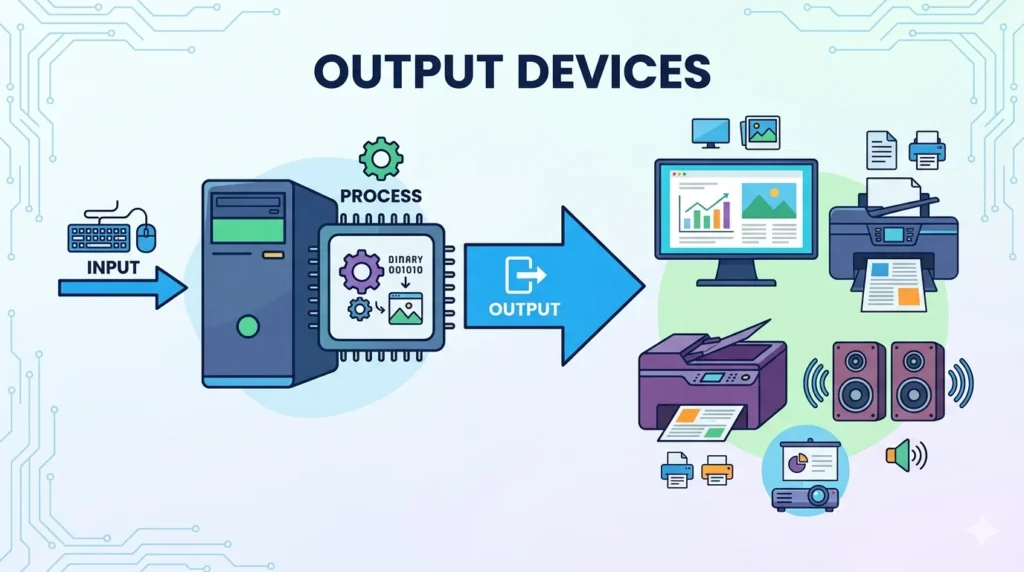
An output device is any hardware component that receives processed data from a computer and presents it to the user in a usable format. In simple terms, it is the part of the computer system that shows you the results of whatever the computer has been doing.
Output devices are the final stage of the information processing cycle. The user provides input through input devices like keyboards or mice, the computer processes that input using its CPU and memory, and then output devices deliver the result back to the user. This result might take the form of text and images on a screen, sound through speakers, or a physical printout from a printer.
Output devices are critically important in computing because they make information accessible. Raw binary data processed inside a computer is meaningless to most users. Output devices translate that binary data into human-readable or human-perceivable formats such as visual content, audio, and printed material.
It is worth noting the distinction between input and output devices. Input devices send data from the user to the computer, while output devices send data from the computer to the user. A keyboard is an input device; a monitor is an output device. Some devices, like touchscreens, serve as both input and output devices simultaneously.
How Do Output Devices Work?
The process by which an output device presents information to a user involves several stages. Understanding these stages reveals the sophisticated engineering behind even the most everyday devices like monitors and speakers.
Receiving Processed Data
The process begins when the computer’s CPU finishes processing an instruction or piece of data. The processed result is then sent to the appropriate output device. This data travels through the computer’s internal components and connections, ultimately reaching the output device via a cable or wireless signal. For example, when you open an image file, the CPU processes the image data and sends it to the graphics card, which then forwards it to the monitor.
Converting Digital Signals into Usable Output
Computers work entirely in digital signals, sequences of binary 1s and 0s. Output devices must convert these digital signals into a format that human senses can perceive. A monitor converts digital pixel data into light patterns that form visible images. Speakers convert digital audio data into electrical signals that drive speaker cones to vibrate, producing sound waves. A printer converts digital page layout data into precise movements of a print head that deposits ink on paper. Each type of output device has its own conversion mechanism tailored to the kind of output it produces.
Displaying or Presenting Information
After conversion, the output device presents the information to the user. This presentation is the moment the human-computer interaction completes its loop. The monitor displays the image, the speakers emit the sound, or the printer ejects the finished page. The quality of this presentation depends on the specifications of the output device, such as screen resolution, speaker frequency response, or printer DPI (dots per inch). Higher-quality devices present information with greater clarity, accuracy, and detail.
Communication with the Computer
Output devices maintain an ongoing two-way communication channel with the computer, even though they are primarily responsible for output. Many output devices send status information back to the computer, such as a printer reporting that it is out of paper, a monitor communicating its resolution capabilities, or speakers signalling their connection status. This feedback helps the computer manage the output process effectively and allows the operating system to configure each device appropriately for the best possible user experience.
Why Are Output Devices Important?
Output devices are not optional accessories. They are indispensable components of any computer system. Here is why they matter so much.
Displaying Information
The most fundamental reason output devices are important is that they make information visible or perceptible. Without a monitor, printer, or speakers, the results of all the computing power in the world would remain locked inside the machine, invisible and inaccessible. Output devices are the window through which users see, hear, and interact with the digital world. Every document you read on screen, every video you watch, and every piece of music you hear is made possible by an output device.
Supporting Communication
Output devices are central to modern communication. Video calls are only possible because both parties have a monitor to see each other and speakers or headphones to hear each other. Presentations rely on projectors or large monitors to communicate ideas to an audience. Printed documents enable physical communication that digital files cannot always replace. In every form of communication that involves computers, output devices play a starring role.
Improving User Experience
The quality of output devices directly determines the quality of the user experience. A high-resolution monitor makes working with detailed graphics or reading long documents far more comfortable than a low-resolution screen. High-fidelity speakers enhance the experience of listening to music or watching films. An accurate, fast printer reduces frustration and increases confidence in the printed results. Investing in good output devices is one of the most effective ways to improve everyday computing experience.
Enhancing Productivity
Output devices significantly impact productivity. A large, high-resolution monitor allows users to have multiple windows open simultaneously without straining to read small text. Fast printers can produce large volumes of documents quickly. Professional audio output helps in tasks that require careful listening, such as audio editing or online meetings. In professional environments, the right output devices can mean the difference between a smooth, efficient workflow and a frustrating, slow one.
Types of Output Devices
Output devices come in many forms, each designed to deliver a specific type of output. Here is a detailed look at the most important types.
1. Monitor
The monitor, also known as a display or screen, is the most common and essential output device for personal computers. It displays visual information including text, images, video, and graphical interfaces.
- Features: Available in various sizes, typically measured diagonally in inches. Key specifications include resolution (e.g., Full HD, 4K), refresh rate (Hz), panel type (IPS, TN, OLED), and response time. Connects via HDMI, DisplayPort, VGA, or USB-C.
- Functions: Displaying the desktop environment, rendering applications and web content, showing video and images, and providing real-time visual feedback for all user actions.
- Uses: Personal computing, professional design and video editing, gaming, office work, streaming media, and digital signage.
2. Printer
A printer is an output device that produces a physical, hard copy of digital documents or images on paper or other media.
- Features: Available as inkjet, laser, thermal, and dot-matrix types. Key specs include print resolution (DPI), print speed (pages per minute), colour capability, and paper size support. Many modern printers include Wi-Fi and duplex printing.
- Functions: Printing text documents, photographs, graphics, labels, receipts, and other physical media from digital files.
- Uses: Office document printing, home use, photo printing, receipt printing in retail, label printing in logistics, and large-format printing in design.
3. Speakers
Speakers are audio output devices that convert digital audio signals into sound waves that can be heard by the user.
- Features: Available as standalone units, integrated into monitors or laptops, or as part of surround sound systems. Key specs include wattage, frequency response range, and connectivity (wired or Bluetooth).
- Functions: Playing music, producing sound effects in games and videos, delivering audio during calls and presentations, and providing system notification sounds.
- Uses: Music playback, video and film audio, gaming, video conferencing, public address systems, and multimedia presentations.
4. Projector
A projector is an output device that displays images or video by projecting light onto a large external surface such as a wall or projection screen.
- Features: Measured by brightness (lumens), resolution, and throw ratio. Available as LCD, DLP, and laser types. Portable and fixed-installation models exist.
- Functions: Projecting presentations, videos, and images onto large surfaces for group viewing.
- Uses: Business presentations, classroom teaching, home cinema, conferences, events, and outdoor screenings.
5. Headphones
Headphones are personal audio output devices worn over or in the ears, delivering sound directly to the individual user.
- Features: Available as over-ear, on-ear, and in-ear designs. May include noise cancellation, wireless (Bluetooth) connectivity, and built-in microphones. Key specs include driver size, frequency response, and impedance.
- Functions: Delivering personal audio without disturbing others, enabling private listening, supporting voice calls, and providing immersive audio in gaming and media.
- Uses: Music listening, video calls and conferencing, gaming, audio editing, language learning, and use in noisy environments.
6. Plotter
A plotter is a specialised output device used to produce large-format, high-precision drawings and technical diagrams on paper or other media.
- Features: Uses pens, inkjet heads, or cutting tools to draw precise lines. Supports very large paper formats. Available as flatbed and drum (roll-feed) types.
- Functions: Producing technical drawings, architectural blueprints, engineering schematics, maps, and large-format graphics with high precision.
- Uses: Architecture, civil engineering, mechanical engineering, cartography, signage production, and pattern making in fashion and manufacturing.
Examples of Output Devices
The table below provides a quick reference guide to the most common output devices, their main functions, and typical applications.
| Output Device | Main Function | Common Uses |
| Monitor | Displays visual information | Computing, gaming, entertainment, design |
| Printer | Produces hard copies | Documents, photographs, labels, receipts |
| Speakers | Produces sound output | Music, video audio, gaming, conferencing |
| Projector | Displays large images | Presentations, education, home cinema |
| Headphones | Personal audio output | Music, calls, gaming, private listening |
| Plotter | Prints technical drawings | Engineering, architecture, cartography |
Functions of Output Devices
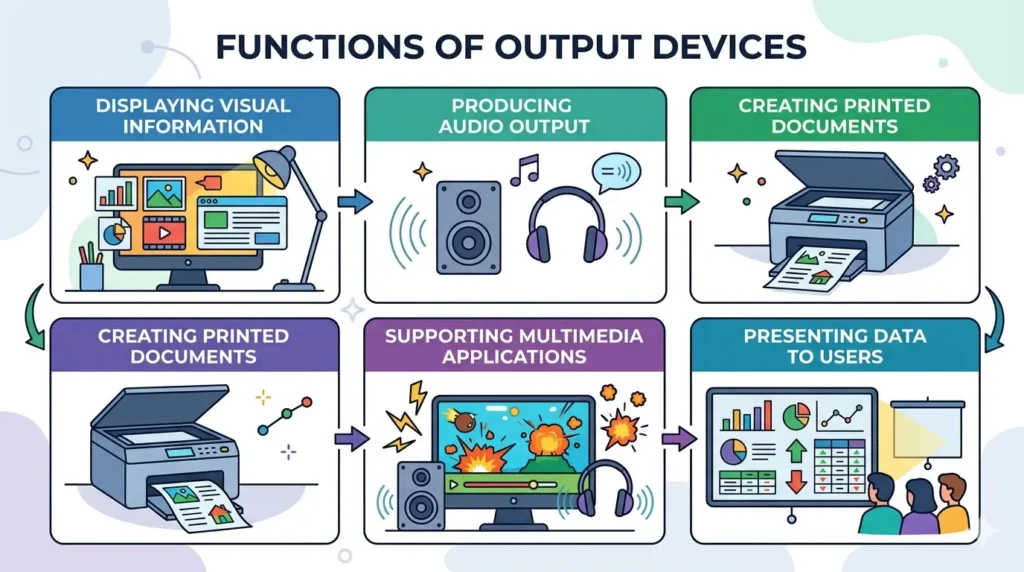
Output devices perform several distinct and critical functions within a computer system. Each function contributes to making computers practical and useful tools for everyday life and professional work.
1. Displaying Visual Information
The most prominent function of output devices is displaying visual information. Monitors render everything from simple text documents to complex three-dimensional graphics. This visual display function is the primary way most users receive information from their computers. The ability to display high-resolution images, smooth video, and crisp text makes modern monitors one of the most important components of any computing setup. Without this function, using a graphical operating system or browsing the web would be impossible.
2. Producing Audio Output
Speakers and headphones perform the function of audio output, converting digital sound data into audible sound waves. This function is essential for multimedia applications, communication, and entertainment. Audio output makes it possible to hear music, dialogue in videos, alerts and notifications from the operating system, voice communications in calls and conferences, and immersive sound effects in games. High-quality audio output significantly enhances the richness of the computing experience.
3. Creating Printed Documents
Printers and plotters perform the function of creating physical copies of digital content. Despite the rise of digital communication, printed documents remain essential in many contexts. Legal documents, contracts, academic papers, photographs, architectural blueprints, and engineering drawings all frequently require physical printed copies. Printers bridge the gap between the digital and physical worlds, making it possible to take digital information out of the computer and into a tangible, shareable format.
4. Supporting Multimedia Applications
Output devices collectively enable multimedia applications, those that combine text, images, audio, and video. A complete multimedia experience, such as watching a film, playing a video game, or attending a virtual event, requires multiple output devices working simultaneously. The monitor displays the visuals, the speakers or headphones deliver the audio, and together they create an immersive experience. Without capable output devices, multimedia software would have no way of delivering its content to the user.
5. Presenting Data to Users
Beyond entertainment and communication, output devices perform the critical function of presenting data to users in an understandable format. Spreadsheets displayed on a monitor turn raw numbers into readable tables and charts. Printed reports make data portable and shareable. Data visualisations on a projector allow an entire team to analyse information together. In every professional and academic discipline, output devices are the tools through which data becomes knowledge.
Output Devices and Computer Hardware
Output devices do not work in isolation. They are integral parts of the broader computer hardware ecosystem, interacting closely with other components to deliver information to users.
1. Relationship with CPU
The Central Processing Unit (CPU) is the engine that generates the data output devices present. After the CPU processes instructions, it produces output data that must be sent to the appropriate output device. For visual output, the CPU often works in conjunction with the Graphics Processing Unit (GPU), which handles the complex calculations required to render images and video. The GPU then sends the rendered output to the monitor. The processing power of the CPU and GPU directly affects the quality and smoothness of visual output, particularly for demanding applications like 3D gaming or video editing.
2. Communication Through the Motherboard
The motherboard is the central circuit board that connects all hardware components. Output devices communicate with the computer through ports on the motherboard or expansion cards attached to it. HDMI and DisplayPort connectors on a graphics card, USB ports for printers, and audio jacks for speakers are all examples of motherboard-connected pathways for output devices. The motherboard ensures that data flows correctly from the CPU and GPU to whichever output device needs it, routing signals efficiently and managing the connections between components.
3. Interaction with Input Devices
Output devices and input devices work in close partnership to create the complete human-computer interaction loop. Every action taken through an input device produces a visible or audible result through an output device. When you type a letter on a keyboard (input), it appears on the monitor (output). When you click play on a media player using a mouse (input), the speakers begin producing audio (output). This constant interplay between input and output devices is what makes computing feel natural and responsive. The quality and responsiveness of output devices directly affects how satisfying it feels to use input devices.
4. Role in the Computer Hardware System
In the overall computer hardware system, output devices represent the delivery mechanism for all computational results. The system works as a pipeline: input devices capture user actions, the CPU and memory process those actions, and output devices deliver the results. Each stage depends on the others. A powerful CPU means nothing if the output devices cannot display its results with sufficient quality. A high-resolution monitor is wasted if the GPU cannot render at that resolution. Understanding output devices in the context of the full hardware system helps users make better decisions when building or upgrading computers.
Input Devices vs Output Devices
Input and output devices are complementary categories of hardware that together make computers interactive and useful. The table below highlights their key differences.
| Feature | Input Devices | Output Devices |
| Purpose | Enter data into a computer | Display information from a computer |
| Data Flow | User to Computer | Computer to User |
| Examples | Keyboard, Mouse, Scanner, Microphone | Monitor, Printer, Speakers, Projector |
| Function | Send instructions and data | Present results and information |
| User Role | Active (user initiates action) | Passive (user receives output) |
| Interaction | Human controls the device | Device communicates to human |
Advantages of Output Devices
Output devices provide numerous benefits that make computer systems genuinely useful in daily life, professional work, and entertainment.
1. Easy Access to Information
Output devices make information immediately accessible in a human-readable format. Without them, digital data would remain locked in binary form inside the computer, useful only to the machine itself. A monitor translates complex data into text and images you can read and understand at a glance. A printer gives you a physical copy of that information you can take anywhere. A speaker turns digital audio into sound you can hear without any technical effort. This instant, effortless access to information is one of the most valuable contributions output devices make to computing.
2. Better Communication
Output devices enable and enrich communication in countless ways. Video conferencing is only meaningful because monitors show the faces of participants and speakers or headphones deliver their voices. Printed reports and presentations communicate business data to clients and colleagues. Projectors allow a single presenter to share information with hundreds of people simultaneously. In every communication scenario involving computers, output devices are the mechanism through which the message is received, making them indispensable for personal, professional, and public communication.
3. Improved Productivity
High-quality output devices directly boost productivity. A large, high-resolution monitor allows professionals to work with multiple applications open side by side without losing clarity. A fast laser printer produces dozens of pages per minute, eliminating waiting time. Noise-cancelling headphones help workers focus in busy environments. In every professional domain, from accounting to architecture, the right output devices make work faster, more accurate, and less fatiguing, leading to measurably better productivity.
4. Enhanced Multimedia Experience
Output devices are the foundation of every multimedia experience. High-definition monitors with wide colour gamuts bring films, games, and digital art to life with stunning visual quality. High-fidelity speakers and headphones deliver audio with clarity and depth that transforms the experience of listening to music or playing games. For content creators, high-quality output devices are professional tools that allow precise evaluation of colour, sound, and image quality. For consumers, they turn entertainment into an immersive, engaging experience.
Disadvantages of Output Devices
Despite their essential role in computing, output devices also come with limitations and drawbacks that users and organisations should consider.
1. Additional Hardware Costs
Output devices represent a significant portion of the total cost of a computer system. High-quality monitors, especially large 4K or OLED displays, can cost as much as or more than the computer itself. Professional-grade printers, particularly colour laser or large-format models, require substantial investment. Projectors suitable for professional use carry premium price tags. For businesses equipping many workstations, these costs multiply quickly. Budget constraints often force compromises on output device quality, which can impact the user experience and productivity.
2. Maintenance Requirements
Output devices require ongoing maintenance to function reliably. Printer ink and toner cartridges must be replaced regularly, representing a recurring operational cost. Printer heads can clog, requiring cleaning cycles that waste ink. Monitor screens accumulate dust and smudges that reduce visibility. Speakers and headphones can degrade over time, with drivers wearing out and connections loosening. Neglecting maintenance leads to degraded performance and shortened device lifespan, ultimately increasing the total cost of ownership.
3. Power Consumption
Output devices consume significant amounts of electricity. Large monitors, especially older LCD and CRT models, can draw considerable power during operation. Laser printers consume a great deal of electricity during the fusing process. Projectors generate significant heat and require powerful bulbs that consume substantial power. In environments with many output devices, such as offices and schools, the cumulative power consumption can be very high, increasing energy bills and environmental impact. Energy-efficient models and automatic sleep settings can help mitigate this, but power consumption remains a genuine concern.
4. Potential Hardware Failures
Like all hardware, output devices are subject to failure. Monitor screens can develop dead pixels, backlight failures, or colour distortion. Printer mechanisms can jam, heads can fail, and electronic components can burn out. Speakers can blow their drivers or develop connection faults. Projector bulbs have limited lifespans and must be replaced periodically. Hardware failures disrupt workflow, and in critical environments like hospitals or broadcast studios, they can have serious consequences. Maintaining spare devices and investing in quality hardware with good warranties can help manage this risk.
Modern Output Devices
The world of output devices is evolving rapidly, driven by advances in display technology, three-dimensional printing, virtual reality, and interactive projection. These modern developments are redefining what it means to receive output from a computer.
1. Smart Monitors
Smart monitors go beyond simple display functionality by integrating operating systems, wireless connectivity, and streaming services directly into the display. These devices can function independently of a computer, running apps, accessing the internet, and displaying content without being connected to a separate PC. Many smart monitors also include built-in webcams, microphones, and speakers, turning them into all-in-one communication and productivity hubs. Features like adaptive brightness, blue light filtering, and automatic refresh rate adjustment reflect a growing focus on user health and comfort in display design.
2. VR Headsets
Virtual Reality (VR) headsets are among the most immersive output devices ever created. They place screens directly in front of each eye and use head-tracking sensors to adjust the displayed image in real time as the user moves their head, creating a convincing illusion of being inside a three-dimensional digital environment. VR headsets are used in gaming, professional training, architectural visualisation, medical simulation, and education. As the technology matures, VR headsets are becoming lighter, higher resolution, and more affordable, pointing toward a future where immersive three-dimensional output becomes a mainstream computing experience.
3, 3D Printers
3D printers represent a revolutionary expansion of what output devices can produce. Rather than depositing ink on paper, 3D printers build physical three-dimensional objects layer by layer using materials such as plastic, resin, metal, or even biological tissue. The applications are vast: manufacturing custom parts, producing medical implants, creating architectural models, printing consumer products, and prototyping new designs. In education, 3D printers bring abstract concepts to life as tangible objects. As material science and printing technology advance, 3D printers are becoming faster, more precise, and capable of working with an ever-wider range of materials.
4. Interactive Projectors
Interactive projectors combine traditional projection with touch and gesture recognition to transform any surface into an interactive display. Users can draw, write, or manipulate projected content directly on the projection surface using their fingers or a stylus. These devices are transforming education by enabling dynamic, participatory lessons on large shared screens. In business, interactive projectors replace traditional whiteboards with digital collaboration surfaces where notes and diagrams can be saved and shared instantly. As the technology improves, interactive projectors are becoming more accurate, faster, and capable of supporting multiple simultaneous touch inputs.
Uses of Output Devices
Output devices find applications across virtually every domain of human activity. Here is a survey of the most important use areas.
a. Education and Learning
Output devices are transforming education at every level. Projectors and interactive smart boards allow teachers to present multimedia lessons to entire classrooms. Students use monitors to access digital textbooks, complete online assignments, and attend remote classes. Printers produce worksheets, study guides, and assessment materials. Language learning software uses speakers and headphones to deliver pronunciation guides and listening exercises. In higher education, research is shared through high-quality printed publications and digital displays. As technology advances, VR headsets are beginning to offer entirely new modes of immersive educational experience.
b. Business and Office Work
Modern business operations depend on output devices at every turn. Monitors allow office workers to manage emails, spreadsheets, presentations, and communication platforms throughout the workday. Laser printers produce contracts, invoices, reports, and marketing materials. Projectors or large display screens enable boardroom presentations and team meetings. Headphones support the remote and hybrid work arrangements that have become standard in many industries. In retail, receipt printers and display screens are essential components of point-of-sale systems. Every business function that produces information ultimately relies on output devices to make that information accessible.
c. Entertainment and Gaming
Output devices are what make entertainment and gaming genuinely enjoyable experiences. High-resolution monitors and televisions display games, films, and streaming content with stunning visual quality. Surround sound speaker systems and high-fidelity headphones create immersive audio landscapes that enhance dramatic impact and gaming realism. VR headsets transport users into entirely different virtual worlds. Large projectors create home cinema experiences comparable to commercial theatres. The entertainment industry invests enormously in output device technology because the quality of the output is what determines how engaging and enjoyable the experience feels to the audience or player.
d. Graphic Design and Engineering
Creative and technical professionals depend on high-quality output devices for their work. Graphic designers require monitors with accurate colour reproduction and wide colour gamuts to ensure that what they see on screen matches the final printed or published result. Video editors need high-refresh-rate displays that render motion smoothly. Engineers use plotters to produce precise large-format technical drawings and blueprints. Architects print detailed scale models and plans. Industrial designers use 3D printers to create physical prototypes. In all these fields, the accuracy and quality of output devices directly affects the quality of the professional output.
e. Communication and Collaboration
Output devices are the delivery mechanism for virtually all forms of digital communication. Video calls and virtual meetings require monitors, speakers, and headphones to see and hear remote participants. Online presentations use monitors or projectors to share slides and documents with an audience. Shared display screens in open-plan offices or meeting rooms facilitate real-time collaboration. Printed documents enable communication in contexts where digital devices are unavailable or impractical. Even simple notifications on a monitor screen represent a form of computer-to-human communication made possible by output devices.
Tips to Maintain Output Devices
Proper maintenance extends the lifespan of output devices and ensures they perform at their best. Here are practical tips for keeping your devices in excellent condition.
Clean Devices Regularly
Regular cleaning prevents dust, grease, and debris from degrading performance. Monitor screens should be cleaned with a soft, dry microfibre cloth to remove smudges, using a slightly damp cloth only when necessary and ensuring the screen is powered off first. Never use household cleaning sprays directly on screens as they can damage anti-glare coatings. Speaker grilles should be vacuumed gently to remove accumulated dust. Printer rollers and paper paths should be cleaned periodically to prevent paper jams and streaks on printouts. Projector air filters should be cleaned or replaced regularly to prevent overheating.
Protect from Dust and Moisture
Dust and moisture are the primary environmental threats to output devices. Use dust covers for printers and monitors when they are not in use for extended periods. Ensure that devices are used in environments with reasonable humidity levels, as excessive moisture can cause corrosion of internal components. Avoid placing drinks near monitors, printers, or speakers. For devices used in industrial or outdoor environments, choose ruggedised models designed to withstand those conditions. Keeping devices in clean, dry environments significantly extends their operational life.
Update Drivers and Software
Output devices rely on software drivers to communicate with the operating system and applications. Manufacturers regularly release driver updates that fix bugs, improve compatibility with new software, and sometimes add new features. Keeping device drivers up to date ensures stable performance and prevents compatibility issues with operating system updates. For printers and monitors, firmware updates can also improve functionality. Check the manufacturer’s website periodically or enable automatic updates in your operating system’s device management settings to ensure drivers stay current.
Use Proper Power Protection
Power surges and fluctuations can damage sensitive electronic components in output devices. Using surge protectors for monitors, printers, and other output devices protects them from sudden voltage spikes that can occur during thunderstorms or power grid events. For environments with frequent power interruptions, an Uninterruptible Power Supply (UPS) provides battery backup that allows devices to be powered down safely rather than being cut off abruptly. Proper power protection is a relatively inexpensive measure that can prevent costly device damage and data loss.
Handle Devices Carefully
Physical care significantly extends the life of output devices. Monitor screens are delicate and can crack or develop pressure damage if touched or pressed too firmly. Printer paper trays and covers should be opened and closed gently to avoid breaking plastic clips and hinges. Headphone cables should be stored without tight bending or kinking, which can damage internal wires over time. When moving printers or projectors, follow manufacturer guidelines about securing moving parts and using proper lifting techniques. For devices with consumables like printer cartridges or projector bulbs, handle them according to manufacturer instructions to avoid damage and ensure optimal performance.
FAQs About Output Devices
What is an output device?
An output device is any hardware component that receives processed data from a computer and presents it to the user in a usable form. Output devices translate the digital results of computer processing into formats that humans can perceive, such as visual images on a monitor, sound from speakers, or physical documents from a printer. They are essential components of any computer system.
What are the main types of output devices?
The main types of output devices include monitors and displays (for visual output), printers and plotters (for physical hard copy output), speakers and headphones (for audio output), and projectors (for large-scale visual output). Modern categories also include VR headsets and 3D printers, which represent advanced forms of immersive and physical output respectively.
Is a monitor an output device?
Yes, a monitor is the most commonly used output device. It receives processed visual data from the computer’s graphics system and displays it as text, images, and video on screen. Monitors are essential for virtually all personal computing tasks, from browsing the web and writing documents to gaming and video editing. They are a primary output device in almost every computer setup.
What is the difference between input and output devices?
Input devices allow users to send data and instructions to a computer, with information flowing from the user to the machine. Output devices allow the computer to present the results of processing back to the user, with information flowing from the machine to the user. A keyboard is an input device, while a monitor is an output device. Some devices, like touchscreens, function as both input and output devices simultaneously.
Why are output devices important?
Output devices are important because they make the results of computer processing accessible and usable by humans. Without output devices, all the computing power in the world would be invisible and inaccessible to users. They enable communication, support productivity, deliver entertainment, and present data in meaningful formats. Output devices are the bridge between digital computation and human perception.
What are five examples of output devices?
Five common examples of output devices are the monitor, which displays visual content on screen; the printer, which produces physical copies of documents; the speakers, which deliver audio output; the projector, which displays images on large surfaces; and headphones, which provide personal audio output. Each device serves a distinct purpose and is suited to different contexts and applications.
Are speakers output devices?
Yes, speakers are output devices. They receive digital audio data from the computer’s sound card or audio processor and convert it into sound waves that can be heard by the user. Speakers are essential for any application that involves audio, including music playback, video and film, gaming, video conferencing, and multimedia presentations. Headphones serve the same function as speakers but deliver sound directly to the individual user’s ears.
Conclusion
Output devices are the voice and face of every computer system. They take the invisible digital work done inside the machine and transform it into something humans can see, hear, and hold. From the monitor on your desk to the speakers beside it, from the printer in your office to the projector in your conference room, output devices are present at every moment when a computer communicates with a person.
In this guide, we covered the full scope of output devices. We defined what they are and why they matter. We explored the four-stage process by which they receive, convert, and present computer output. We examined six major types in detail, including monitors, printers, speakers, projectors, headphones, and plotters. We discussed the key functions they serve, their relationship to other computer hardware components, their advantages and disadvantages, and the exciting modern developments such as VR headsets, 3D printers, and interactive projectors that are expanding the boundaries of what output devices can do.
We also explored the wide range of applications for output devices across education, business, entertainment, design, and communication, demonstrating just how central these devices are to virtually every domain of modern life. And we provided practical maintenance advice to help you keep your output devices performing at their best for as long as possible.
To continue building your understanding of computer hardware, we recommend exploring our related guides on What Is Monitor, What Is Printer, What Is Input Device, and Computer Hardware. Each topic deepens your knowledge of how modern computer systems are built and how they work together to create the seamless computing experiences we rely on every day.