
If you have ever wondered how your browser plays a video, download a file. Lets you scroll through many open tabs at the same time without freezing the answer is multithreading.
Multithreading is one of those things that your operating system does that sounds complicated until you realize it is happening now on your computer or phone.
This guide explains multithreading in operating systems from the start: what multithreading is, how it works, the ways an operating system can use multithreading and where things can go wrong when threads are not managed carefully such as deadlocks, race conditions and starvation.
You will learn about multithreading whether you are preparing for an operating system course, an interview or just trying to understand why your app feels slow.
What Is Multithreading in an Operating System?
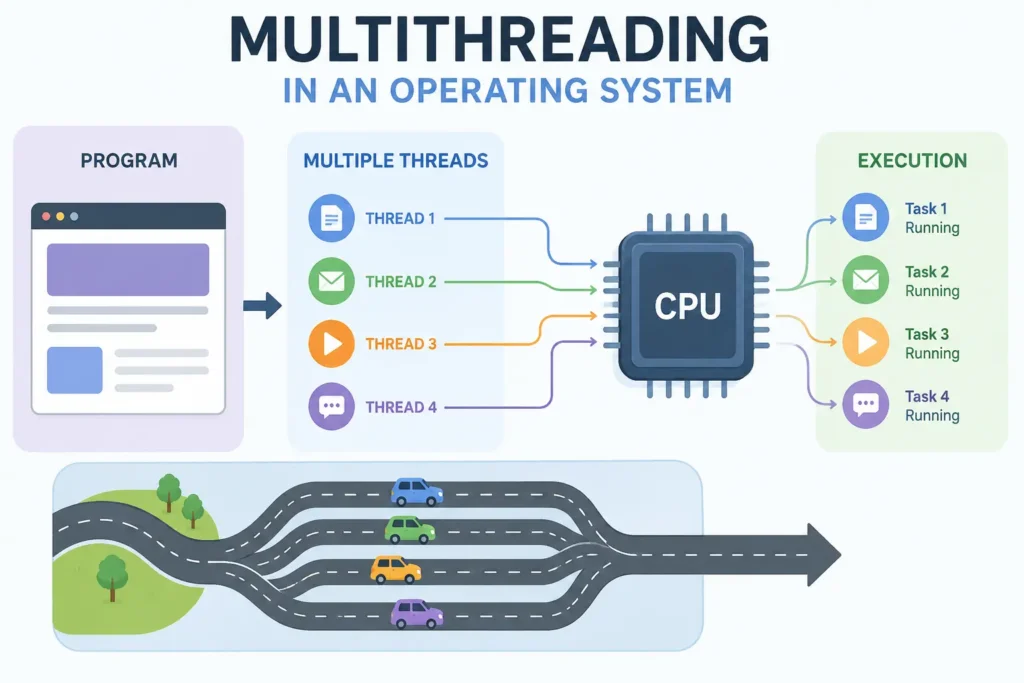
Multithreading is when a computer processor can do lots of things at the time. It does this by breaking down a job into smaller jobs called threads. Each thread is like a road that the computer can follow.
In terms: multithreading lets a computer program do several things at the same time by splitting its work into smaller tasks. These tasks are, like helpers that work together and share the same information.
Multithreading Explained with a Real-Life Analogy
Imagine you are in a restaurant kitchen. The head chef, who is in charge of the process, needs to get a meal ready.. The head chef does not do everything by themselves. They give jobs to line cooks. One line cook grills the meat, one line cook prepares the salad and one line cook sets out the dessert. They all work in the kitchen. They share the food and the same tools but each line cook is doing something different at the same time.
If the kitchen only had one cook and this cook had to do every job one after the other it would take a long time to get dinner ready. The operating system is like a manager who lets many line cooks work on the meal at the same time. This is called multithreading. The operating system lets line cooks or threads work from the same plan, which is like a recipe all, at the same time. Multithreading is what makes it possible for the operating system to let many threads work together in the memory just like the line cooks work together in the same kitchen.
Why Operating Systems Need Multithreading
Modern applications do not just do one thing. A word processor needs to do a lot of things at the time. It needs to accept the keys you press, check for spelling mistakes, save your work without you asking it to and show you the page. It has to do all these things without stopping the user interface from working.
If we do not use multithreading each of these tasks would have to wait for the other to finish.
The operating system supports multithreading because it makes the application more responsive. Multithreading also makes use of the multiple cores in the computer processor. This means that programs can do things at the same time like getting data from the network and getting input from the user without stopping each other. Multithreading is very important for multithreading to work. The operating system supports multithreading for multithreading.
What Is a Thread?
A thread is the thing that the operating system can handle on its own. The operating system can manage a thread by itself. People often call a thread a process. This is because a thread runs inside a process. A thread does not need its memory space. The thread uses the memory space of the parent process. The thread borrows things from the parent process. A thread uses the resources of the parent process. For a deeper technical history and definition, Wikipedia’s entry on threads is a solid reference point.
Process vs Thread
A process is an independent program in execution, with its own memory space, file handles, and system resources. A thread lives inside a process and shares that process’s memory and resources with other threads in the same process.
| Aspect | Process | Thread |
| Memory | Has its own separate address space | Shares memory with other threads in the same process |
| Creation cost | Heavier, slower to create | Lightweight, faster to create |
| Communication | Needs inter-process communication (IPC) | Can communicate directly via shared memory |
| Crash impact | One process crashing doesn’t usually affect others | One thread crashing can bring down the whole process |
| Context switch | Expensive (full memory map change) | Cheaper (shares memory, less to switch) |
Components of a Thread
Even though threads share memory with their parent process, each thread still needs a few things of its own to execute independently:
- Thread ID – a unique identifier
- Program counter – tracks which instruction is next
- Register set – holds the thread’s current working values
- Stack – stores local variables and function call history
Everything else code, data, open files, heap memory is shared with the other threads in the process.
How Threads Share Resources
Threads in the process use the same address space. This means threads can get to the global variables and heap memory. They can also get to the open file descriptors. Threads do not need a way to talk to each other to do this. This is what makes threads fast.
Threads need to be synchronized. If two threads try to write to the variable at the same time it can cause big problems. Threads can cause bugs if they are not controlled. Threads writing to the variable at the same time is a big issue. Threads need to be synchronized to prevent this from happening to threads. Threads and synchronization are very important for threads.
How Multithreading Works in an OS
Thread Creation
A thread is made by either the application or the operating system kernel.
The application can create a thread using a library like POSIX threads or a programming languages built-in thread class, such as Java’s Thread class. create a thread the system allocates a stack. Set up a thread control block.
Then it registers the thread with the scheduler. This process is done so the thread can be managed and run by the operating system. Threads are created to help applications do things at once.
The operating system kernel also creates threads to manage system tasks. A thread control block is used to keep track of a threads information. The scheduler is used to decide which thread to run next.
Thread Scheduling
Once created, a thread doesn’t run continuously the OS scheduler decides which thread gets CPU time and for how long. Scheduling decisions are based on factors like thread priority, time slice (quantum), and the scheduling algorithm in use (round-robin, priority-based, and so on).
Context Switching
When the computer processor switches from working on one task to another it has to save what the current task is doing and get ready for the task. This is called a context switch. Switching between tasks that’re part of the same program is faster than switching between completely different programs because these tasks use the same memory space so the operating system does not have to reload all of the memory. Thread context switches are cheaper than process context switches because threads share memory the operating system does not need to reload the memory map so thread context switches are faster.
CPU Execution Flow
When you have a computer with one core, multithreading makes it seem like things are happening at the time. This is because it quickly switches between threads, which is called concurrency. When you have a computer with cores, threads can really run at the same time on different cores and that is what you call true parallelism. Most programs that use multithreading, like the ones you use every day use a combination of concurrency and true parallelism depending on what the computer can handle.
Thread Lifecycle
Every thread moves through a defined set of states during its life, managed by the OS scheduler.
1. New
The thread has been created but hasn’t started executing yet. It’s waiting to be admitted into the “ready” state.
2. Ready
The thread is loaded into memory and waiting for the CPU scheduler to allocate it a time slice. It’s fully capable of running, it’s just waiting its turn.
3. Running
The thread is actively executing instructions on a CPU core. Only one thread can be “running” per core at any given instant.
4. Waiting
The thread is paused because it’s waiting on something external: a file read, a network response, a lock, or user input. It can’t proceed until that event happens.
5. Terminated
The thread has finished executing (or was forcibly killed) and its resources are being cleaned up by the OS.
Types of Threads
1. User-Level Threads
User level threads are handled completely by a library that the user has control over. This library works outside of the kernel. The kernel does not know that these threads exist on their own.
The kernel only sees one process. The threads are scheduled inside the program itself.
These threads are quick to make and switch between because the kernel is not involved. But they have a problem: if one user level thread needs something, from the system the whole process can come to a stop. This happens because the kernel does not know that there are threads. User level threads can cause the whole process to stall if one of them makes a system call that blocks.
2. Kernel-Level Threads
The operating system kernel. Manages kernel-level threads. It knows about each kernel-level thread. Can run them on different CPU cores.
This fixes the problem that user-level threads have when they get stuck. If one kernel-level thread gets stuck the operating system can switch to another kernel-level thread.
The downside is that it takes work to do things with kernel-level threads. Every time you do something with a kernel-level thread you have to ask the operating system to do it for you, which takes longer than if you could just do it yourself.
3. Multithreading Models
Operating systems do this thing where they connect user level threads to kernel level threads. They use different ways to do this. The way they do this mapping decides how much the application can really do things at the same time and how flexible it can be. Operating systems and the way they map these threads is important for the application. The operating system is what maps user level threads to kernel level threads.
4. Many-to-One
A lot of threads that people use are connected to one thread that the computer uses to manage everything. Managing these threads is really fast. It all happens in the user space but the entire process comes to a stop if one of these threads needs to make a system call that takes a long time. The system also cannot use more than one computer core at a time, which is a big limitation, for threads. Threads are basically stuck with one core.
5. One-to-One
Each user-level thread is like its kernel thread. This way you can do lots of things at the time on computers with many cores. The user-level thread model is good because it does not stop things from happening when one thing is waiting. However making a lot of threads can be bad because the computer has to make a kernel thread, for each user-level thread. This takes up resources. Windows and Linux use the user-level thread model a lot nowadays.
6. Many-to-Many
Many user-level threads map to a smaller or equal number of kernel threads, and the OS multiplexes them. This gives a balance between developers can create many user-level threads without a one-to-one kernel cost, and the OS can still schedule multiple threads on multiple cores.
7. Two-Level Model
This is a kind of many-to-many setup. It lets a user-level thread connect directly to a kernel thread when it needs to. This is similar to a one-to-one setup. Just, for that specific thread. This way applications can use both dedicated threads, which gives them more flexibility.
Comparison Table
| Model | Parallelism | Blocking Risk | Overhead | Used By |
| Many-to-One | None | High (one block = all block) | Very low | Early green-thread libraries |
| One-to-One | Full | Low | Higher (per-thread kernel cost) | Linux, Windows |
| Many-to-Many | Good | Low | Moderate | Some Solaris versions |
| Two-Level | Good, with flexibility | Low | Moderate | Solaris (older versions) |
Advantages of Multithreading
- Better responsiveness – a UI thread can stay responsive while background threads do heavy work
- Efficient resource sharing – threads share memory, so there’s no need for costly IPC
- Improved performance on multi-core CPUs – workloads can be split across cores
- Faster context switching than switching between full processes
- Economical thread creation – threads are cheaper to spin up than processes
- Better scalability for applications handling many simultaneous tasks (like web servers)
Disadvantages of Multithreading
- Complexity – multithreaded code is genuinely harder to write, debug, and reason about
- Race conditions – unsynchronized access to shared data can produce unpredictable bugs
- Deadlocks and starvation – poor lock management can freeze or stall threads indefinitely
- Harder debugging – bugs may be non-deterministic and hard to reproduce
- Overhead of synchronization – locks and semaphores add performance cost if overused
- One thread’s crash can take down the whole process, since they share memory space
Thread Synchronization
When lots of things are happening at the time and they all use the same memory, the computer system and the person writing the program both need ways to make sure that sharing is safe. The operating system and the programmer need to work to keep everything safe. This is where synchronization comes in. Synchronization is important when multiple threads share memory.
Race Condition
A race condition happens when two or more threads access shared data at the same time, and the final outcome depends on the unpredictable order in which they execute. A classic example: two threads incrementing the same counter variable can lose an update if they read and write it at nearly the same instant.
Critical Section
A critical section is the part of a program where shared resources are accessed. To avoid race conditions, only one thread should be allowed inside a critical section for a given resource at any time.
Mutex
A thread needs to get a lock before it can go in and then let go of that lock when it comes out so other threads can move forward.
This special lock is called a mutex, which helps make sure one thread can use a very important part of the code at any given time.
Semaphore
A semaphore is a tool that helps control when lots of things are trying to use the resource at the same time. It does this by using a counter. Think of a semaphore like a kind of lock. A binary semaphore is like a lock that only lets one thing in at a time.. A counting semaphore is different. It lets a certain number of things use the resource at the time. This is really useful for things, like connection pools, where you want to let things in but not too many. The semaphore makes sure that only the right number of things can get in.
Spinlock
A spinlock makes a thread “busy-wait” in a loop, repeatedly checking if a lock is available, instead of going to sleep. It’s efficient for very short waits on multi-core systems but wastes CPU cycles if the wait is long.
Atomic Operations
Atomic operations are instructions that complete in a single, indivisible step, with no possibility of another thread interrupting midway. Using atomic operations (like compare-and-swap) for simple updates avoids the overhead of a full lock in many cases.
Thread Scheduling in Operating Systems
1. Scheduling Queues
The operating system has lists of things that are waiting to happen, like a list of things that’re ready to go and a list of things that are waiting for something. The operating system moves things from one list to another when something changes with them. The operating system does this with the list and the waiting lists to keep track of which threads are ready to run and which threads are waiting for something.
2. CPU Scheduler
The CPU scheduler chooses which ready thread gets to run on a free core. It uses a method like round-robin or priority-based scheduling. This helps balance fairness, responsiveness and how much work gets done.
The CPU scheduler is key to managing threads. It picks the thread to run. The goal is to make sure everything runs smoothly. The CPU scheduler uses algorithms to achieve this. It aims for a balance between fairness, responsiveness and throughput.
3. Priority Scheduling
In priority scheduling, each thread is assigned a priority, and the scheduler picks the highest-priority ready thread to run next. This is useful for real-time systems but can lead to starvation of low-priority threads if not handled carefully (often mitigated with “aging,” where a thread’s priority increases the longer it waits).
4. Time Slicing
Time slicing is a way of sharing the computer’s brain power. It gives each task a bit of time to use the computer’s brain before it is stopped and another task gets to use it. This is called round-robin scheduling. It makes sure that no single task can use the computer’s brain all the time on systems that are shared by tasks. Time slicing is important because it allows many tasks to share the computer’s brain without any one task taking over completely.
Multithreading vs Related Concepts
1. Multithreading vs Multitasking
Multitasking is the OS running multiple processes seemingly at once. Multithreading is a step further: it’s multiple threads running within a single process. You can multitask without multithreading (multiple single-threaded processes), but multithreading is a specific technique used to achieve concurrency within one program.
2. Multithreading vs Multiprocessing
Multithreading uses multiple threads within one process sharing the same memory. Multiprocessing uses multiple separate processes, each with its own memory space. Multiprocessing avoids the “one crash takes down everything” risk of multithreading, but it’s heavier and communication between processes is more expensive.
3. Concurrency vs Parallelism
Concurrency is about dealing with multiple tasks by interleaving their execution (which can happen even on a single core). Parallelism is about executing multiple tasks at the exact same physical instant, which requires multiple cores. A single-core CPU can be concurrent but never truly parallel.
4. User Threads vs Kernel Threads
User threads are managed in application space by a library and are fast but limited (as covered in the Many-to-One model above). Kernel threads are managed by the OS itself, support true parallelism, and integrate with the scheduler directly, at the cost of more overhead per thread.
Multithreading on Multi-Core Processors
1. Physical vs Logical Cores
A physical core is an actual, independent processing unit on the CPU chip. A logical core (sometimes called a “thread” in CPU marketing, confusingly) is a virtual core created by a technology like hyper-threading, which lets one physical core handle two instruction streams for better utilization though it doesn’t double actual performance.
2. Hyper-Threading
Hyper-Threading (Intel’s implementation of simultaneous multithreading, or SMT) allows a single physical core to appear as two logical cores to the OS, interleaving instructions from two threads to better use idle execution units. It typically gives a meaningful but not 2x performance boost, since the threads still share the same physical execution resources.
3. CPU Affinity
CPU affinity is the practice of binding a thread (or process) to run on a specific core or set of cores, rather than letting the scheduler move it around freely. This can improve cache performance for latency-sensitive applications, though it reduces the scheduler’s flexibility to balance load.
Real-World Examples
1. Web Browsers
When you use a browser these days it uses threads and sometimes even separate processes to do different things. It will use one thread to show you the page, another thread to run the JavaScript code and another thread to handle the things you ask for from the internet. The browser also uses a thread to manage the user interface. This is why if one tab is really slow it does not make your whole browser freeze. The browser is like a team, with workers so if one worker is slow the other workers can still do their jobs.
2. Video Games
Game engines often use threads for things like physics, artificial intelligence, graphics and sound. These threads all run at the time. This helps the game world update smoothly and quickly without any stuttering or freezing.
The physics thread handles all the physics calculations. The AI thread takes care of the game’s intelligence. The rendering thread is responsible for the graphics. The audio thread handles the sound effects and music. All these threads working together make the game run smoothly.
3. Database Servers
Database systems use a group of threads to handle client queries at the same time. This way if one user’s query takes a time it does not stop other users from getting their results quickly.
The thread pool helps to manage queries. It allows slow queries to run without blocking requests. This improves the performance of database systems. Many users can access the database at the time.
Their queries are handled by the thread pool. The database can handle queries. It keeps users’ requests moving.
4. Streaming Platforms
Streaming services use threads to do several things at the same time. They buffer video data, decode audio and video streams. Handle things like scrubbing or changing video quality. This all happens while the video keeps playing
The threads help with video playback, audio and video decoding and user interactions. They make sure everything works together.
5. Android Apps
Android explicitly separates the main UI thread from background worker threads; doing heavy work on the main thread causes the notorious “Application Not Responding” (ANR) freeze, which is why background threading is a core Android development practice.
6. Desktop Applications
When you use things, like word processors and image editors they do some work in the background. This means they can autosave your work and check for spelling mistakes without slowing down the program. They can also export files in the background. This way the interface is still easy to use while all these things are happening with the word processors and image editors.
Multithreading in Popular Programming Languages
1. Java
Java has built-in threading support via the Thread class and Runnable interface, along with a higher-level java.util.concurrent package offering thread pools (ExecutorService), locks, and concurrent collections.
2.C++
C++ (since C++11) provides native threading through the <thread> header, along with std::mutex, std::condition_variable, and atomic types in the standard library, giving developers low-level control over thread behavior.
3. Python
Python supports threading via the threading module, but CPU-bound multithreading is limited by the Global Interpreter Lock (GIL), which allows only one thread to execute Python bytecode at a time. Python threads are still useful for I/O-bound tasks, and CPU-bound parallelism is usually achieved instead with the multiprocessing module.
4. C#
C# provides threading through the System.Threading namespace, plus higher-level abstractions like the Task Parallel Library (TPL) and async/await, which make asynchronous and parallel code easier to write and reason about.
5. Go
Go uses lightweight, user-space “goroutines” managed by the Go runtime’s own scheduler, which multiplexes many goroutines onto a smaller number of OS threads closely resembling the many-to-many threading model.
6. Rust
Rust supports OS-level threads through std::thread, and its ownership and borrowing rules are enforced at compile time specifically to prevent data races, a distinctive feature compared to most other languages.
Thread Pools and Modern Thread Management
1. Why Thread Pools Matter
Creating and destroying threads repeatedly is expensive. A thread pool keeps a set of worker threads alive and reuses them for incoming tasks, avoiding that repeated creation cost — which matters a lot for high-throughput systems like web servers.
2. Common Thread Pool Implementations
Java’s ExecutorService, .NET’s ThreadPool, and Python’s ThreadPoolExecutor are all common examples. Most implementations let you configure the pool size, queue behavior, and rejection policy for when the pool is saturated.
3. Benefits and Limitations
Thread pools reduce overhead and give predictable resource usage, but a poorly sized pool can become a bottleneck if too few threads underuse the CPU, while too many can cause excessive context switching and contention.
Common Problems in Multithreading
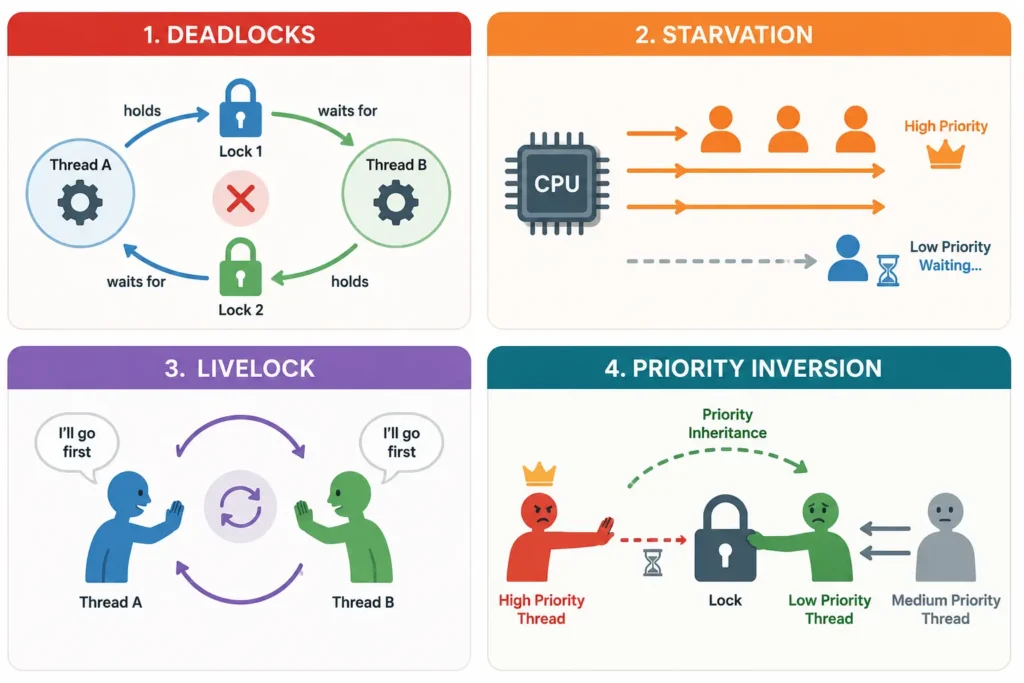
A deadlock happens when two or more threads are each waiting on a resource held by the other, so none of them can proceed. The classic example is Thread A holding Lock 1 and waiting for Lock 2, while Thread B holds Lock 2 and waits for Lock 1 neither ever releases what the other needs. Deadlock article lists the four Coffman conditions that must all hold true for a deadlock to occur.
2. Starvation
Starvation occurs when a thread is perpetually denied the resources it needs to proceed, often because the scheduler keeps favoring higher-priority threads. Aging (gradually increasing a waiting thread’s priority) is a common fix.
3. Livelock
A livelock is similar to a deadlock, but the threads aren’t stuck; they’re actively responding to each other in a way that prevents any real progress, like two people repeatedly stepping aside for each other in a hallway and never getting past one another.
4. Priority Inversion
Priority inversion happens when a lower-priority thread holds a lock that a higher-priority thread needs, effectively causing the high-priority thread to wait on the low-priority one. This can be mitigated with techniques like priority inheritance, where the low-priority thread temporarily “borrows” the higher priority until it releases the lock.
Best Practices for Writing Multi-Threaded Applications
- Minimize shared state the less data threads share, the fewer synchronization headaches you’ll have
- Use higher-level concurrency tools (thread pools, concurrent collections) instead of raw locks where possible
- Always acquire locks in a consistent order across the codebase to avoid deadlocks
- Keep critical sections short to reduce contention and improve throughput
- Prefer immutable data where practical, since immutable objects are inherently thread-safe
- Use thread-safe libraries and data structures rather than writing your own synchronization from scratch
- Test under real concurrency, not just single-threaded scenarios, since race conditions are often non-deterministic
- Profile before optimizing adding more threads doesn’t always mean better performance, especially past your core count
Interview Questions on Multithreading in OS
- What is the difference between a process and a thread?
- What is context switching, and why is it cheaper for threads than processes?
- Explain the difference between user-level and kernel-level threads.
- Compare the Many-to-One, One-to-One, and Many-to-Many threading models.
- What is a race condition, and how do you prevent one?
- What’s the difference between a mutex and a semaphore?
- What causes a deadlock, and what are the four necessary conditions for one?
- How does priority inversion happen, and how is it solved?
- Why does Python’s GIL limit true multithreaded CPU-bound performance?
- What’s the difference between concurrency and parallelism?
Quick Revision Cheat Sheet
- Thread = smallest schedulable unit of execution inside a process
- Process vs Thread = separate memory vs shared memory
- Concurrency = tasks interleaved; Parallelism = tasks truly simultaneous
- User threads = fast, but one block can stall all; Kernel threads = OS-managed, true parallelism
- Many-to-One / One-to-One / Many-to-Many = the core multithreading models
- Mutex = one thread at a time; Semaphore = counter-controlled access
- Deadlock = circular waiting; Starvation = indefinite waiting; Livelock = active but no progress
- Thread pool = reused workers to avoid repeated thread creation cost
Frequently Asked Questions
1. Is multithreading the same as parallel processing?
No. Multithreading can happen on a single core through time-slicing (concurrency), while true parallel processing requires multiple cores executing threads at the exact same instant.
2. Does more threads always mean better performance?
No. Beyond a certain point, adding threads increases context-switching and synchronization overhead, which can actually slow a program down especially once you exceed the number of available CPU cores for CPU-bound work.
3. What is thread-safe code?
Code is thread-safe if it behaves correctly when accessed by multiple threads at the same time, without producing race conditions or corrupted data.
4. Why does Python struggle with multithreading?
Because of the Global Interpreter Lock (GIL), which allows only one thread to execute Python bytecode at a time, limiting true parallel execution for CPU-bound tasks (I/O-bound tasks are less affected).
5. What’s the difference between a deadlock and starvation?
A deadlock is a permanent standstill where threads wait on each other in a cycle. Starvation is a thread being repeatedly skipped over, but it could still eventually run if scheduling conditions change.
6. Can a single-core CPU run multithreaded programs?
Yes, it achieves concurrency by rapidly switching between threads, even though it can’t run them in true parallel.
Conclusion
Multithreading in an operating system is really about doing more with the same resources letting a single program split its workload across multiple lightweight threads instead of grinding through everything sequentially. It’s what keeps your apps responsive, your games smooth, and your servers handling thousands of requests at once.
The tradeoff is complexity: shared memory means shared risk, and getting synchronization wrong leads to bugs that are notoriously hard to track down. But understood well from thread lifecycles to scheduling models to synchronization primitives multithreading is one of the most powerful tools an OS gives developers to build fast, scalable software.