
For developers targeting roles in backend, full stack, or cloud development within the Microsoft ecosystem, .net interview questions are a category that separates thoroughly prepared candidates from the rest. The .NET platform powers some of the most demanding enterprise applications in the world, and companies across banking, healthcare, e-commerce, and government technology actively seek developers who understand it at a fundamental level.
Mastering .NET concepts goes hand in hand with performing well across all areas of technical interviews because the platform demands clear thinking about runtime behaviour, memory management, and system architecture. Whether you are explaining how the CLR executes code or designing a scalable ASP.NET Core API, the depth of your answers signals your readiness to build production-grade systems.
This guide covers the top 50 .NET interview questions spanning the runtime architecture, C# OOP, memory management, ASP.NET Core, Entity Framework, async programming, LINQ, and modern .NET 8 features. Whether you are a fresher stepping into your first .NET role or a senior architect preparing for a lead position, everything you need is here.
Why .NET Interviews Test Architecture and Not Just Syntax
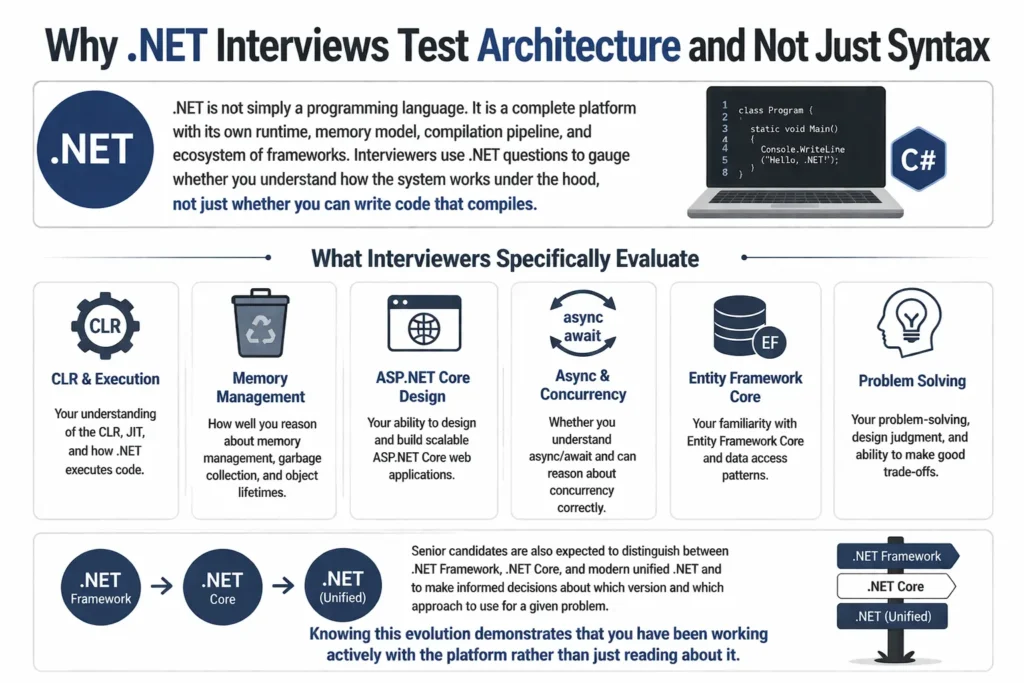
.NET is not simply a programming language. It is a complete platform with its own runtime, memory model, compilation pipeline, and ecosystem of frameworks. Interviewers use .NET questions to gauge whether you understand how the system works under the hood, not just whether you can write code that compiles.
What interviewers specifically evaluate:
- Your understanding of the CLR, JIT, and how .NET executes code
- How well you reason about memory management, garbage collection, and object lifetimes
- Your ability to design and build scalable ASP.NET Core web applications
- Whether you understand async/await and can reason about concurrency correctly
- Your familiarity with Entity Framework Core and data access patterns
Senior candidates are also expected to distinguish between .NET Framework, .NET Core, and modern unified .NET and to make informed decisions about which version and which approach to use for a given problem. Knowing this evolution demonstrates that you have been working actively with the platform rather than just reading about it.
.NET Framework and Architecture Interview Questions (Q1 to Q10)
These foundational questions appear in almost every .NET interview regardless of experience level. They test your understanding of how the platform works at a runtime level.
Q1. What is .NET and how does it work?
Answer: .NET is a cross-platform application framework developed by Microsoft for building web, desktop, mobile, cloud, and IoT applications. It supports multiple programming languages including C#, F#, and VB.NET.
When you write code in C# and compile it, the compiler does not produce native machine code directly. Instead it produces Common Intermediate Language (CIL), a platform-independent bytecode. At runtime, the Common Language Runtime (CLR) takes that CIL and uses a Just-In-Time (JIT) compiler to convert it into native machine code specific to the hardware it is running on.
The three key components are the CLR which manages execution, the Base Class Library (BCL) which provides reusable APIs, and the JIT compiler which bridges CIL and native code.
Q2. What are the major components of the .NET framework?
Answer: The major components work together to provide a complete application execution environment.
The CLR (Common Language Runtime) is the execution engine that manages memory, security, exception handling, and thread management for .NET applications.
The BCL (Base Class Library) is a collection of reusable class libraries covering file I/O, collections, networking, string manipulation, and more.
The CTS (Common Type System) defines how types are declared and used in the runtime, enabling type compatibility across all .NET languages. The CLS (Common Language Specification) is a subset of CTS that defines rules ensuring cross-language interoperability. The JIT compiler converts CIL to native machine code at runtime.
Q3. What is the difference between .NET Framework, .NET Core, and .NET 5 and above?
Answer: .NET has evolved significantly and understanding that evolution is tested in most interviews.
.NET Framework is the original implementation, released in 2002. It runs only on Windows and is tightly coupled to the Windows operating system and IIS. It is now in maintenance mode, receiving security updates but no major new features. It is used to maintain legacy Windows desktop and web applications.
.NET Core was introduced to address the limitations of .NET Framework. It brought cross-platform support for Windows, Linux, and macOS, a modular lightweight architecture, and significantly better performance, especially for cloud and microservices workloads.
.NET 5 and later versions unified both into a single platform simply called .NET. Starting with .NET 5, the separate .NET Core and .NET Framework tracks merged. .NET 8 is the current Long-Term Support (LTS) release and is the recommended choice for all new projects.
Q4. What is the CLR (Common Language Runtime)?
Answer: The CLR is the heart of the .NET runtime environment. It is what actually executes .NET applications.
When a .NET application runs, the CLR takes the compiled CIL code and performs several critical functions: it uses the JIT compiler to convert CIL to native machine code, it manages memory through automatic garbage collection, it enforces type safety and security policies, and it handles exceptions and thread management.
Because the CLR handles these concerns automatically, .NET developers do not need to manually allocate or free memory and do not need to worry about many low-level security issues. The CLR is what makes .NET applications reliable, secure, and portable across platforms.
Q5. What is CIL or MSIL in .NET?
Answer: CIL stands for Common Intermediate Language, also known as MSIL (Microsoft Intermediate Language). It is the intermediate bytecode that all .NET language compilers produce.
When you compile a C# or F# program, the compiler translates your source code into CIL rather than directly into machine code. CIL is a set of CPU-independent instructions that the CLR understands.
This design is what gives .NET its cross-platform capability and cross-language interoperability. Because all .NET languages compile to the same CIL, code written in C# can interact with code written in F# or VB.NET seamlessly. The JIT compiler then converts the CIL to native code for the specific machine architecture at runtime.
Q6. What is the JIT compiler in .NET?
Answer: JIT stands for Just-In-Time. The JIT compiler is the component inside the CLR that converts CIL into native machine code at the moment the code is about to be executed for the first time.
The key word is “just in time”: the code is not compiled ahead of the application running, but compiled on demand during execution. Once a method is JIT-compiled, the native code is cached so subsequent calls to the same method use the cached native version without recompiling.
There are three types of JIT in .NET: Normal JIT which compiles methods on first call, Pre-JIT (used with Native AOT) which compiles all code before execution, and Econo-JIT which compiles only the code needed and may discard it after use. The JIT optimises code for the specific CPU architecture the application is running on.
Q7. What is the CTS (Common Type System)?
Answer: CTS stands for Common Type System. It is a set of structured rules in the .NET runtime that defines how types must be declared and used in the program code.
The CTS ensures that types defined in one .NET language can be understood and used by code written in another .NET language. For example, an integer in VB.NET and an int in C# are both mapped to the same underlying System.Int32 type in the CTS.
Developers can create their own classes and define their own types as long as they follow CTS rules. This interoperability is one of the defining features of the .NET platform and is what allows a C# library to be consumed from an F# project without any translation layer.
Q8. What is the CLS (Common Language Specification)?
Answer: CLS stands for Common Language Specification. It is a subset of the CTS that defines a minimum set of rules and conventions that every .NET language must follow to ensure cross-language compatibility.
While CTS defines all the types and operations available in the runtime, not every feature of every type needs to be usable from every language. CLS narrows this down to a common baseline that all CLS-compliant .NET languages must support.
When you mark an assembly or class as CLS-compliant, you are guaranteeing that it can be used from any other CLS-compliant .NET language. For example, a library written in C# and marked CLS-compliant can be fully used from VB.NET without any compatibility issues. Code that uses unsigned types like uint as public API members violates CLS compliance because not all languages support unsigned types.
Q9. What is an Assembly in .NET?
Answer: An assembly is the fundamental unit of deployment and versioning in .NET. It is what the CLR actually loads and executes.
An assembly contains several things: the compiled CIL code, metadata that describes the types and members defined in the assembly, a manifest that contains assembly-level information such as name, version, culture, and public key, and optionally resources such as images or localisation strings.
Assemblies come in two forms: an EXE (executable) assembly that can be run directly as an application, and a DLL (Dynamic Link Library) assembly that contains code shared between multiple applications. The CLR uses the assembly manifest to perform version checking and dependency resolution when loading assemblies.
Q10. What is the difference between an EXE and a DLL in .NET?
Answer: Both EXE and DLL files are assembly executable modules in .NET but they serve different purposes.
An EXE is an executable file that runs an application independently. When you build an application and run it, the EXE is loaded directly by the CLR. An EXE has an entry point method (typically Main) and cannot be referenced and reused by other applications.
A DLL (Dynamic Link Library) is a library containing compiled code designed to be shared and reused across multiple applications. DLLs have no entry point and cannot be executed directly. They are loaded into the memory of another process that needs them. One application can reference many DLLs, and one DLL can be shared across many different applications running on the same machine.
C# and OOP Interview Questions (Q11 to Q22)
OOP and C# fundamentals are tested at every experience level. Make sure you can explain each concept clearly and provide a brief example.
Q11. What are the four main principles of OOP in .NET?
Answer: The four pillars of object-oriented programming are encapsulation, inheritance, polymorphism, and abstraction.
Encapsulation means bundling data and the methods that operate on that data within a class and restricting direct access to some components using access modifiers like private and protected. This protects the internal state of an object from unintended external modification.
Inheritance allows a child class to acquire the properties and methods of a parent class using the colon syntax in C#. Polymorphism allows the same method to behave differently based on the object type, achieved through method overriding and interfaces. Abstraction hides implementation complexity and exposes only what is necessary through abstract classes and interfaces.
Q12. What is the difference between a value type and a reference type in C#?
Answer: This is one of the most frequently asked C# questions and the distinction has significant performance implications.
Value types store their actual data directly in the memory location of the variable. When you assign a value type to another variable, a complete copy of the data is made. Modifying the new variable does not affect the original. Common value types include int, float, bool, char, struct, and enum. Value types are typically stored on the stack.
Reference types store a reference, which is a memory address, pointing to where the actual data lives on the heap. When you assign a reference type to another variable, both variables point to the same object in memory. Modifying the object through one variable affects it when accessed through the other. Common reference types include class, string, array, and interface implementations.
Q13. What is the difference between a class and a struct in C#?
Answer: Classes and structs look similar in syntax but behave very differently in memory.
A class is a reference type allocated on the heap. It supports inheritance, can implement interfaces, and its memory is managed by the garbage collector. Classes are suitable for objects that have complex behaviour, mutable state, or need to be shared across different parts of an application.
A struct is a value type allocated on the stack. It does not support inheritance from other structs or classes (though it can implement interfaces) and is copied by value when passed around. Structs are suitable for small, lightweight data structures like coordinates, colours, or date-time values where copying is cheap and heap allocation overhead is undesirable.
Q14. What is the difference between an abstract class and an interface in C#?
Answer: Both abstract classes and interfaces define contracts that implementing classes must fulfil, but they differ in important ways.
An abstract class can have both abstract methods with no implementation and concrete methods with full implementation. It can have fields, constructors, and properties. A class can inherit from only one abstract class. Abstract classes are used when related classes need to share common code and state while still enforcing some abstract contract.
An interface traditionally contains only method signatures with no implementation, though C# 8 introduced default interface methods. A class can implement multiple interfaces simultaneously. Interfaces are used to define capabilities or roles that unrelated classes can share, such as IDisposable or IComparable, without enforcing a shared inheritance hierarchy.
Q15. What is boxing and unboxing in .NET?
Answer: Boxing and unboxing are the processes of converting between value types and reference types, and they come with a performance cost that experienced developers need to be aware of.
Boxing is the implicit conversion of a value type to a reference type. When you assign an int to a variable of type object, the runtime allocates a new object on the heap, copies the value into it, and stores a reference to that heap object. For example: int a = 10; object o = a; is boxing.
Unboxing is the explicit conversion back from the reference type to the value type. For example: int b = (int)o; retrieves the value from the heap object back to a stack variable. Boxing is implicit and happens automatically, while unboxing requires an explicit cast. Excessive boxing and unboxing in performance-critical code paths should be avoided by using generics instead.
Q16. What is the difference between int and Int32 in C#?
Answer: There is no functional difference. int is simply a C# language keyword that serves as an alias for the System.Int32 type provided by the .NET framework class library.
Both compile to exactly the same intermediate language code. The choice between writing int or Int32 is purely stylistic. In C# code, int is more idiomatic and commonly used. Int32 is sometimes used in contexts where you want to be explicit about the type size, particularly when working with interoperability code or documentation that needs to be very precise about the data type.
Q17. What is the difference between managed and unmanaged code in .NET?
Answer: The distinction between managed and unmanaged code comes down to whether the code runs inside the CLR or outside it.
Managed code runs inside the CLR. The CLR handles memory allocation and deallocation automatically through garbage collection, enforces type safety, provides exception handling, and prevents illegal memory access. All standard C# code is managed code.
Unmanaged code runs outside the CLR, typically written in C or C++. The developer is responsible for manually allocating and freeing memory, which creates risks of memory leaks and buffer overflows. In .NET, you interact with unmanaged code using P/Invoke (Platform Invocation Services) to call native C functions, or COM Interop for legacy Windows components. Unmanaged code can be faster in some specific scenarios but is riskier.
Q18. What is a delegate in .NET?
Answer: A delegate is a type-safe function pointer. It holds a reference to a method with a specific signature and return type, allowing methods to be passed as parameters or stored as variables.
When you create a delegate instance and pass it around, invoking the delegate calls the method it references. Delegates are the foundation of event-driven programming in .NET. They enable callback patterns where code defines what should happen when a certain action completes without knowing at compile time which specific method will handle it.
The built-in generic delegates Action, Func, and Predicate cover most common use cases without requiring custom delegate type declarations. Action represents a method with no return value, Func represents a method with a return value, and Predicate represents a boolean-returning method.
Q19. What is the difference between a delegate and an event in C#?
Answer: Delegates and events are closely related but events add important access restrictions that make them suitable for the publisher-subscriber pattern.
A delegate can be invoked from any code that has access to it. This means external code could invoke all subscribed handlers at any time, which breaks encapsulation. An event wraps a delegate and restricts invocation so that only the class that declares the event can raise it. External code can only subscribe or unsubscribe using the += and -= operators.
This restriction is what makes events safe for broadcasting notifications. When you use events, subscribers know they will only receive notifications when the publisher decides to raise the event, not when any other code arbitrarily decides to invoke the delegate.
Q20. What are generics in C# and why are they used?
Answer: Generics allow you to write type-safe code that works with any data type without committing to a specific type at authoring time. The actual type is specified when the generic class or method is used.
Without generics, a collection class like a list would need to use object as the element type, requiring boxing for value types and explicit casting when retrieving elements, both of which hurt performance and type safety. With generics, List<int> stores integers directly without boxing and returns integers without casting.
Generics are defined using angle bracket syntax with a type parameter, such as List<T> or Dictionary<TKey, TValue>. They reduce code duplication by allowing one type-safe implementation to serve many types, they eliminate boxing and unboxing overhead for value types, and they catch type errors at compile time rather than at runtime.
Q21. What is the difference between override and virtual keywords in C#?
Answer: These two keywords work together to enable polymorphism through method overriding.
The virtual keyword is applied to a method in a base class to indicate that the method can be overridden by derived classes. A virtual method has a default implementation in the base class that will be used if the derived class does not override it.
The override keyword is applied to a method in a derived class to provide a new implementation of a virtual or abstract method from the base class. The override method completely replaces the base class implementation when the method is called on an instance of the derived class, even when accessed through a base class reference. This dynamic dispatch behaviour is the foundation of runtime polymorphism.
Q22. What is the difference between sealed, static, and partial classes in C#?
Answer: These three class modifiers serve very different purposes.
A sealed class cannot be inherited. It prevents other developers from extending the class. String is a well-known example of a sealed class in the BCL. Sealing a class can also provide minor performance improvements because the JIT knows it does not need to consider virtual dispatch for its methods.
A static class cannot be instantiated and all its members must also be static. Static classes are used as containers for utility or helper methods that do not require any object state. Math and Console are examples of static classes. A partial class allows the definition of a single class to be split across multiple source files. This is commonly used in code-generation scenarios where tooling generates one part of a class and a developer maintains another part.
Memory Management and Garbage Collection Interview Questions (Q23 to Q27)
Memory management questions are common in mid and senior level interviews. Understanding GC generations and the dispose pattern demonstrates production-level maturity.
Q23. How does garbage collection work in .NET?
Answer: The .NET garbage collector (GC) automatically reclaims memory occupied by objects that the application no longer references, preventing memory leaks without requiring developers to manually free memory.
The GC works in three steps. First it marks all objects that are still reachable by traversing references from known root objects like local variables, static fields, and CPU registers. Objects that are not reachable are considered garbage. Then it sweeps by collecting those unreachable objects and freeing their memory. Finally it compacts the remaining live objects in memory to reduce fragmentation and improve allocation performance.
While GC eliminates most memory management errors, it can temporarily pause application execution during collection cycles. For performance-sensitive applications, minimising object allocation, reusing objects, and avoiding large object allocations can reduce the frequency and impact of GC pauses.
Q24. What are the three garbage collection generations in .NET?
Answer: The .NET GC uses a generational model based on the observation that newly created objects tend to die young, while objects that survive longer tend to live for a long time.
Generation 0 contains newly allocated, short-lived objects. The GC collects Gen 0 most frequently because most objects become unreachable quickly after creation. Collection is fast because it covers a small memory area.
Generation 1 is a buffer between Gen 0 and Gen 2. Objects that survive a Gen 0 collection are promoted to Gen 1. It is collected less frequently than Gen 0. Generation 2 contains long-lived objects such as static data, application-level caches, and objects that survive multiple GC cycles. Gen 2 collection is the most expensive and least frequent. Objects on the Large Object Heap (LOH), typically objects over 85,000 bytes, are treated similarly to Gen 2.
Q25. What is the difference between stack and heap memory in .NET?
Answer: Stack and heap are two distinct memory regions that serve different purposes in a .NET application.
The stack stores method call frames, local variables, and value type data. It follows a Last-In-First-Out structure and is managed automatically as methods are called and return. Allocation and deallocation from the stack are extremely fast because they simply move a stack pointer. Stack memory is thread-specific and limited in size.
The heap stores reference type objects and the data they contain. When you create a class instance with the new keyword, memory is allocated on the heap. Heap allocation is slower than stack allocation because the GC must find available space. The heap is shared across threads and is managed by the garbage collector, which tracks and collects objects when they are no longer referenced.
Q26. What is the IDisposable interface and the using statement in C#?
Answer: IDisposable is an interface with a single Dispose() method that classes implement to release unmanaged resources deterministically, without waiting for the garbage collector.
Unmanaged resources include things like file handles, database connections, network sockets, and Windows API handles. The GC manages memory automatically but it does not know how to release these non-memory resources. By implementing IDisposable and calling Dispose() explicitly, you ensure resources are released promptly when no longer needed.
The using statement provides syntactic sugar for this pattern. When you wrap an IDisposable object in a using block, the compiler automatically generates a try-finally block that calls Dispose() when the block exits, even if an exception occurs. In C# 8 and above, the using declaration removes the need for explicit braces and the object is disposed at the end of the enclosing scope.
Q27. What is the difference between Finalize and Dispose in .NET?
Answer: Both Finalize and Dispose are used to release resources but they differ fundamentally in when and how they are called.
Dispose is part of the IDisposable interface and is called explicitly by the developer. It is deterministic: you know exactly when it runs. Dispose is the preferred mechanism for releasing resources and should always be called when you are done with a resource-holding object, typically via a using statement.
Finalize (the destructor in C# syntax) is called by the garbage collector at some non-deterministic point after the object becomes unreachable, as a safety net for objects whose Dispose was never called. It is non-deterministic because you cannot predict when the GC will run. Objects with a finalizer take longer to collect because they require two GC cycles. The standard pattern is to implement both: Dispose for explicit cleanup and Finalize as a fallback, with Dispose calling GC.SuppressFinalize to skip the finalizer if Dispose was already called.
ASP.NET Core Interview Questions (Q28 to Q37)
ASP.NET Core is the most tested .NET area for web developer roles. Know the request pipeline, middleware, DI, and the MVC pattern inside out.
Q28. What is ASP.NET Core and how is it different from ASP.NET?
Answer: ASP.NET Core is a complete redesign of the ASP.NET web framework. It is open-source, cross-platform, and significantly more performant than classic ASP.NET.
Classic ASP.NET ran only on Windows and was tightly coupled to IIS. ASP.NET Core runs on Windows, Linux, and macOS and can be hosted on Kestrel (its built-in web server), IIS, Nginx, or Apache. It has a modular architecture where you only include the components your application actually needs, resulting in smaller and faster applications.
ASP.NET Core introduced a unified framework for building web applications and APIs. It uses a request processing pipeline built from middleware components, a built-in dependency injection container, and a configuration system that works seamlessly with environment variables, JSON files, and secrets managers. ASP.NET Core is the recommended choice for all new web development on .NET.
Q29. What is the ASP.NET Core request pipeline?
Answer: The request pipeline is the sequence of middleware components that process every incoming HTTP request and produce an HTTP response.
When an HTTP request arrives at an ASP.NET Core application, it enters the pipeline and passes through each middleware component in the order they are registered. Each middleware can inspect the request, perform work, pass the request to the next middleware using await next(), or short-circuit the pipeline and return a response directly without calling next.
The pipeline is configured in Program.cs. The order of middleware registration matters significantly. For example, authentication middleware must come before authorisation middleware, and exception handling middleware should be registered early so it can catch exceptions from later middleware. Common middleware includes UseHttpsRedirection, UseStaticFiles, UseRouting, UseAuthentication, UseAuthorization, and UseEndpoints.
Q30. What is middleware in ASP.NET Core?
Answer: Middleware in ASP.NET Core is a software component that sits in the HTTP request processing pipeline. It handles cross-cutting concerns that apply to many or all requests without coupling that logic to individual controllers or actions.
Each middleware component receives the HttpContext representing the current request, performs its work, and either calls the next middleware in the pipeline or terminates the pipeline by returning a response. Middleware can operate on both the incoming request and the outgoing response.
Common built-in middleware handles concerns like HTTPS redirection, serving static files, request routing, session management, authentication, authorisation, CORS policy enforcement, response compression, and exception handling. Custom middleware is created either as a class with an InvokeAsync method or using the app.Use() method in Program.cs.
Q31. What is the difference between ASP.NET Web Forms and ASP.NET MVC?
Answer: Web Forms and MVC represent two fundamentally different approaches to building ASP.NET web applications.
Web Forms used an event-driven programming model with server-side controls that abstracted away HTML. Developers worked with controls like GridView and Button that raised server-side events, similar to Windows Forms development. While this made some tasks quick, it produced poor HTML, made testing difficult, and gave developers limited control over the rendered output.
ASP.NET MVC follows the Model-View-Controller pattern with a clear separation between data (Model), presentation (View), and request handling (Controller). It gives developers full control over the HTML output, makes unit testing easy because controllers are plain C# classes, and works naturally with modern JavaScript frameworks and REST APIs. MVC is stateless and more aligned with how the web actually works.
Q32. Explain the MVC pattern in ASP.NET Core.
Answer: MVC stands for Model-View-Controller and it is the architectural pattern used by ASP.NET Core MVC to structure web applications.
The Model represents the data and business logic. In a typical ASP.NET Core application, models are C# classes that represent domain entities and ViewModels that carry data specifically shaped for a view. The View is the presentation layer, typically Razor templates (.cshtml files) that define the HTML structure and use Razor syntax to embed C# expressions for rendering dynamic content.
The Controller handles HTTP requests. When a request arrives, the router maps it to a controller action method. The action retrieves or modifies data using models and services, then selects which view to render, passing the relevant data as a model. This separation keeps each component focused and makes the application easier to test and maintain as it grows.
Q33. What is the difference between TempData, ViewData, and ViewBag in ASP.NET MVC?
Answer: All three are mechanisms for passing data from a controller to a view, but they differ in type safety and how long they persist.
ViewData is a dictionary of type ViewDataDictionary that stores objects with string keys. It requires explicit casting when reading values in the view. ViewBag is a dynamic property wrapper over ViewData. It uses the dynamic keyword, so no casting is needed, but you lose compile-time type checking. Both ViewData and ViewBag survive only for the current request.
TempData is designed for passing data across a redirect. It persists for one additional request after it is set, making it useful for Post-Redirect-Get patterns such as displaying a success message after a form submission and redirect. By default TempData uses session storage. After the data is read, it is marked for deletion at the end of the request.
Q34. What is routing in ASP.NET Core?
Answer: Routing is the mechanism that maps incoming HTTP request URLs to specific endpoint handlers, typically controller action methods.
ASP.NET Core supports two routing styles. Conventional routing defines URL patterns centrally in Program.cs using templates like {controller}/{action}/{id?}. This is common for MVC applications with a consistent URL structure. Attribute routing defines routes directly on controller classes and action methods using attributes like [Route], [HttpGet], and [HttpPost]. Attribute routing gives finer-grained control and is preferred for REST APIs.
Route templates can include parameters in curly braces that are automatically extracted and bound to action method parameters. Constraints can be added to restrict what values a parameter accepts, such as {id:int} to only match integer IDs. Named routes and route generation using the Url.Action() or url helper allow generating URLs in views and controllers without hardcoding strings.
Q35. What are action filters in ASP.NET Core?
Answer: Action filters are attributes that execute code before or after specific stages of the request processing pipeline, particularly around controller action execution.
They are used for cross-cutting concerns that apply to multiple actions without duplicating code in each action method. Common uses include logging requests, implementing output caching, enforcing custom authorisation rules, validating model state before reaching the action, and handling action-specific exceptions.
ASP.NET Core provides several filter types: Authorization filters run first and handle authentication and authorisation. Resource filters run after authorisation and before model binding. Action filters run just before and after the action method executes. Exception filters handle unhandled exceptions thrown by action methods. Result filters run around the result execution. Filters can be applied at the action level, controller level, or globally to all controllers.
Q36. What is Kestrel in ASP.NET Core?
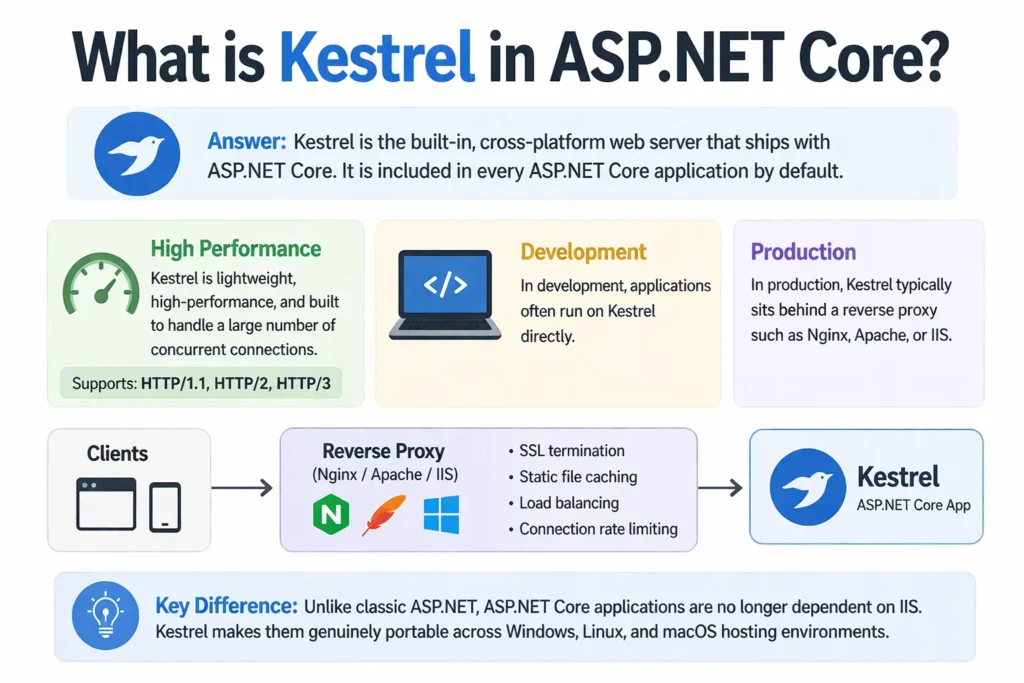
Answer: Kestrel is the built-in, cross-platform web server that ships with ASP.NET Core. It is included in every ASP.NET Core application by default.
Kestrel is designed to be lightweight, high-performance, and suitable for handling a large number of concurrent connections. It can serve HTTP/1.1, HTTP/2, and HTTP/3 connections. In development, applications often run on Kestrel directly. In production, Kestrel typically sits behind a reverse proxy such as Nginx, Apache, or IIS which handles concerns like SSL termination, static file caching, load balancing, and connection rate limiting before forwarding requests to Kestrel.
The key difference from classic ASP.NET is that ASP.NET Core applications are no longer dependent on IIS. Kestrel makes them genuinely portable across Windows, Linux, and macOS hosting environments.
Q37. What is dependency injection in ASP.NET Core?
Answer: ASP.NET Core includes a built-in dependency injection (DI) container that makes it easy to manage service lifetimes and inject dependencies into controllers, middleware, and other components.
Services are registered in Program.cs and become available for injection throughout the application. There are three service lifetimes: Singleton creates one instance for the entire application lifetime and reuses it for every request. Scoped creates one instance per HTTP request and disposes it when the request ends. Transient creates a new instance every time the service is requested.
Controllers and other components declare their dependencies as constructor parameters, and the DI container automatically resolves and injects them at runtime. This promotes loose coupling because components depend on interfaces rather than concrete implementations, making it easy to swap implementations or inject mock objects during unit testing.
Entity Framework and Data Access Interview Questions (Q38 to Q42)
EF Core questions are common for any .NET backend role. Know the difference between Code First and Database First, and understand loading strategies.
Q38. What is Entity Framework Core and how does it differ from ADO.NET?
Answer: Entity Framework Core (EF Core) is an Object-Relational Mapper (ORM) that allows .NET developers to work with a database using C# objects instead of writing raw SQL queries.
With EF Core, you define your data model as C# classes called entities. EF Core maps these classes to database tables and translates LINQ queries written in C# into SQL queries that execute against the database. This means you rarely need to write SQL directly for standard CRUD operations.
ADO.NET is the lower-level data access technology that EF Core builds on. With ADO.NET you write SQL queries manually, open connections, execute commands, and read results through DataReaders. ADO.NET gives maximum control and can be faster for specific high-performance queries. EF Core offers much higher developer productivity and maintainability for most data access scenarios at the cost of slightly less control over the generated SQL.
Q39. What is the difference between Code First and Database First in Entity Framework?
Answer: These are two different workflows for using Entity Framework with a database.
Code First is the modern approach where you define your domain model as C# classes first and EF Core generates the database schema from those classes using migrations. You design your application in pure C# and let the framework handle database creation and schema changes. This approach works well for new projects and gives you full control over your model design.
Database First is used when you already have an existing database. EF Core can scaffold C# entity classes and a DbContext from the existing database schema using the dotnet ef dbcontext scaffold command. This approach is preferred when working with legacy databases that have existing tables, stored procedures, and constraints that must be respected. Code First is recommended for all new projects.
Q40. What are migrations in Entity Framework Core?
Answer: Migrations are how EF Core manages changes to your database schema over time as your C# model evolves.
When you change your entity classes such as adding a new property, renaming a column, or adding a new table, you create a migration using dotnet ef migrations add MigrationName. EF Core compares the current model to the last known state and generates a migration file containing the Up() method (changes to apply) and Down() method (how to reverse them).
You apply migrations to the database using dotnet ef database update. This executes all pending migration Up() methods against the database. Migrations provide a version-controlled history of all database schema changes that can be applied consistently across development, staging, and production environments. They replace the need to manually write and maintain database change scripts.
Q41. What is the difference between eager loading, lazy loading, and explicit loading in EF Core?
Answer: These three strategies control when EF Core loads related entity data from the database.
Eager loading loads related data as part of the initial query using the Include() and ThenInclude() methods. For example, loading a list of orders and including their order items happens in a single database query (or a small number of efficient queries). Eager loading is the most predictable and is the default recommendation for most scenarios.
Lazy loading automatically fetches related data from the database the first time a navigation property is accessed. It requires the navigation properties to be marked virtual. While convenient, lazy loading can cause the N+1 query problem when accessed inside loops. Explicit loading lets you manually load related entities using the Load() method after the parent entity is already retrieved, giving precise control over when the additional query is executed.
Q42. What is the difference between ExecuteScalar and ExecuteNonQuery in ADO.NET?
Answer: These are two methods on the SqlCommand object used for executing different types of SQL statements.
ExecuteScalar executes a SQL query and returns a single value from the first row and first column of the result set, ignoring all other rows and columns. It is used for queries that return a single aggregate result such as SELECT COUNT(*) FROM Users or SELECT MAX(Price) FROM Products.
ExecuteNonQuery executes SQL statements that do not return a result set, such as INSERT, UPDATE, DELETE, and DDL statements like CREATE TABLE. It returns an integer indicating how many rows were affected by the statement. It is used for all data modification operations where you do not need to read back any result data.
Async Programming and LINQ Interview Questions (Q43 to Q47)
Async and LINQ questions are heavily tested at mid and senior levels. Understand lazy evaluation, the difference between IEnumerable and IQueryable, and async pitfalls.
Q43. What is async and await in C# and how does it work?
Answer: The async and await keywords in C# enable asynchronous programming without blocking threads, which is critical for scalable web applications and I/O-intensive operations.
The async keyword marks a method as asynchronous. Inside an async method, the await keyword is applied to an awaitable operation, typically a Task or Task<T>. When the runtime hits an await expression, it suspends the current method, returns control to the caller, and registers a continuation to resume the method when the awaited operation completes. The calling thread is freed to do other work during the wait.
This is fundamentally different from blocking I/O where a thread sits idle waiting for the operation to complete. In ASP.NET Core, using async throughout the call stack allows a single thread to handle many concurrent requests because threads are not blocked waiting for database queries or external API calls to return. The result is dramatically better scalability under load.
Q44. What is the difference between Task.Wait() and await in C#?
Answer: Both wait for a task to complete but they do so in completely different ways with very different consequences.
Task.Wait() is a synchronous blocking call. It halts the calling thread completely until the task finishes. In ASP.NET Core or any context with a synchronisation context, calling Task.Wait() on an async operation that eventually needs to resume on the same synchronisation context causes a deadlock. The blocked thread holds the context while the awaitable tries to post its continuation back to that same blocked context.
await is asynchronous and non-blocking. It suspends the method without blocking the thread, freeing the thread for other work. The method resumes after the awaited task completes. The general rule is to use async and await all the way through the call stack. Mixing synchronous blocking calls like Wait() or Result into an async codebase is one of the most common sources of deadlocks in .NET applications.
Q45. What is LINQ in .NET?
Answer: LINQ stands for Language Integrated Query. It is a set of features built into C# and other .NET languages that adds native query capabilities for working with data.
LINQ allows you to write queries against collections, databases, XML documents, and other data sources using a consistent syntax directly in C#. There are two LINQ syntaxes: query syntax which resembles SQL and uses from, where, select, and group keywords, and method syntax which uses extension methods like Where(), Select(), OrderBy(), GroupBy(), and FirstOrDefault() chained together.
LINQ is strongly typed, meaning errors are caught at compile time rather than at runtime. It works with any data source that implements IEnumerable<T> for in-memory collections or IQueryable<T> for remote data sources like databases. Method syntax is more commonly used in modern C# code and integrates naturally with lambda expressions.
Q46. What is the difference between IEnumerable and IQueryable in .NET?
Answer: Understanding this difference is essential for writing efficient data access code with EF Core and LINQ.
IEnumerable<T> is used for querying in-memory collections. When you apply LINQ operators to an IEnumerable, all the filtering and transformation happens in memory after the data has been fetched. If you start with an EF Core query and cast it to IEnumerable before adding Where() clauses, the full table is loaded into memory first and then filtered in C#, which is very inefficient.
IQueryable<T> extends IEnumerable and works with an expression tree. When you apply LINQ operators to an IQueryable, the expression is not executed immediately. Instead, the expression tree is built up and translated to the underlying query language (SQL for EF Core) when the query is finally executed by a terminal operator like ToList(), FirstOrDefault(), or Count(). This means the filtering happens at the database level, dramatically reducing the amount of data transferred.
Q47. What are lambda expressions in C# and how are they used with LINQ?
Answer: Lambda expressions are anonymous functions defined inline using the => (arrow) operator. They provide a concise way to write short functions without declaring a named method.
The syntax is: (parameters) => expression or (parameters) => { statements }. For a single parameter, the parentheses are optional. Lambda expressions implement functional interface types in .NET such as Func<T, TResult>, Action<T>, and Predicate<T>. They are also used to implement delegates.
With LINQ, lambdas are used as predicates and transformations in method syntax. For example, list.Where(x => x.Age > 25) filters elements where the Age property is greater than 25. list.Select(x => x.Name) projects each element to its Name property. list.OrderBy(x => x.LastName) sorts by last name. Lambda expressions make LINQ queries concise and readable, especially for simple one-line operations.
Modern .NET and Advanced Interview Questions (Q48 to Q50)
These questions demonstrate awareness of the current state of the platform and are increasingly expected even at mid-level roles.
Q48. What are the key features introduced in .NET 8?
Answer: .NET 8 is the current Long-Term Support (LTS) release and introduces several significant improvements.
Native AOT (Ahead-of-Time) compilation matured significantly in .NET 8, allowing applications to be published as self-contained native executables that start much faster and use less memory, making them ideal for serverless and container workloads. Primary constructors in C# 12 allow declaring constructor parameters directly on the class declaration.
Collection expressions in C# 12 provide a unified syntax for initialising lists, arrays, and other collections. .NET Aspire was introduced as an opinionated stack for building cloud-native distributed applications. Performance improvements touched virtually every area of the runtime including improved JIT code generation, better SIMD intrinsics, and reduced memory allocation in common operations. Blazor United merged the Blazor Server and Blazor WebAssembly hosting models into a single flexible architecture.
Q49. What is the Global Assembly Cache (GAC)?
Answer: The GAC is a machine-wide cache for storing .NET assemblies that are shared across multiple applications on the same computer.
Before .NET Core introduced side-by-side versioning, the GAC solved the problem of multiple applications needing the same shared library. Assemblies stored in the GAC have strong names including the assembly name, version, culture, and a public key token, which allows different versions of the same assembly to coexist in the cache simultaneously.
The GAC is managed using the gacutil command-line tool and is primarily relevant to .NET Framework applications. Modern .NET (Core and .NET 5+) moved away from the GAC model toward NuGet packages and application-local deployments where each application carries its own copies of dependencies. This eliminated most of the version conflict problems that the GAC was designed to address.
Q50. What is Code Access Security (CAS) in .NET?
Answer: Code Access Security is part of the .NET security model that controls what resources code is allowed to access based on the origin and identity of that code.
CAS was designed for scenarios where code from different sources runs on the same machine and you need to restrict what less-trusted code can do. For example, code downloaded from the internet might be restricted from accessing the file system or making network connections, while locally installed code has full trust. The CLR enforces these permissions every time the code attempts to access a protected resource.
CAS applies only to managed code. Assemblies that use CAS are treated as partially trusted and are checked against permission grants each time they access restricted resources. In modern .NET (Core and .NET 5+), CAS is not supported and has been replaced by operating system-level security controls and process isolation mechanisms. Understanding CAS is still relevant for maintaining or migrating legacy .NET Framework applications.
.NET Interview Questions by Experience Level
Freshers and Entry-Level
Focus areas: What .NET is and how it works, CLR basics and how it executes code, CTS and CLS roles, JIT compilation, value types vs reference types, difference between class and struct, boxing and unboxing, four OOP principles with examples, MVC pattern basics, and garbage collection overview. Be ready to explain these concepts in plain language without jargon.
Mid-Level Developers (2 to 4 years)
Focus areas: Generics and why they matter, delegates and events including the publisher-subscriber pattern, IDisposable and the Dispose pattern, async and await including Task.Wait() pitfalls, ASP.NET Core middleware and routing, dependency injection service lifetimes, EF Core Code First and migrations, LINQ with IEnumerable vs IQueryable, and action filters.
Senior Developers (5 or more years)
Focus areas: GC generation tuning and memory pressure optimisation, concurrency and thread safety patterns, designing scalable ASP.NET Core APIs, EF Core advanced querying and performance, microservices architecture with .NET, .NET 8 features including Native AOT, Minimal APIs design decisions, integration testing strategies, and reasoning about .NET Framework migration paths to modern .NET.
How to Prepare for .NET Interview Questions
Must-Study Topics in Order
- .NET architecture: CLR, CIL, JIT, CTS, CLS, assemblies and how they connect
- .NET Framework vs .NET Core vs modern .NET evolution and when to use each
- C# fundamentals: value vs reference types, boxing/unboxing, generics
- OOP: all four principles with concrete C# examples
- Delegates, events, lambda expressions, and the Func/Action/Predicate interfaces
- Memory management: GC generations, Stack vs Heap, IDisposable, Finalize vs Dispose
- ASP.NET Core: request pipeline, middleware, routing, MVC, and DI
- Entity Framework Core: Code First, migrations, and loading strategies
- Async/await: how it works and Task.Wait() deadlock pitfalls
- LINQ: IEnumerable vs IQueryable and method vs query syntax
Best Practice Resources
- Zero To Mastery .NET Interview Guide: Excellent structured coverage with code examples for all levels.
- InterviewBit .NET Questions (70+): Comprehensive question bank mapped to difficulty levels.
- Microsoft Learn (learn.microsoft.com): Official documentation and learning paths for all .NET topics.
- Edureka .NET Interview Questions: Clear explanations of common questions with practical context.
- Skilr .NET Interview Guide: Well-structured study roadmap covering architecture through design patterns.
Interview Day Tips
- Know the CLR execution pipeline from source code to CIL to JIT to native code and explain it without hesitation
- Be ready to explain the difference between value and reference types with a concrete code example
- Know at least three async/await pitfalls and how to avoid them, especially the Task.Wait() deadlock
- Have a real ASP.NET Core project ready to walk through including how you structured the middleware pipeline and DI registrations
- Know the difference between the three EF Core loading strategies and when you would choose each one
Frequently Asked Questions (FAQ)
What .NET topics are most commonly asked in interviews?
The most consistently tested topics across all experience levels are the CLR and JIT execution model, value types vs reference types, garbage collection, the difference between abstract class and interface, boxing and unboxing, delegates and events, async and await, and the MVC pattern in ASP.NET Core. For senior roles, expect questions on GC tuning, concurrent programming, and EF Core performance.
Is C# knowledge required for .NET interviews?
Yes, virtually every .NET interview assumes C# as the primary language. While .NET supports F# and VB.NET, C# is the dominant language in the ecosystem and all .NET interview questions are typically framed around C# syntax and idioms. If you are preparing for a .NET role, C# fundamentals are non-negotiable.
Do I need to know both .NET Framework and .NET Core?
You need to understand the difference between them and be able to explain the evolution from .NET Framework to .NET Core to modern unified .NET. For new projects, you will almost always use modern .NET. However, many enterprise companies maintain large .NET Framework codebases, so understanding legacy concepts like the GAC, CAS, and Web Forms can be relevant depending on the role.
Is Entity Framework knowledge required in a .NET interview?
For most .NET backend and full stack roles, yes. EF Core is the standard ORM in the .NET ecosystem and interviewers expect you to know Code First vs Database First, migrations, LINQ-to-EF queries, and the difference between eager and lazy loading. Raw ADO.NET knowledge is a bonus but EF Core is the primary focus in most interviews today.
How long does it take to prepare for a .NET developer interview?
With 2 to 3 hours of focused daily study, most candidates feel confident for a junior .NET interview within 3 to 4 weeks. For mid-level roles requiring strong async, EF Core, and ASP.NET Core knowledge, plan for 6 to 8 weeks. For senior roles covering architecture, performance tuning, and distributed systems, allow 2 to 3 months of study combined with hands-on project work.
Conclusion
This guide has covered all 50 .NET interview questions spanning the complete breadth of the platform from CLR architecture and CTS internals through C# OOP, memory management, ASP.NET Core, Entity Framework Core, async programming, and the latest .NET 8 features.
.NET interviews reward developers who understand not just how to use the framework but why it is designed the way it is. The CLR, GC, and JIT are not abstract concepts; they directly affect how you write performant, scalable applications. The middleware pipeline, DI container, and EF Core loading strategies are not just configuration options; they are architectural decisions with real consequences.