
Every time you load a web page, send an email, join a video call, or stream a movie, a set of hardware components is working silently in the background to make that communication possible. These components are known as communication devices, and they are as fundamental to modern computing as the CPU or the storage drive. Without communication devices, a computer would be an isolated machine, cut off from the internet, from other computers, and from the networks that define how we live and work in the twenty-first century.
Communication devices are the hardware components of a computer system that are responsible for transmitting and receiving data between computers, networks, and other connected devices. They manage the conversion of digital data into signals that can travel across wired or wireless channels, and they handle the reverse process of converting incoming signals back into data that the computer can process. In doing so, they serve as the bridge between individual computing devices and the broader world of networked communication.
The category of communication devices covers a wide range of hardware: from the modem that connects your home to your internet service provider, to the router that distributes that connection to every device in your home, to the network interface card inside your computer that actually handles the data transfer, to the wireless access point in a corporate office, to the Bluetooth adapter that pairs your laptop with a wireless headset. Each device plays a specific, well-defined role in the communication infrastructure of modern computing.
In this comprehensive guide, we will explore everything you need to know about communication devices: what they are and how they work, why they are important, the different types and their key examples, their functions and real-world applications, how they relate to other computer hardware components, and how to maintain them properly. By the end, you will have a thorough and practical understanding of the hardware that connects every computer to the world around it.
What Are Communication Devices?
Communication devices are hardware components used to transmit data from one computer or device to another, either over a local network or across the internet. They handle the entire process of preparing data for transmission, sending it through a communication channel, and receiving and interpreting incoming data from other devices. Without them, computers would exist as isolated units, unable to share information, access online resources, or collaborate with other systems.
At their core, communication devices are responsible for data exchange. They translate the digital data that a computer produces into a format suitable for transmission over a specific type of channel, whether that is an electrical signal over a copper cable, light pulses through a fibre optic cable, or radio waves through the air. On the receiving end, the device performs the reverse operation, converting the incoming signal back into digital data that the host computer can read and process.
Communication devices are important in computing because they enable the networked world that modern technology is built on. The internet, email, cloud computing, online collaboration, social media, video streaming, online banking, and remote work are all made possible because communication devices allow computers to exchange data reliably and at high speed. Without these devices, every computer would be a standalone machine, and the entire infrastructure of the modern digital economy would not exist.
In a modern computer system, communication devices typically connect to the system through the motherboard, either as built-in components integrated into the motherboard’s chipset or as expansion cards installed in PCIe slots. They are managed by the operating system through device drivers, which provide a standard software interface between the hardware and the networking stack of the OS. The operating system, in turn, uses this interface to enable all the networked applications and services that users rely on.
How Do Communication Devices Work?
Communication devices follow a consistent operational process regardless of the specific technology they use. Understanding this process reveals how data moves from one computer to another across a network.
Sending Data
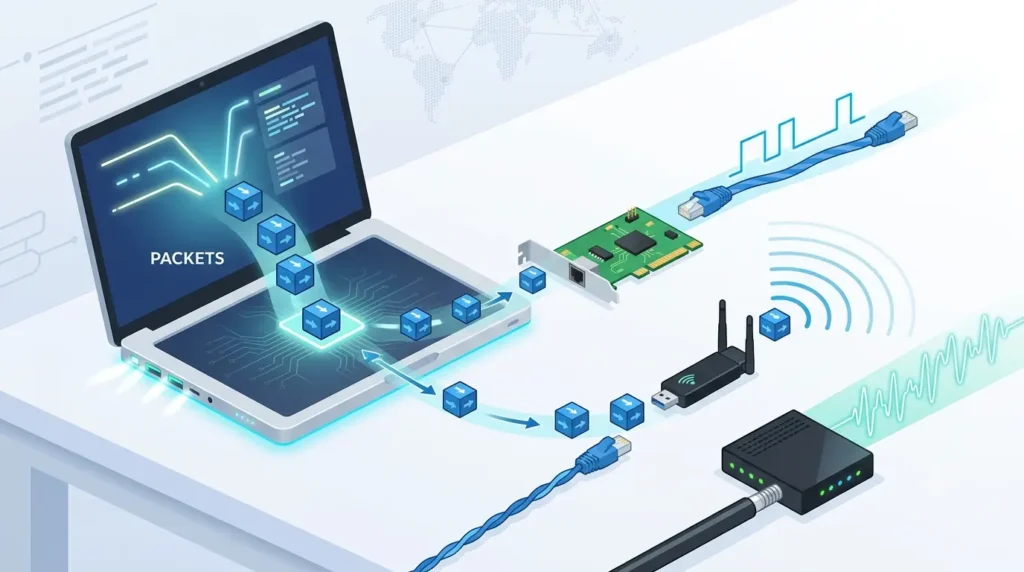
When a computer needs to send data to another device, the process begins in software. An application generates data, which travels down through the operating system’s networking stack, where it is organised into packets. Each packet is a small, standardised unit of data that includes the actual content being sent, plus header information specifying the source and destination addresses, packet sequence numbers, and error-checking values.
The communication device receives these packets from the operating system and prepares them for transmission over the specific channel it uses. A network interface card, for example, encodes the packet data into electrical signals according to the Ethernet standard. A Wi-Fi adapter encodes the data as radio frequency modulations. A modem converts the digital data into a signal format suitable for transmission over the telephone or cable network. The device then transmits these encoded signals through its connection to the network.
Receiving Data
The receiving process is the mirror image of sending. When signals arrive at the communication device from the network, the device captures them and performs the reverse conversion, turning the physical signals back into digital data. A network interface card reads the electrical signal patterns on the Ethernet cable and reconstructs the binary data. A Wi-Fi adapter demodulates the incoming radio waves. A modem converts the incoming analog signal back to a digital stream.
The device then passes the reconstructed packet data up through the operating system’s networking stack, where it is processed, verified for integrity using the error-checking codes in the packet headers, reassembled into the original data sequence if it arrived as multiple packets, and delivered to the application that was waiting for it. This entire process happens in milliseconds, creating the experience of seamless, real-time communication.
Converting Signals
Signal conversion is a core function of many communication devices, particularly those that bridge different types of networks or communication channels. A modem, for example, must convert digital computer data into an analog signal format suitable for transmission over the public switched telephone network or cable television infrastructure, and convert incoming analog signals back into digital data. This process, called modulation and demodulation, gives the modem its name.
Similarly, a router must translate data between different network segments that may use different addressing schemes or protocols. A wireless access point must convert data between the wired Ethernet protocol used on the local network and the 802.11 Wi-Fi protocol used for wireless transmission. Each conversion step is performed by the device’s internal processor and signal processing circuitry, transparently to the applications using the network.
Establishing Network Connections
Before data can be exchanged, communication devices must establish a connection. This involves a negotiation process between devices to agree on communication parameters: the speed at which data will be transmitted, the encoding method to be used, the protocols governing the exchange, and the addressing information identifying each end of the connection. For a wired Ethernet connection, this negotiation happens automatically when the cable is plugged in, with devices exchanging signals to agree on link speed and duplex mode.
For wireless connections, the process is more involved: the device must scan for available networks, authenticate with the network using the appropriate security credentials, negotiate encryption parameters, and obtain an IP address through DHCP before it can begin exchanging data. For internet connections through a modem, the process may involve point-to-point protocol negotiation with the ISP, authentication, and IP address assignment. These connection establishment processes are managed automatically by the device firmware and operating system, but they are essential prerequisites to any actual data transfer.
Why Are Communication Devices Important?
Communication devices are not optional accessories. They are foundational components that determine what a computer can do in the connected world of modern computing.
Internet Connectivity
The internet is the defining infrastructure of the modern digital world, and communication devices are what provide access to it. Without a modem to connect to the internet service provider and a network interface or Wi-Fi adapter to connect the individual computer to the local network, a computer simply cannot access the internet. Every internet-dependent function of a modern computer, from web browsing and email to cloud storage, software updates, video streaming, and online communication, depends entirely on the communication devices that establish and maintain internet connectivity.
The quality and type of communication device significantly affects the internet experience. A modem capable of DOCSIS 3.1 cable standards or fibre optic connectivity can deliver gigabit internet speeds that make large file transfers, 4K streaming, and low-latency gaming possible. A Wi-Fi 6 or Wi-Fi 6E adapter can maintain multi-gigabit wireless speeds even in environments with many competing devices. The communication device is the bottleneck that determines the maximum speed and reliability of the internet connection the user experiences.
Network Communication
Beyond internet access, communication devices enable communication within local networks. In a home, they allow multiple computers, smartphones, smart TVs, and IoT devices to share a single internet connection and communicate with each other. In an office, they connect every employee’s computer to shared resources such as file servers, printers, databases, and collaboration tools, creating the collaborative infrastructure that makes modern office work possible. In industrial settings, they connect machines, sensors, and control systems into integrated production networks.
Network communication enabled by these devices is not limited to simple file sharing. It supports real-time collaboration tools like shared document editing, enterprise resource planning systems, customer relationship management platforms, and video surveillance systems. The reliability and performance of the communication devices in a network directly determine the quality and availability of all these network services.
Data Sharing
Communication devices enable the sharing of data and resources across networks, eliminating the need to physically transfer data on storage media or duplicate resources across multiple machines. A network printer connected to an office network can be shared by every computer in the building, rather than requiring a dedicated printer for each workstation. Files stored on a network-attached storage device can be accessed by any authorised computer on the network. A shared internet connection can be simultaneously used by dozens of devices, with the router managing the distribution of bandwidth.
Data sharing enabled by communication devices extends far beyond local networks. Cloud storage services, collaborative platforms, and content distribution networks all depend on communication devices to connect users to shared remote resources. The ability to share data and resources across networks has transformed how organisations operate, enabling distributed teams to collaborate on the same files and systems regardless of geographic location.
Remote Collaboration
Modern work and education increasingly depend on remote collaboration, and communication devices are the hardware that makes it possible. Video conferencing platforms, which have become central to how teams, classrooms, and healthcare providers operate, require robust, low-latency network connections maintained by reliable communication devices. Cloud-based collaboration tools that allow multiple users to simultaneously edit documents, manage projects, and communicate in real time depend on the continuous data exchange that communication devices enable.
The shift to remote and hybrid work patterns has made the performance and reliability of home network communication devices as important for productivity as the capabilities of the computer itself. A worker on a video call with unreliable Wi-Fi connectivity will have a worse professional experience than one on a stable wired connection, regardless of how powerful their computer is. Communication devices have moved from being background infrastructure to being front-line determinants of work and education quality.
Types of Communication Devices
Communication devices are broadly categorised by how they transmit data: through physical cables or through wireless signals. Each category has distinct characteristics, advantages, and typical applications.
1. Wired Communication Devices
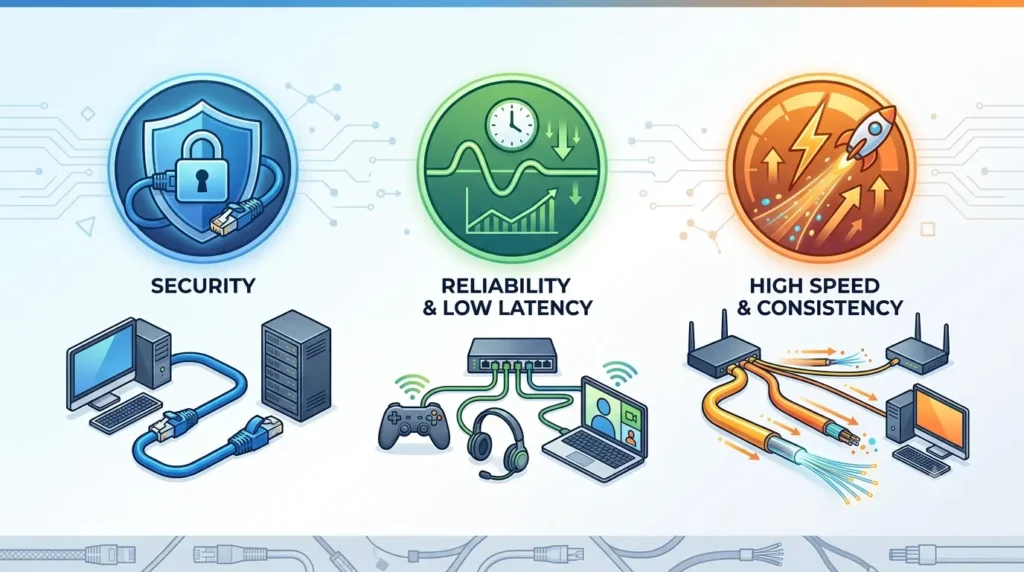
Wired communication devices transmit data through physical cables, using electrical signals over copper conductors or light pulses through fibre optic strands. The physical connection provides a dedicated, consistent transmission medium that is not shared with other devices and is not subject to radio frequency interference or signal attenuation over short to medium distances.
The primary advantage of wired communication is reliability and consistency. A well-installed wired network connection delivers predictable, stable performance without the variability that wireless connections can experience due to interference, distance from the access point, or physical obstacles. Wired connections also typically offer lower latency than wireless connections, which matters for real-time applications like video conferencing and online gaming. Security is another advantage: because the data travels through a physical cable, intercepting it requires physical access to the cable, making wired connections inherently more secure than wireless ones.
Common examples of wired communication devices include network interface cards (NICs) for Ethernet connectivity, modems for DSL or cable internet connections, Ethernet switches for local network switching, and fibre optic transceivers for high-speed network infrastructure. Ethernet cables use the RJ-45 connector standard and support speeds from 10 Mbps (10BASE-T) to 10 Gbps (10GBASE-T) and beyond, with Cat5e, Cat6, Cat6a, and Cat8 cables supporting progressively higher speeds and frequencies.
2. Wireless Communication Devices
Wireless communication devices transmit data through electromagnetic waves, most commonly radio frequency waves, without requiring a physical cable between communicating devices. This allows devices to connect to networks and to each other from any location within range of the wireless signal, providing the mobility and flexibility that has become fundamental to how people use computers and mobile devices.
The primary advantages of wireless communication are mobility and convenience. A laptop, smartphone, or tablet can be used anywhere within the wireless coverage area without being tethered to a wall port. Adding new devices to a wireless network requires no cable installation. Wireless networks can cover large areas with fewer physical infrastructure requirements than wired networks, making them cost-effective for large buildings, outdoor areas, and temporary deployments.
Common examples of wireless communication devices include Wi-Fi adapters (built into virtually all modern laptops, smartphones, and tablets), wireless routers and access points, Bluetooth adapters for short-range device pairing, mobile data modems for 4G LTE and 5G connectivity, and near-field communication (NFC) chips for contactless payment and device pairing. Each wireless technology operates on different frequency bands and supports different range, speed, and use case profiles.
Common Examples of Communication Devices
The following are the most important and widely used communication devices in modern computing environments, each playing a specific role in the network communication infrastructure:
1. Modem
A modem (from Modulator-Demodulator) is a communication device that connects a computer or local network to an internet service provider (ISP) by converting digital data into a signal format appropriate for the transmission medium used by the ISP’s network, and converting incoming ISP signals back into digital data for the local network.
The specific type of modulation a modem uses depends on the ISP’s infrastructure. A DSL modem converts digital data into high-frequency signals that travel over standard telephone copper wire pairs. A cable modem converts data into signals that travel over the cable television coaxial cable infrastructure using the DOCSIS (Data Over Cable Service Interface Specification) standard. A fibre optic modem (sometimes called an ONT, or Optical Network Terminal) converts digital data into light pulses that travel through fibre optic cables. A cellular modem converts data into radio signals for transmission over 4G LTE or 5G mobile networks.
Modems are used in every home and business that has a broadband internet connection. They are the gateway device that connects the local network to the public internet, and their performance capabilities directly determine the maximum speeds available to all devices on the local network. Modern cable modems supporting DOCSIS 3.1 can theoretically support download speeds exceeding 1 Gbps, while DOCSIS 3.0 modems are limited to around 300 Mbps. In many home setups, the modem and router are combined into a single gateway device provided by the ISP.
2. Router
A router is a communication device that directs data packets between networks, managing the flow of internet traffic between the ISP connection (via the modem) and the devices on the local network. The router assigns a local IP address to every device on the network, maintains a routing table that maps destinations to network paths, and forwards packets between the internet and the appropriate local device based on this information.
Routers perform network address translation (NAT), which allows multiple devices to share a single public IP address provided by the ISP by mapping each device’s private local IP address to the public IP when packets leave the local network, and reversing this mapping when packets arrive from the internet. They also provide DHCP services (automatically assigning IP addresses to new devices joining the network), DNS forwarding (translating domain names like www.example.com into IP addresses), and firewall functionality (filtering incoming traffic to block potentially malicious connections).
Home routers typically include a built-in wireless access point, Ethernet switch ports for wired connections, and the modem connection, making them an all-in-one networking hub. Enterprise routers are more sophisticated, supporting advanced routing protocols (OSPF, BGP), VPN tunnelling, traffic quality of service (QoS) prioritisation, and complex security policies. The router is arguably the single most important communication device in a typical home or small office network, as every internet communication passes through it.
3. Network Interface Card (NIC)
A Network Interface Card is the communication device inside a computer that provides the physical interface for connecting to a network. It handles the low-level details of network communication: converting data packets from the operating system into electrical signals for transmission on the Ethernet cable (or radio signals for Wi-Fi), and receiving incoming signals and converting them back into data packets for the operating system. Modern NICs are almost universally integrated directly onto the motherboard rather than being separate expansion cards, though dedicated NIC cards are used in servers and high-performance workstations.
Each NIC has a unique identifier called the MAC address (Media Access Control address), a 48-bit address burned into the card during manufacturing that identifies the device on the local network. You can do a MAC Address Lookup to identify the vendor details behind the NIC.
The NIC implements the Ethernet or Wi-Fi standard protocols in hardware, offloading this processing from the CPU. High-performance server NICs support features like TCP offloading (handling TCP/IP processing on the NIC rather than the CPU), RDMA (Remote Direct Memory Access for ultra-low-latency data transfer), and SR-IOV (Single Root I/O Virtualisation for sharing a single NIC across multiple virtual machines).
NICs are used in every networked computing device: desktops, laptops, servers, smartphones, smart TVs, and IoT devices all contain one or more NICs. A typical modern desktop or laptop motherboard includes a 2.5 Gigabit Ethernet NIC for wired connectivity and a Wi-Fi 6 or Wi-Fi 6E NIC for wireless connectivity, providing both connection options without requiring any additional hardware.
4. Switch
A network switch is a communication device that connects multiple devices on the same local area network (LAN) and intelligently directs data packets between them. Unlike a hub (which simply broadcasts all incoming data to every connected port), a switch learns the MAC address of the device connected to each port and uses this information to forward incoming packets only to the specific port leading to the intended destination device. This makes switches far more efficient than hubs in networks with more than two devices.
Switches operate at Layer 2 of the OSI networking model (the Data Link layer), making forwarding decisions based on MAC addresses rather than IP addresses. Managed switches add the ability to configure VLANs (Virtual Local Area Networks, which logically segment a physical network into multiple isolated networks), port mirroring (copying traffic from one port to another for monitoring), spanning tree protocol (to prevent network loops in redundant topologies), and port-based access control. Unmanaged switches perform basic switching with no configuration interface and are appropriate for simple home and small office networks.
Switches are found in virtually every wired network, from the 5-port unmanaged switch on a home desk to the 48-port managed switches in enterprise network closets that connect entire floors of office buildings. They are the fundamental building block of wired local area networks, and their capacity and performance determine how many devices can be connected to the network and at what speeds they can communicate with each other.
5. Hub
A network hub is a basic communication device that connects multiple Ethernet devices together, functioning as a central connection point in a star network topology. Unlike a switch, a hub has no intelligence: it simply receives any incoming data packet on one port and broadcasts it identically to every other port connected to it, regardless of which specific device the packet is intended for. Every device on the network receives every packet, and devices must check each incoming packet’s destination address to determine if it is intended for them.
This broadcast behaviour is the fundamental limitation of hubs. Because all ports share the same bandwidth, and because every transmission is broadcast to all ports, hubs create a single collision domain where only one device can successfully transmit at a time. As more devices are added to a hub, or as traffic volume increases, collisions become frequent and network efficiency drops sharply. Hubs operate at Layer 1 of the OSI model (the Physical layer), with no awareness of addressing or protocols.
Network hubs are now largely obsolete in modern networking, having been completely replaced by switches that deliver dramatically better performance, efficiency, and security. The per-port cost of switches has fallen to the point where there is no longer any meaningful cost advantage to using a hub, and the performance disadvantages of hubs are substantial. Hubs remain relevant primarily as an educational and historical concept to contrast with switches in understanding network design principles. They may still be encountered in very old network installations that have not been updated.
6. Wireless Access Point (WAP)
A Wireless Access Point is a communication device that creates a wireless local area network (WLAN) by providing a bridge between the wired Ethernet network and wireless devices. The WAP connects to the wired network through an Ethernet port and transmits and receives data wirelessly using the 802.11 Wi-Fi standard, allowing wireless devices within its coverage area to access the network and internet as if they were connected by wire.
Wireless access points support one or more of the 802.11 standards: 802.11n (Wi-Fi 4, up to 600 Mbps theoretical), 802.11ac (Wi-Fi 5, up to several Gbps theoretical), 802.11ax (Wi-Fi 6/6E, up to 9.6 Gbps theoretical across multiple spatial streams), and the emerging 802.11be (Wi-Fi 7). Each new generation improves speed, efficiency in congested environments, and latency. Enterprise WAPs support features like multiple SSIDs (allowing a single WAP to broadcast multiple network names for different user groups), band steering (automatically directing clients to the optimal frequency band), and centralised management through a wireless controller.
Wireless access points are used in homes (where the router typically includes a built-in WAP), offices, schools, hospitals, retail stores, airports, and any other environment where wireless network coverage is needed. In large buildings, multiple WAPs are deployed to provide seamless coverage throughout the space, with devices automatically roaming between access points as users move. Modern enterprise mesh networking systems allow many WAPs to cooperate intelligently, with the network fabric automatically managing roaming, load balancing, and interference avoidance.
7. Bluetooth Adapter
A Bluetooth adapter is a short-range wireless communication device that enables a computer to communicate with Bluetooth-enabled peripherals and devices. Bluetooth operates on the 2.4 GHz ISM frequency band using a frequency-hopping spread spectrum technique that rapidly changes transmission frequency to minimise interference. Modern Bluetooth 5.0 and 5.3 specifications support data rates up to 2 Mbps, range up to 240 metres in optimal conditions, and simultaneous connections to multiple devices.
Virtually all modern laptops, smartphones, and tablets include Bluetooth adapters built into the wireless NIC alongside Wi-Fi. Desktop computers often lack built-in Bluetooth, requiring either a PCIe expansion card or a small USB Bluetooth dongle. The USB dongle is typically tiny, plugging into any USB port and adding full Bluetooth capability to any computer without opening the case.
Bluetooth adapters are used for connecting wireless keyboards, mice, headsets, earbuds, speakers, game controllers, and other peripherals to computers without cables. They enable data transfer between a computer and a smartphone for file sharing or device synchronisation. They support Apple AirDrop and Android Nearby Share file transfer features, connect to Bluetooth printers, enable hands-free calling through a computer’s speakers and microphone, and support Bluetooth beacons for location-aware applications. As the number of Bluetooth peripherals in a typical user’s collection grows, the Bluetooth adapter has become an increasingly important communication component of modern computers.
Functions of Communication Devices
Communication devices perform a set of core functions that together enable all networked computing activities:
1. Data Transmission
The primary function of communication devices is transmitting data between computers and devices. This involves taking digital data produced by the computer, encoding it into a signal appropriate for the transmission medium (electrical signals for copper cables, light pulses for fibre, radio waves for wireless), and transmitting it through the communication channel to the destination. The transmission must be reliable, meaning the data must arrive at the destination intact and in the correct order, even if the physical channel introduces noise, signal degradation, or packet loss. Communication devices implement error detection and correction mechanisms, automatic retransmission of lost packets, and flow control to manage the rate of transmission and prevent buffer overflows at the receiving end.
2. Signal Conversion
Many communication devices must perform signal conversion, transforming data between the digital format used by computers and the analog or different-digital signal formats used by specific communication channels. A modem converts digital data to analog signals and back. A fibre optic NIC converts electrical signals to light pulses and back. A Wi-Fi adapter converts digital data to radio frequency modulations and back. These conversion processes must be performed with minimal signal degradation and latency, and with enough fidelity to allow the original data to be perfectly reconstructed at the receiving end. Advances in digital signal processing (DSP) technology have been a key driver of the dramatic increases in communication speed over the past several decades.
3. Network Management
Beyond simple data transmission, many communication devices perform active network management functions. Routers manage the flow of traffic across interconnected networks, implementing routing protocols to discover and maintain knowledge of network topology and making forwarding decisions that minimise latency and avoid congestion. Switches manage traffic within local networks, learning device locations and optimising packet forwarding. Managed switches and enterprise access points implement quality of service (QoS) policies that prioritise time-sensitive traffic like voice and video over less time-critical traffic like background file downloads. Network management functions ensure that the network operates efficiently and that available bandwidth is allocated appropriately across competing users and applications.
4. Device Connectivity
Communication devices provide the physical and logical connectivity that allows computers, peripherals, and network resources to be part of a shared network. Without communication devices, each computer would be an isolated unit. With them, computers can access shared printers, file servers, databases, and other network resources as if they were locally connected. Communication devices also provide the connectivity that enables cloud computing, where applications and data reside on remote servers that the user accesses as seamlessly as if they were on the local machine. The device connectivity function of communication hardware is the foundation of the collaborative, resource-sharing computing environments that modern organisations depend on.
5. Internet Access
Providing and maintaining internet access is a fundamental function of the communication devices at the edge of a network. The modem connects the local network to the ISP, the router manages the sharing of that connection among local devices and provides security and address translation, and the NIC or Wi-Fi adapter connects the individual computer to the local network. Together, these devices create the complete pathway from the individual user’s device to any server on the internet. The speed, reliability, and security of internet access depends directly on the quality and configuration of these communication devices.
Communication Devices and Computer Hardware
Communication devices are an integral part of the broader computer hardware system, with important relationships to every major hardware component:
1. Relationship with CPU
The CPU and communication devices interact whenever network data is sent or received. When an application sends data over the network, the CPU processes the data through the networking stack, organises it into packets, and passes it to the communication device for transmission. When data arrives from the network, the communication device receives it and generates an interrupt to notify the CPU, which then processes the incoming packets through the networking stack and delivers the data to the waiting application.
Modern communication devices reduce the CPU burden through hardware offloading. Advanced NICs can handle TCP/IP checksum calculation, packet segmentation, and even the full TCP connection management in hardware on the NIC itself, freeing the CPU for application processing. In high-performance server environments, this offloading is critical, as a 10 or 25 Gbps NIC receiving millions of packets per second would otherwise consume a significant fraction of the CPU’s processing capacity just to handle network traffic.
2. Communication Through the Motherboard
Communication devices connect to the rest of the computer system through the motherboard. Modern NICs and Wi-Fi adapters are integrated directly into the motherboard, connecting to the PCH (Platform Controller Hub) chipset through high-speed internal buses. Discrete NIC cards or Wi-Fi cards can be installed in PCIe expansion slots on the motherboard. USB-connected communication devices (like external Wi-Fi adapters and Bluetooth dongles) connect through the USB controller in the motherboard’s chipset.
The motherboard’s chipset and its interconnects determine the maximum bandwidth available to communication devices. A 2.5 Gigabit Ethernet NIC requires at least 2.5 Gbps of bandwidth on the PCIe or chipset interconnect to the CPU, and a 10 Gbps NIC requires even more. High-performance server motherboards include multiple 25 Gbps or 100 Gbps NIC slots directly connected to PCIe lanes from the CPU to minimise latency. The UEFI firmware on the motherboard also manages the initial configuration of built-in communication devices.
3. Interaction with Storage Devices
Communication devices and storage devices work together in several important ways. When files are accessed from a network file server, data flows from the server’s storage device, through the server’s NIC, across the network, through the client computer’s NIC, and into the client computer’s RAM. Network-attached storage (NAS) devices combine storage hardware with network communication hardware to create shared storage resources accessible to all network users.
Internet-connected cloud storage services are a form of storage in which the storage hardware is in a remote data centre and the communication device is the pathway through which data is accessed. The speed of the communication device determines the effective performance of cloud storage and network file shares. A computer with a fast NVMe SSD but a slow Wi-Fi connection will experience much lower effective file access speeds when working with network storage than when working with local storage, demonstrating how communication device performance can become the limiting factor even when other hardware is fast.
4. Role in the Computer Hardware System
Within the complete computer hardware system, communication devices occupy a unique and essential position: they are the hardware that opens the system to the outside world. While the CPU processes data, RAM stores working data, and storage drives hold persistent data, communication devices extend the reach of the system beyond its physical boundaries. They connect the local system to other computers, to shared resources, to internet services, and to the global network infrastructure that underlies modern digital life.
From a computer hardware architecture perspective, communication devices are classified as I/O (input/output) devices that handle both incoming and outgoing data. They sit at the boundary of the local hardware system and the external network, managing all traffic that crosses that boundary. Their performance, reliability, and security directly affect the quality of every networked function the computer performs.
Wired vs Wireless Communication Devices
The choice between wired and wireless communication devices involves trade-offs across several important dimensions:
| Feature | Wired Devices | Wireless Devices |
|---|---|---|
| Connection Method | Physical cables (copper or fibre) | Radio signals (Wi-Fi, Bluetooth, cellular) |
| Speed | Higher and more consistent | Variable; depends on signal strength and interference |
| Latency | Lower; typically 1-5ms on LAN | Higher; typically 5-30ms or more on Wi-Fi |
| Mobility | Limited to cable length | High; device can move freely in coverage area |
| Reliability | Very stable; immune to RF interference | Can be affected by interference, distance, obstacles |
| Security | More secure; physical access required to intercept | More vulnerable; signals extend beyond physical space |
| Installation | Requires cable routing; less convenient to add devices | Easy to add devices; no cable installation needed |
| Best Use Cases | Desktop PCs, servers, gaming, video editing | Laptops, smartphones, smart home devices, IoT |
| Examples | NIC, switch, hub, wired modem | Wi-Fi adapter, WAP, Bluetooth adapter, cellular modem |
Communication Devices Used in Networks
Communication devices are deployed differently depending on the scale and purpose of the network environment:
Home Networks
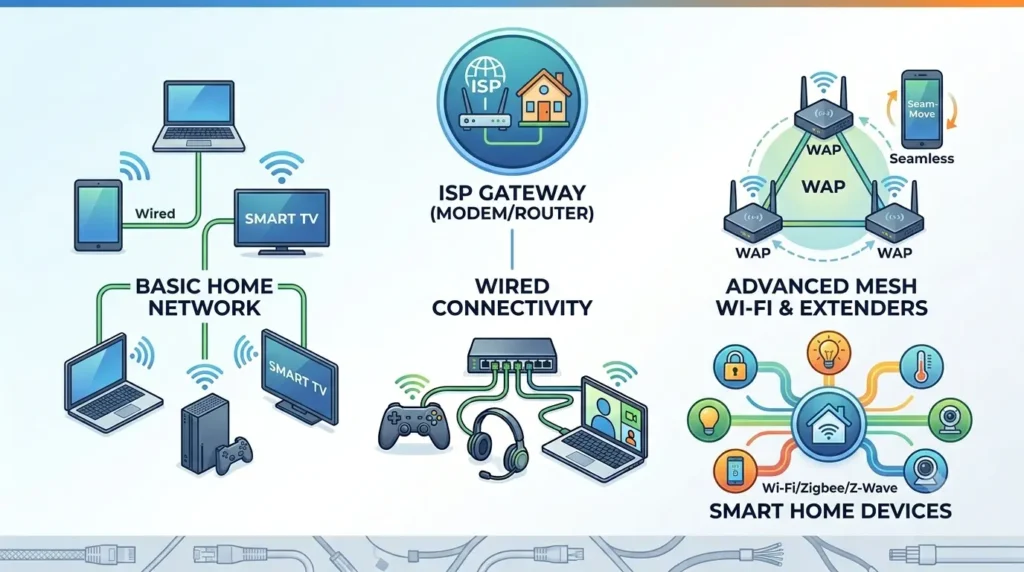
A typical home network is built around a gateway device provided by the ISP, which combines the modem (connecting to the ISP) and a wireless router (providing local network connectivity). This single device manages all internet traffic for the home, provides Wi-Fi coverage for wireless devices, and offers Ethernet ports for wired devices like desktop computers, smart TVs, and gaming consoles. Each device on the network uses its built-in NIC (wired) or Wi-Fi adapter (wireless) to connect to the gateway.
More sophisticated home networks may add separate access points to extend Wi-Fi coverage to areas of the home with poor signal, or a network switch to add more wired Ethernet ports than the gateway provides. Mesh networking systems such as those from Eero, Google Nest, or TP-Link Deco use multiple WAP units that work together to provide seamless whole-home Wi-Fi coverage with automatic roaming as devices move through the space. Smart home devices, including thermostats, security cameras, door locks, and lighting systems, each require their own communication capabilities, typically using Wi-Fi or Zigbee/Z-Wave wireless protocols.
Office Networks
Office networks are significantly more complex than home networks, designed to support dozens to hundreds of simultaneous users with high reliability and security. The internet connection enters the building through one or more enterprise-grade routers or firewall appliances that manage security policy, routing, and connection to the ISP. Managed Ethernet switches in network closets on each floor connect to the core router and distribute connectivity to Ethernet ports at each desk. Wireless access points deployed throughout the building provide Wi-Fi coverage, managed by a centralised wireless controller that coordinates channel assignment, load balancing, and roaming.
Enterprise office networks typically implement network segmentation using VLANs to separate employee traffic from guest Wi-Fi, printer networks, security camera networks, and IoT device networks. Quality of service policies prioritise voice and video conferencing traffic. Network monitoring tools continuously check device health and traffic patterns to detect problems and security threats. The communication devices in an enterprise network are configured and managed by dedicated IT staff using vendor management platforms.
Educational Institutions
Schools, colleges, and universities have demanding and unique network communication requirements. They must provide reliable, high-speed connectivity to thousands of students, faculty, and staff simultaneously, supporting both academic computing (research databases, learning management systems, online exams) and general internet access, while enforcing policies that restrict access to inappropriate content for younger students. The network must also connect administrative systems, security cameras, building automation, and an ever-growing number of student-owned devices.
Educational institution networks typically feature enterprise-grade wireless infrastructure with high-density WAP deployments in lecture halls, libraries, and student residences, fibre optic backbone connections between buildings, and internet connections dimensioned for the high demands of simultaneous streaming and research data access. Identity-aware networking allows the system to apply different access policies based on whether the connected user is a student, faculty member, or guest. Many universities also operate their own data centres connected to the internet through high-capacity fibre links.
Data Centers
Data centres represent the most demanding network communication environment of all. A modern hyper-scale data centre housing thousands of servers requires a networking infrastructure capable of handling petabytes of data transfer every day with microsecond latency and extremely high reliability. Data centre networking uses 10 Gbps, 25 Gbps, 100 Gbps, and 400 Gbps Ethernet connections between servers and switches, with a spine-and-leaf architecture that provides multiple equal-cost paths between any two servers to maximise bandwidth and eliminate bottlenecks.
Data centre communication devices include specialised server NICs with multiple 25 or 100 Gbps ports, top-of-rack switches with tens of high-speed ports, aggregation and spine switches with hundreds of ports, and optical transceivers that carry data as light pulses over fibre optic cables between equipment racks and buildings. High-performance computing clusters use specialised communication fabrics like InfiniBand that provide even lower latency and higher bandwidth than Ethernet for tightly coupled parallel computing workloads. The communication infrastructure of a data centre can cost tens or hundreds of millions of dollars and requires continuous expert management.
Advantages of Communication Devices
1. Fast Data Transfer
Modern communication devices enable data transfer at speeds that were unimaginable just a generation ago. A 10 Gbps enterprise NIC can transfer an entire feature-length film in under a second. Wi-Fi 6E delivers multi-gigabit wireless speeds to laptops and phones. Fibre optic network links within data centres operate at 400 Gbps per connection. These speeds enable real-time video streaming at 4K and 8K resolution, rapid synchronisation of large cloud storage libraries, sub-second software download speeds, and responsive remote desktop and cloud application experiences. The continuous improvement in communication device speeds is a fundamental driver of what applications become practical and what user experiences become possible.
2, Improved Connectivity
Communication devices have dramatically expanded connectivity by making network access available in virtually every environment. Wi-Fi has extended network access from fixed desk locations to every room of a home, every floor of an office building, and public spaces including airports, cafes, libraries, and parks. Cellular modems provide internet connectivity even in locations far from any fixed network infrastructure. Satellite internet communication devices are extending broadband connectivity to rural and remote areas that cannot be served by terrestrial networks. The result is that the connected experience, which once required a desk and a cable, is now available virtually everywhere, with communication devices as the enabling technology.
3. Resource Sharing
Communication devices enable the sharing of hardware resources across networks, significantly reducing costs and improving efficiency. A single high-performance printer can serve an entire office rather than requiring a printer at every desk. A NAS device can make a large storage array available to every computer in the home or office. Enterprise servers can be accessed by thousands of simultaneous users. Cloud computing services provide access to computing resources far beyond what any individual organisation could afford to own, because those resources are shared across millions of users, with communication devices providing the pathway to access them on demand.
4. Global Communication
The most transformative advantage of communication devices is that they enable global communication at effectively zero marginal cost. Email, instant messaging, video calling, social media, collaborative document editing, and online meeting platforms all allow people on opposite sides of the world to communicate and work together in real time, as easily and inexpensively as if they were in the same room. This global communication capability, made possible by the communication devices that connect individual computers to the internet, has reshaped commerce, education, science, culture, and personal relationships in ways that continue to unfold.
Disadvantages of Communication Devices
1. Security Risks
Communication devices, by their very nature, connect computers to networks that include potentially hostile actors. Every internet-connected device is continuously exposed to scanning, probing, and attack attempts from malicious actors around the world. Routers and firewalls are first-line defences, but they can be compromised if firmware is not kept updated, if default passwords are not changed, or if security configurations are misconfigured. Wireless communication devices introduce additional risks, as radio signals extend beyond the physical boundaries of the premises and can be intercepted or used to conduct attacks if the network is not properly secured with strong encryption.
High-profile vulnerabilities in communication device firmware have repeatedly demonstrated the consequences of poor security practices: compromised routers used as part of botnets, industrial switches used as entry points for ransomware attacks, and wireless access points exploited to intercept sensitive communications. Maintaining the security of communication devices through regular firmware updates, strong authentication, network segmentation, and monitoring is an ongoing responsibility that requires continuous attention.
2. Hardware Costs
While consumer communication devices like home routers and network switches have become very affordable, the communication infrastructure for large enterprise networks, data centres, and telecommunications providers represents enormous capital investment. Enterprise-grade managed switches with high port counts and advanced features cost thousands to tens of thousands of dollars per unit. High-capacity routers for ISP core networks cost hundreds of thousands of dollars. The specialised optical transceivers, fibre optic cables, and network management systems required for large-scale deployments add further cost. For organisations building or expanding their network infrastructure, communication hardware represents a significant capital expenditure that must be carefully planned and justified.
3. Network Failures
Despite the reliability of modern communication equipment, network failures do occur, and their consequences can be severe. A failed router in a corporate network can cut off hundreds or thousands of employees from internet access and cloud services, halting business operations. A failed switch in a data centre can take down the servers connected to it. An ISP’s equipment failure can disconnect entire regions from internet access. Communication devices that are a single point of failure in a network architecture carry disproportionate risk. Mitigating this risk requires redundant hardware, automatic failover configurations, backup internet connections, and careful network design, all of which add cost and complexity.
4. Maintenance Requirements
Communication devices require ongoing maintenance to remain secure, reliable, and performant. Firmware must be regularly updated to patch security vulnerabilities and fix bugs. Configuration must be reviewed and updated as the network environment changes. Hardware health must be monitored, and aging devices must be identified and replaced before they fail. In large enterprise networks, the maintenance burden of hundreds or thousands of communication devices requires dedicated network engineering staff with specialised skills and access to vendor support contracts. Even in small business environments, the technical complexity of properly maintaining communication devices often exceeds the capability of non-specialist staff, leading to configurations that are insecure or suboptimal.
Modern Communication Technologies
Communication technology is advancing rapidly, with several current and emerging technologies transforming the speed, reach, and capability of networked communication:
a. Wi-Fi 6 and Wi-Fi 7
Wi-Fi 6 (802.11ax) and Wi-Fi 6E represent significant advances over previous Wi-Fi generations, adding several features that improve performance in congested environments. Orthogonal Frequency Division Multiple Access (OFDMA) allows a single access point to simultaneously communicate with multiple devices in each transmission, dramatically improving efficiency when many devices are connected. Multi-User Multiple Input Multiple Output (MU-MIMO) enables simultaneous multi-stream communication with multiple clients. Target Wake Time (TWT) allows the access point to schedule when IoT devices wake up to communicate, reducing interference and improving battery life. Wi-Fi 6E additionally operates on the 6 GHz frequency band, providing a much wider, less congested spectrum for high-speed communication.
Wi-Fi 7 (802.11be), becoming available in 2024 and 2025, pushes further with 320 MHz channel widths, 4K QAM modulation, and multi-link operation that allows devices to simultaneously use multiple frequency bands. Theoretical maximum speeds reach 46 Gbps, with real-world speeds for individual devices expected to reach several Gbps. These advances will support the growing density of wireless devices in homes and offices, deliver more consistent low-latency performance for gaming and video conferencing, and enable new wireless use cases that previously required wired connections.
b. 5G Communication
5G is the fifth generation of cellular mobile communication standards, offering dramatically higher speeds, lower latency, and greater device density capacity than its 4G LTE predecessor. 5G mid-band deployments (using sub-6 GHz frequencies) deliver typical real-world download speeds of 100-900 Mbps with latency as low as 10-20 milliseconds, making 5G a viable substitute for fixed broadband in many scenarios. 5G mmWave (millimetre wave) deployments in dense urban areas can deliver multi-gigabit speeds with sub-5 millisecond latency, though with limited range requiring dense small cell deployments.
5G cellular modems and communication devices are enabling new use cases beyond smartphone connectivity: fixed wireless access (FWA) uses 5G modems to provide home broadband in areas underserved by fixed-line infrastructure; industrial 5G networks connect manufacturing equipment, robots, and sensors in factory environments with the reliability and low latency of wired connections and the flexibility of wireless; autonomous vehicle communication systems use 5G for vehicle-to-vehicle and vehicle-to-infrastructure data exchange; and private 5G networks allow enterprises to deploy dedicated cellular communication infrastructure on their own premises.
c. Fiber Optic Networking
Fibre optic networking uses pulses of light transmitted through glass or plastic fibre strands to carry data at extremely high speeds over long distances with minimal signal loss. A single-mode fibre strand can carry data at 100 Gbps over distances of tens of kilometres without a repeater, making fibre the backbone technology for internet infrastructure, metropolitan area networks, and data centre interconnects. Fibre is immune to electromagnetic interference, cannot be tapped without physically interrupting the fibre (making it inherently secure), and has virtually unlimited bandwidth potential by multiplexing many wavelengths of light on a single fibre using DWDM (Dense Wavelength Division Multiplexing).
Fibre to the home (FTTH) and fibre to the premises (FTTP) deployments are bringing gigabit and multi-gigabit internet connections directly to residences and businesses, replacing the legacy copper infrastructure that limited connection speeds. The communication device at the customer end of a fibre connection is the ONT (Optical Network Terminal), which converts the optical signal to electrical signals for the home or business network. As governments and telecoms companies accelerate fibre deployment worldwide, fibre optic connectivity is becoming the standard for high-performance broadband access.
d. Internet of Things (IoT)
The Internet of Things is the category of networked computing that extends internet connectivity to physical devices beyond traditional computers and smartphones. IoT devices include smart home devices (thermostats, security cameras, door locks, lighting, appliances), wearable technology (smartwatches, fitness trackers, medical monitors), industrial sensors (temperature, pressure, flow, vibration monitors in manufacturing), smart city infrastructure (traffic sensors, environmental monitors, smart meters), and agricultural sensors (soil moisture, weather stations, livestock trackers).
IoT devices use a variety of communication technologies depending on their power, range, and bandwidth requirements. Wi-Fi and cellular are used for devices requiring high bandwidth. Bluetooth and Zigbee are used for short-range, low-power applications. LoRaWAN and NB-IoT are used for long-range, very low-power sensor applications that transmit small amounts of data infrequently. The proliferation of IoT devices is creating enormous growth in the number of communication devices deployed, requiring network infrastructure that can manage unprecedented numbers of connections, and raising important considerations for network security, as each connected IoT device is a potential entry point for attackers.
Real-World Uses of Communication Devices
Communication devices enable a vast range of real-world applications that define how people use computers and the internet:
1. Internet Browsing
Every web page you load, every search query you submit, every online video you stream requires your computer’s communication devices to establish connections with remote servers, send requests, and receive responses. When you type a URL into a browser, the NIC or Wi-Fi adapter sends the request to the router, which forwards it through the modem to the ISP and onward to the destination web server. The web server’s response travels back through this chain in reverse, with the data arriving at your NIC and passing to the browser. This complete round trip, involving multiple communication devices, typically completes in tens to hundreds of milliseconds.
2. Video Conferencing
Video conferencing is one of the most demanding real-time communication applications for networking hardware. A high-quality 1080p video call requires approximately 3-5 Mbps of sustained, symmetric bandwidth with low latency (ideally under 100 ms) to deliver smooth, clear audio and video without freezing or breakup. Simultaneously participating in a video call, sharing a screen, and collaborating on documents can push bandwidth requirements significantly higher. The reliability and speed of communication devices directly determine video conferencing quality, which is why office networks invest in high-quality routers with QoS capabilities that prioritise video traffic, and why many professionals prefer wired connections for important calls.
3. Cloud Computing
Cloud computing services, which deliver computing power, storage, databases, and applications over the internet, depend entirely on communication devices to connect users to remote infrastructure. Every operation in a cloud application, whether reading a row from a cloud database, saving a file to cloud storage, processing data in a cloud function, or rendering a page in a cloud-hosted web application, involves data flowing through the user’s communication devices to remote servers. The performance of cloud applications from a user’s perspective is significantly influenced by the speed and latency of the network connection established by their communication devices, in addition to the performance of the cloud infrastructure itself.
4. Online Gaming
Online gaming places some of the most stringent demands on communication devices of any consumer application. Competitive multiplayer games require network latency (ping) as low as possible, ideally under 20 milliseconds, with consistent, jitter-free connections. Packet loss of even a fraction of a percent can cause perceptible gameplay disruptions. For these reasons, dedicated gamers almost invariably prefer wired Ethernet connections over Wi-Fi, using high-quality routers with gaming-optimised QoS features that prioritise gaming traffic over background downloads and streaming. Gaming routers from vendors like ASUS, Netgear Nighthawk, and TP-Link Archer include features like geo-filtering (connecting to nearby game servers for lower latency), traffic analysis, and advanced QoS controls specifically designed for gaming use cases.
5. Smart Homes
The modern smart home is a network of communication devices connecting appliances, sensors, security systems, entertainment devices, and environmental controls. A smart home might include dozens of IoT devices: Wi-Fi-connected smart speakers, Bluetooth-paired door locks, Zigbee light bulbs connected through a hub, Z-Wave security sensors, a cellular-connected alarm system, and ethernet-connected smart TVs. Managing this diverse ecosystem of communication technologies requires a capable home router that can handle many simultaneous connections, proper network segmentation to isolate IoT devices from computers and phones for security reasons, and potentially a dedicated IoT hub device to manage the Zigbee and Z-Wave devices that cannot directly connect to Wi-Fi.
Tips for Maintaining Communication Devices
Proper maintenance of communication devices ensures reliable network performance and protects against security threats:
1. Update Firmware Regularly
Firmware is the embedded software that runs on communication devices, controlling all their functions and implementing the security features that protect the network. Manufacturers regularly release firmware updates that patch security vulnerabilities, fix bugs that could cause instability, improve performance, and add support for new standards and features. Not applying firmware updates leaves devices vulnerable to known exploits that attackers actively scan for and use to compromise networks.
For home routers and access points, firmware updates are typically applied through the device’s web-based administration interface or a companion mobile app. Many modern home networking devices support automatic firmware updates, which should be enabled where available. For enterprise networking equipment, firmware update cycles must be planned carefully to minimise service disruption and tested in a lab environment before deployment to production networks. Checking for firmware updates at least quarterly is a reasonable cadence for home devices, and more frequently for enterprise equipment.
2. Secure Network Access
Securing network access is one of the most important maintenance activities for communication devices, particularly wireless ones. Change the default administrator password on all routers and managed switches immediately upon installation, as default credentials are publicly known and are the first thing attackers try. Use WPA3 encryption (or at minimum WPA2) on all Wi-Fi networks, and choose a strong, unique Wi-Fi passphrase. Disable Wi-Fi Protected Setup (WPS), which has known security vulnerabilities that allow brute-force attacks. Disable remote management access to the router from the internet if it is not needed.
Consider segmenting the network using VLANs or a separate guest Wi-Fi network to isolate less trusted devices (IoT devices, guest computers) from the main network where sensitive computers and data reside. Enable the router’s built-in firewall if it is not enabled by default, and consider enabling additional threat protection features if available. Regularly review the list of devices connected to the network to identify any unexpected connections that might indicate unauthorised access.
3. Protect Devices from Power Surges
Communication devices contain sensitive electronic components that can be permanently damaged by power surges, such as those caused by lightning strikes on power lines or sudden voltage spikes during power restoration after an outage. Connect all communication devices, including modems, routers, and switches, to a surge-protected power strip or, better still, an uninterruptible power supply (UPS) that provides both surge protection and battery backup. A UPS allows communication devices to continue operating for several minutes during a brief power outage, maintaining network connectivity for UPS-connected computers and preventing the sudden power interruptions that can cause router and switch configuration corruption.
Also protect the cable connections to the modem: the coaxial cable, DSL line, or Ethernet cable from the network infrastructure can carry surge energy from an external lightning strike directly into the modem. Surge protection devices designed specifically for coaxial or telephone line connections can provide an additional layer of protection for the modem and anything connected to it.
4. Position Wireless Devices Properly
The physical placement of wireless communication devices has a large impact on the quality of wireless coverage and network performance. Place wireless routers and access points as centrally as possible relative to the area they need to cover, elevated off the floor, and away from physical obstructions like thick walls, metal objects, large appliances, and fish tanks that absorb or reflect radio signals. Keep wireless devices away from other electronics that emit radio interference, including microwave ovens, cordless phone base stations, and baby monitors that operate on the 2.4 GHz band.
For homes or offices with multiple floors or large floor areas, a single access point may not provide adequate coverage throughout the space. In these cases, additional access points connected by Ethernet (a wired backhaul) provide more consistent coverage than relying on Wi-Fi range extenders, which halve available bandwidth by having to both receive and retransmit signals. If running Ethernet cable is not feasible, modern mesh networking systems with wireless backhaul provide a more practical and effective alternative to range extenders for extending coverage.
FAQs About Communication Devices
What are communication devices?
Communication devices are hardware components that transmit and receive data between computers, networks, and other devices. They convert digital data into signals appropriate for specific transmission media, send those signals through wired or wireless channels, and receive and convert incoming signals back into digital data. Examples include modems, routers, network interface cards, switches, wireless access points, and Bluetooth adapters. They are the hardware that connects individual computers to local networks and to the internet.
What are the main types of communication devices?
Communication devices are primarily classified as wired or wireless. Wired devices transmit data through physical cables using electrical signals (copper Ethernet) or light pulses (fibre optic) and include network interface cards, switches, hubs, and wired modems. Wireless devices transmit data through radio waves or infrared signals without physical cables and include Wi-Fi adapters, wireless routers, Bluetooth adapters, wireless access points, and cellular modems. Both categories are essential parts of modern network infrastructure.
Is a router a communication device?
Yes, a router is one of the most important communication devices in a typical network. It directs data packets between the local network and the internet, assigns IP addresses to local devices, manages network address translation, and provides firewall security. In a home or small office network, the router is the central communication hub through which all internet traffic flows. Enterprise routers are even more sophisticated, implementing complex routing protocols, VPN services, and advanced traffic management policies.
What is the function of a modem?
A modem’s function is to connect a local computer or network to an internet service provider by converting digital data into a signal format suitable for the ISP’s transmission medium, and converting incoming ISP signals back into digital data. The term modem is derived from Modulator-Demodulator, describing this signal conversion process.
Different types of modems serve different connection types: DSL modems work over telephone lines, cable modems work over coaxial cable TV infrastructure, fibre optic ONTs work over fibre optic cables, and cellular modems work over 4G LTE or 5G mobile networks.
What is a Network Interface Card (NIC)?
A Network Interface Card (NIC) is the communication device inside a computer that provides its interface for connecting to a network.
It handles the low-level physical and data link layer functions of network communication, converting data packets from the operating system into electrical or radio signals for transmission, and converting incoming signals back into data packets. Each NIC has a unique MAC address that identifies it on the local network.
Modern NICs are typically integrated directly onto the motherboard and may include both wired Ethernet and wireless Wi-Fi capabilities in a single chip.
What is the difference between a hub and a switch?
A hub is a basic network device that broadcasts all incoming data to every connected port, regardless of which device the data is intended for. A switch is a more intelligent device that learns which device is connected to each port and forwards data only to the specific port connected to the destination device. This makes switches far more efficient, as they do not waste bandwidth broadcasting to uninvolved devices, and they can support simultaneous full-speed communication between multiple pairs of devices. Switches have completely replaced hubs in modern networking due to their much better performance.
Why are communication devices important?
Communication devices are important because they make computers useful in the connected world of modern computing. Without communication devices, a computer cannot access the internet, connect to other devices on a local network, share resources with other users, or participate in any networked application. All the defining activities of modern digital life, including browsing the web, sending messages, video calling, cloud storage, remote work, online gaming, and smart home automation, depend on communication devices to function. They are the hardware that connects individual computers to the broader world.
Conclusion
Communication devices are the hardware that connects computers to each other, to local networks, and to the internet. Without them, every computer would be an isolated machine, unable to access web pages, send emails, join video calls, stream media, or participate in any of the networked activities that define modern computing. They are as fundamental to the usefulness of a computer as the CPU that processes data or the storage drive that holds it.
In this guide, we explored the full landscape of communication devices: their definition as hardware that transmits and receives data across wired and wireless channels; how they work by sending, receiving, and converting signals and establishing network connections; why they matter for internet access, network communication, data sharing, and remote collaboration; and the main types, divided into wired and wireless categories with distinct characteristics and trade-offs.
We examined the seven most important examples in detail: the modem that connects to the ISP, the router that manages local network traffic, the NIC that provides the computer’s physical network interface, the switch that intelligently directs local network traffic, the hub that broadcasts traffic to all ports (now largely historical), the wireless access point that extends Wi-Fi coverage, and the Bluetooth adapter that enables short-range wireless peripherals. We covered their functions in data transmission, signal conversion, network management, device connectivity, and internet access; their relationships to the CPU, motherboard, and storage devices; and their deployment across home networks, offices, educational institutions, and data centres.
We also looked at the advantages of fast data transfer, improved connectivity, resource sharing, and global communication; the disadvantages of security risks, costs, failures, and maintenance demands; and the exciting modern technologies, including Wi-Fi 6 and 7, 5G, fibre optics, and IoT, that are expanding what communication devices can do. To deepen your understanding of the complete computer hardware ecosystem, explore our related guides on What Is Motherboard, What Is CPU, What Are Storage Devices, What Is Input Device, and What Is Output Device, which together cover the complete range of hardware categories that make modern computing possible.