
If you have ever wondered what actually happens the moment you press the power button on your laptop, the answer starts with system software. It is the quiet layer of code that wakes up your hardware, loads your operating system, and gets everything ready before you even see your desktop icons.
In simple words, system software is the set of programs that manage and control a computer’s hardware so that application software (like Word, Chrome, or a mobile game) can run smoothly on top of it. Without it, your computer would just be a box of electronic parts with no way to talk to each other.
This guide breaks down what system software is, how it works, its main types, real examples, and how it differs from application software. Whether you are a student preparing for an exam or someone who simply wants to understand how computers work, this article covers it in plain English.
What Is System Software?
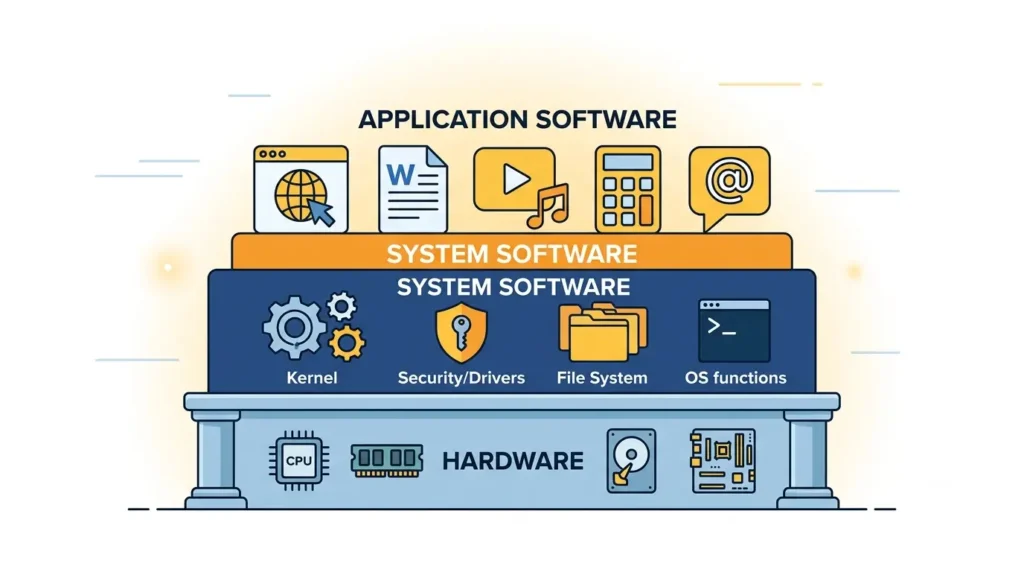
System software is a category of computer programs designed to operate and control computer hardware, and to provide a platform on which application software can run. Think of it as the foundation of a house. You do not see it directly, but everything else is built on top of it.
Technical Definition
More formally, system software refers to low level programs that interface directly with computer hardware, manage system resources such as memory and processing power, and provide essential services to other software. This includes operating systems, device drivers, firmware, and utility programs.
Why Every Computer Needs System Software
A computer’s hardware, its processor, memory chips, hard drive, and other components, cannot understand human commands on its own. System software acts as a translator and manager. It converts your clicks, taps, and keystrokes into instructions the hardware can actually process. According to the Wikipedia entry on system software, this category exists specifically to support the running of application programs and to manage the computer system itself.
What Is the Purpose of System Software?
System software exists to do the behind the scenes work that makes computing possible. Its core purposes include the following.
- Managing hardware: It controls the processor, memory, storage devices, and peripherals like printers and keyboards.
- Running applications: It creates the environment in which apps like browsers, games, and office tools can function.
- Providing a user interface: It gives you a way to interact with the machine, whether through a graphical desktop or a command line.
- Managing system resources: It allocates memory, CPU time, and storage space efficiently across every running process.
How System Software Works (Step by Step)
Understanding the boot process is one of the best ways to actually see system software in action. Here is what happens between the moment you press the power button and the moment you start using your computer.
- Power button is pressed: Electricity flows to the motherboard, and the processor begins executing its very first instructions.
- BIOS or UEFI starts: This firmware checks that essential hardware, like your memory and storage, is present and working. This is called the Power On Self Test.
- Bootloader loads: A small program locates the operating system on your storage drive and prepares to hand over control to it.
- Operating system kernel starts: The kernel, the core of the operating system, takes charge of memory management, process scheduling, and hardware communication.
- Device drivers load: These small programs let the kernel communicate properly with your graphics card, network adapter, keyboard, and other devices.
- User login: The operating system presents a login screen or loads your user profile directly.
- Applications become ready: Once the desktop or home screen appears, application software can now be launched safely.
This entire sequence usually takes just a few seconds, but every one of those steps depends entirely on system software working correctly.
Main Types of System Software
Operating Systems
The operating system is the most well known type of system software. It manages hardware resources and provides the interface through which you interact with your device.
Common examples include:
- Windows
- Linux (and its many distributions, as documented by the Linux Foundation)
- macOS
- Android
- iOS
- ChromeOS
Device Drivers
Device drivers are small, specialized programs that let the operating system communicate with specific hardware components. Without the correct driver, a device may not work at all, or may only work partially.
Common examples include:
- Printer drivers
- Graphics drivers
- Audio drivers
- Network drivers
Firmware
Firmware is software written directly onto hardware components. It is the first code that runs when a device is powered on, and it usually cannot be modified as easily as regular software.
- BIOS (Basic Input Output System): An older firmware standard used to initialize hardware during startup.
- UEFI (Unified Extensible Firmware Interface): A modern replacement for BIOS that supports larger drives, faster boot times, and better security.
Utility Software
Utility software helps maintain, analyze, and optimize a computer system. It supports the operating system rather than replacing it.
Examples include:
- Disk cleanup tools
- Backup software
- Antivirus programs
- File compression utilities
Language Translators
These programs convert human readable code into a format the computer’s processor can execute.
- Compiler: Translates an entire program from source code into machine code before it runs.
- Interpreter: Translates and executes code line by line, without producing a separate machine code file.
- Assembler: Converts assembly language instructions into machine code.
Examples of System Software
| Software | Category | Purpose |
|---|---|---|
| Windows 11 | Operating System | Manages desktop hardware and provides a graphical interface |
| Ubuntu Linux | Operating System | Open source OS used on desktops and servers |
| macOS | Operating System | Apple’s operating system for Mac computers |
| Android | Operating System | Mobile OS for smartphones and tablets |
| iOS | Operating System | Apple’s mobile operating system |
| BIOS | Firmware | Initializes hardware at startup on older systems |
| UEFI | Firmware | Modern firmware standard replacing BIOS |
| NVIDIA GPU Driver | Device Driver | Enables communication between the OS and graphics card |
| Realtek Audio Driver | Device Driver | Manages sound hardware |
| Windows Defender | Utility Software | Provides antivirus and security scanning |
| WinRAR | Utility Software | Compresses and extracts files |
| GCC Compiler | Language Translator | Compiles C and C++ source code |
| Python Interpreter | Language Translator | Executes Python code line by line |
| Docker Engine | Virtualization Software | Runs containerized applications |
| VMware ESXi | Virtualization Software | Hosts and manages virtual machines on servers |
| Hyper V | Virtualization Software | Microsoft’s virtualization platform |
| Bash Shell | Command Interpreter | Lets users interact with Linux through text commands |
| PowerShell | Command Interpreter | Windows scripting and automation shell |
| Package Manager (APT) | Utility Software | Installs and updates software on Linux systems |
| Windows Registry | System Database | Stores configuration settings for Windows |
Functions of System Software
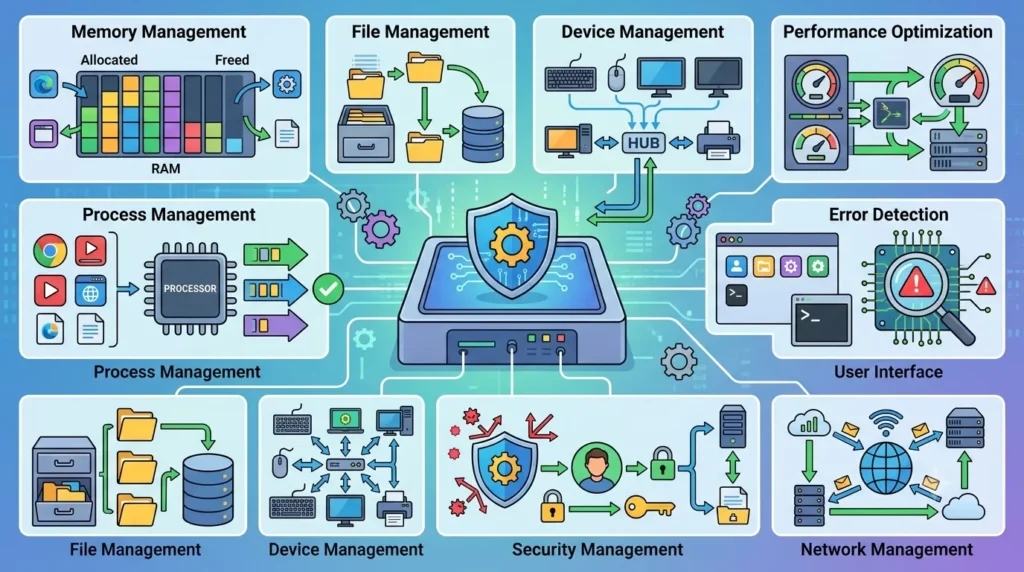
System software handles several critical jobs at once, often without you noticing any of them.
- Memory management: Allocates and frees up RAM as programs open and close.
- Process management: Decides which programs get access to the processor and when.
- File management: Organizes how data is stored, retrieved, and deleted on your drives.
- Device management: Coordinates communication between hardware components and software requests.
- Security management: Enforces permissions, user access controls, and basic protection against threats.
- Network management: Handles data transfer over Wi-Fi, Ethernet, and other connections.
- User interface: Provides the graphical or command line environment you use to control the system.
- Error detection: Identifies hardware or software faults and alerts the user or system.
- Performance optimization: Manages resources so the system runs as efficiently as possible.
Characteristics of System Software
- Runs largely in the background, often without direct user interaction
- Essential for the computer to boot and function at all
- Interacts closely with hardware components
- Built for high reliability, since failures can crash the entire system
- Typically written in low level programming languages such as C or assembly
- Optimized for performance and speed
- Designed with strong security considerations, since it has deep system access
Advantages of System Software
- It allows hardware and application software to communicate effectively.
- It improves overall system stability and reliability.
- It manages resources efficiently, which improves performance.
- It provides a consistent platform so developers can build applications without worrying about hardware specifics.
- It enables multitasking, letting you run several programs at once.
Limitations of System Software
- It can be complex to develop, update, and troubleshoot.
- Poorly written system software, such as a faulty driver, can crash the entire system.
- Updates sometimes introduce compatibility issues with older hardware.
- It often requires specialized technical knowledge to modify or repair.
System Software vs Application Software
| Feature | System Software | Application Software |
|---|---|---|
| Purpose | Manages hardware and system resources | Helps users perform specific tasks |
| Dependency | Runs independently, often starts at boot | Depends on system software to function |
| User Interaction | Usually indirect or background | Direct and task focused |
| Installation | Often pre installed by the manufacturer | Installed separately by the user |
| Examples | Windows, Linux, device drivers, BIOS | Microsoft Word, Chrome, Spotify |
| Resource Usage | Generally lower, runs continuously in background | Varies, often higher during active use |
| Hardware Access | Direct and deep access | Limited, mediated through system software |
| Updates | Less frequent, more critical | More frequent, less risky if it fails |
| Programming Level | Low level languages like C or assembly | Higher level languages like Python or Java |
System Software vs Firmware
Firmware is technically a type of system software, but it deserves its own comparison because people often confuse the two. Firmware is embedded directly into hardware and usually cannot be removed or replaced easily. System software as a broader category, including the operating system, is more flexible and can be updated, reinstalled, or swapped out entirely.
System Software vs Utility Software
Utility software is also a subset of system software, but its role is narrower. While the operating system manages the entire computer, utility software focuses on specific maintenance tasks such as antivirus scanning, backups, or disk cleanup. In short, all utility software is system software, but not all system software is utility software.
Real Life Examples of System Software in Action
Turning On a Laptop
The moment you press the power button, firmware and the operating system kernel work together to check hardware and load your desktop, exactly as described in the boot process section above.
Connecting a Printer
When you plug in or pair a printer, the operating system searches for the matching driver. Once that driver loads, your computer can finally send print commands the printer understands.
Browsing the Internet
Your network driver and operating system manage the connection to Wi-Fi or Ethernet, while system level protocols handle the actual data transfer that lets a browser load a webpage.
Playing Games
Graphics drivers translate game engine instructions into commands your GPU can execute, while the operating system manages memory and processor allocation to keep the game running smoothly.
Installing Software
When you install a new application, the operating system’s package manager or installer handles file placement, registry updates, and permission settings, all of which are system level tasks.
Evolution of System Software
- Early computers: Relied on punch cards and command line interfaces with no graphical elements at all.
- GUI revolution: Systems like early Windows and Mac OS introduced graphical interfaces, making computers accessible to non technical users.
- Mobile operating systems: Android and iOS extended system software concepts to smartphones and tablets, supported by effective software testing strategies to ensure reliability, performance, and security.
- Cloud computing: Virtualization and hypervisors like VMware ESXi and Hyper V allowed system software to manage remote, virtual hardware rather than just physical machines.
- AI integration: Modern operating systems increasingly use AI driven features for resource optimization, security, and predictive performance tuning.
Common Misconceptions About System Software
- “System software and operating system are the same thing.” In reality, the operating system is just one type of system software. Drivers, firmware, and utilities are also part of this category.
- “Antivirus software is application software.” Antivirus tools are generally considered utility software, which falls under the system software umbrella, because they interact deeply with system processes.
- “Firmware and software are completely different things.” Firmware is technically software, just written and stored in a way that makes it harder to modify.
- “You can remove all system software and the computer will still work.” Without core system software like the operating system, a computer cannot function at all.
Tips for Students and Competitive Exam Preparation
Important Exam Questions
- Define system software with an example.
- List and explain the four types of system software.
- Differentiate between system software and application software.
- Explain the role of the kernel in an operating system.
Frequently Asked MCQs
- Which of the following is not a type of system software: (a) Compiler (b) Photoshop (c) Device Driver (d) BIOS
- BIOS stands for: (a) Basic Input Output System (b) Binary Input Output Setup
Memory Tricks
A simple way to remember the four main types is the phrase “Old Doctors Fix Utilities,” standing for Operating systems, Device drivers, Firmware, and Utility software.
Frequently Asked Questions
- What is system software?
System software is a category of programs that manage and control computer hardware, providing a platform for application software to run on.
- What are the four types of system software?
The four main types are operating systems, device drivers, firmware, and utility software. Language translators like compilers and interpreters are sometimes included as a fifth category.
- Is Windows system software?
Yes. Windows is an operating system, which is a core type of system software.
- Is Android system software?
Yes. Android is a mobile operating system, making it system software designed specifically for smartphones and tablets.
- Is BIOS system software?
Yes. BIOS is a type of firmware, and firmware falls under the system software category.
- Is firmware system software?
Yes. Firmware is considered a specialized subtype of system software because it manages hardware at the most basic level.
- Can a computer work without system software?
No. Without system software, particularly an operating system, a computer’s hardware has no way to communicate with users or applications.
- Is antivirus system software?
Yes. Antivirus programs are usually classified as utility software, which is a subtype of system software.
- What is a kernel?
The kernel is the core component of an operating system. It manages memory, processes, and communication between hardware and software.
- What are examples of utility software?
Common examples include antivirus programs, disk cleanup tools, backup software, and file compression utilities.
- What is the difference between firmware and system software?
Firmware is a specific type of system software that is embedded directly into hardware and is harder to modify, while system software as a whole includes more flexible components like the operating system.
- Why is system software important?
System software is important because it allows hardware and application software to work together, manages system resources efficiently, and keeps the entire computer running reliably.
Key Takeaways
- System software manages computer hardware and provides the platform on which application software runs.
- The main types include operating systems, device drivers, firmware, and utility software.
- Common examples range from Windows and Linux to BIOS, UEFI, and antivirus tools.
- System software differs from application software mainly in purpose, dependency, and how directly it interacts with hardware.
- Understanding the boot process, from pressing the power button to loading your desktop, is one of the clearest ways to see system software at work.
- Modern system software now extends well beyond desktops, covering mobile operating systems, virtualization platforms, and cloud environments.
For deeper technical discussions and real world troubleshooting experiences shared by developers and IT professionals, communities like sysadmin on Reddit and professional groups on LinkedIn are useful places to see how system software concepts apply in actual jobs and infrastructure management.