
Software is a collection of programs and instructions that tell a computer or device what to do. It helps systems perform tasks, process data, and allow users to interact with digital devices smoothly. Without software, hardware like computers, laptops, and smartphones would not be useful on their own.
Software is mainly divided into two major categories: system software and application software. System software manages the computer’s hardware and core functions, while application software is designed to help users perform specific tasks such as writing documents, browsing the internet, editing photos, or attending online meetings.
Many students, beginners, interview candidates, and everyday users search for the difference between application software and system software because it is a common computer fundamentals topic in schools, competitive exams, job interviews, and technical learning.
In this guide, you will learn the difference between both types of software in simple words, along with examples, features, and an easy comparison table so you never get confused again.
Quick Difference Between Application Software and System Software
| Basis | System Software | Application Software |
| Purpose | Runs and manages the computer system | Performs specific user tasks |
| Works With | Hardware and system resources | End users |
| Runs When | Starts during system boot | Runs when opened by the user |
| Dependency | Can run independently | Needs system software to operate |
| Examples | Windows, Linux, macOS | Chrome, MS Word, Photoshop |
What is System Software?
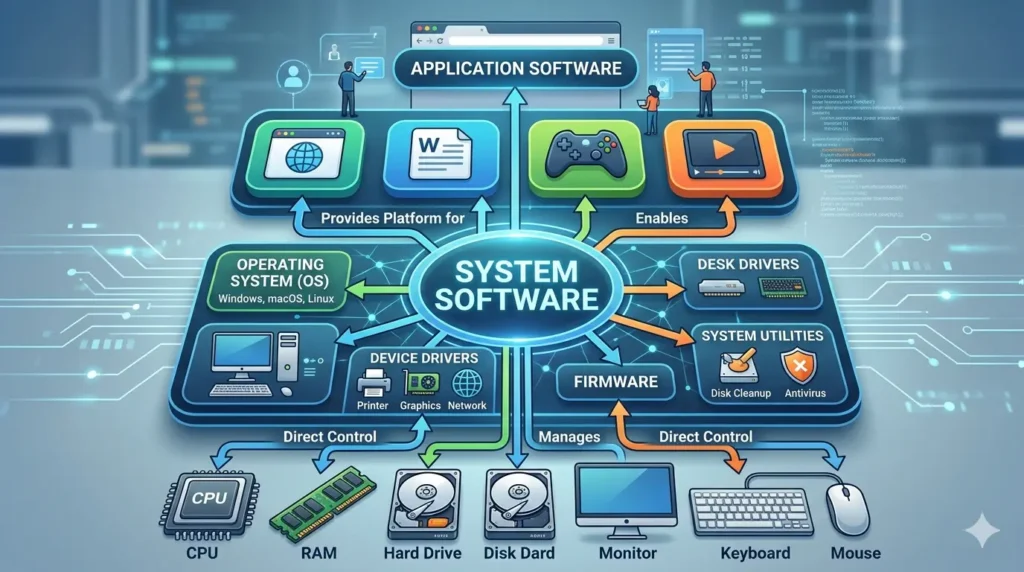
System software is a type of software that manages and controls the basic functions of a computer or device. It works between the hardware and the user, making sure all parts of the system run properly. In simple words, system software is the foundation that allows a computer to start, operate, and run other programs.
It controls hardware components such as the keyboard, mouse, printer, hard drive, and display. It also manages important resources like the CPU, memory (RAM), and storage so different tasks can run smoothly without conflicts.
Another major role of system software is to provide a platform for application software. Programs like browsers, games, or word processors need system software to function properly.
Examples of System Software
- Windows – Popular operating system used on many computers
- Linux – Open-source operating system widely used in servers and PCs
- macOS – Operating system designed for Apple computers
- Android – Mobile operating system used on smartphones and tablets
- Device Drivers – Help the operating system communicate with hardware devices
- BIOS – Starts the computer and loads the operating system during boot process
What is Application Software?
Application software is a type of software designed to help users perform specific tasks on a computer, laptop, or mobile device. In simple words, it is the software people use directly for work, learning, communication, creativity, or entertainment.
Unlike system software, application software focuses on user needs rather than managing hardware. It allows users to create documents, browse the internet, edit images, watch videos, attend meetings, and much more.
Application software is usually installed based on personal or business requirements. Users can download, update, or remove these programs whenever needed without affecting the core functioning of the system.
Examples of Application Software
- Microsoft Word – Used for creating and editing documents
- Google Chrome – Popular web browser for internet browsing
- Zoom – Used for video meetings and online classes
- Photoshop – Professional image editing software
- VLC Media Player – Used to play audio and video files
Main Difference Between Application Software and System Software
Understanding the difference between application software and system software becomes easy when we compare their purpose, working style, and usage. Below are the main differences explained in simple words.
1. Purpose
The main purpose of system software is to manage the computer system and control hardware resources. It ensures the device works properly and supports all core operations.
The purpose of application software is to help users complete specific tasks such as writing documents, browsing the web, editing photos, or joining online meetings.
2. Dependency
System software can operate independently because it is built to run the device itself.
Application software depends on system software to function. Without an operating system, apps cannot run properly.
3. User Interaction
System software usually runs silently in the background. Most users do not interact with it directly on a regular basis.
Application software is designed for direct use. Users open it, click buttons, enter data, and perform tasks through its interface.
4. Installation
System software is often preinstalled on a device by the manufacturer or installed during initial setup.
Application software is usually installed later by users based on their personal, educational, or business needs.
5. Language Used
System software is commonly developed using low-level or system-level languages such as C and Assembly because they work closely with hardware.
Application software is generally developed using high-level languages like Java, Python, and C#, which are easier for building user-friendly programs.
6. Speed and Performance
System software is usually faster because it works directly with hardware and manages essential system resources like CPU and memory.
Application software depends on system software and focuses more on functionality than low-level performance.
7. Removal
Removing important system software, especially the operating system, can stop the computer from functioning properly.
Application software can be installed or uninstalled anytime without damaging the core system.
Examples of System Software and Application Software
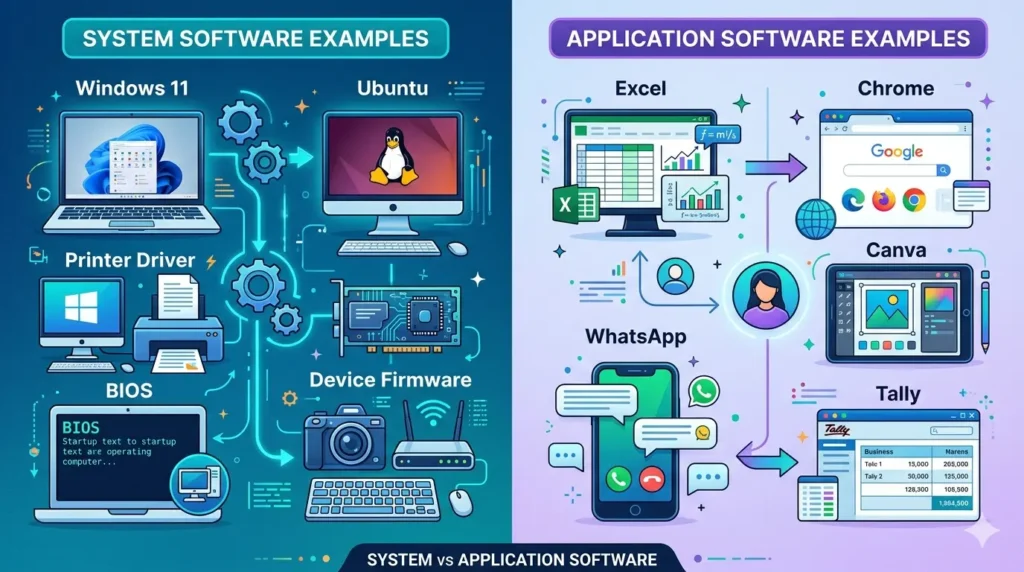
Understanding real examples makes it easier to learn the difference between application software and system software. Both types of software serve different purposes and are essential for smooth device operation.
System Software Examples
These programs help run the computer and manage hardware resources.
- Windows 11 – A popular operating system used on personal computers and laptops.
- Ubuntu – A Linux-based operating system known for stability and open-source features.
- Printer Driver – Software that allows the computer to communicate with a printer.
- BIOS – Built-in firmware that starts the computer and loads the operating system.
- Device Firmware – Permanent software stored inside devices like routers, keyboards, cameras, or hard drives.
Application Software Examples
These programs are designed to help users perform specific tasks.
- Excel – Spreadsheet software used for calculations, reports, and data analysis.
- Chrome – Web browser used for internet browsing and online activities.
- Canva – Graphic design tool used to create social media posts, presentations, and banners.
- WhatsApp – Messaging application used for chat, voice calls, and video calls.
- Tally – Accounting software used by businesses for finance and inventory management.
Types of System Software
System software includes different programs that help a computer run efficiently and communicate with hardware. Each type performs a specific role in managing the system and supporting other software.
1. Operating System
The operating system is the most important type of system software. It manages hardware, memory, files, and running applications. It also provides the interface users interact with.
Examples: Windows, Linux, macOS, Android
2. Device Drivers
Device drivers are small programs that allow the operating system to communicate with hardware devices. Without drivers, devices like printers, keyboards, graphics cards, or speakers may not function properly.
Examples: Printer driver, graphics driver, audio driver
3. Firmware
Firmware is software permanently stored inside hardware devices. It controls the basic functions of the device and helps it start correctly.
Examples: Router firmware, keyboard firmware, camera firmware
4. Utility Programs
Utility programs are maintenance tools that help improve system performance, security, and storage management. They keep the computer running smoothly.
Examples: Antivirus software, disk cleanup tool, backup tools
5. Language Translators
Language translators convert programming code into machine language that the computer can understand and execute.
Examples: Compiler, interpreter, assembler
Types of Application Software
Application software is created to help users perform specific tasks in daily life, education, business, and entertainment. Different types of application software are designed for different needs.
1. Productivity Software
Productivity software helps users create documents, manage data, prepare presentations, and organize work efficiently.
Examples: Microsoft Word, Excel, PowerPoint, Google Docs
2. Multimedia Software
Multimedia software is used to create, edit, play, or manage audio, video, and images, while Virtual Tour Software helps create interactive digital experiences and immersive tours.
Examples: VLC Media Player, Adobe Photoshop, Premiere Pro, Audacity
3. Web Browsers
Web browsers allow users to access websites, search information, and use online services through the internet.
Examples: Google Chrome, Mozilla Firefox, Microsoft Edge, Safari
4. Business Software
Business software helps companies manage accounting, payroll, inventory, sales, and customer records.
Examples: Tally, QuickBooks, Zoho Books, ERP software
5. Educational Software
Educational software supports learning, online classes, skill development, and student practice.
Examples: Google Classroom, Duolingo, BYJU’S, Khan Academy
6. Gaming Software
Gaming software is designed for entertainment and interactive gameplay on computers, consoles, or mobile devices.
Examples: PUBG, Minecraft, FIFA, Free Fire
7. Communication Apps
Communication apps help users send messages, make calls, hold meetings, and collaborate online.
Examples: WhatsApp, Zoom, Microsoft Teams, Telegram
How System Software and Application Software Work Together
System software and application software do not work separately. They depend on each other to provide a smooth user experience. Application software needs system software to access hardware resources and run properly.
For example, when a user opens Google Chrome, several processes happen within seconds:
1. User Opens Chrome
The user clicks the Chrome icon or selects it from the menu. This sends a request to the operating system to start the application.
2. Operating System Loads It in RAM
The operating system locates Chrome files from storage and loads the required data into RAM so the application can run quickly.
3. CPU Resources Are Allocated
The system software assigns processor time and computing resources to Chrome. This allows the browser to open tabs, process commands, and run smoothly.
4. Drivers Activate Display and Network
Device drivers help Chrome communicate with hardware such as the screen, keyboard, mouse, graphics card, and internet adapter. This enables visuals and network access.
5. Application Starts Functioning
Once resources are ready, Chrome opens fully and becomes usable. The user can browse websites, watch videos, download files, or log into accounts.
This example shows that application software relies on system software at every step. Without the operating system, memory management, CPU scheduling, and drivers, applications cannot function properly.
Why This Difference Matters
Understanding the difference between application software and system software is important for students, professionals, and everyday computer users. It is more than a theory topic because it helps in practical situations as well.
1. Useful in Exams
This topic is commonly asked in school exams, computer courses, and competitive tests. Knowing the difference helps students answer questions accurately and score better marks.
2. Helpful in Interviews
Many technical and non-technical job interviews include basic computer questions. Interviewers may ask about system software, application software, or examples of each type.
3. Better Troubleshooting
When a problem occurs, knowing the software type helps identify the cause. For example, if the operating system crashes, it is a system software issue. If Microsoft Word stops responding, it is usually an application software issue.
4. Smart Software Selection
Users and businesses can choose better tools when they understand software categories. For example, selecting the right operating system or choosing useful business applications becomes easier.
5. Important for Computer Basics Learners
Anyone learning computer fundamentals should understand this concept first. It builds a strong base for advanced topics like programming, networking, cybersecurity, and IT support.
Which Comes First: System Software or Application Software?
System software comes first. A computer or device needs system software installed before any application software can run properly.
System software, especially the operating system, is responsible for starting the device, managing hardware, controlling memory, and creating the environment required for other programs. Without it, the computer cannot load applications or respond correctly to user commands.
Once system software is installed and working, users can then install and run application software based on their needs. Programs like browsers, games, video editors, and office tools all depend on the operating system to function.
In simple words:
First: System software (Windows, Linux, Android, macOS)
Then: Application software (Chrome, Word, Zoom, Photoshop)
So, application software always depends on system software to come first.
Real Life Examples
Understanding real-world examples makes it easier to see how system software and application software work together in daily life. System software runs the device, while application software helps users complete tasks.
- In Office
Windows + Excel + Chrome
In many offices, Windows works as the system software that manages the computer. Employees then use Excel for reports, calculations, and data management, while Chrome is used for browsing websites, emails, and online tools.
- In Mobile
Android + WhatsApp + Instagram
On smartphones, Android acts as the system software that controls the device. Users install apps like WhatsApp for messaging and calls, while Instagram is used for social media and sharing content.
- In School
Linux + Browser + Presentation Software
Many schools and computer labs use Linux as the operating system. Students use a browser for research and online learning, while presentation software like PowerPoint or LibreOffice Impress helps create classroom presentations.
These examples show that system software provides the platform, and application software helps users perform everyday tasks.
Common Mistakes People Make
Many beginners get confused between system software and application software. Here are some common mistakes people make and the correct explanation.
1. Thinking Chrome Is System Software
Many people assume Google Chrome is system software because it is used every day. However, Chrome is application software because it is a web browser designed for user tasks like browsing websites, watching videos, and using online tools.
2. Thinking Antivirus Is Always Application Software
Some users think antivirus programs are only application software. In reality, antivirus tools are often considered utility software, which is closely related to system software because they help protect, maintain, and optimize the computer system.
3. Thinking Apps Can Run Without an Operating System
A common misunderstanding is that applications can work independently. The truth is that apps need an operating system like Windows, Linux, Android, or macOS to run. Without system software, applications cannot load, use memory, or communicate with hardware.
Understanding these mistakes helps build a clearer concept of how software works on any device.
Conclusion
Understanding the difference between application software and system software is an important part of basic computer knowledge. Both types of software have different roles, but they work together to make a computer useful and functional.
System software manages the machine, controls hardware, handles memory, and provides the platform needed for all other programs to run. It is the foundation of every computer, laptop, or smartphone.
Application software helps users perform specific tasks such as writing documents, browsing the internet, editing photos, attending meetings, or managing business work.
In simple words, system software makes the device work, while application software helps people use the device productively. Both are essential, and understanding their difference improves your computer knowledge, troubleshooting skills, and overall digital awareness.
FAQs
Q1. What is the difference between application software and system software?
System software runs and manages the computer, hardware, and core functions. Application software helps users perform specific tasks such as writing documents, browsing the internet, or editing files.
Q2. Is Windows system software?
Yes, Windows is system software because it is an operating system that manages hardware resources and allows other programs to run.
Q3. Is MS Word application software?
Yes, Microsoft Word is application software because it is designed to help users create, edit, and manage documents.
Q4. Can application software run without system software?
No, application software cannot run without system software. It needs an operating system like Windows, Linux, Android, or macOS to function properly.
Q5. Is antivirus system software?
Antivirus is usually considered utility software, which is closely related to system software because it helps protect and maintain the computer system.
Q6. Which software starts first?
System software starts first when the computer boots. The operating system loads before any application software can be opened.