
At the heart of every computer , whether it is a smartphone in your pocket, a laptop on your desk, or a server powering the internet , sits a single component that makes everything else possible. That component is the CPU, the Central Processing Unit, and it is universally recognised as the brain of the computer. Without the CPU, a computer is nothing more than a collection of inert electronic parts; with it, the machine comes alive, capable of executing billions of instructions every second.
The CPU is responsible for interpreting and executing the instructions that make up every software program. When you open a web browser, play a video, type a document, or run a calculation, it is the CPU that orchestrates all of those actions , reading instructions, performing computations, coordinating with memory and storage, and delivering results to the appropriate output devices, all in the span of nanoseconds.
Despite its enormous importance, the CPU is often misunderstood or confused with other components like RAM or the GPU. In this comprehensive guide, we will demystify the CPU from the ground up: its definition and full form, its rich history, exactly how it works, what it is made of, its many functions and types, how it compares with other components, and how to maintain it for optimal performance. By the end, you will have a thorough, practical understanding of one of the most important inventions in the history of technology.
What Is a CPU?
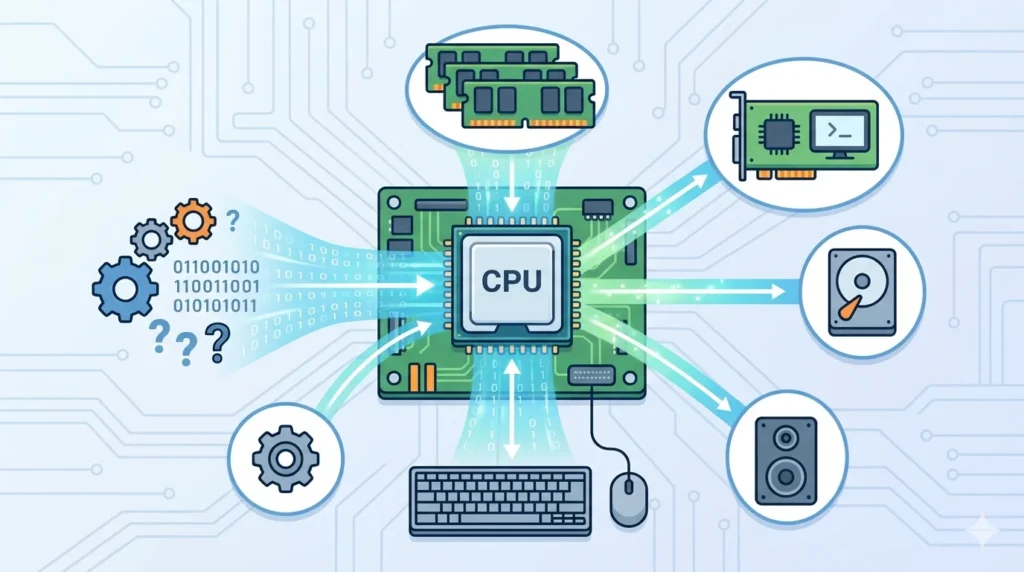
A CPU, or Central Processing Unit, is the primary electronic component of a computer that carries out the instructions of a computer program. It performs the basic arithmetic, logical, control, and input/output operations specified by the instructions. In short, the CPU is what makes a computer compute.
The CPU is often called the brain of the computer because, like a brain, it serves as the central decision-making and processing unit for the entire system. Every action a computer takes , every keystroke processed, every frame of video rendered, every web page loaded , passes through the CPU at some point. It coordinates the activities of every other What Is CPU? Definition, Components, Functions & Typesware component, telling memory what to store, instructing storage what to retrieve, and signalling output devices what to display or output.
Physically, a modern CPU is a small, flat chip , typically a square or rectangular piece of silicon roughly the size of a postage stamp , that plugs into a socket on the computer’s motherboard. Despite its modest physical size, a modern CPU contains billions of microscopic transistors etched into its silicon surface, all working together to execute instructions at extraordinary speed.
The CPU does not work in isolation. It communicates constantly with RAM (which holds the data and instructions it is currently working with), with storage devices (which hold data and programs at rest), with the GPU (which handles graphics rendering), and with peripheral devices through the motherboard’s chipset. The CPU is the conductor of this hardware orchestra, ensuring that every component plays its part in the right sequence at the right time.
Full Form of CPU
CPU stands for Central Processing Unit. Each word in the name carries specific meaning that describes the component’s role and position within the computer system:
- Central: The CPU occupies a central position in the computer’s architecture, both physically (on the motherboard) and functionally (as the hub through which all processing flows). Every instruction executed, every calculation performed, and every coordination of hardware resources passes through the CPU, making it truly central to the system’s operation.
- Processing: The CPU’s defining activity is processing , taking raw data and instructions, performing operations on them (arithmetic, logical, and control operations), and producing results. Processing is what transforms a computer from a storage device into a machine capable of computation, reasoning, and response.
- Unit: The CPU is a discrete, identifiable unit , a single component (or chip) that can be defined, measured, and discussed independently, even though it works in concert with many other components. The term “unit” reflects its identity as a distinct hardware element with specific, well-defined responsibilities within the computer system.
Together, the full form , Central Processing Unit , precisely describes a component that sits at the centre of the computer’s architecture and performs all of its processing work.
History of CPU
The history of the CPU is the history of computing itself , a story of relentless miniaturisation, increasing speed, and growing sophistication spanning more than seventy years.
Early Computer Processors
Before the modern CPU existed, the “processing” in early computers was distributed across massive arrays of vacuum tubes, electromechanical relays, and later discrete transistors. Computers like the ENIAC (Electronic Numerical Integrator and Computer), completed in 1945, used approximately 18,000 vacuum tubes and occupied an entire room. These early machines were programmable but had no single centralised processing unit; their logic was hardwired into their physical structure.
The invention of the transistor in 1947 at Bell Laboratories by William Shockley, John Bardeen, and Walter Brattain was the pivotal event that made modern computing possible. Transistors were smaller, faster, more reliable, and far more energy-efficient than vacuum tubes. By the late 1950s, computers were being built with discrete transistors, and the concept of a centralised processing unit began to emerge as an architectural principle.
The next leap came with the integrated circuit (IC), invented by Jack Kilby at Texas Instruments and independently by Robert Noyce at Fairchild Semiconductor in 1958–1959. The IC placed multiple transistors and other electronic components onto a single piece of semiconductor material (silicon), dramatically reducing size and cost. Early ICs used in computers of the 1960s began to concentrate processing functions into fewer, smaller chips.
Evolution of Microprocessors
The microprocessor , a complete CPU on a single chip , was born in 1971 when Intel introduced the Intel 4004, designed by Federico Faggin, Ted Hoff, and Stan Mazor. The 4004 contained 2,300 transistors on a chip smaller than a fingernail and could perform 60,000 operations per second. Though modest by modern standards, it was a revolutionary achievement: for the first time, an entire CPU existed on a single piece of silicon.
Intel quickly followed with the 8008 (1972), the 8080 (1974), and the landmark 8086 (1978) , the processor whose architecture, x86, still underpins the vast majority of desktop and laptop CPUs today. The IBM Personal Computer (1981) used the Intel 8088 (a variant of the 8086), establishing the x86 architecture as the standard for personal computing.
Throughout the 1980s and 1990s, CPU development was defined by rapidly increasing clock speeds, growing transistor counts (following Moore’s Law , the observation by Intel co-founder Gordon Moore that transistor counts roughly doubled every two years), and architectural innovations like pipelining, superscalar execution, and branch prediction. The Intel Pentium (1993) and AMD’s competing processors pushed clock speeds into the hundreds of megahertz, then into the gigahertz range by the turn of the millennium.
Modern Multi-Core CPUs
By the early 2000s, engineers had hit a significant obstacle: increasing clock speeds beyond a few gigahertz caused processor chips to generate too much heat. The solution was to place multiple independent processing units , called cores , on a single chip, allowing parallel processing of multiple tasks without needing to run each core faster.
Intel and AMD began releasing dual-core processors around 2005–2006, and the industry rapidly progressed to quad-core, hexa-core, octa-core, and beyond. Today’s consumer CPUs from Intel and AMD routinely feature 8, 12, 16, or even 24 cores, while server-grade processors can contain 64 or more cores. Modern CPUs also employ simultaneous multithreading (Intel calls it Hyper-Threading), which allows each physical core to handle two threads of execution simultaneously, further improving throughput.
Manufacturing processes have continued to shrink, with leading-edge CPUs now manufactured at 4nm, 3nm, and approaching 2nm node sizes , meaning individual transistors are only a few atoms wide. Apple’s M-series chips, AMD’s Ryzen series, and Intel’s Core Ultra processors represent the current state of the art in consumer CPU technology.
Future of CPU Technology
The future of CPU development is being shaped by several exciting frontiers. Three-dimensional chip stacking , placing multiple silicon dies on top of one another , promises to increase transistor density and reduce communication latency between components that previously had to communicate across circuit boards. AMD’s 3D V-Cache technology, which stacks cache memory directly atop CPU cores, is an early commercial example of this approach.
Heterogeneous computing architectures , combining high-performance cores for demanding tasks with efficient cores for background tasks on the same chip , are becoming mainstream. Intel’s Efficiency cores (E-cores) and Performance cores (P-cores) in its 12th-generation and later processors, and Apple’s performance and efficiency core design in the M-series, both reflect this trend toward specialised cores optimised for different workloads.
Beyond silicon, researchers are exploring entirely new computing paradigms: quantum processors that exploit quantum mechanical effects for certain classes of computation, neuromorphic chips inspired by the architecture of the human brain, and photonic computing that uses light rather than electrons for data transfer. While these technologies are not yet replacements for conventional CPUs, they represent the long-term future of processing hardware.
How Does a CPU Work?
At its most fundamental level, a CPU works by repeatedly executing a sequence of steps known as the instruction cycle, or fetch-decode-execute cycle. This cycle runs continuously and at extraordinary speed , a modern CPU can complete billions of instruction cycles per second.
Fetch Phase
The instruction cycle begins with the fetch phase. The CPU’s control unit reads the address of the next instruction to be executed from a special register called the Program Counter (PC). It then sends a request to RAM to retrieve the instruction stored at that memory address. The instruction , a binary-encoded command specifying what the CPU should do , travels from RAM along the memory bus and into the CPU’s instruction register.
The Program Counter is then automatically incremented to point to the next instruction, so the CPU knows where to continue once the current instruction is finished. In modern pipelined processors, the fetch stage operates continuously in parallel with the other stages, fetching upcoming instructions while earlier ones are still being decoded and executed.
Decode Phase
Once the instruction is fetched and held in the instruction register, the control unit moves to the decode phase. The instruction, stored as a binary number, is “decoded” , interpreted to determine what operation it specifies and what data (operands) it refers to. The control unit breaks the instruction into its component parts: the opcode (which identifies the operation, such as ADD, SUBTRACT, MOVE, or COMPARE) and the operand addresses or values (the data on which the operation will be performed).
The decode phase also determines which of the CPU’s internal resources , the ALU, registers, or memory , will be needed to carry out the instruction. Modern CPUs perform decoding in parallel for multiple instructions simultaneously, allowing the execution pipeline to remain full and maximise throughput.
Execute Phase
With the instruction decoded, the CPU enters the execute phase , the stage where the actual work happens. The control unit signals the appropriate CPU components to carry out the decoded instruction. If the instruction involves arithmetic or logical operations (addition, subtraction, comparison, bitwise operations), it is routed to the Arithmetic Logic Unit (ALU). If it involves moving data between registers or between a register and memory, the appropriate data transfers are initiated.
The execute phase is where the CPU demonstrates its power. A single execute phase might add two numbers, compare values, shift bits, or branch to a different part of the program. In modern superscalar CPUs, multiple instructions can be in the execute phase simultaneously, across multiple execution units, with the processor’s out-of-order execution engine managing which instructions run in which order to maximise efficiency.
Store Phase
The final phase of the instruction cycle is the store phase (also called the write-back phase). Once the execute phase has produced a result, that result must be stored somewhere. Depending on the instruction, the result may be written back to one of the CPU’s internal registers for immediate use in subsequent instructions, stored in the CPU’s cache memory for near-term access, or written back to a specific address in main RAM.
After the store phase completes, the CPU’s program counter already points to the next instruction, and the entire cycle begins again , fetch, decode, execute, store , repeating billions of times per second, consuming instructions and producing results in the continuous flow of computation that gives a computer its functionality.
Components of a CPU
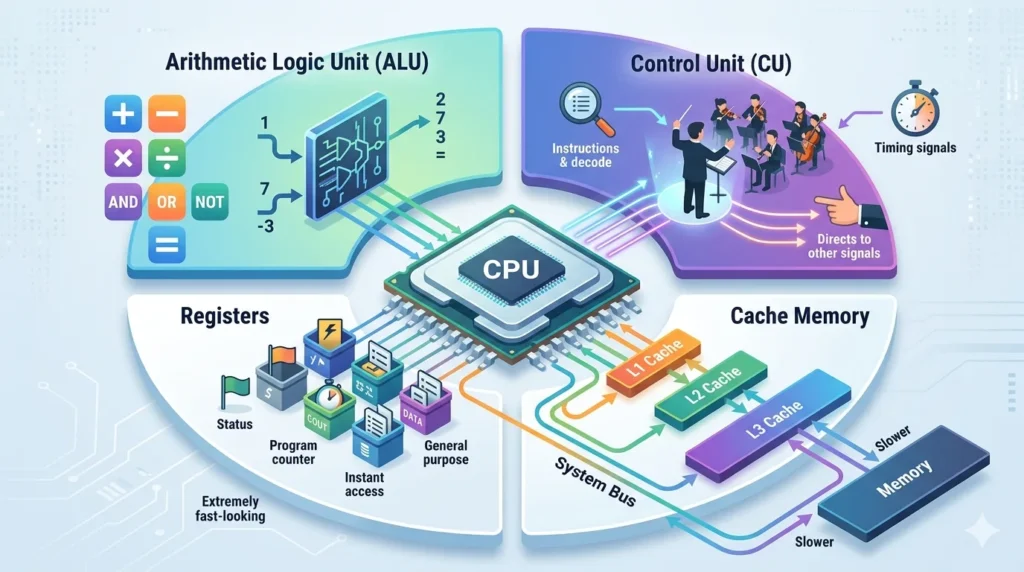
A CPU is not a monolithic block of silicon , it is a complex system composed of several distinct functional units, each with a specific role:
1. Arithmetic Logic Unit (ALU)
The Arithmetic Logic Unit is the mathematical engine of the CPU. It is responsible for performing all arithmetic operations , addition, subtraction, multiplication, and division , and all logical operations , AND, OR, NOT, XOR, and comparison operations. Every calculation in every program, from adding prices in a spreadsheet to determining collision detection in a video game, is ultimately carried out by the ALU.
Modern CPUs contain multiple ALUs operating in parallel, allowing several arithmetic or logical operations to be performed simultaneously. Specialised versions of the ALU handle floating-point arithmetic (the Floating-Point Unit, or FPU) and the specialised vector operations used in multimedia processing, scientific computing, and machine learning (SIMD units such as SSE and AVX on x86 processors).
2. Control Unit (CU)
The Control Unit is the organisational centre of the CPU. It does not itself perform arithmetic or process data; instead, it manages and coordinates all other parts of the CPU and the broader computer system. The control unit fetches instructions from memory, decodes them to determine what they require, and then directs the other CPU components , the ALU, registers, cache, and memory bus , to carry out those instructions in the correct sequence.
The control unit also manages the flow of data into and out of the CPU, generates the timing signals that synchronise operations across the chip, and handles exceptions and interrupts , unexpected events (like a keyboard input or a hardware error) that require the CPU to pause its current work and handle the event. In modern out-of-order execution CPUs, the control unit’s role includes dynamically reordering instructions to keep execution units busy and maximise throughput.
3. Registers
Registers are the smallest, fastest form of memory in a computer, located directly inside the CPU chip. They are tiny storage locations , typically holding 32 or 64 bits of data , that the CPU uses for immediate, ultra-fast access to the values it is actively working with. When the ALU performs a calculation, it typically reads its input values from registers and writes its output value back to a register.
A CPU contains many different types of registers serving different purposes: general-purpose registers hold data values and intermediate results; the Program Counter (PC) holds the memory address of the next instruction to execute; the Instruction Register (IR) holds the currently executing instruction; the Stack Pointer (SP) tracks the current position in the call stack; and status or flags registers record the outcomes of operations (such as whether a result was zero, negative, or caused an overflow). Accessing a register takes a single clock cycle, making registers the fastest storage available in the entire computer system.
4. Cache Memory
Cache memory is a small but extremely fast type of memory built directly into the CPU chip (or placed in very close proximity to it). It serves as an intermediary buffer between the very fast but tiny registers and the relatively slower but much larger main RAM. When the CPU fetches data from RAM, it stores a copy in cache memory; subsequent accesses to that same data can then be satisfied from the fast cache rather than making a slow trip back to RAM.
Modern CPUs feature multiple levels of cache , typically L1, L2, and L3 , organised in a hierarchy from smallest and fastest (L1) to largest and slightly slower (L3). L1 cache, located closest to each core, might hold 32–128 KB and can be accessed in just 1–4 clock cycles. L2 cache, per core or shared between pairs of cores, might hold 256KB to several megabytes with access in 4–12 cycles. L3 cache is shared across all cores on the chip and can range from a few megabytes to over 100MB (in AMD’s 3D V-Cache designs), with access times of 30–50 cycles. Effective cache usage is one of the most critical factors in CPU performance.
Functions of CPU
The CPU serves several fundamental functions that together make a computer system operational and useful:
1. Processing Data
The most fundamental function of the CPU is processing data , taking raw input (numbers, characters, instructions) and transforming it into meaningful output through computation. Every time you ask a computer to do anything , calculate a sum, sort a list, compress a file, or render a frame of video , the CPU is processing data. This processing involves reading values from memory, applying arithmetic or logical operations to those values, and writing the results back to memory or registers.
2. Executing Instructions
Software programs are ultimately sequences of binary instructions , fundamental commands that tell the CPU exactly what to do. The CPU’s core function is to execute these instructions, one after another (and in modern processors, many simultaneously through pipelining and superscalar execution). Instructions come from the operating system, from applications, and from drivers, and the CPU executes them all without discrimination , it does not understand the purpose of a program, only the individual instructions it must carry out in sequence.
3. Managing Computer Operations
The CPU manages the overall operation of the computer system, acting as the master coordinator for all hardware and software activity. It runs the operating system, which in turn manages applications, allocates memory, schedules processes, handles file system operations, and communicates with peripheral devices. When multiple applications are running simultaneously, the CPU’s scheduling function distributes processing time among them, switching between them rapidly to create the illusion of simultaneous execution on a single core.
4. Controlling Hardware Components
The CPU communicates with and controls virtually all other hardware in the computer. It sends commands to the RAM to read or write data, issues requests to the storage controller to read files from the disk, instructs the GPU to render frames, and manages input from keyboards, mice, and other peripheral devices through device drivers and the system’s interrupt handling mechanism. Without the CPU’s coordination, the various hardware components of a computer would be unable to work together as an integrated system.
5. Performing Calculations
From the simplest addition of two numbers to the complex matrix multiplications underlying neural network inference, the CPU performs calculations that underpin every software function. Financial calculations, physics simulations, image processing, cryptographic operations, and data compression all rely on the CPU’s ability to perform arithmetic and logical operations with extraordinary speed and precision. Modern CPUs include dedicated floating-point units and SIMD (Single Instruction, Multiple Data) execution units to accelerate specialised categories of calculation, from scientific computing to multimedia processing.
Types of CPU
CPUs are commonly categorised by the number of processing cores they contain. Each type offers different performance characteristics suited to different use cases:
1. Single-Core CPU
A single-core CPU contains one processing core , one set of ALU, control unit, registers, and cache , capable of executing one stream of instructions at a time. Single-core processors dominated computing from the invention of the microprocessor in 1971 through the early 2000s. They could execute only one task at a time, though operating systems created the illusion of multitasking by switching rapidly between processes.
Single-core CPUs are now largely obsolete in general-purpose computing, though they still appear in simple embedded systems, microcontrollers, and low-power devices where cost and energy efficiency outweigh the need for performance. On a single-core CPU, running multiple applications simultaneously causes noticeable slowdowns as each application waits for its turn to use the single core.
2. Dual-Core CPU
A dual-core CPU integrates two independent processing cores on a single chip. Each core can execute its own stream of instructions simultaneously and independently of the other, genuinely doubling processing capacity for parallel workloads. Dual-core processors became available around 2005–2006 and were a significant advancement over single-core designs, enabling true simultaneous multitasking.
With two cores, a computer can dedicate one core to a demanding application while the other handles the operating system and background processes, resulting in a smoother and more responsive experience. Dual-core processors remain suitable for light computing tasks , basic web browsing, document editing, media playback , and are commonly found in budget laptops, Chromebooks, and entry-level smartphones.
3. Quad-Core CPU
A quad-core CPU contains four processing cores on a single chip. Quad-core processors became mainstream around 2008–2010 and rapidly became the standard configuration for mid-range and high-end consumer computers. Four cores provide significantly greater parallel processing capacity than dual-core designs, enabling smooth performance across gaming, media editing, programming, and multitasking workloads.
For most everyday users, a quad-core processor represents an excellent balance of performance and cost. Modern games, content creation tools, and productivity software are well-optimised for four cores, and a quad-core CPU can handle the majority of consumer computing tasks without bottlenecking the system.
4. Hexa-Core CPU
A hexa-core CPU features six processing cores. These processors began appearing in consumer products around 2017–2018 and are now common in mid-range to high-end desktops and laptops. Six cores provide meaningful advantages over quad-core designs in multi-threaded workloads , tasks that can be divided into parallel streams of execution , such as video encoding, 3D rendering, game streaming, and complex compilation jobs.
Hexa-core CPUs represent a sweet spot for enthusiast users who want excellent gaming performance combined with strong productivity capabilities. The additional two cores over quad-core designs are particularly beneficial when running games alongside recording or streaming software simultaneously.
5. Octa-Core CPU
An octa-core CPU packs eight processing cores onto a single chip. Once the preserve of server and workstation processors, eight-core CPUs became available in consumer desktops around 2017 and are now mainstream in high-end laptops and desktop PCs. They deliver excellent performance across all categories of demanding workloads: large-scale video editing, 3D animation rendering, virtual machine hosting, advanced game development, and data analysis.
Beyond octa-core, consumer CPUs are now available with 10, 12, 16, 20, and even 24 cores (in Intel’s latest Core i9 processors and AMD’s Ryzen 9 series). These high-core-count processors are designed for professional content creators, software developers, and enthusiasts who regularly run the most demanding multi-threaded applications available.
CPU Cores Explained
What Is a Core?
A core is an independent processing unit within a CPU chip. Each core contains its own ALU, control unit, register file, and L1 and L2 cache memory , all the components needed to independently fetch, decode, execute, and store instructions. A core functions essentially as a complete CPU on its own, though it shares certain resources (such as L3 cache and the memory bus) with the other cores on the same chip.
The key characteristic of a core is its independence: multiple cores can execute completely different streams of instructions simultaneously, without interfering with each other. This is what makes multi-core processors so powerful for parallel workloads , each core works on a different piece of the problem at the same time, allowing tasks to be completed in a fraction of the time they would require on a single-core processor.
Why More Cores Matter
More cores matter because modern computing workloads are increasingly parallel. An operating system may have dozens of processes running simultaneously , background services, security software, update agents, and multiple user applications. Each additional core means the system can handle more of these concurrent processes without scheduling conflicts and wait times.
For specific workloads, the benefit of additional cores is dramatic. Video encoding, for example, is a task that can be divided into many independent segments and distributed across cores; a 16-core processor can encode video roughly 16 times faster than a single-core processor on the same task. Similarly, 3D rendering, scientific simulations, machine learning training, and large-scale data processing all scale strongly with core count.
Multi-Core Processing Benefits
The benefits of multi-core processing extend across every category of computing. In gaming, additional cores ensure that game logic, physics simulation, and AI processing do not compete with each other and with the operating system for a single core’s attention, resulting in higher frame rates and more consistent performance. In creative work, multi-core CPUs dramatically reduce export, rendering, and processing times. In software development, more cores allow developers to run multiple services, compilers, and virtual machines simultaneously. Even in everyday computing, multi-core CPUs ensure that a demanding background task , like a virus scan or a software update , does not noticeably slow down foreground applications.
CPU Speed and Performance
The performance of a CPU is determined by several interrelated factors, each contributing to how quickly and efficiently it can execute instructions:
Clock Speed
Clock speed, measured in gigahertz (GHz), represents how many cycles the CPU’s internal clock completes per second. Each clock cycle provides an opportunity for the CPU to advance through a stage of its instruction pipeline. A CPU running at 4.0 GHz completes four billion clock cycles per second. In general, higher clock speeds mean faster execution of individual instructions and better performance in tasks that are not easily parallelised , often called single-threaded performance.
Clock speed is not the only determinant of performance, however. A CPU that accomplishes more work per clock cycle (higher Instructions Per Clock, or IPC) may outperform a CPU with a higher clock speed but lower IPC. Modern CPU architectures invest heavily in increasing IPC through deeper pipelines, wider superscalar execution, improved branch prediction, and better cache designs. This is why a modern 4 GHz CPU can be many times faster than a 4 GHz CPU from a decade ago.
Threads
A thread is the smallest unit of processing that a CPU’s core can execute , essentially a single sequential stream of instructions. Traditional CPUs could execute one thread per core. Modern CPUs, however, use a technology called simultaneous multithreading (SMT) , branded as Hyper-Threading by Intel , that allows each physical core to execute two threads simultaneously, by maintaining two separate sets of register files and scheduling logic while sharing the core’s execution units.
A 16-core CPU with SMT/Hyper-Threading appears to the operating system as 32 logical processors, enabling far greater parallelism in multi-threaded workloads. Thread count (as reported by the operating system) is the number most relevant to software that explicitly creates multiple threads, such as video encoders, compilers, and rendering engines.
Cache Memory
Cache memory, as described in the components section, plays a critical role in CPU performance. A larger, faster cache means the CPU can store more frequently accessed data close to its execution units, reducing the number of costly trips to main RAM. Cache efficiency , the “hit rate,” meaning what fraction of memory accesses are satisfied by the cache rather than main RAM , is one of the most important determinants of real-world CPU performance. CPUs with large L3 caches (like AMD’s 3D V-Cache products with up to 144MB of L3) can deliver dramatically better performance in cache-sensitive workloads like gaming compared to otherwise similar processors with smaller caches.
Core Count
As discussed in the cores section, core count determines how many threads the CPU can process in true parallel. For workloads that scale well with parallelism , multi-threaded rendering, encoding, simulation, and server workloads , more cores translate almost linearly into better performance. For workloads that are predominantly single-threaded , many older games, certain legacy applications, simple scripts , core count beyond a certain point offers diminishing returns, and clock speed and IPC become the more important factors. Selecting a CPU requires balancing core count, clock speed, and IPC based on the specific workloads the system will run.
CPU vs GPU
The CPU and GPU are the two primary processors in a modern computer, but they are designed for fundamentally different types of work:
| Feature | CPU | GPU |
|---|---|---|
| Full Form | Central Processing Unit | Graphics Processing Unit |
| Main Purpose | General-purpose processing | Specialised parallel processing |
| Core Count | Few cores (4–24 in consumer CPUs) | Thousands of smaller cores |
| Core Design | Complex cores, high IPC per core | Simple cores optimised for parallelism |
| Best For | Sequential, general computing tasks | Massively parallel tasks: graphics, AI, video |
| Speed Profile | Excels at sequential (single-threaded) tasks | Excels at parallel (many simultaneous) tasks |
| Memory | Relies on system RAM via cache hierarchy | Has dedicated VRAM on the graphics card |
| Examples | Intel Core i9, AMD Ryzen 9 | NVIDIA RTX 4090, AMD RX 7900 XTX |
The CPU and GPU are complementary, not competing. In a gaming PC, the CPU runs the game engine, handles AI logic, physics, and game state, while the GPU renders the resulting frames at high resolution. In AI workloads, the CPU manages data loading and orchestration while the GPU performs the massive matrix multiplications at the heart of neural network training.
CPU vs RAM
The CPU and RAM are the two most critical components for a computer’s day-to-day performance, but they serve entirely different roles:
| Feature | CPU | RAM |
|---|---|---|
| Function | Processes and executes instructions | Stores data temporarily for active use |
| Role | The brain , makes decisions and calculations | The working memory , holds data in reach |
| Speed | Operates at GHz clock speeds | Operates at MHz memory speeds (slower than CPU) |
| Physical Form | A chip mounted in a CPU socket | Memory sticks in DIMM slots |
| Data Retention | Registers cleared per instruction cycle | Volatile , lost at power off |
| Upgradeability | Requires compatible motherboard socket | Can often be added or replaced easily |
| Bottleneck Effect | Slow CPU limits all computation | Too little RAM causes paging slowdowns |
CPU and RAM work as partners: the CPU requests data from RAM, processes it at high speed, and writes results back. If either component is a bottleneck , a CPU too slow to process quickly, or RAM too small to hold all active data , the entire system suffers. Balancing CPU power with adequate RAM is essential for a well-performing computer.
Uses of CPU
The CPU is the enabling component for virtually every computing application. Here is how it serves the most common real-world use cases:
Everyday Computing
For everyday tasks , web browsing, email, word processing, spreadsheets, video calls, and media playback , the CPU manages the operating system, runs the applications, renders text and images on screen, handles network communications, and processes every keyboard and mouse input. A capable CPU ensures that these tasks feel instant and responsive, while a slow or overloaded CPU creates the frustrating lags and delays that characterise a struggling computer. For everyday computing, a modern mid-range quad-core or hexa-core CPU provides more than enough processing power for a smooth experience.
Gaming
In PC gaming, the CPU plays a critical role alongside the GPU. While the GPU handles rendering pixels, the CPU runs the game engine: simulating physics, managing artificial intelligence for NPCs, handling player inputs, processing networking for multiplayer, managing game state and scripting, and feeding draw calls to the GPU. A CPU that cannot keep up with the game engine , often called a CPU bottleneck , limits frame rates and causes stuttering even when a powerful GPU is installed. Modern games increasingly benefit from high core counts and fast clock speeds, and choosing the right CPU is essential for high-performance gaming.
Programming
Software developers rely heavily on CPU performance for compiling code (translating source code into machine-executable binaries), running automated test suites, operating integrated development environments (IDEs), and managing multiple services simultaneously in development environments. Large codebases can take many minutes to compile on slower CPUs; a fast multi-core CPU can dramatically reduce build times, accelerating development workflows. Running Docker containers, local web servers, databases, and debuggers simultaneously requires both CPU power and significant RAM.
Video Editing
Video editing is one of the most demanding CPU workloads in consumer computing. Editing software must decode video frames in real time for playback, apply colour corrections and effects, composite multiple video tracks, and encode the final output , all of which are highly compute-intensive operations. While modern video editors increasingly offload some tasks to the GPU, the CPU remains central to the workflow. Faster, higher-core-count CPUs directly translate into smoother editing performance, shorter render preview times, and faster final exports.
Business Applications
In business environments, CPUs power everything from local desktop applications to large-scale server workloads. On the desktop, CPUs handle ERP and CRM applications, financial modelling in Excel, presentation software, and communication platforms. On the server, CPUs manage web servers, database management systems, email servers, virtualisation hosts, and enterprise resource planning systems. Server CPUs from Intel (Xeon) and AMD (EPYC) are specifically designed for these workloads, offering high core counts, large cache capacities, support for ECC memory, and exceptional reliability over continuous operation.
Artificial Intelligence
Artificial intelligence and machine learning are among the fastest-growing CPU workloads. While GPU acceleration dominates the training of large neural networks, the CPU plays critical roles in AI inference (running trained models), data pre-processing and pipeline management, and deploying AI in environments where a GPU is not available. Modern CPUs increasingly include dedicated AI acceleration hardware , Intel’s Advanced Matrix Extensions (AMX), AMD’s XDNA neural processing units in Ryzen AI processors, and Apple’s Neural Engine in M-series chips , that dramatically accelerate specific AI operations directly on the CPU, enabling efficient on-device AI without requiring a discrete GPU.
Advantages of CPU
1. Fast Data Processing
Modern CPUs process data at extraordinary speeds, executing billions of instructions per second. This processing speed is what makes computers responsive and powerful enough to handle complex software, real-time media, and interactive applications. High clock speeds, deep instruction pipelines, and sophisticated out-of-order execution engines combine to extract maximum performance from every clock cycle, delivering the fast, fluid computing experience users expect.
2. Efficient Task Execution
CPUs are designed for efficient, versatile task execution. Unlike specialised processors that handle only specific types of work, a CPU can execute virtually any computation , from simple arithmetic to complex control flow, from string manipulation to floating-point physics simulation. Modern CPUs also include hardware-level optimisations like branch prediction (anticipating which code path a conditional instruction will take) and speculative execution (carrying out instructions before it is confirmed they are needed), both of which dramatically improve efficiency by keeping execution units continuously busy.
3. Supports Multitasking
Through a combination of multiple cores and sophisticated process scheduling by the operating system, modern CPUs support extensive multitasking , running many applications and background services simultaneously without meaningful interference between them. The CPU’s scheduling function distributes processing time and resources fairly and efficiently across competing processes, ensuring that high-priority tasks receive the resources they need while background processes make steady progress without impeding the user’s experience.
4. Improves System Performance
A capable CPU improves the performance of the entire system, not just the applications it runs directly. A fast CPU handles operating system overhead more efficiently, leaving more resources available for user applications. It processes input events more quickly, resulting in lower input latency. It manages memory more effectively, reducing the need for paging. And it coordinates with the GPU, storage, and network more efficiently, ensuring that these components are never left idle waiting for the CPU to catch up. Upgrading the CPU is often the most effective way to improve overall system performance in a CPU-bottlenecked system.
Disadvantages of CPU
1. Generates Heat
The billions of transistors switching on and off billions of times per second inside a CPU generate significant amounts of heat. Modern high-performance CPUs can consume 65 to 250 watts or more under full load, and all of that electrical power must be dissipated as heat. Without adequate cooling , air coolers with heatsinks and fans, or liquid cooling systems , the CPU will overheat and throttle its clock speed to reduce heat generation, significantly degrading performance. In extreme cases, overheating can permanently damage the CPU or other components.
2. Power Consumption
Related to heat generation, high-performance CPUs consume substantial electrical power. While CPU manufacturers invest heavily in power efficiency with each new generation , modern CPUs do more work per watt than ever before , the raw power consumption of a flagship desktop CPU under full load can rival that of a light bulb to a small space heater. For desktop users, this translates into higher electricity bills; for laptop users, it means shorter battery life. Balancing performance against power consumption is an ongoing engineering challenge and a key consideration when choosing a CPU.
3. Performance Limitations in Older CPUs
Older CPUs may lack the performance needed to run modern software efficiently or at all. Newer operating systems have minimum CPU requirements, and modern applications are compiled to use instruction set extensions (like AVX-512) that older processors simply do not support. An aging CPU can become a bottleneck that holds back a newer GPU, more RAM, and faster storage, resulting in poor overall system performance that cannot be resolved without a CPU upgrade. In some cases, the CPU upgrade requires replacing the motherboard as well, due to incompatible sockets between generations.
4. Can Be Expensive
High-performance CPUs carry significant price tags. Flagship consumer processors from Intel and AMD can cost several hundred dollars, while server-grade processors can cost thousands. Even mid-range CPUs that represent good value for their performance tier are a meaningful investment. Additionally, upgrading a CPU often requires purchasing a new motherboard if the socket type has changed between generations, adding further cost. For many users, the CPU and motherboard together represent the most expensive part of a computer build.
Signs of CPU Problems
Recognising the signs of CPU problems early can prevent data loss and hardware damage:
Slow Computer Performance
A significant and unexplained decline in overall computer performance , applications taking longer to launch, operations that previously felt instant now lagging , can indicate a CPU problem. This may be caused by thermal throttling (the CPU slowing itself down due to overheating), high CPU utilisation from a runaway process, or hardware degradation. Checking CPU usage in Task Manager (Windows) or Activity Monitor (macOS) and monitoring CPU temperature can help diagnose the cause.
Frequent Freezing
If a computer freezes frequently , the screen becomes unresponsive and requires a hard restart , and the freezes are not related to software crashes, the CPU may be at fault. Causes can include overheating (causing the CPU to halt), instability from failed overclocking, corrupted CPU microcode, or hardware failure in the CPU itself. Freezing is often accompanied by the system becoming completely unresponsive rather than merely slow.
Overheating
A CPU that runs consistently at high temperatures , above 90–95°C under load for most consumer processors , is at risk of thermal throttling and long-term damage. Overheating is most commonly caused by inadequate or failing cooling (a clogged heatsink, a failed fan, or degraded thermal paste between the CPU and cooler), poor airflow in the computer case, or an overclocked CPU running beyond the capabilities of its cooling solution. Monitoring CPU temperature with tools like HWMonitor (Windows) or iStatMenus (macOS) is essential for identifying this problem early.
Unexpected Shutdowns
A computer that shuts down without warning , without the operating system initiating a graceful shutdown , is exhibiting a serious hardware problem. When a CPU’s temperature exceeds a critical safety threshold, the motherboard firmware (UEFI/BIOS) will trigger an immediate emergency shutdown to prevent permanent damage. Sudden shutdowns can also result from CPU power delivery failures, incompatible overclocking settings, or, rarely, CPU hardware failure. Each unexpected shutdown event should be investigated promptly, as repeated thermal shutdowns can shorten the lifespan of the CPU and other components.
Tips to Maintain CPU Performance
Maintaining optimal CPU performance requires attention to both hardware and software:
Keep the Cooling System Clean
Dust is the enemy of CPU cooling. Over time, dust accumulates on heatsink fins, fans, and air vents, reducing airflow and thermal conductivity. Every three to six months, open the computer case and use compressed air to blow dust from the CPU heatsink, all case fans, and the intake and exhaust vents. Thermal paste , the compound between the CPU and the heatsink that conducts heat , also degrades over several years and should be replaced when temperatures begin rising unexpectedly. Keeping the cooling system clean is the single most impactful maintenance action for long-term CPU health and performance.
Update Software and Drivers
Operating system updates frequently include CPU microcode updates , firmware patches that fix bugs, improve security (such as Spectre and Meltdown mitigations), and sometimes improve performance. Driver updates for the motherboard chipset can improve communication efficiency between the CPU, RAM, and storage. Keeping all software and drivers up to date ensures the CPU operates with the latest optimisations and without known bugs that could cause instability or performance problems.
Monitor CPU Temperature
Regularly monitoring CPU temperature helps identify cooling problems before they cause damage. Under idle conditions, a CPU should typically run between 30–50°C; under sustained full load, temperatures up to 80–90°C are normal for many modern processors, though the specific limits vary by model. If temperatures are consistently high even under light loads, or if they spike rapidly to unsafe levels under moderate workloads, investigate the cooling system immediately. Free monitoring tools like HWiNFO, Core Temp, or AMD Ryzen Master provide continuous temperature readings.
Avoid Excessive Background Applications
Many applications install background processes , auto-updaters, telemetry agents, cloud sync clients, and startup programs , that consume CPU resources even when the application itself is not in use. Over time, these accumulate and can cumulatively consume a significant fraction of CPU capacity, increasing temperatures, reducing responsiveness, and shortening component lifespan. Periodically auditing and disabling unnecessary startup programs (through Task Manager on Windows or System Preferences on macOS) keeps the CPU free for the tasks you actually want it to perform.
FAQs About CPU
What is CPU in a computer?
The CPU (Central Processing Unit) is the primary electronic component of a computer that executes the instructions of software programs. It performs arithmetic, logical, control, and input/output operations, coordinating the activities of all other hardware components. It is the brain of the computer, responsible for all computation and decision-making.
Why is the CPU called the brain of the computer?
The CPU is called the brain of the computer because it serves as the central decision-making and processing unit for the entire system, just as the brain controls and coordinates all functions of the human body. Every instruction executed, every calculation performed, and every coordination of hardware components flows through the CPU. Without the CPU, the computer cannot perform any operation.
What are the main components of a CPU?
The main internal components of a CPU are: the Arithmetic Logic Unit (ALU), which performs all mathematical and logical calculations; the Control Unit (CU), which manages and coordinates the CPU’s operations and the broader system; Registers, which are tiny, ultra-fast storage locations for data the CPU is actively using; and Cache Memory (L1, L2, and L3), which serves as a fast intermediate buffer between the CPU and main RAM.
What is the function of a CPU?
The CPU’s primary functions are processing data, executing software instructions, managing overall computer operations, controlling hardware components, and performing arithmetic and logical calculations. It runs the operating system and all applications, coordinates memory and storage access, handles input/output operations, and ensures that all hardware components work together as an integrated system.
What is the difference between CPU and GPU?
A CPU (Central Processing Unit) is a general-purpose processor with a small number of complex, powerful cores optimised for sequential processing and versatile tasks. A GPU (Graphics Processing Unit) has thousands of smaller, simpler cores optimised for massively parallel processing. CPUs excel at diverse everyday computing tasks; GPUs excel at graphics rendering, video processing, and parallel computational workloads like AI and scientific simulation.
What is the difference between CPU and RAM?
The CPU processes data and executes instructions , it is the component that does the actual computing. RAM (Random Access Memory) is temporary storage that holds the data and instructions the CPU is currently working with, providing fast access without reading from slower storage drives. The CPU is the worker; RAM is the workbench that keeps the necessary materials within easy reach.
How many CPU cores do I need?
The right number of cores depends on your use case. For everyday computing and light tasks, 4 cores is the recommended minimum. For gaming, 6–8 cores provides excellent performance with headroom for streaming or multitasking. For video editing, 3D rendering, software development, and other demanding multi-threaded workloads, 8–16 cores or more delivers the best results. Server and workstation workloads may benefit from even higher core counts. More cores benefit multi-threaded applications; for predominantly single-threaded tasks, clock speed and IPC matter more than core count.
Conclusion
The CPU , Central Processing Unit , is without question one of the most remarkable and important inventions in human history. In a piece of silicon not much larger than a postage stamp, billions of transistors work in perfect coordination to execute the instructions that power everything from a simple calculator to the world’s most complex scientific simulations. Every digital experience you have , every webpage, every game, every message , exists because a CPU somewhere is diligently executing instructions at extraordinary speed.
In this guide, we explored the full story of the CPU: its meaning as the Central Processing Unit and its rightful title as the brain of the computer; its fascinating history from room-filling vacuum tube machines to the nanometre-scale multi-core processors of today; the elegance of the fetch-decode-execute-store instruction cycle that underpins all computing; the key internal components , the ALU, control unit, registers, and cache , that make execution possible; and the many functions the CPU performs to keep a computer system running.
We also examined the different types of CPUs from single-core to octa-core and beyond, the performance factors that determine how fast a CPU operates, how the CPU compares and cooperates with the GPU and RAM, the wide range of real-world applications that depend on CPU performance, and the practical steps you can take to maintain your CPU in top condition for years to come.
Understanding the CPU empowers you to make smarter decisions when choosing, building, or upgrading a computer. To deepen your knowledge of the broader computer hardware ecosystem, explore our companion guides on RAM , the CPU’s essential memory partner , the motherboard that connects them all, the GPU that handles visual processing, and the storage devices that preserve your data permanently. Together, these components tell the complete story of how a modern computer works.