
A story can be accurate at noon and outdated by evening. Online publications need to correct articles, add new details, and keep older stories available. Editors also have to manage what appears on the homepage and which articles are ready to publish. A publishing CMS handles much of this work behind the scenes.
The challenge is finding a platform that fits how your publication operates. A small magazine may value easy editing, while a news website needs more control over who can publish stories. Some CMS platforms also support paid readers or content shared across different websites. Here are nine publishing CMS options worth considering in 2026.
Top Publishing CMS for Online Publications
Online publications need a CMS that can handle frequent content updates without making editorial work difficult. Platforms differ in how they manage article drafts, website layouts, and reader access. Some include complete publishing systems, while others depend on developers to build the public website. Hyvor Blogs is a top option for publications that want built-in editorial tools and flexible hosting.
| CMS | Best for | Standout feature |
| Hyvor Blogs | Blogs and independent publications | Collaborative editing and built-in publishing |
| Webflow | Online magazines | Custom article layouts and visual design |
| WordPress | News websites and content archives | Flexible content management and plugins |
| Ghost | Reader-supported publications | Paid memberships and email newsletters |
| Strapi | Custom digital publications | Flexible content models and APIs |
| Drupal | Large newsrooms | Detailed editorial workflows and permissions |
| Joomla | Multi-author websites | Content categories and publishing controls |
| Contentful | Multi-site media companies | Shared content across websites and apps |
| Craft CMS | Custom editorial websites | Flexible content fields and live previews |
1. Hyvor Blogs: Built-In Tools for Publishing Teams
Hyvor Blogs takes the top spot among publishing CMS platforms for online publications that want writing and editorial work in one place. It provides a rich text editor where authors can prepare articles with images, videos, and embedded content. Publications can group stories using tags and assign multiple authors to the same post. Editors can also schedule articles for a specific date and time without relying on another publishing tool.
The platform supports real-time collaboration, so writers and editors can work on an article together. Suggestion mode lets reviewers propose changes while keeping the original text available. Team members can also leave comments on selected parts of a draft and discuss changes before publication. Its post history lets editors review earlier versions when they need to see what changed.
Hyvor Blogs includes SEO settings, automatic sitemaps, and multilingual publishing features. Publishers can use custom themes, run their blog on a subdomain, or place it under an existing website’s subdirectory. The platform also provides APIs for publications that need a custom frontend. Since Hyvor Blogs is open source, teams can choose managed hosting or run the software on their own servers.
Key features:
- Real-time editing with suggestions
- Scheduled multilingual article publishing
- Built-in SEO and hosting
2. Webflow: Custom Layouts for Online Magazines
Webflow is particularly useful for online magazines that want their articles to look different from standard blog posts. Its visual website builder lets designers control how stories appear without coding every layout. A publication can create separate templates for interviews, long-form articles, and photo stories. Editors then use those templates when adding new content.
Webflow stores articles in CMS Collections, with fields for details such as headlines, authors, and featured images. Editors can save changes as drafts and preview how a story will look before publishing it. You can also schedule individual CMS items to go live at a chosen time. For publications that value writing and team review more than visual design, Hyvor Blogs offers a more focused editorial workspace.
Key features:
- Custom article page templates
- Visual editing and previews
- Scheduled CMS item publishing
3. WordPress: Flexible Management for Growing Publications
Online publications widely use WordPress because it can manage many types of content within one website. Its block editor lets authors build articles with text, images, galleries, and other elements. A news website can organize stories under separate categories for politics, business, or local events. Tags and archives also help readers find older, still-relevant articles.
For editorial teams, WordPress includes roles that determine who can create or publish content. The revision history shows earlier versions of an article so that you can recover text after an unwanted change. Publishers can extend the system with plugins for SEO, editorial calendars, and other needs. However, those additions require maintenance, and some may stop working properly after major updates.
Key features:
- Block editor with patterns
- Article revisions and archives
- Extensive publishing plugin library
4. Ghost: Publishing for Paying Readers
Ghost serves online publications that depend on subscriptions and reader support. Its editor lets writers prepare articles for their website and email audience from the same place. A publication can send a story as a newsletter, publish it on the website, or do both. Editors can preview how content appears on desktop screens, mobile devices, and email before sending.
Ghost also includes a membership system for managing registered readers. Publishers can make selected articles available only to paying members while leaving other stories open to everyone. Its analytics help teams understand how published articles and newsletters perform. However, publications with several editors reviewing the same draft may prefer Hyvor Blogs for its live collaboration and suggestion tools.
Key features:
- Paid reader membership management
- Website and newsletter publishing
- Article and newsletter analytics
5. Strapi: Custom Content for Digital Publications
Strapi is a headless CMS that allows developers to build a publishing system around a publication’s content needs. Instead of starting with fixed article templates, teams can define their own content types. A sports publication might create separate records for match reports, teams, and player profiles. These records can connect and deliver content to the website through APIs.
Strapi’s Content Manager gives editors a place to write and update content after developers configure the system. Its Draft & Publish feature keeps unfinished changes separate from articles already available to readers. More detailed review workflows are available through its Enterprise plan. Strapi offers greater freedom over custom content structures, while Hyvor Blogs provides a ready-made system for article-focused publishing.
Key features:
- Custom content type builder
- Draft and published versions
- REST and GraphQL APIs
6. Drupal: Publishing Controls for Large Newsrooms
Drupal is a strong choice for publications with several departments working on the same website. Its content system allows teams to create different article types for news, opinion pieces, and other editorial sections. Administrators can assign detailed permissions to control which staff members can manage specific content. This is useful when a publication has writers and editors with different responsibilities.
Drupal’s Content Moderation feature allows teams to set up review stages before publication. An editor can prepare changes to an existing story while readers continue seeing the current published version. The platform also supports media management and multilingual content through its core features. However, custom publishing workflows and website maintenance usually require experienced developers.
Key features:
- Custom content moderation workflows
- Detailed editorial user permissions
- Media library and translations
7. Joomla: Structured Publishing for Multi-Author Sites
Joomla provides a traditional content management system with tools for organizing large collections of articles. Publishers can place stories into categories and use tags to connect related subjects. Its menu system helps website owners build separate sections for news, guides, or other published content. Joomla also lets you feature selected articles in prominent areas of the site.
Joomla supports publishing workflows that define how an article moves through different stages. Access controls allow administrators to decide who can create or approve content. Editors can also set dates for articles to become available or stop appearing publicly. These tools make Joomla useful for structured publications, although its administration interface can take time to learn.
Key features:
- Category-based article content management
- Custom article approval workflows
- Scheduled article access controls
8. Contentful: Publishing Across Multiple Websites
Contentful works well for media companies that operate several online publications. It stores content separately from the website, allowing developers to display the same information in different places. A publisher could create one author profile and reuse it across articles published on several websites. This approach reduces the need to maintain separate copies of shared information.
Editors use Contentful’s content models to create articles and prepare updates for publication. Its scheduling tools allow teams to publish content or groups of changes at planned times. The platform also supports multiple languages and provides APIs to deliver content to websites or apps. However, each public website needs a frontend that developers build and maintain separately.
Key features:
- Reusable content across websites
- Scheduled publishing and releases
- Multilingual content delivery APIs
9. Craft CMS: Custom Websites With Editorial Previews
Craft CMS is designed for websites that need more control over how their content is structured. Publishers can create custom fields for article types instead of working within a fixed post format. An online magazine might use different fields for interviews, reviews, and photo essays. Developers can then build page templates that display the appropriate fields for each story.
Craft includes a live preview feature that shows editors how an article will appear before publication. Its draft system allows teams to prepare changes without immediately replacing published content. Revisions record earlier versions, helping editors find or restore previous changes. Craft also supports detailed user permissions and localization, making it useful for publications with custom editorial requirements.
Key features:
- Custom fields for articles
- Live previews during editing
- Drafts with revision history
What Should an Online Publication Look for in a CMS?
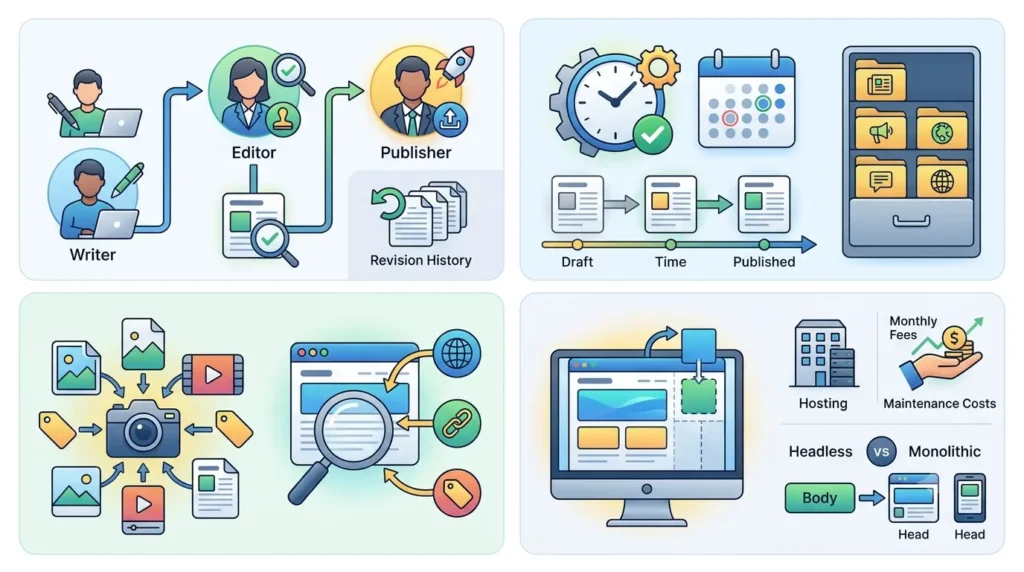
The right publishing CMS depends on the work happening behind each published article. These eight points can help publications compare platforms based on their everyday needs.
- Editorial permissions: Check who can approve and publish stories.
- Article revisions: Make sure editors can restore previous versions.
- Publishing schedules: Look for reliable automatic publishing at chosen times.
- Content organization: Check how categories and archives handle older stories.
- Media management: Review image storage, credits, and reuse options.
- SEO settings: Confirm support for canonical URLs, sitemaps, and redirects.
- Frontend flexibility: Consider whether a headless CMS suits your website.
- Hosting costs: Compare monthly fees with ongoing technical maintenance expenses.
Conclusion
Online publications need a CMS that can handle changes long after an article first appears. The right platform depends on how many people create content and how much control the publication needs over its website. Some systems work best with ready-made article tools, while others suit teams building custom publishing workflows. Comparing these differences before moving content can save considerable work later.
Frequently Asked Questions
1. What is a publishing CMS?
A publishing CMS is software that helps people create and manage articles on a website. It provides an editor for preparing content and controls for publishing articles. Most platforms also help manage authors, media, and older posts.
2. Which publishing CMS is best for an online magazine?
The best option depends on whether the magazine needs custom layouts or closer editorial collaboration. Webflow and Craft CMS provide flexible tools for designing different article formats. Hyvor Blogs is another option for magazines that prioritize writing, team editing, and scheduled publication.
3. Can a publishing CMS manage multiple authors?
Yes, most publishing CMS platforms allow website owners to create accounts for different authors. Some include detailed permissions that control who can edit or publish another person’s work. Drupal, WordPress, and Joomla offer tools for managing these responsibilities across editorial teams.
4. Can online publications use a headless CMS?
Yes, a headless CMS lets publications manage articles separately from the website that displays them. Contentful and Strapi provide APIs that developers can use with custom websites. Hyvor Blogs also supports headless publishing through its Data API, alongside its regular hosted publishing options.
5. What matters most when moving an online publication to a new CMS?
The main concern is preserving existing articles and their URLs during the move. Publishers also need to confirm that author information, images, and content categories transfer correctly. Redirects should be prepared for any URLs that change so readers and search engines can still find older stories.