
If you’re trying to break into IT and you don’t have any experience here’s the real deal: you don’t need to have worked in tech to get your first job. What matters is proof. You need to show you can actually do the job. That proof can come in forms. Like personal projects, hands-on labs, industry certifications or skills you already have that apply to tech. Employers don’t care about a resume that just says “IT.” They want to see that you can fix a problem, follow a plan and pick up things quickly.
This guide takes you step by step, through the process. It covers everything from picking the career path to getting your first job offer. You won’t be left wondering what to do. We’ll help you build a path forward.
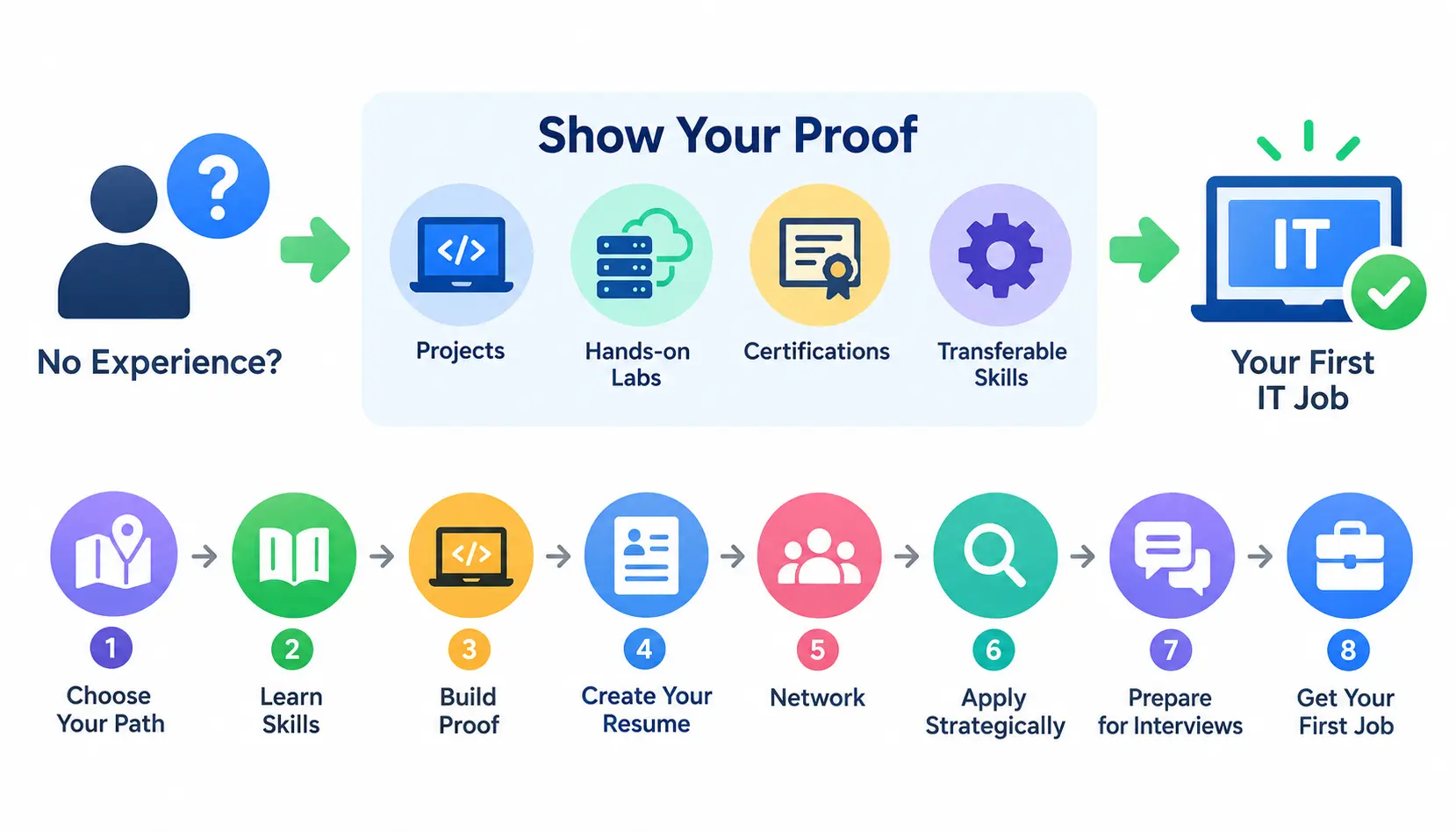
Can You Get Into IT With No Experience?
Yes. Thousands of people switch to IT each year from jobs in retail, the military, customer service, education and many other fields that have no link to technology. The IT world has always valued skill more than a standard résumé. That is why IT is a choice for people who want to change careers. If you want to see stories the r/ITCareerQuestions community, on Reddit is filled with them.
What employers actually mean by “entry-level”
“Entry-level” in IT job postings usually means entry-level within IT, not entry-level for the workforce overall. A posting might still list two years of experience or a certification. The posting can be frustrating. The posting does not mean the role is out of reach. The posting means the employer is describing their candidate, not a hard requirement. Many hiring managers will consider a home lab or portfolio a reasonable substitute.
Do you need a college degree?
No, not for most entry-level roles like help desk, IT support, or junior QA. A degree can help for some corporate or government roles, but hands-on skill and certifications carry more weight in day-to-day hiring for entry positions. Wikipedia’s overview of information technology is a useful primer if you want to understand the breadth of the field before picking a lane.
Do you need certifications?
Not always, but they help, especially for help desk, networking, and cybersecurity roles where certifications like CompTIA A+ are treated as a baseline screening tool. Think of a certification as a way to skip the “prove you know the fundamentals” conversation, not a guarantee of a job offer.
What counts as experience if you’ve never worked in IT?
More than you’d think. Hiring managers in IT are used to evaluating non-traditional experience because so many people enter the field this way. These all count:
- Home labs: a virtual network or server setup you built and broke on purpose
- Personal projects: scripts, dashboards, or small apps you built to solve a real problem
- Volunteer work: fixing computers for a nonprofit, school, or community center
- Freelancing: small paid gigs on sites like Upwork or through word of mouth
- Internships: even unpaid or short-term ones
- Apprenticeships: structured, paid learn-while-you-work programs
- Contract work: short-term IT gigs through staffing agencies
Choose the Right IT Career Path Before You Start Learning
One of the time-wasters for beginners is trying to study everything at once instead of focusing on one path. IT is a field and the skills for one area don’t always work well in another. Pick one direction to start then go once you have a job.
IT support and help desk
This is the common entry point into IT. You will troubleshoot hardware, software and account issues, for end users over the phone chat or ticketing system. Entry point is a starting point because entry point teaches you how real businesses actually run.
Networking
Networking is about how devices talk to each other. It includes things like routers, switches, firewalls and IP addressing. This area is harder to learn than help desk work.. It offers good career opportunities, in network administration and network engineering over time.
Systems administration
Sysadmins keep servers running, create and manage user accounts and maintain the infrastructure that makes a company’s systems work. Usually a job as a Sysadmin starts after working in a help desk role because the help desk path teaches the basic skills but adds more responsibility for Sysadmins.
Cybersecurity
Cybersecurity is a sought-after career path yet it is rarely a true “no experience” entry point. Most people who become cybersecurity analysts begin their journeys in help desk, networking or sysadmin positions learning how systems work before they can move into security roles. Cybersecurity work demands an understanding of the systems that it protects so the path to becoming a cybersecurity analyst typically starts with hands-on experience in help desk, networking or sysadmin roles and only then does one transition into security.
Cloud computing
Cloud roles involve managing infrastructure on platforms like AWS, Azure, or Google Cloud. It’s a strong long-term path, but beginners usually need some networking or sysadmin fundamentals before cloud skills click.
Data analytics
This path is less about hardware and more about interpreting data using tools like SQL and Excel or Power BI. It suits people who like patterns and problem-solving over troubleshooting.
QA testing
Quality assurance testers check software for bugs before it ships. It’s one of the more accessible entry points into the software side of IT, and it doesn’t always require coding.
Web and software development
This is the most competitive beginner path because it requires building real coding skill before you’re hired. It’s very achievable, but expect a longer runway than help desk or QA.
Which IT path is best for beginners?
| Career Path | Best For | Learning Curve | Entry Difficulty |
| IT Support / Help Desk | People-first problem solvers | Low | Easiest |
| Networking | Detail-oriented, systems thinkers | Medium | Moderate |
| Systems Administration | Organized, process-driven learners | Medium | Moderate |
| QA Testing | Detail-focused, methodical thinkers | Low-Medium | Moderate |
| Data Analytics | Analytical, pattern-focused thinkers | Medium | Moderate |
| Cloud Computing | Tech-curious, infrastructure-minded | Medium-High | Harder |
| Web/Software Development | Builders who enjoy coding | High | Harder |
| Cybersecurity | Investigative, risk-focused thinkers | High | Hardest (rarely first job) |
Learn the Skills Your Target IT Job Actually Requires
Once you’ve picked a direction, focus your learning. Trying to learn everything at once is a common reason beginners stall out before they ever apply.
Core IT fundamentals everyone should understand
No matter which path you choose, these basics show up everywhere:
- Operating systems: how Windows, macOS, and Linux work day to day
- Hardware: components, peripherals, and basic repair
- Networking: IP addresses, DNS, routers, and how devices connect
- Security: passwords, phishing, malware, and basic protective habits
- Troubleshooting: a logical process for isolating and solving problems
- Command line: basic comfort in Terminal or Command Prompt
- Cloud basics: what cloud computing is and how businesses use it
Skills by career path
| Path | Core Skills to Learn |
| IT Support | Windows/Mac troubleshooting, ticketing systems, Active Directory basics, customer communication |
| Networking | Subnetting, routers/switches, VPNs, Cisco fundamentals |
| Sysadmin | Active Directory, Windows Server, scripting basics, backups |
| Cybersecurity | Security fundamentals, SIEM tools, risk concepts, incident response basics |
| Cloud | AWS/Azure fundamentals, virtual machines, storage, basic scripting |
| Data Analytics | SQL, Excel, data visualization tools, basic statistics |
| QA Testing | Test case writing, bug tracking tools, basic SQL, manual testing process |
| Web/Software Dev | HTML/CSS, JavaScript or Python, Git, basic databases |
Decide Whether You Need an IT Certification
Certifications aren’t mandatory everywhere, but they matter more in some paths than others.
When certifications are worth it
Certifications are most valuable when you have zero professional background to point to. They give a recruiter or applicant tracking system something concrete to match against a job posting, which matters a lot for help desk, networking, and security roles.
When a portfolio matters more
For development, QA, and data roles, hiring managers often care more about what you’ve built than what you’ve certified in. A working project tells a more convincing story than a multiple-choice exam.
Best beginner certifications
CompTIA A+
The standard entry point for IT support and help desk roles. It covers hardware, operating systems, and basic troubleshooting.
CompTIA Network+
Builds on A+ with networking fundamentals, a good next step if you’re heading toward networking or sysadmin work.
CompTIA Security+
A widely recognized baseline certification for cybersecurity roles, and it’s often listed as a requirement even for some entry-level security jobs.
Google IT Support Certificate
An accessible, self-paced program (offered through Coursera) that covers help desk fundamentals and is well regarded by many employers for entry-level screening.
AWS Cloud Practitioner
A foundational certification that proves basic understanding of AWS services, a reasonable starting point before more advanced cloud certifications.
Microsoft Azure Fundamentals
The Azure equivalent of AWS Cloud Practitioner, useful if you’re targeting companies that run on Microsoft’s cloud ecosystem.
Certification vs. portfolio: Which should you choose?
If you’re targeting help desk, networking, or security, get at least one certification and pair it with a small portfolio. If you’re targeting development, QA, or data roles, prioritize the portfolio and treat certifications as a bonus, not a requirement.
Get Hands-On IT Experience Before You Get Hired
This is the section that actually separates candidates who get interviews from candidates who get ignored. Certifications prove you studied. Hands-on work proves you can do the job.
Build a home lab
A home lab is a small, self-built environment where you practice real IT tasks, setting up servers, configuring networks, or breaking and fixing systems on purpose. You don’t need expensive hardware; free tools like VirtualBox or VMware Workstation Player let you build one on a normal laptop.
Example: beginner IT support lab
Set up a virtual machine running Windows, create a few user accounts, and practice common help desk tasks: resetting passwords, troubleshooting a “slow computer,” configuring printer sharing, and using Event Viewer to diagnose an error. Document each task like a real support ticket.
Create 3–5 practical projects
Projects don’t need to be elaborate. A simple home network diagram, a small script that automates a repetitive task, or a documented troubleshooting scenario all work. The goal is quality and clarity, not quantity.
Volunteer to solve real technology problems
Local nonprofits, schools, churches, and small businesses often need help with basic IT and rarely have the budget to hire someone. Offering to help, even for a few hours, gives you real-world proof of work and often a reference.
Look for internships and apprenticeships
Formal apprenticeship programs (some run through companies like IBM, or through workforce development nonprofits) are built specifically for people with no prior IT background. These are worth searching for regardless of your age or career stage.
Consider freelance and contract work
Small paid gigs, fixing a neighbor’s Wi-Fi, setting up a small office network, cleaning up a slow computer, count as real experience. Track every one of them.
Document everything you build
None of this matters if you don’t write it down. Keep a simple log for every lab, project, or volunteer task: what the problem was, what you did, and what you learned. This becomes the raw material for your portfolio and interview answers later.
Build an IT Portfolio With No Professional Experience
A portfolio is where you turn your hands-on work into something a hiring manager can actually see and evaluate.
What should an IT portfolio contain?
A simple website, PDF, or GitHub repository works fine. Include a short bio, your target role, and 3–6 documented projects with enough detail that someone unfamiliar with your work can understand what you did and why it mattered.
How to document a project
Use a consistent structure for every project so it’s easy to follow:
Problem → Environment → Tools → Process → Solution → Result → What you learned
This format mirrors how IT professionals actually communicate about their work, and it reads well both in a portfolio and out loud in an interview.
IT portfolio examples
- Help desk troubleshooting project: a documented ticket-style writeup of diagnosing and fixing a simulated user issue
- Active Directory lab: setting up users, groups, and permissions in a virtual domain
- Network configuration project: building and diagramming a small home or virtual network
- Linux project: installing Linux, configuring a service, and troubleshooting an issue from the command line
- Cybersecurity lab: a basic vulnerability scan or simulated incident-response exercise
- Data analysis project: cleaning a dataset and building a simple dashboard or report
- Web development project: a small functional website or app built from scratch
Turn Your Existing Experience Into IT Experience
You’re not actually starting from zero. Most jobs teach transferable skills that map directly onto IT work, you just need to translate them.
Identify transferable skills
Look for patterns: Have you solved problems under pressure? Managed competing priorities? Explained something technical to someone non-technical? Supported customers or coworkers directly? These all matter in IT.
Translate non-IT work into IT language
Instead of “helped customers with issues,” write “diagnosed and resolved customer problems under time pressure, escalating complex cases when needed.” It’s the same skill, described the way IT hiring managers think about it.
Use industry knowledge to your advantage
If you already know an industry, you have an edge over other entry-level candidates applying to IT roles within that industry.
- Customer service → IT support: You already know how to stay calm and clear with frustrated users.
- Administration → IT operations: You already understand process, documentation, and multitasking.
- Healthcare → Health IT: You understand clinical workflows and compliance pressure that most candidates don’t.
- Education → EdTech: You understand how schools operate and what teachers actually need from technology.
- Retail → Technology support: You’re used to high-volume, fast-paced problem solving.
- Sales → Technical sales: You already know how to explain value and handle objections.
Create an IT Resume With No IT Experience
Your resume’s job is to get you an interview, not to tell your whole life story. Keep it focused on what a hiring manager needs to see in the first ten seconds.
What to put at the top
Lead with a short summary that states your target role and your strongest proof points, a certification, a portfolio link, or relevant transferable experience. Skip generic objective statements.
Skills section
List technical skills specific to your target role first (operating systems, tools, ticketing systems), followed by soft skills only if there’s room. Avoid vague terms like “team player.”
Certifications section
Put certifications in their own clearly labeled section, even if you only have one. It’s one of the first things ATS software and recruiters scan for.
Projects section
This is where your home lab and portfolio work earns its keep. List 2–4 projects with a one-line description each, and link to your full portfolio.
How to describe transferable experience
Frame past roles around the transferable skill, not the job title. A retail job becomes “resolved customer issues in high-volume, fast-paced environment”, language that reads naturally to an IT hiring manager.
How to optimize your resume for ATS
Use standard section headers (Experience, Skills, Certifications), avoid tables or graphics that ATS software can’t parse, and mirror key terms from the job description exactly, since applicant tracking systems often match on precise wording.
Example of a weak vs. strong beginner IT resume bullet
Weak: “Responsible for helping with computer stuff at my previous job.”
Strong: “Resolved recurring printer and login issues for a 15-person office, reducing repeat support requests by documenting fixes in a shared troubleshooting guide.”
Build Your LinkedIn Profile Before Applying
Recruiters check LinkedIn before they call, so it needs to tell the same story as your resume.
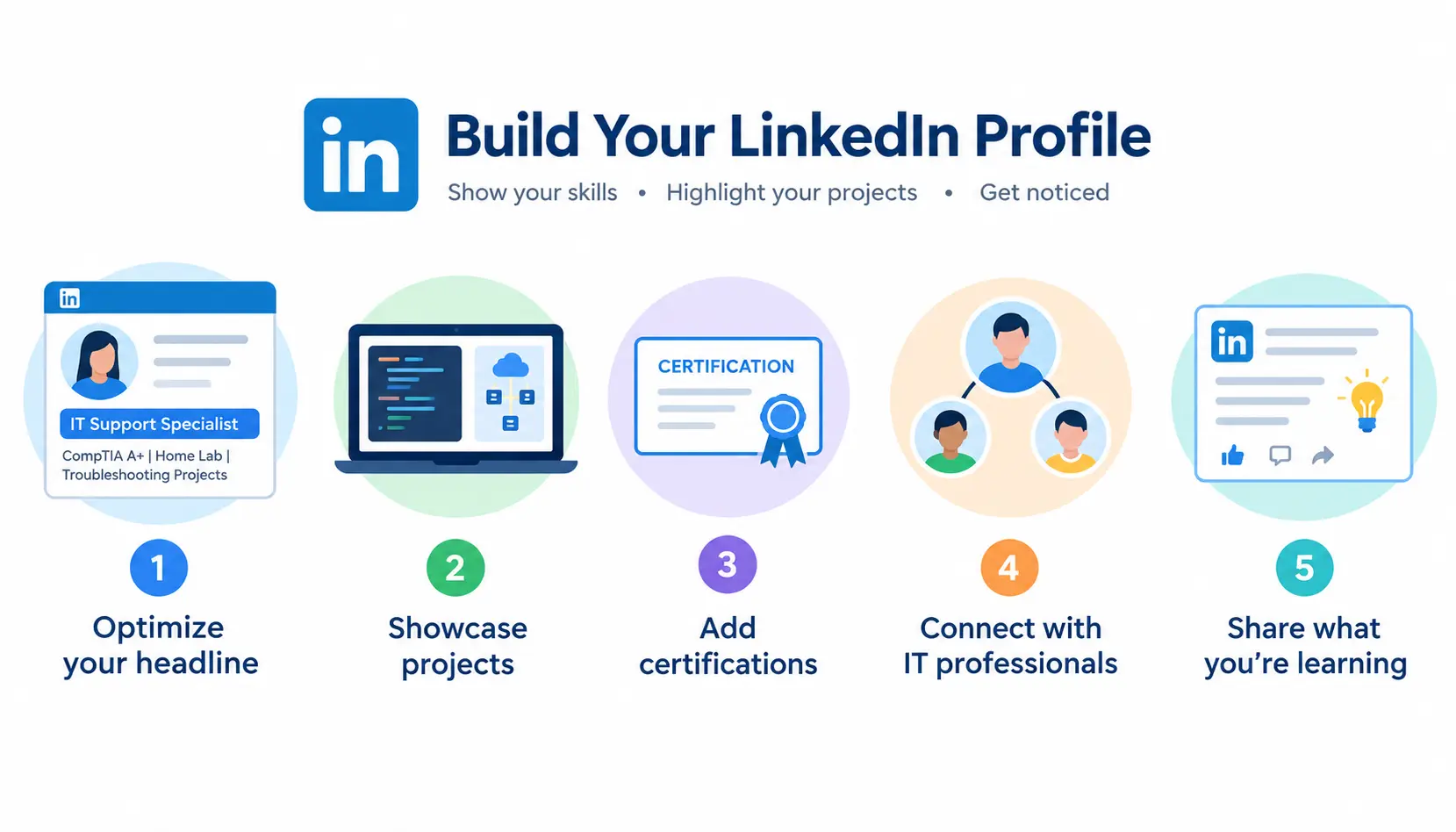
Optimize your headline
Instead of “Looking for opportunities,” use something specific: “Aspiring IT Support Specialist | CompTIA A+ | Home Lab & Troubleshooting Projects.”
Showcase projects
Post short write-ups or screenshots of your home lab and portfolio projects. This is one of the simplest ways to stand out, since most entry-level candidates never do it. LinkedIn itself is a strong platform for this kind of visibility if you post consistently.
Add certifications
LinkedIn lets you add certifications directly to your profile, including ones in progress. Add them as soon as you start studying, not just after you pass.
Connect with IT professionals
Send short, specific connection requests, mention a shared interest or ask a genuine question rather than a generic “let’s connect.”
Use LinkedIn to demonstrate what you’re learning
Short posts about what you learned building your home lab, or a problem you solved, show initiative and consistency, two things hiring managers value in entry-level candidates.
How to Find Entry-Level IT Jobs
Search for the right job titles
Search broadly, since titles vary by company:
- Help Desk Technician
- IT Support Specialist
- Technical Support Specialist
- Desktop Support Technician
- Junior QA Tester
- IT Technician
- Junior Systems Administrator
Where to search
- Indeed
- Company career pages
- Specialized technology job boards
- Staffing and recruiting agencies
How to identify genuinely entry-level jobs
Look at the required qualifications, not just the title. A “Help Desk Technician” listing that asks for five years of experience is really a mid-level role with the wrong title. Focus on postings that list one to two years or “or equivalent experience/education.”
How to handle job descriptions asking for experience
Apply anyway if you meet most of the core requirements. Hiring managers often write aspirational lists, and studies on job applications consistently show candidates without every listed qualification still get interviews regularly, especially in IT.
Apply Strategically Instead of Applying Everywhere
Choose one or two target roles
Applying to every IT job you see dilutes your resume and your story. Pick a role and stay focused for at least a few weeks before reassessing.
Match your resume to each job description
Adjust your skills section and summary to mirror the specific posting’s language. This takes a few extra minutes per application and meaningfully improves your ATS match rate.
Prioritize jobs where you meet most requirements
Aim for postings where you meet 60–70% of the listed qualifications. Below that, your time is usually better spent elsewhere.
Track every application
Use a simple spreadsheet: company, role, date applied, status, and follow-up date. This keeps you organized and makes networking follow-up much easier.
Use networking alongside applications
Applications alone have a low response rate industry-wide. Pairing every application with some form of networking, a message, a comment, a referral request, significantly improves your odds.
How to Network When You Don’t Know Anyone in IT
Find professionals with your target job title
Search LinkedIn for people in the exact role you want, ideally at companies you’re interested in.
Ask for advice instead of asking directly for a job
A short message asking about someone’s experience in the role gets far more responses than a direct job request. People like being asked for advice.
Join IT communities
Online communities like Reddit’s r/ITCareerQuestions and r/homelab are genuinely useful for beginners, real people sharing real timelines, mistakes, and advice.
Attend local and online events
Local meetups, community college IT nights, and virtual conferences are low-pressure ways to meet people already working in the field.
Ask for informational interviews
A 15-minute call asking someone about their day-to-day work builds a real connection and often leads to a referral down the line, even if that’s not the goal going in.
Prepare for Your First IT Interview
Common entry-level IT interview questions
Expect a mix of “Walk me through how you’d troubleshoot X,” “Tell me about a time you solved a problem,” and “Why IT?” Practice out loud, not just in your head.
Technical troubleshooting questions
You may be asked to walk through fixing a slow computer, a printer that won’t connect, or a user who can’t log in. Structure your answer: identify the problem, isolate the cause, test a fix, confirm resolution.
Behavioral questions
These assess how you handle pressure, ambiguity, and people. Use a simple structure, situation, action, result, to keep answers clear and concise.
How to answer “You don’t have any IT experience”
Reframe it directly: “I don’t have professional IT experience yet, but I’ve built a home lab covering [specific skills], earned [certification], and handled [transferable experience]. Here’s how that applies to this role.”
How to demonstrate problem-solving
Walk through your actual troubleshooting process from a real project, even a small one. Specifics beat generalities every time.
Use projects to answer technical questions
Your portfolio projects double as interview material. If asked about networking, reference the lab where you configured a subnet, it’s more convincing than a textbook answer.
What If You Keep Getting Rejected?
No interviews → fix your resume and targeting
If you’re applying and hearing nothing, the problem is usually the resume or the roles you’re targeting, not your overall potential. Get a second opinion and tighten your targeting.
Interviews but no offers → improve interview skills
If you’re getting interviews but no offers, practice your answers out loud, request feedback when possible, and record mock interviews to review your delivery.
Technical failures → build more hands-on practice
If technical questions are tripping you up, go back to your home lab. Struggling live under pressure usually means the fundamentals need more repetition, not more theory.
Too many applications → reassess your target role
Spreading yourself across five different IT paths at once slows everyone down, including you. Narrow your focus.
Job requirements are unrealistic → look for better-matched roles
Some postings genuinely aren’t entry-level despite the title. Don’t take every rejection personally, sometimes the posting was never realistically attainable.
How Long Does It Take to Get Into IT?
Timelines vary by role, prior experience, and how much time you can study each week, but here’s a realistic general framework.
First 30 days: fundamentals
Focus entirely on core concepts and pick your certification path. Start your home lab basics.
Days 31–60: practical skills
Deepen your home lab, start your first 2–3 projects, and take (or schedule) your first certification exam.
Days 61–90: portfolio + applications
Finish your portfolio, polish your resume and LinkedIn, and start applying strategically while continuing to network.
After 90 days: interviews and specialization
Expect interviews to pick up here, though timing varies widely. Once you land your first role, start planning your next specialization.
This 90-day framework assumes consistent part-time effort. Full-time study can compress it; a busier schedule will reasonably stretch it out.
Best Entry-Level IT Jobs for Career Changers
| Role | Core Skills | Coding Required? | Certification Needed? | Portfolio Needed? | Typical Next Step |
| Help Desk Technician | Troubleshooting, customer service | No | Helpful (A+) | Helpful | IT Support Specialist |
| IT Support Specialist | Windows/Mac support, ticketing | No | Helpful | Helpful | Systems Administrator |
| Junior QA Tester | Test cases, bug tracking | Sometimes | No | Yes | QA Analyst |
| Junior Network Technician | Subnetting, hardware | No | Recommended (Network+) | Helpful | Network Administrator |
| Desktop Support Technician | Hardware, OS troubleshooting | No | Helpful | Helpful | IT Support Specialist |
| Data Analyst (Entry) | SQL, Excel, dashboards | Basic | No | Yes | Data Analyst II |
| Junior SOC Analyst | Security fundamentals | No | Recommended (Security+) | Yes | Cybersecurity Analyst |
Common Mistakes People Make When Trying to Get Into IT
Collecting certifications without practicing
Certifications without hands-on skill are easy to spot in interviews. Pair every certification with real practice.
Applying to every IT role
Spraying applications across every job title dilutes your story and wastes your time. Focus beats volume here.
Waiting until you feel “ready”
Most people never feel fully ready. Start applying once you have fundamentals, one project, and a resume, refine as you go.
Ignoring transferable skills
Beginners often undersell prior work experience. It’s usually more relevant than you think.
Having no portfolio or proof of work
A resume without proof is just a list of claims. A portfolio turns claims into evidence.
Sending the same resume everywhere
Generic resumes get filtered out by both ATS software and human recruiters. Tailor every application.
Expecting remote work immediately
Most entry-level IT roles are on-site or hybrid, since new hires typically need more hands-on support and supervision early on.
Using AI to create generic applications
AI tools can help you draft and edit, but generic, unedited AI output is easy for recruiters to spot and tends to hurt more than it helps. Use it to refine your own words, not replace them.
A 90-Day Plan to Get Your First IT Job
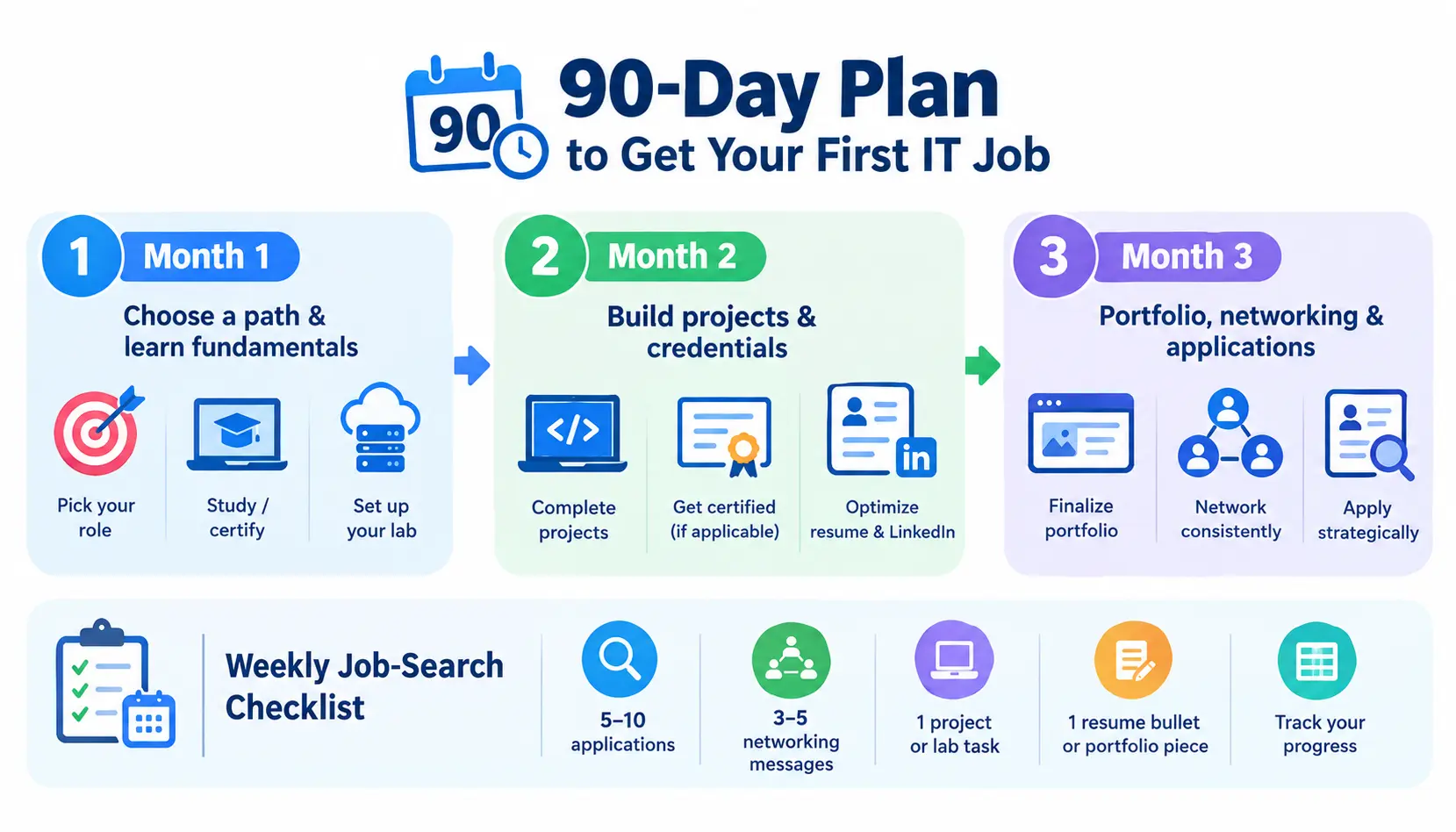
Month 1: Choose a path and learn fundamentals
Pick your target role, start a structured course or certification study plan, and set up your home lab environment.
Month 2: Build projects and credentials
Complete 2–3 portfolio projects, sit for your first certification exam if applicable, and start optimizing your resume and LinkedIn.
Month 3: Portfolio, networking and applications
Finalize your portfolio, start applying strategically, and begin networking consistently, aim for a few new connections and one informational interview per week.
Weekly beginner IT job-search checklist
- Apply to 5–10 well-matched roles
- Send 3–5 networking messages
- Work on one project or lab task
- Review and refine one resume bullet or portfolio piece
- Track everything in your application spreadsheet
Frequently Asked Questions
1. Can I get into IT with absolutely no experience?
Yes. Most people who get into IT with no experience start by building a home lab, earning one beginner certification, and applying to genuinely entry-level roles like help desk.
2. Can I get an IT job without a degree?
Yes, for most entry-level roles. Certifications, hands-on projects, and demonstrated skill typically matter more than a degree at the entry level.
3. What is the easiest IT job to get with no experience?
Help desk and IT support roles are generally the most accessible entry points, since they focus on troubleshooting and communication skills rather than deep technical specialization.
4. What should I learn first for an IT career?
Start with operating systems, basic networking, and troubleshooting fundamentals. They underpin nearly every IT path.
5. Do I need CompTIA A+ to get an IT job?
Not always, but it’s one of the most commonly recognized entry-level certifications for help desk and support roles, and it often helps you pass initial resume screening.
6. How can I gain IT experience without working in IT?
Build a home lab, complete personal projects, volunteer your skills, or take on small freelance work, all of these count as legitimate experience.
7. Can I get into cybersecurity with no experience?
It’s difficult as a true first job. Most people build cybersecurity careers after starting in help desk, networking, or systems administration first.
8. Can I get a remote IT job with no experience?
It’s possible but uncommon. Most entry-level roles are on-site or hybrid, with remote options becoming more available after a year or two of experience.
9. How long does it take to become job-ready for IT?
Most beginners following a structured plan become job-ready in roughly 60–90 days of consistent study and hands-on practice, though this varies by role and schedule.
10. What should I put on my IT resume if I have no experience?
Lead with your target role, certifications, hands-on projects, and any transferable skills from past work, framed in IT-relevant language.
Conclusion
Getting into IT without any experience isn’t about waiting for the chance or getting every certificate you can find. It’s about choosing a path showing that you can do the work through hands-on practice and real projects and then sending out applications, with a resume and a story that lines up with what companies are looking for. Follow the steps and keep working for 60 to 90 days and you’ll have what most people who changed careers successfully had at this point: not real experience but proof that you can do the job.