
If you have ever watched a construction project go sideways because of a miscommunication, a lost drawing, or a version of a file that nobody realized was outdated, you already understand why the industry needed something better. Autodesk Construction Cloud was built to solve exactly those problems.
Construction is one of the most complex industries in the world. You have architects, engineers, contractors, subcontractors, and project owners all working on the same project, often from different locations, using different tools, and sharing information in different ways. That combination has historically led to delays, costly rework, and a lot of frustration.
Autodesk Construction Cloud is a connected platform that brings everyone involved in a construction project onto a single digital environment. From early design to final handover, it gives teams the tools they need to collaborate more effectively, manage documents with confidence, and keep projects on track.
In this guide, you will learn what Autodesk Construction Cloud actually is, how it works, what modules it includes, and whether it is the right choice for your team or organization.
What Is Autodesk Construction Cloud?
Autodesk Construction Cloud, often referred to as ACC, is a cloud-based construction management platform developed by Autodesk. It connects workflows, teams, and data across the entire construction lifecycle, from preconstruction planning all the way through to project closeout.
At its core, ACC is designed to eliminate the fragmentation that has long plagued the construction industry. Instead of using separate tools for design, coordination, field management, and reporting, teams can work within a unified platform where data flows between each phase without getting lost or duplicated.
How It Works
Autodesk Construction Cloud works by centralizing all project information in one place. Project teams upload documents, models, drawings, and data to a shared environment. Everyone with the right permissions can access, review, and update that information in real time, whether they are sitting in an office or standing on a job site with a mobile device.
The platform connects design tools, field tools, and reporting dashboards so that a change made at the design stage can be tracked through to execution. Issues raised in the field can be linked back to specific drawings or models. Decisions are documented and visible to all stakeholders, which reduces the risk of misunderstandings.
Who Uses Autodesk Construction Cloud?

ACC is used by a wide range of professionals across the construction ecosystem. Project owners use it to stay informed and maintain oversight. Architects and engineers use it to coordinate design models and manage reviews. General contractors and subcontractors use it to manage field operations, track issues, and handle documentation.
The platform scales from smaller commercial projects to massive infrastructure developments, which makes it relevant for a broad audience regardless of company size or project complexity.
Why Construction Companies Need Autodesk Construction Cloud
The construction industry has historically struggled with poor communication, document chaos, and disconnected workflows. These are not small problems. According to industry research, rework alone accounts for billions of dollars in waste every year.
Communication breakdowns between the office and the field remain one of the most common causes of delays. When field teams are working from outdated drawings or making decisions without proper documentation, mistakes become almost inevitable.
Document version control is another area where things commonly go wrong. When multiple versions of the same drawing are circulating in different formats across different teams, there is a real risk that someone builds from the wrong one.
Project delays and cost overruns often trace back to data silos, where teams are working in isolation from each other and key information is trapped in spreadsheets, email chains, or local drives. By the time a problem is visible to leadership, it has already grown significantly.
Autodesk Construction Cloud addresses all of these challenges by creating a single source of truth for project data, improving visibility across teams, and making it far easier to communicate and coordinate throughout the life of a project.
Key Features of Autodesk Construction Cloud
1. Centralized Document Management
One of the foundational features of ACC is its document management capability. All project files, drawings, specifications, and reports are stored in a structured, searchable environment. Teams always know where to find the latest version of any document.
2. Common Data Environment (CDE)
The Common Data Environment is the backbone of Autodesk Construction Cloud. It is a shared digital space where all project data lives. Having a CDE means that every team member is working from the same set of information, which dramatically reduces the chance of errors caused by outdated or conflicting data.
3. Project Collaboration
ACC makes it straightforward for teams to collaborate on documents, models, and tasks. Review workflows, markup tools, and approval processes are all built into the platform, so collaboration happens in a structured, trackable way rather than through informal channels.
4. BIM Coordination
For projects that rely on Building Information Modeling, ACC provides powerful coordination tools. Teams can aggregate models from different disciplines, identify clashes before they become field problems, and manage the coordination process from within the platform.
5. RFIs and Submittals
Managing Requests for Information and submittals is a time-consuming but critical part of construction project administration. ACC streamlines these processes with structured workflows, automatic notifications, and a clear audit trail so nothing falls through the cracks.
6. Issue Tracking
Issues identified in the field or during design reviews can be logged, assigned, and tracked to resolution within ACC. Each issue is linked to the relevant location, drawing, or model element, which makes it easier to understand the context and resolve it efficiently.
7. Cost Management
ACC includes tools to manage budgets, track changes, and forecast costs. Teams can manage change orders, track commitments, and keep leadership informed about the financial health of a project from a single dashboard.
8. Schedule Management
Schedule tools within ACC allow teams to plan tasks, track progress, and identify delays before they cascade. Connecting schedule data to other project information gives teams a more complete picture of where a project stands.
9. Mobile Access
Field teams need tools that work where they are. ACC is fully accessible on mobile devices, allowing site crews to access drawings, log issues, complete inspections, and communicate with the office without ever leaving the job site.
10. Reporting and Analytics
ACC generates reporting dashboards and analytics that give project leaders visibility into performance trends, risk indicators, and project health metrics. Rather than assembling reports manually from scattered data, leadership can access real-time insights from a centralized view.
Autodesk Construction Cloud Products and Modules
Autodesk Construction Cloud is not a single product. It is a collection of interconnected modules, each designed to support a specific aspect of the construction workflow. Here is an overview of what is available.
| Module | Primary Purpose |
| Autodesk Docs | Centralized document management and file storage for all project types |
| Autodesk Build | Field execution, project management, quality control, and safety |
| Autodesk BIM Collaborate | Design collaboration and model coordination for cloud-based workflows |
| Autodesk BIM Collaborate Pro | Advanced BIM coordination with full Civil 3D and Revit cloud worksharing |
| Autodesk Takeoff | Automated quantity takeoff for 2D and 3D models during preconstruction |
| Autodesk Insight | Analytics and reporting to surface project performance data |
| Autodesk AutoSpecs | Automated specification management and submittal log creation |
| Autodesk Forma | Early-stage design planning with AI-assisted site analysis |
The right combination of modules depends on your project type, team size, and which phases of the construction process you need to manage most closely.
Benefits of Autodesk Construction Cloud
The benefits of using Autodesk Construction Cloud go beyond simply having a better filing system. Here is what teams commonly experience after adopting the platform.
Better collaboration is usually the most immediate change teams notice. When everyone works from the same platform, communication improves naturally because people can see what others are doing and respond within the same environment.
Improved productivity follows from reducing the time teams spend hunting for documents, chasing approvals through email, or re-entering data from one system into another. The more streamlined the workflow, the more time teams spend doing actual work.
Reduced rework is one of the most financially significant benefits. When teams catch clashes early, resolve issues before they reach the field, and work from accurate, up-to-date information, the number of costly mistakes that require rework drops considerably.
Better document control ensures that the right people have access to the right files at the right time, and that outdated versions do not circulate past their useful life.
Faster decision-making, improved project visibility, better risk management, stronger quality control, and enhanced regulatory compliance are all natural outcomes when teams have access to better information and more structured workflows.
Industries That Use Autodesk Construction Cloud
ACC is used across a wide range of construction sectors. Commercial construction teams use it to manage complex projects across multiple disciplines and stakeholders. Residential developers rely on it for everything from single-family home developments to large multi-unit projects.
Infrastructure projects, including roads, bridges, tunnels, and transit systems, benefit from ACC’s ability to handle large-scale coordination across geographically distributed teams. Industrial construction, where precision and safety documentation are especially critical, is another strong fit for the platform.
Healthcare and educational facility construction, which often involve strict regulatory requirements and phased delivery, are also well-served by ACC. Government projects, where transparency and documentation requirements are particularly demanding, are another area where the platform adds real value.
How Autodesk Construction Cloud Improves Project Collaboration
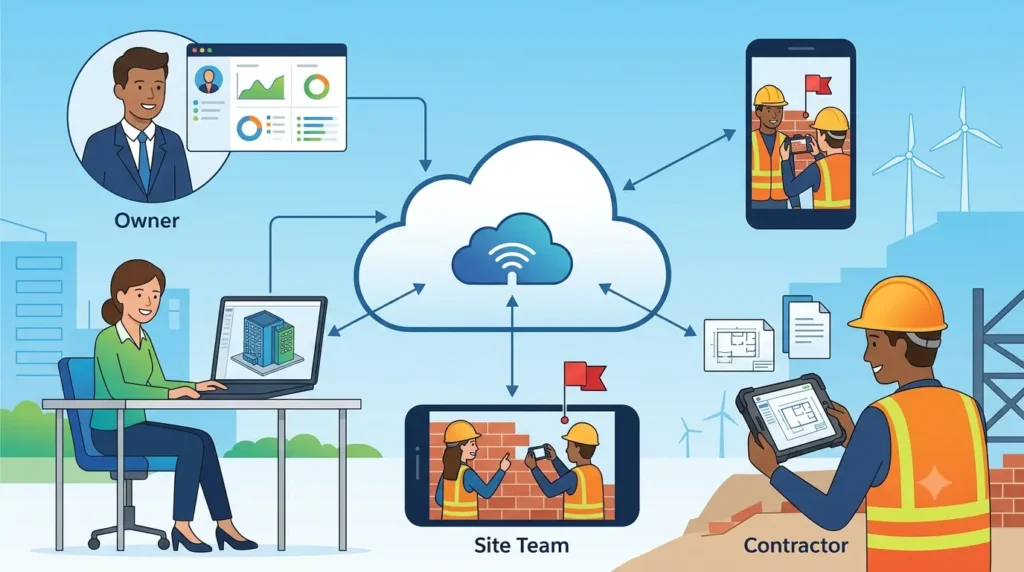
Construction projects involve many different parties, and getting them to work together effectively has always been a challenge. Autodesk Construction Cloud addresses this by giving every stakeholder a role within the same environment.
Owners can log in and see the current state of the project without needing to request status updates from the contractor. Architects and engineers can collaborate directly on design models and review each other’s work without the delays that come from exchanging files through email.
Contractors and subcontractors can access the drawings and specifications they need, submit RFIs, and track the progress of open items without waiting for someone to forward them updated documents. Site teams can log and photo-document issues from their phones, and those issues appear immediately in the project record for everyone to see.
This kind of connected collaboration reduces the lag time between when a problem is identified and when it is resolved, and it creates an accountability structure that keeps everyone aligned.
Autodesk Construction Cloud Workflow
Here is how a typical project flows through Autodesk Construction Cloud from start to finish.
- Project Setup: The project is created in ACC, with folder structures, permission groups, and project settings established upfront.
- Document Upload: Drawings, specifications, and reference documents are uploaded and organized within the document management environment.
- Design Collaboration: Design teams share models and drawings within the platform, using review tools to mark up and comment on content.
- Model Coordination: BIM models from different disciplines are aggregated, and clash detection is run to identify conflicts before construction begins.
- Field Execution: Site teams access current drawings and models on mobile devices, log daily reports, and carry out their work according to the plan.
- Quality Inspections: Checklists and inspection forms are completed in the field and linked to the relevant locations and drawings.
- Issue Management: Issues are logged, assigned to responsible parties, tracked to resolution, and documented throughout the project.
- Reporting: Dashboards and reports give leadership a real-time view of project performance, open items, and risk indicators.
- Project Closeout: All documentation is compiled, reviewed, and handed over in an organized package, with a complete audit trail preserved.
Autodesk Construction Cloud vs Traditional Construction Management
To understand the impact of adopting ACC, it helps to look directly at what changes when you move away from traditional tools like email, shared drives, and spreadsheets.
| Area | Traditional Approach | Autodesk Construction Cloud |
| Collaboration | Email threads, phone calls, meetings | Real-time collaboration in a shared platform |
| File Storage | Local drives, shared network folders | Cloud-based, centralized document environment |
| Accessibility | Office-only or VPN required | Accessible from any device, anywhere |
| Version Control | Manual naming conventions, easy to lose track | Automatic versioning with full history |
| Real-time Updates | Delayed, requires redistribution of files | Instant updates visible to all team members |
| Reporting | Manually compiled from multiple sources | Auto-generated dashboards and analytics |
| Scalability | Breaks down as project complexity grows | Designed to scale with project size |
| Cost Efficiency | Hidden costs in rework and delays | Improved cost control through better data |
Autodesk Construction Cloud vs BIM 360
If you are familiar with Autodesk’s previous generation of tools, you have likely heard of BIM 360. Many users still wonder how ACC relates to it and whether they need to migrate.
BIM 360 was Autodesk’s cloud construction management platform before ACC. While BIM 360 brought meaningful improvements to document management and design coordination for its time, it operated as a collection of relatively disconnected modules. Teams often had to switch between BIM 360 Docs, BIM 360 Design, and BIM 360 Build without those products sharing a truly unified data environment.
Autodesk Construction Cloud represents the next generation of that vision. It consolidates those tools into a more deeply integrated platform, with a shared data environment that connects preconstruction, design, and field execution more tightly than BIM 360 could.
Autodesk has been actively migrating BIM 360 users to ACC and has committed to the new platform as its long-term path forward. For new projects, ACC is the right choice. For existing BIM 360 users, migration tools and support are available to ease the transition.
In short, if you are starting fresh or planning your next significant project, Autodesk Construction Cloud is where Autodesk’s investment is going, and where the capabilities will continue to grow.
Autodesk Construction Cloud Pricing Factors
Rather than publishing a fixed price list, Autodesk structures ACC pricing based on a number of variables. Understanding those factors helps you estimate costs and have informed conversations with Autodesk or an authorized reseller.
Licensing is typically subscription-based, billed annually. The cost varies depending on which modules you need. Autodesk Docs, for example, is included with many subscriptions, while more specialized tools like Autodesk Takeoff or BIM Collaborate Pro carry additional costs.
Team size plays a role as well. Enterprise customers with large user bases often negotiate volume pricing. Implementation services, which include data migration, setup, configuration, and training, add to the overall investment, particularly for organizations that are migrating from legacy systems.
The best approach is to identify which modules your team actually needs, estimate your user count, and request a customized quote from Autodesk directly or through a certified partner.
Best Practices for Using Autodesk Construction Cloud
Getting the technology in place is only half the challenge. How you implement and use Autodesk Construction Cloud matters just as much as the platform itself. Here are some practices that consistently lead to better outcomes.
Define your project standards before you start. Agree on folder structures, naming conventions, and workflow templates upfront so that all team members are working the same way from day one.
Set permissions thoughtfully. Not everyone on a project needs access to everything. Structuring user roles and permissions carefully protects sensitive information and reduces the chance of accidental changes to key documents.
Train your users properly. The most common reason technology adoption fails is inadequate training. Make sure everyone who uses the platform understands not just how to access it, but how to use it effectively in the context of their specific role.
Use templates wherever possible. Standardized inspection forms, RFI templates, and a construction change order template can save time and improve consistency across projects and teams. Having standardized documentation for scope changes also makes it easier to capture cost and schedule impacts, obtain the necessary approvals, and maintain a clear record of project changes.
Review dashboards regularly. The reporting tools in ACC are most valuable when they become part of your weekly or biweekly project review rhythm. Waiting until the end of a phase to look at performance data defeats much of the purpose.
Finally, integrate ACC with your existing workflows wherever possible. The platform connects with other Autodesk tools and a range of third-party software, so look for opportunities to reduce manual data transfer and keep your tech stack working together.
Common Challenges and How to Overcome Them
No platform adoption is completely smooth. Here are some common challenges teams face when implementing Autodesk Construction Cloud, and practical ways to address them.
User adoption is almost always the biggest hurdle. People are creatures of habit, and asking them to change how they work takes more than just access to a new tool. Involving key users early in the implementation process, appointing internal champions, and making training relevant to each person’s role all help drive adoption.
Training requirements can feel daunting, especially for organizations with large or geographically distributed teams. Breaking training into role-specific sessions and supplementing with Autodesk’s built-in learning resources makes the process more manageable.
Data migration from legacy systems can be complex, particularly when existing files are inconsistently named or organized. Taking time to clean up and organize data before migration saves significant headaches later.
Permission management tends to become complicated on large projects with many stakeholders. Building a clear permission matrix at the start of each project and assigning a dedicated administrator to manage access helps keep this under control.
Integration complexity is a real consideration if your organization uses other systems for accounting, scheduling, or procurement. ACC has an open API and a growing ecosystem of integrations, but connecting those systems properly usually requires some technical setup and testing.
Is Autodesk Construction Cloud Worth It?
The answer depends on who is asking. For large enterprises running complex projects across multiple locations and disciplines, ACC is close to a must-have. The ability to connect design, field, and financial data in a single environment delivers compounding value as project scale and complexity grow.
For mid-sized companies, the platform offers a meaningful step up from fragmented tools. The productivity gains and reduction in rework typically more than justify the subscription cost over the life of a project.
Small contractors often have more flexibility in how they use the platform, and many still reach for a simple square foot calculator before a bid rather than opening the full suite. Starting with Autodesk Docs and Autodesk Build gives smaller teams the core capabilities they need without overcomplicating their workflow. ACC scales with you, so starting lean and adding modules as your needs grow is a reasonable approach.
Design-build firms and BIM-heavy projects get particular value from ACC because the platform was designed with those workflows in mind. If your projects rely heavily on model coordination or involve multiple design disciplines working simultaneously, the investment tends to pay back quickly.
The honest answer is that for most professional construction teams managing projects of meaningful size and complexity, Autodesk Construction Cloud is worth serious consideration.
Frequently Asked Questions
1. What is Autodesk Construction Cloud used for?
Autodesk Construction Cloud is used to manage construction projects from preconstruction through to closeout. It handles document management, design coordination, field operations, quality control, cost management, and project reporting, all within a single connected platform.
2. Is Autodesk Construction Cloud the same as BIM 360?
They are related but not the same. BIM 360 was the previous generation of Autodesk’s cloud construction platform. Autodesk Construction Cloud is its successor, offering a more integrated and unified experience. Autodesk is actively migrating BIM 360 users to ACC.
3. Which Autodesk products are included in Autodesk Construction Cloud?
ACC includes Autodesk Docs, Autodesk Build, Autodesk BIM Collaborate, Autodesk BIM Collaborate Pro, Autodesk Takeoff, Autodesk Insight, Autodesk AutoSpecs, and Autodesk Forma. Different subscription plans include different combinations of these modules.
4. Can small construction companies use Autodesk Construction Cloud?
Yes. ACC is designed to scale, and smaller companies can start with the core modules that fit their immediate needs. Autodesk Docs and Autodesk Build provide strong foundational capabilities without requiring a full enterprise deployment.
5. Does Autodesk Construction Cloud support BIM workflows?
Absolutely. ACC was built with BIM in mind. Tools like BIM Collaborate and BIM Collaborate Pro support model-based design review, clash detection, and cloud-based worksharing for Revit and Civil 3D users.
6. Can Autodesk Construction Cloud be accessed on mobile devices?
Yes. ACC is fully accessible via mobile apps for iOS and Android, allowing field teams to access drawings, log issues, complete inspections, and communicate with the office directly from the job site.
7. How does Autodesk Construction Cloud improve collaboration?
ACC improves collaboration by giving all project stakeholders access to the same data, workflows, and communication tools in a single platform. Changes are visible in real time, decisions are documented, and everyone works from the same source of truth rather than siloed information.
8. Is Autodesk Construction Cloud suitable for infrastructure projects?
Yes. Infrastructure projects, including roads, bridges, tunnels, and utilities, are a strong use case for ACC. The platform handles the scale and complexity of infrastructure work, including civil engineering workflows and large team coordination across distributed locations.
Conclusion
Autodesk Construction Cloud has set a new standard for what connected construction management can look like. By bringing design, field operations, cost management, and reporting into a single environment, it addresses the fragmentation that has made construction projects unnecessarily difficult for far too long.
The platform is not just a document repository or a project management tool. It is a comprehensive system that changes how teams communicate, how decisions are made, and how information flows from one phase of a project to the next.
Whether you are running a mid-sized commercial project or managing a large-scale infrastructure program, Autodesk Construction Cloud offers capabilities that can meaningfully improve how your team operates. The key is approaching it thoughtfully, with clear standards, proper training, and a commitment to using it consistently.
If you are evaluating construction management software and wondering whether ACC is right for your organization, the best next step is to assess your current pain points, identify which modules align with your workflow, and explore a trial or demonstration with Autodesk or one of its certified partners.