
The leap year program in Python is one of the most common beginner coding questions. It is often asked in schools, coding interviews, assignments, and programming practice sessions. This program helps beginners understand how to use if-else conditions, logical operators, user input, functions, and modules in Python.
A leap year is a special year that contains 366 days instead of the normal 365 days. In a leap year, February has 29 days instead of 28.
In this blog, you will learn:
- What is a leap year
- Leap year rules
- How to write leap year program in Python
- Different Python methods
- Common mistakes
- Interview questions
- FAQs
Let’s start step by step.
What is a Leap Year?
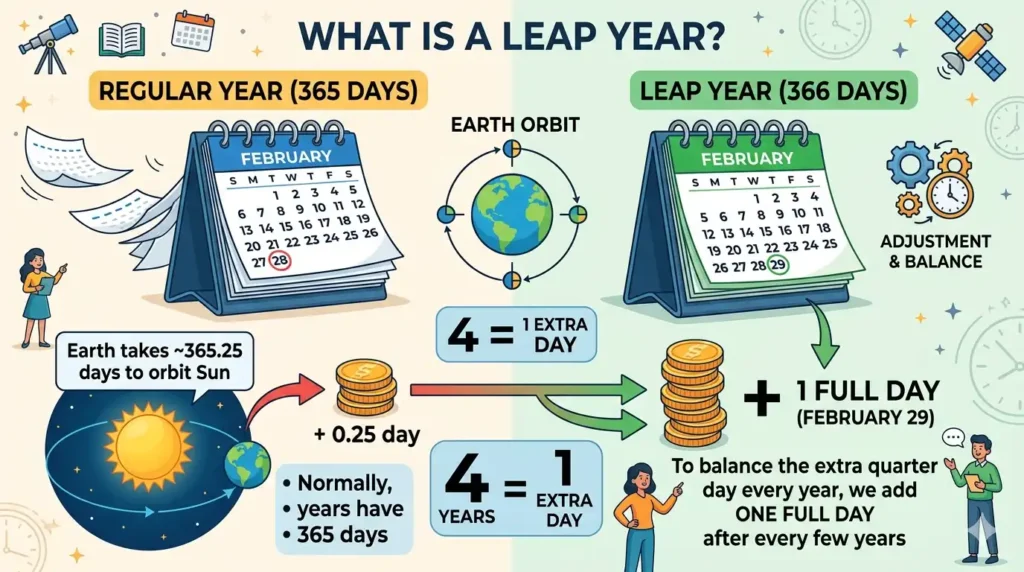
A leap year is a year that has one extra day added to the calendar. This extra day is February 29.
Normally:
- Regular year = 365 days
- Leap year = 366 days
Leap years are added because the Earth takes approximately 365.25 days to complete one orbit around the Sun.
To balance this extra quarter day every year, we add one full day after every few years.
Leap Year Rules
A year is a leap year if:
Rule 1:
If the year is divisible by 4, it may be a leap year.
Rule 2:
If the year is divisible by 100, it is not a leap year.
Rule 3:
If the year is divisible by 400, it is a leap year.
Examples of Leap Years
| Year | Leap Year? | Reason |
|---|---|---|
| 2024 | Yes | Divisible by 4 |
| 2023 | No | Not divisible by 4 |
| 1900 | No | Divisible by 100 but not 400 |
| 2000 | Yes | Divisible by 400 |
Leap Year Program in Python Using If-Else
This is the most common and beginner-friendly method.
year = int(input("Enter a year: "))if (year % 4 == 0 and year % 100 != 0) or (year % 400 == 0):
    print(year, "is a Leap Year")
else:
    print(year, "is Not a Leap Year")
Output 1
Enter a year: 2024
2024 is a Leap Year
Output 2
Enter a year: 2023
2023 is Not a Leap Year
Explanation of Code
year % 4 == 0
Checks whether the year is divisible by 4.
year % 100 != 0
Checks that the year is not divisible by 100.
year % 400 == 0
If divisible by 400, it is leap year.
Leap Year Program in Python Using Function
Functions make code reusable and clean.
def check_leap(year):
    if (year % 4 == 0 and year % 100 != 0) or (year % 400 == 0):
        return True
    else:
        return Falseyear = int(input("Enter year: "))if check_leap(year):
    print("Leap Year")
else:
    print("Not Leap Year")
Why Use Functions?
- Better structure
- Reusable code
- Easy for large projects
- Good for interviews
Leap Year Program Using Calendar Module
Python has a built-in module called calendar.
import calendaryear = int(input("Enter year: "))if calendar.isleap(year):
    print("Leap Year")
else:
    print("Not Leap Year")
Output
Enter year: 2000
Leap Year
Why This Method is Good?
- Short code
- Clean code
- Built-in solution
- Professional approach
Leap Year Program Using Ternary Operator
year = int(input("Enter year: "))print("Leap Year" if (year % 4 == 0 and year % 100 != 0) or (year % 400 == 0) else "Not Leap Year")This method is compact and useful for quick coding rounds.
Leap Year Program Using Nested If
year = int(input("Enter year: "))if year % 4 == 0:
    if year % 100 == 0:
        if year % 400 == 0:
            print("Leap Year")
        else:
            print("Not Leap Year")
    else:
        print("Leap Year")
else:
    print("Not Leap Year")
Flowchart Logic
Start
 |
Enter Year
 |
Is divisible by 4?
 | No -> Not Leap Year
 |
Yes
 |
Divisible by 100?
 | No -> Leap Year
 |
Yes
 |
Divisible by 400?
 | Yes -> Leap Year
 | No -> Not Leap Year
Operators Used in Leap Year Program
| Operator | Meaning |
|---|---|
| % | Modulus |
| == | Equal to |
| != | Not equal |
| and | Both true |
| or | Any true |
Common Mistakes Beginners Make
1. Only Checking Divisible by 4
Wrong:
if year % 4 == 0:
This fails for 1900.
2. Ignoring 400 Rule
Many students forget:
- 1900 = Not leap year
- 2000 = Leap year
3. Input Without int()
Wrong:
year = input()
Correct:
year = int(input())
4. Using Wrong Brackets
Always use:
(year % 4 == 0 and year % 100 != 0) or (year % 400 == 0)
Interview Version of Leap Year Program in Python
year = 2024if year % 400 == 0:
    print("Leap Year")
elif year % 100 == 0:
    print("Not Leap Year")
elif year % 4 == 0:
    print("Leap Year")
else:
    print("Not Leap Year")
This looks structured and clean.
Real Life Uses of Leap Year Logic

Leap year programs are used in:
- Calendar applications
- Date calculators
- Attendance systems
- Banking software
- Payroll systems
- Government records
- Age calculators
Why This Question is Asked in Interviews?
Because it checks:
- Logical thinking
- If-else understanding
- Operator knowledge
- Problem solving
- Code clarity
Practice Questions
Try these:
- Check if 2028 is leap year
- Check if 2100 is leap year
- Create function for leap year
- Print leap years from 2000 to 2050
- Count leap years between two years
FAQs (Important for Rankings)
Q1. What is leap year program in Python?
It is a Python program used to check whether a year is leap year or not.
Q2. Is 2024 a leap year?
Yes, because it is divisible by 4.
Q3. Is 1900 a leap year?
No, because it is divisible by 100 but not by 400.
Q4. Is 2000 a leap year?
Yes, because it is divisible by 400.
Q5. Which method is best in Python?
calendar.isleap() is easiest, while if-else is best for beginners.
Q6. Is leap year asked in interviews?
Yes, very commonly for beginners and freshers.
Q7. Can I check leap year without module?
Yes, by using if-else logic.
Conclusion
The leap year program in Python is one of the best beginner coding exercises. It teaches conditions, operators, functions, modules, and logical thinking.
Start with the basic if-else method, then practice using functions and modules. Once you understand this concept, many date-based Python programs become easier.
If you are learning Python, this is a must-practice question.