
If you want to learn how to code, you don’t start with a programming language; you start with Basic Coding Concepts. These are the universal rules, like variables, loops, and functions, that remain the same whether you are using Python, JavaScript, or C++. Understanding these fundamentals is the difference between struggling with syntax and actually thinking like a developer.
At its simplest level, coding is built on five pillars:
- Variables: Storing information (like a username or a score).
- Data Types: Defining what that information is (text, numbers, or true/false).
- Control Structures: Using logic (If/Else) to make decisions.
- Loops: Automating repetitive tasks so you don’t have to write the same code twice.
- Functions: Bundling code into reusable “recipes” to keep your project organized.
By mastering these five building blocks, you gain the ability to solve complex problems and build functional software. In this guide, we will break down each of these concepts with realistic examples to help you transition from a beginner to a logic-driven programmer.
1. Variables: The Storage Units of Code
Before you can manipulate data, you need a place to keep it. In programming, a variable is essentially a labeled container in your computer’s memory. Instead of remembering a complex memory address, you give that “box” a name (like user_age) and store a value inside it.
The Role of Data Types
Computers are literal; they need to know exactly what kind of data is inside the box so they know how to handle it. You wouldn’t try to perform math on a person’s name, and you wouldn’t try to alphabetize a list of temperatures.
Here are the four essential Data Types you will encounter in almost every language:
| Data Type | What it represents | Example Value |
| Integer (int) | Whole numbers (no decimals) | 25, -10, 1024 |
| String (str) | Textual data (always in quotes) | “Hello World”, “Excendra” |
| Float (float) | Numbers with decimal points | 19.99, 3.14 |
| Boolean (bool) | Logical states (True or False) | True, False |
Why this matters for your logic
Variables allow your code to be dynamic. Instead of writing a program that only says “Hello John,” you use a variable: Hello [user_name]. This allows your code to work for thousands of different users without changing the underlying logic.
Deep Dive: Want to see how variables change between Python, Java, and C++? Check out our full guide on [Mastering Variables and Constants].
2. Control Structures: The Decision Makers
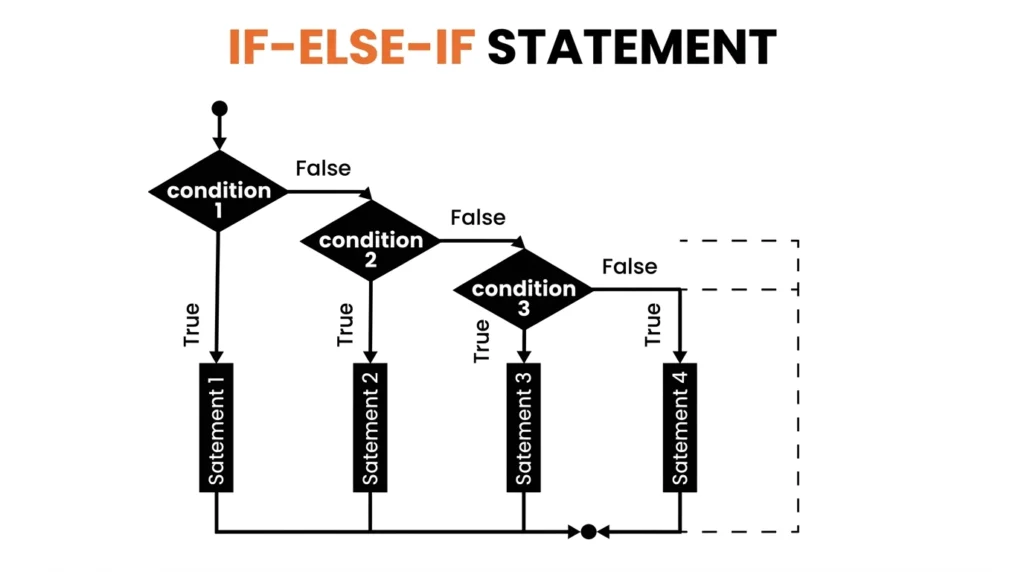
If a program just ran from top to bottom without stopping, it would be a simple list of instructions. Control Structures allow your code to make decisions based on specific conditions. This is known as Conditional Logic.
Think of it as a fork in the road: depending on whether a condition is “True” or “False,” the program will take a different path.
The If, Else If, and Else Hierarchy
In almost every programming language, we handle decisions using a standard flow:
- If (The First Check): The program checks if a condition is met. If yes, it runs the code inside.
- Else If (The Alternative): If the first “If” was false, the program checks this next specific condition.
- Else (The Safety Net): If none of the above conditions were met, the program runs this block as a default.
Practical Example: The Login Flow
To understand how this looks in a real-world scenario, let’s look at a standard login system logic:
Markdown
1. IF (password entered == stored password) {
       RESULT: Grant Access to Dashboard
   }
2. ELSE IF (password is empty) {
       RESULT: Show "Please enter a password" warning
   }
3. ELSE {
       RESULT: Show "Incorrect Password" error
   }
3. Iteration and Loops: The Automators
In programming, you will often need to perform the same action multiple times—like sending an email to 100 users or checking every item in a shopping cart. Writing that code 100 times is inefficient and prone to errors.
Loops allow you to write a block of code once and tell the computer to repeat it as many times as necessary. This concept is called Iteration.
The Two Most Common Types of Loops
Most languages use two primary structures to handle repetition:
| Loop Type | When to Use It | Real-World Analogy |
| For Loop | When you know exactly how many times to repeat. | “Run 5 laps around the track.” |
| While Loop | When you repeat until a specific condition changes. | “Run until you feel tired.” |
The Anatomy of a Loop
Every successful loop needs three things to prevent it from running forever (a “crash”):
- The Start: Where the counting begins.
- The Condition: The rule that keeps the loop running.
- The Step: How much the count increases after each round.
Practical Example: Processing a List
Imagine you have a list of names for a technical interview. Instead of manually typing a greeting for each, a loop does this:
- Logic: For every name in the interview_list, print “Good luck, [name]!”
- Result: It doesn’t matter if you have 5 names or 5,000; the code remains just two lines long.
The “Infinite Loop” Warning
One of the most common beginner mistakes is creating an infinite loop, a loop where the condition is never met, causing the program to run until it runs out of memory. Understanding how to “break” a loop is just as important as starting one.
Efficiency Tip: Want to see how loops handle large datasets in Python vs. JavaScript? Read our sub-blog: [Loops and Iteration: Writing Cleaner, Faster Code].
4. Functions and Modules: The Reusable Tools
If variables are the “storage” and loops are the “automators,” Functions are the “machines.” A function is a self-contained block of code designed to perform a specific task. You write the code once, and then you can “call” it whenever you need it.
The “Recipe” Analogy
Think of a function as a recipe for a cake. You don’t need to rewrite the instructions for “how to bake a cake” every time you want a dessert. You simply call the “BakeCake” recipe, provide the ingredients (inputs), and get a cake (output).
Key Components of a Function
- The Declaration: Giving your function a name (e.g., calculate_tax).
- Parameters (Inputs): The information the function needs to do its job (e.g., the price).
- The Body: The logic inside that does the work.
- Return Value (Output): The result the function gives back to the main program.
Why use Functions? (The DRY Principle)
Professional developers follow the DRY Principle: Don’t Repeat Yourself. * Maintainability: If you need to change how tax is calculated, you only change it in one function, rather than searching through 50 different pages of code.
- Readability: Functions allow you to name your logic. Seeing send_welcome_email() in your code is much easier to understand than seeing 20 lines of raw email-sending logic.
Modules: Organizing Your Toolkit
As your project grows, you might end up with dozens of functions. Modules allow you to group related functions into separate files. For example, you might have a math_utils.py file or a string_helpers.js file. You simply “import” them into your main project when needed.
Pro Tip: This is how frameworks like Laravel or Django work, they are essentially massive collections of pre-written functions and modules that you “call” to build your site faster.
5. Data Structures: The Organizers
If a variable is a single box, a Data Structure is a filing cabinet or a bookshelf. As your program grows, you won’t just have one piece of data; you’ll have thousands. Data structures are specific ways of organizing and storing data so that it can be accessed and worked with efficiently.
Common Beginner Data Structures
While there are complex structures like Trees and Graphs, every beginner must start with these two:
- Arrays (or Lists): A simple, ordered list of items. Think of it like a “To-Do” list where every item has a specific position (index) starting from zero.
- Example: [‘Python’, ‘Java’, ‘PHP’]
- Dictionaries (or Maps): A collection of “Key-Value” pairs. Think of this like a real dictionary or a contact list. You use a “Key” (a name) to find a “Value” (a phone number).
- Example: {‘username’: ‘dev_pro’, ‘score’: 95}
Why Organization Matters
Choosing the right structure changes how fast your program runs.
- If you need to keep things in a specific order, use an Array.
- If you need to find specific information quickly using a label, use a Dictionary.
The Concept of “Indexing”
In almost all coding languages, the computer starts counting at 0, not 1. This means in an array of three items, the first item is at position 0, and the last is at position 2. Mastering “Zero-based indexing” is a rite of passage for every new coder.
The Next Level: Data structures are the most common topic in technical interviews. Once you’ve mastered these basics, check out our advanced series: [Data Structures for Technical Interviews]. (Internal link placeholder)
Beyond Syntax: Logic and Problem Solving
Learning the “grammar” of a programming language is easy; the real challenge is learning how to solve problems using that grammar. This is where logic comes into play. Even without a computer, you use these principles every day.
Algorithms: The Step-by-Step Recipe
Don’t let the word “Algorithm” intimidate you. An algorithm is simply a set of well-defined instructions to complete a task.
- Real-world example: A recipe for baking bread is an algorithm. If you follow the steps in order, you get the same result every time.
- In Coding: An algorithm might be the steps a program takes to sort a list of names alphabetically or calculate the shortest route on a map.
Pseudo-code: Coding in Plain English
Before you start typing complex syntax into an editor, professional developers often use Pseudo-code. This is writing out your logic in simple, human language.
Why use it? It allows you to focus on the logic without worrying about where the semicolons or brackets go.
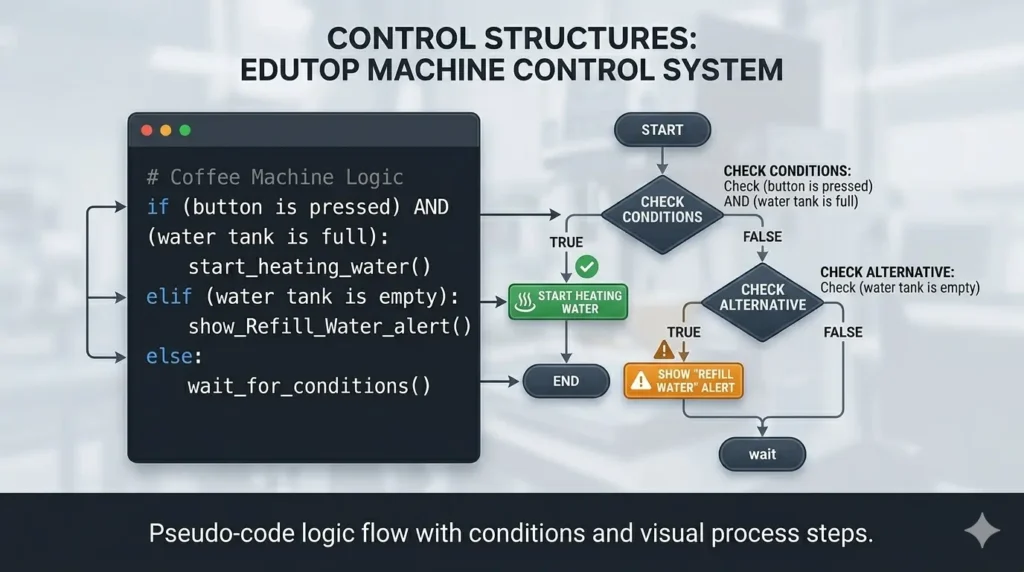
Example of Pseudo-code for a Coffee Machine:
- IF (button is pressed) AND (water tank is full)
- THEN start heating water.
- ELSE IF (water tank is empty)
- THEN show “Refill Water” alert.
Debugging: The Detective Work
In programming, “bugs” are simply errors that prevent the code from working as intended. Debugging is the systematic process of finding and fixing these errors.
To be a great debugger, you need a specific mindset:
- Hypothesize: Why is the code failing? Is a variable empty?
- Isolate: Test small sections of code to find exactly where it breaks.
- Fix & Test: Apply a fix and see if it breaks anything else.
The Interview Edge: In a technical interview, the interviewer cares more about how you debug a problem than whether your code worked on the first try. Showing your logic is key.
Choosing Your First Language: Where to Start?
Now that you understand the basic coding concepts, the next step is picking a language to practice them in. While the logic remains the same, each language has a different “flavor” and purpose.
Here is a breakdown of the best languages for beginners based on your career goals:
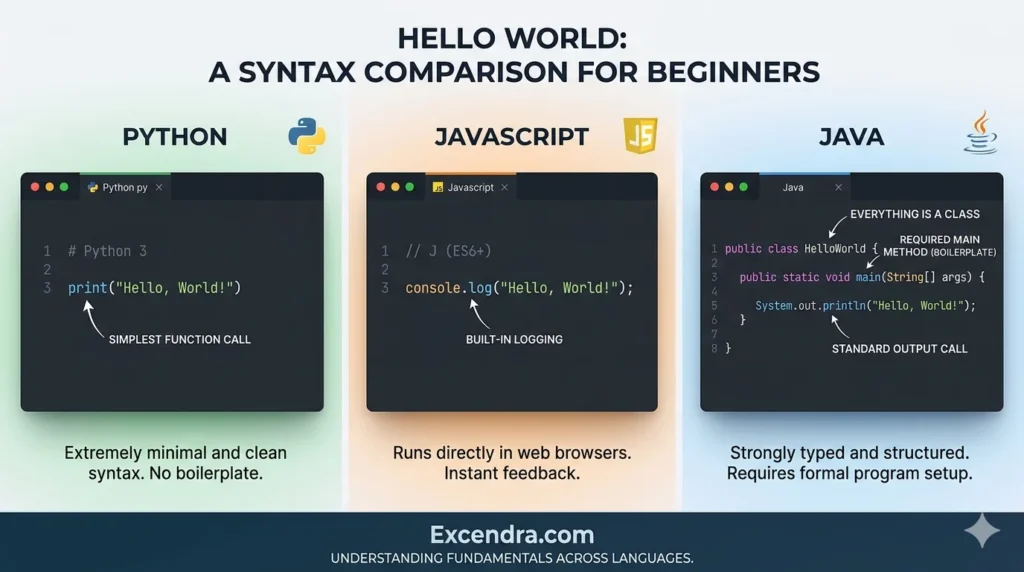
1. Python: The Beginner’s Favorite
Python is widely considered the best starting point because its syntax is the closest to plain English.
- Best for: Data Science, AI, and Backend Web Development (using Django).
- Why it’s great for basics: You don’t have to worry about complex brackets or memory management; you can focus entirely on the logic of your variables and loops.
2. JavaScript: The Language of the Web
If you want to see your code come to life in a browser immediately, JavaScript is the way to go.
- Best for: Frontend web development, interactive websites, and mobile apps (using React Native).
- Why it’s great for basics: Every computer already has a way to run JavaScript (the browser). You can start coding in seconds without installing anything.
3. Java or C#: The Professional Foundation
These are “Strongly Typed” languages. They are stricter than Python, which means they force you to be very disciplined about your Data Types and Object-Oriented Programming (OOP).
- Best for: Enterprise software, Android apps (Java), and Game Development (C# with Unity).
- Why it’s great for basics: Because these languages are “strict,” they teach you deep architectural habits that make you a more precise developer.
Quick Comparison Table
| Language | Learning Curve | Primary Use Case | Key Strength |
| Python | Easy | AI, Automation, Backend | Readability |
| JavaScript | Medium | Web & Mobile Apps | Instant Feedback |
| Java / C# | Hard | Large-scale Apps, Gaming | Strong Structure |
Conclusion: Your Foundation is Set
Mastering basic coding concepts is the most significant hurdle for any aspiring developer. While syntax and frameworks change, languages like Python or JavaScript might go in and out of style, the core principles of variables, loops, logic, and functions are universal.
By understanding how a computer stores information and makes decisions, you have moved beyond just “writing code” and have started “solving problems.” This foundational mindset is what separates a great programmer from someone who simply memorizes commands.