
A palindrome is a word, number, or sequence that reads the same forward and backward. For example, 121, madam, and racecar are common palindrome examples. In simple terms, if reversing the value gives the same result, it is called a palindrome.
The palindrome program in python is one of the most popular beginner coding exercises because it helps learners understand loops, conditions, string handling, and logical thinking. It is also frequently asked in Python interviews and coding tests to check problem-solving skills.
One interesting thing about palindromes is that they can be checked in different forms, such as numbers, strings, and even phrases like nurses run (ignoring spaces and case). This makes palindrome programs a great way to practice multiple Python concepts.
What is a Palindrome?
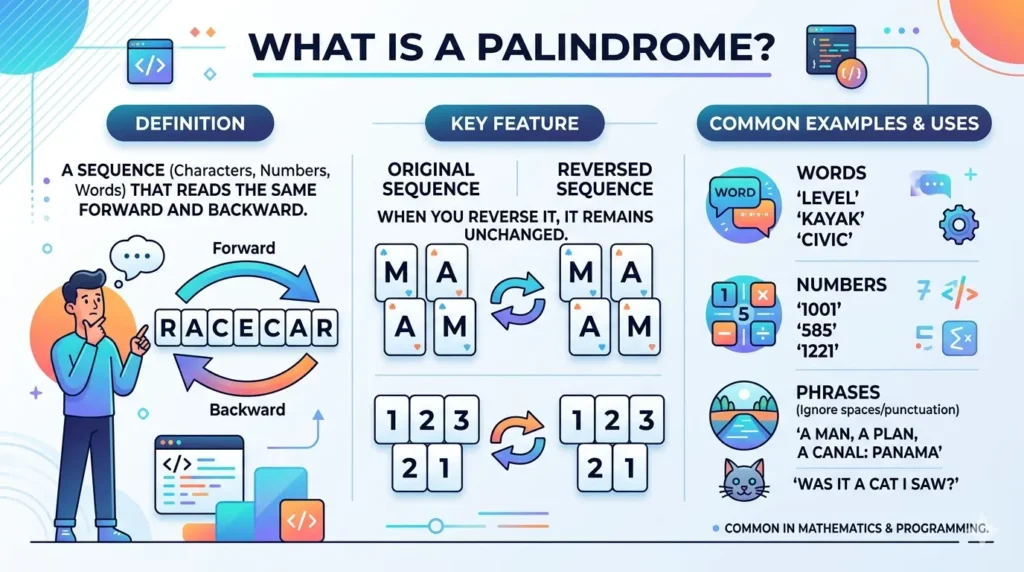
A palindrome is a sequence of characters, numbers, or words that reads the same forward and backward. In simple terms, when you reverse the sequence, it remains unchanged.
Palindromes can appear in numbers, words, or phrases, making them a common concept in mathematics and programming.
Examples of Palindrome
- 121
- madam
- racecar
- 1221
Since these examples remain the same when reversed, they are called palindromes.
Why Learn Palindrome Program in Python?
Learning the palindrome program in Python is a great way to strengthen your programming basics. It is one of the most common beginner exercises because it combines multiple important Python concepts in a simple problem.
Helps Understand Loops
Palindrome programs often use for loops or while loops to reverse numbers or compare characters step by step. This improves your understanding of loop logic.
String Slicing
Python provides string slicing like [::-1], which is a quick way to reverse text. Palindrome programs help you learn and apply this useful feature.
Conditions (if-else)
You need to compare the original value with the reversed value using if-else statements. This builds confidence in decision-making logic.
Functions
Many palindrome solutions use functions to make code reusable and organized. This helps you understand how functions work in Python.
Logic Building for Interviews
Palindrome questions are common in coding interviews for freshers. Solving them improves problem-solving ability and logical thinking skills.
Palindrome Program in Python for Numbers (Using While Loop)
One of the most common ways to check a palindrome number in Python is by using a while loop. In this method, we take a number as input, reverse its digits, and then compare the reversed number with the original number.
If both values are the same, the number is a palindrome. Otherwise, it is not.
Python Code
num = int(input("Enter number: "))
temp = num
rev = 0

while temp > 0:
    digit = temp % 10
    rev = rev * 10 + digit
    temp = temp // 10

if num == rev:
    print("Palindrome")
else:
    print("Not Palindrome")
How It Works
- num stores the original number entered by the user.
- temp is used for processing without changing the original value.
- rev stores the reversed number.
- The while loop extracts each digit using % 10.
- Digits are added in reverse order.
- Finally, the reversed number is compared with the original number.
Example Output
Input: 121
Output: Palindrome
Input: 123
Output: Not Palindrome
This method is excellent for beginners because it teaches loops, arithmetic operations, and comparison logic.
Palindrome Program in Python Using String Slicing
String slicing is one of the easiest and most popular methods to check a palindrome in Python. It is widely used because the code is short, simple, and efficient.
In this method, we take input from the user and reverse the text using Python slicing [::-1]. Then we compare the original text with the reversed text.
If both are the same, it is a palindrome.
Python Code
text = input("Enter text: ")

if text == text[::-1]:
    print("Palindrome")
else:
    print("Not Palindrome")
How It Works
- text stores the user input.
- text[::-1] creates a reversed version of the string.
- The if condition checks whether the original and reversed strings are equal.
- If equal, Python prints Palindrome.
Example Output
Input: madam
Output: Palindrome
Input: python
Output: Not Palindrome
Why This Method is Popular
- Very short code
- Easy to understand
- Fast for strings
- Commonly asked in beginner Python exercises
This is often considered the most searched and beginner-friendly palindrome program in Python.
Palindrome Program in Python Using Function
Using a function is a clean and reusable way to check whether a word is a palindrome in Python. Functions help organize code and allow you to check multiple values without repeating the same logic again and again.
In this method, we create a function named is_palindrome() that compares the original word with its reversed version.
Python Code
def is_palindrome(word):
    return word == word[::-1]

print(is_palindrome("radar"))
How It Works
- def is_palindrome(word): creates a function that accepts one input.
- word[::-1] reverses the given string.
- The function returns True if both values match.
- Otherwise, it returns False.
Example Output
Input: radar
Output: True
Input: hello
Output: False
Why Use a Function?
- Makes code reusable
- Easy to read and maintain
- Useful for larger programs
- Helps understand Python functions
This is a smart and professional way to write a palindrome program in Python, especially for interviews and practice.
Palindrome Program in Python Using Recursion
Recursion is another interesting way to solve a palindrome program in Python. In recursion, a function calls itself repeatedly until a stopping condition is met.
For palindrome checking, we compare the first and last characters of the string. If they are the same, we continue checking the remaining middle part of the string. If all characters match, the string is a palindrome.
Python Code
def check_palindrome(s):
    if len(s) <= 1:
        return True
    if s[0] == s[-1]:
        return check_palindrome(s[1:-1])
    return False
How It Works
- If the string length is 0 or 1, it is automatically a palindrome.
- Compare the first character s[0] with the last character s[-1].
- If both match, call the function again with the middle part s[1:-1].
- If any pair does not match, return False.
Example Output
print(check_palindrome("madam"))
print(check_palindrome("python"))
Output:
True

False
Why Learn Recursion?
- Builds problem-solving skills
- Helps understand recursive functions
- Common concept in coding interviews
- Useful for advanced Python logic
This method is slightly advanced but very useful for learning how recursion works in Python.
Palindrome Number in Python from 1 to N
Sometimes, instead of checking only one value, you may want to print all palindrome numbers within a range. This Python program checks numbers from 1 to N and prints those that read the same forward and backward.
In the example below, the range is from 1 to 100.
Python Code
for i in range(1, 101):

   if str(i) == str(i)[::-1]:

       print(i)
How It Works
- range(1, 101) generates numbers from 1 to 100.
- Each number is converted into a string using str(i).
- str(i)[::-1] reverses the number.
- If the original and reversed values are equal, the number is a palindrome.
Example Output
1
2
3
4
5
6
7
8
9
11
22
33
44
55
66
77
88
99
Change the Range
To print palindrome numbers up to 500, use:
for i in range(1, 501):
    if str(i) == str(i)[::-1]:
        print(i)
Why This Program is Useful
- Helps understand loops and conditions
- Useful in coding practice
- Demonstrates string reversal logic
- Common beginner Python exercise
Palindrome String Ignoring Spaces and Case
Sometimes a phrase may contain spaces or uppercase letters, but it can still be a palindrome. To check such cases, we first remove spaces and convert all characters to lowercase.
This method is useful for phrases like Madam or Nurses Run, where capitalization and spaces should be ignored.
Python Code
text = input("Enter phrase: ").replace(" ", "").lower()

if text == text[::-1]:

   print("Palindrome")

else:

   print("Not Palindrome")
How It Works
- replace(” “, “”) removes all spaces from the input.
- lower() converts all letters to lowercase.
- text[::-1] reverses the cleaned string.
- If both values match, the phrase is a palindrome.
Example Output
Input: Madam
Output: Palindrome
Input: Nurses Run
Output: Palindrome
Input: Hello World
Output: Not Palindrome
Why Use This Method?
- Handles phrases with spaces
- Ignores uppercase and lowercase differences
- Useful for real-world palindrome checks
- Great for beginner Python practice
Time Complexity of Palindrome Program
Understanding time complexity helps you know how efficient a palindrome program is when handling larger inputs. In most palindrome-checking methods, the program needs to examine each character or digit once, which makes them efficient for normal use.
Time Complexity Table
| Method | Time Complexity |
| String slicing | O(n) |
| Loop method | O(n) |
| Recursion | O(n) |
Explanation
String Slicing – O(n)
When using text[::-1], Python creates a reversed copy of the string by scanning all characters once. It then compares both strings, which also takes linear time.
Loop Method – O(n)
In loop-based solutions, each character or digit is checked one by one until the end, so the total work depends on the input length.
Recursion – O(n)
Recursive palindrome checking compares characters from both ends and moves inward. Since each character is processed once, the complexity remains linear.
What Does O(n) Mean?
O(n) means the execution time grows proportionally with the size of the input. If the string length doubles, the work roughly doubles as well.
Which Method is Best?
- String slicing: Best for short and simple code
- Loop method: Good for learning logic
- Recursion: Good for understanding advanced concepts
For most practical Python programs, string slicing is the fastest and easiest option.
Common Mistakes Beginners Make
While writing a palindrome program in Python, beginners often make small mistakes that can lead to incorrect output. Understanding these common errors can help you write cleaner and more accurate code.
Forgetting [::-1]
Many beginners forget the correct slicing syntax used to reverse a string.
text[::-1]
Without this, the palindrome check may not work properly.
Comparing Integer with String
Sometimes users compare a number directly with a string version of the reversed value.
121 == “121” # Wrong comparison
Always make sure both values are of the same data type.
Ignoring Spaces in Phrases
Phrases like Nurses Run may fail if spaces are not removed before checking.
text.replace(” “, “”)
Removing spaces is important when checking palindrome phrases.
Wrong Loop Condition
In number-based palindrome programs, using an incorrect while loop condition can stop the loop too early or cause errors.
while temp > 0:
Use proper loop conditions for correct digit reversal.
Case-Sensitive Errors
Words like Madam may fail because uppercase and lowercase letters are treated differently.
text.lower()
Convert text to lowercase before comparison.
Interview Questions on Palindrome in Python
Palindrome-based questions are common in Python interviews because they test your understanding of strings, loops, conditions, and logic building. Below are some frequently asked interview questions with short answers.
1. How to check palindrome without slicing?
You can use loops or two-pointer logic instead of [::-1]. Compare the first and last characters one by one until the middle is reached.
text = "madam"

if text == ''.join(reversed(text)):

   print("Palindrome")
You can also use a while loop with indexes.
2. How to check palindrome number?
To check a palindrome number, reverse its digits and compare it with the original number.
Example: 121 becomes 121, so it is a palindrome.
num = 121

rev = int(str(num)[::-1])

if num == rev:

   print("Palindrome")
3. Difference between palindrome string and number?
- Palindrome String: Uses letters or words that read the same backward.
Example: madam, racecar - Palindrome Number: Uses digits that remain the same when reversed.
Example: 121, 1331
The logic is similar, but data types are different.
4. Can you do it recursively?
Yes, a palindrome can be checked using recursion by comparing the first and last characters repeatedly.
def check(s):
    if len(s) <= 1:
        return True
    if s[0] == s[-1]:
        return check(s[1:-1])
    return False
Conclusion
The palindrome program in Python is one of the best beginner coding exercises for learning core programming concepts. It helps you understand loops, conditions, string manipulation, functions, and logical thinking in a practical way.
By practicing different methods such as loops, string slicing, and recursion, you build stronger problem-solving skills that are useful in real coding tasks. Once you master this concept, many Python interview questions and number/string-based problems become much easier to solve.
Q1. What is palindrome program in Python?
A palindrome program in Python checks whether a word, number, or phrase reads the same forward and backward. If both directions are identical, it is called a palindrome.
Q2. Is 121 a palindrome?
Yes, 121 is a palindrome because it remains the same when reversed.
Q3. Is Python slicing best for palindrome?
Yes, Python slicing using [::-1] is one of the best methods because it is short, simple, and efficient for checking palindromes.
Q4. How to check palindrome without reverse function?
You can use loops and compare characters from the beginning and end one by one until the middle is reached.
Q5. Is palindrome asked in interviews?
Yes, palindrome questions are commonly asked in coding interviews, especially for freshers and beginners, to test logic-building skills.