
A finished video is rarely made from one perfect recording. Editors usually work with dozens or even hundreds of individual clips that need to be reviewed, trimmed, arranged, and connected. How those shots are selected and placed can have a major impact on how professional, clear, and engaging the final video feels.
Shot editing is the process of selecting, trimming, and arranging individual shots to create a coherent visual sequence. It involves deciding where a shot should begin and end, when to move to another angle, how long each shot should remain on screen, and how different shots should connect.
Good shot editing does more than make footage look polished. It helps control pacing, guide attention, maintain continuity, and communicate the story more effectively.
What Is Shot Editing?
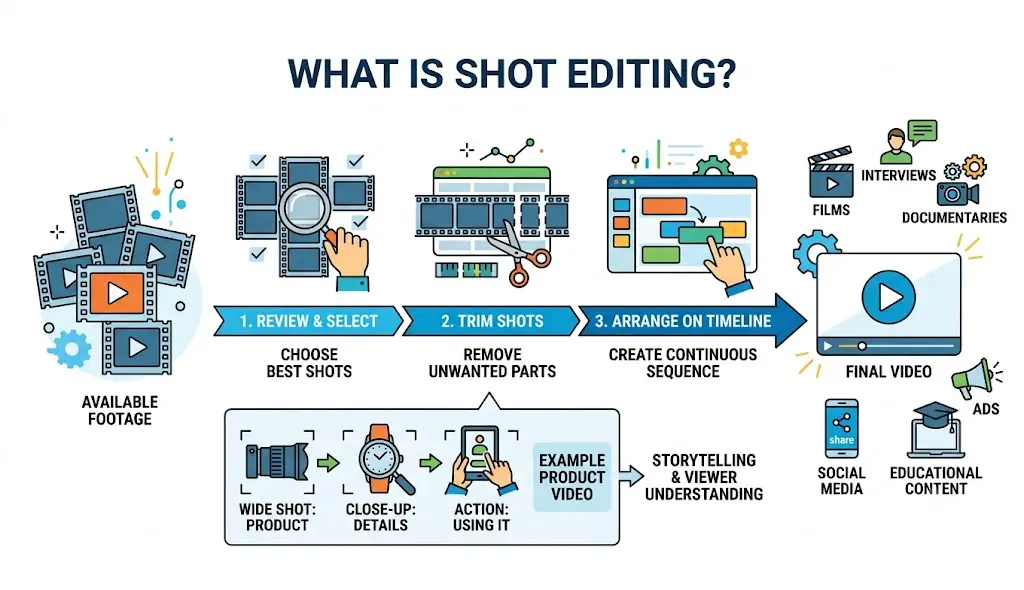
Shot editing refers to working with individual shots during the post-production process. A shot can be a single camera recording, a portion of a longer clip, or a specific visual moment selected for the final edit.
Editors review available footage and choose the shots that best support the story. They then trim and arrange those shots on a timeline to create a continuous sequence.
For example, a product video might begin with a wide shot showing the product, move to a close-up of its details, and then show someone using it. Each shot provides different information, and their order helps the viewer understand the subject.
The same process applies to interviews, films, documentaries, advertisements, social media videos, and educational content.
Why Is Shot Selection Important?
Not every recorded shot belongs in the final video. A production may contain multiple takes, different camera angles, pauses, mistakes, unwanted movements, or footage that repeats information already communicated elsewhere.
Shot selection allows editors to remove weaker material and keep footage that contributes to the story.
Editors typically consider factors such as:
- Performance quality
- Composition and framing
- Camera movement
- Lighting
- Continuity
- Audio quality
- Emotional impact
- Relevance to the story
Choosing the right shot can improve a sequence without requiring additional footage or visual effects.
How Does Shot Editing Improve Video Quality?
Video quality is not determined only by resolution, camera equipment, or image sharpness. Editing decisions also influence how professional and engaging a video feels.
Better Pacing
Shot duration has a direct effect on pacing. Keeping a shot on screen for too long can make a sequence feel slow, while cutting too quickly can make it difficult to follow.
Editors adjust shot lengths according to the purpose of the scene. A fast-paced advertisement may rely on short shots to maintain energy. A documentary or dramatic scene may use longer shots to give viewers time to absorb information.
Good shot editing creates a rhythm that supports the content rather than distracting from it.
Clearer Storytelling
Each shot should contribute something to the viewer’s understanding of the story.
A wide shot can establish a location. A close-up can reveal an expression or important detail. A reaction shot can show how another person responds to an event.
Placing these shots in a logical order allows editors to communicate information visually instead of relying entirely on dialogue or narration.
Smoother Continuity
Continuity is another important part of shot editing. Viewers can notice when an object suddenly changes position, a person’s movement does not match between shots, or the direction of movement changes unexpectedly.
Editors compare shots before placing them next to one another. They may choose another take, trim a few frames, or add a different shot to make the transition feel natural.
This helps the finished video feel like one continuous experience rather than a collection of separate recordings.
How Do Editors Choose Between Multiple Takes?
Many productions record the same scene several times. Editors need to decide which take works best for the final sequence.
A technically clean take is not always the strongest one. One version may have better delivery, another may have more natural body language, and another may have stronger framing.
Editors compare these details before choosing a take. They may also combine sections from different takes when the footage and audio allow it.
This process is particularly important for interviews and talking-head videos, where small differences in delivery can change how natural the final result feels.
How Does Shot Editing Improve Visual Flow?
A well-edited sequence guides the viewer from one visual idea to the next.
An editor might move from a wide establishing shot to a medium shot and then to a close-up. This provides context before directing attention toward a particular detail.
Shot editing can also create visual contrast. A static shot followed by movement can add energy, while switching from a close-up to a wide shot can change the viewer’s sense of scale.
These choices prevent a video from becoming visually repetitive.
What Role Does B-Roll Play in Shot Editing?
B-roll provides additional footage that supports the main subject or story.
Consider an interview with a chef. Instead of showing the chef speaking for the entire conversation, an editor might show ingredients, food preparation, the kitchen, customers, or finished dishes over parts of the dialogue.
These supporting shots add visual variety and can also hide cuts or remove sections of dialogue without making the edit obvious.
Finding the right B-roll is therefore an important part of shot editing, particularly for longer interviews and documentary-style content.
How Can AI Help With Shot Editing?
AI is making some parts of shot editing faster by helping editors analyze and organize large amounts of footage. Instead of manually reviewing every file, editors can use AI-powered tools to identify useful material based on what appears or is said in the footage.
AI can help locate specific people, objects, scenes, spoken phrases, and actions. It can also help identify repeated takes, remove unwanted sections, and create an initial arrangement of footage.
This can be especially useful for projects containing hours of raw footage. The editor can begin with a more organized selection rather than spending most of the initial editing process searching through recordings.
How Is an Agentic Video Editor Different?
An agentic video editor takes AI-assisted editing a step further by allowing AI agents to perform broader editing tasks based on instructions.
Rather than simply suggesting an individual cut, an agent can be asked to review footage, select usable takes, remove repetition, and assemble a starting sequence. The editor can then review the result and make the creative decisions needed for the final version.
Invideo editor follows this approach by combining AI editing agents with an editable timeline. Editors can provide raw footage and direction, allowing the agents to help with footage review, take selection, cleanup, and initial timeline assembly.
The resulting edits remain visible and editable, so creators can replace shots, adjust timing, change the pacing, and continue refining the sequence manually.
Where Can AI-Assisted Shot Editing Help Most?
AI assistance can be particularly useful when projects contain a large amount of repetitive or similar footage.
For example, an editor working on an interview may have several takes of the same answer. An AI editing agent can help identify the usable sections and create a starting sequence. The editor can then compare the suggested selections and make the final decision.
The same approach can help with podcasts, documentaries, events, educational videos, product demonstrations, and social media content created from longer recordings.
The benefit is not simply faster cutting. It is reducing the time required to find and prepare the material before creative refinement begins.
Does AI Replace the Editor’s Role?
AI can assist with shot selection and sequence assembly, but creative judgment remains essential.
An AI system may identify technically strong footage, but an editor still needs to understand why one shot works better in a particular moment. Storytelling often depends on subtle choices involving timing, emotion, performance, and context.
An editor may even deliberately choose a technically imperfect shot because it communicates something important about a character or scene.
AI therefore works best as an assistant that reduces repetitive work while leaving creative control with the editor.
How Does Shot Editing Work With Sound?
Shot editing and audio editing are closely connected. A cut may look appropriate visually but feel unnatural if dialogue, background sound, or music changes abruptly.
Editors often use continuous dialogue or ambient sound to make visual cuts feel smoother. They may also align cuts with music beats or sound effects to create a stronger rhythm.
For example, a product montage may switch between several shots in time with the music. An interview may place B-roll over continuous dialogue to make cuts less noticeable.
The relationship between image and sound is therefore an important part of creating a polished sequence.
Common Shot Editing Mistakes
Several editing choices can reduce the quality of otherwise good footage.
Keeping Weak Takes
A shot may be technically usable but still have weaker delivery, distracting movement, or poor timing. Keeping it simply because it is available can reduce the quality of the sequence.
Making Every Shot the Same Length
Uniform shot durations can make a video feel mechanical. Varying the timing creates a more natural rhythm.
Cutting Without Considering Continuity
Abrupt changes in movement, position, or screen direction can distract viewers from the story.
Overusing Transitions
Most sequences do not need elaborate transitions between every shot. Straight cuts are often more effective because they keep attention on the content.
Ignoring Audio
A visually smooth sequence can still feel unpolished if dialogue levels change suddenly or background sound disappears between cuts.
How Can Editors Improve Their Shot Editing?
The best way to improve shot editing is to understand the purpose of every cut. Before keeping a shot, editors should ask whether it adds information, emotion, context, or visual interest.
It also helps to watch the complete sequence instead of judging individual clips in isolation. A shot that looks impressive on its own may slow down the surrounding sequence.
Editors can experiment with different versions of a scene, moving cuts or replacing individual shots to see how the rhythm changes. AI-assisted tools can make this experimentation faster by reducing the time required to find and organize alternative footage.
The Future of Shot Editing
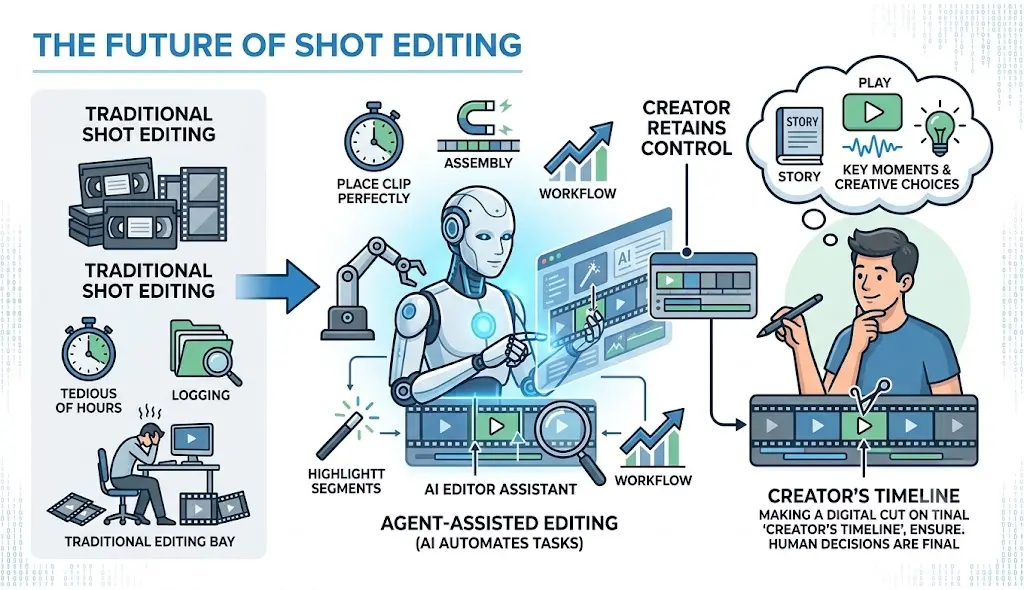
AI is changing how editors approach large collections of footage. Instead of spending hours logging takes, searching for individual moments, and assembling every part of a rough sequence manually, editors can increasingly delegate some of these tasks to AI.
Tools such as video editors demonstrate this shift toward agent-assisted editing, where AI can handle parts of the execution while the creator retains control over the timeline and final creative decisions.
The technology does not remove the importance of shot editing. If anything, it gives editors more time to focus on the decisions that matter most: which moments to keep, where to cut, how to build rhythm, and how each shot contributes to the story.
Final Thoughts
Shot editing is one of the foundations of effective video production. It determines which moments viewers see, how long they see them, and how those moments connect to form a complete story.
Strong shot editing improves pacing, continuity, storytelling, visual variety, and the overall viewing experience. It can turn hours of disconnected footage into a sequence that feels deliberate and engaging.
AI is making parts of this process faster by helping editors search footage, compare takes, organize material, and assemble starting sequences. Agentic video editors can take on more of the repetitive execution, giving editors a stronger starting point without removing control over the final timeline.
Ultimately, the quality of a video still depends on the choices made during editing. The right technology simply gives editors more time to make those choices and less time spent searching, sorting, and performing repetitive timeline work.