
Video editing no longer requires a powerful desktop setup or years of experience with complicated editing software. Browser-based video editors have made it possible to upload footage, edit a timeline, add audio and graphics, and export finished videos from a single online workspace.
This shift is particularly useful for creators who publish frequently. Instead of spending time installing software, managing project files, or learning advanced editing features, they can focus on turning raw footage into content that is ready to share.
AI is also becoming part of this workflow. Modern online editors can help with tasks such as organizing footage, creating rough cuts, generating captions, and handling repetitive editing work. The result is a simpler workflow that can still provide enough control for professional-looking videos.
What Is an Online Video Editing Workflow?
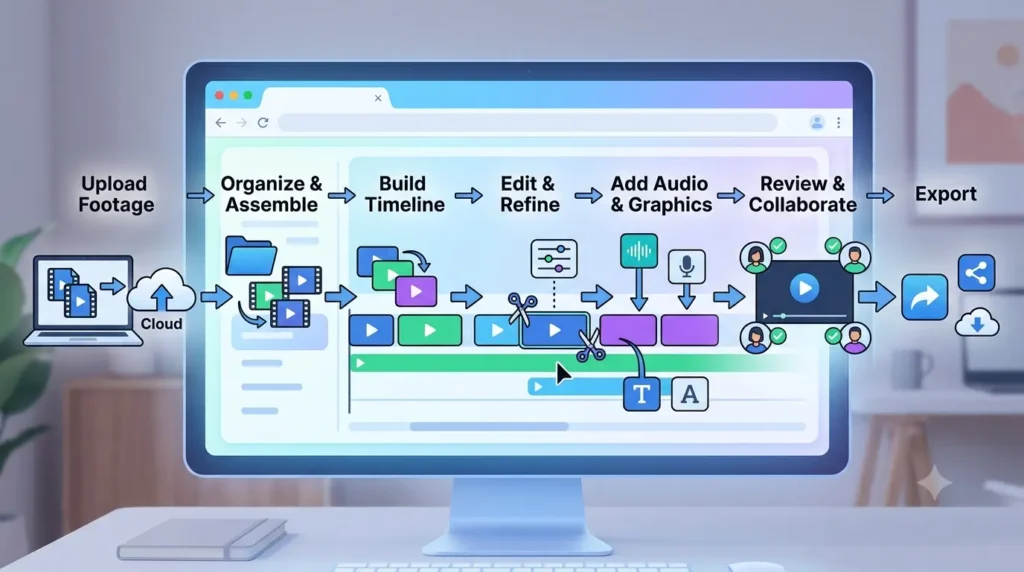
An online video editing workflow is the process of creating and finishing a video through a browser-based editing platform. Instead of relying entirely on locally installed software, creators can manage much of the production process through an online workspace.
A typical workflow looks like this:
Upload footage → Organize clips → Build the timeline → Edit and refine → Add audio and graphics → Review → Export
The exact steps vary depending on the project, but the basic idea is to keep the editing process accessible without requiring a complex software setup.
Step 1: Gather and Upload Your Footage
Every editing workflow begins with the source material. This might include camera footage, screen recordings, phone videos, voiceovers, music, images, or B-roll.
Online editors allow creators to bring these files into a central media workspace. This can be useful for projects where footage comes from several devices or locations.
Before editing, it helps to remove obvious duplicates and identify the clips that are likely to be useful. Organizing the material early makes the rest of the workflow easier.
Step 2: Organize the Media
Once the footage is uploaded, creators need to understand what they have.
For a short video, this might simply mean arranging a few clips in the order they were recorded. Longer projects may require separate groups for interviews, B-roll, voiceovers, music, graphics, and different scenes.
AI can make this stage faster by helping identify what appears in footage. Instead of manually opening every clip, creators can search for people, scenes, actions, dialogue, or other moments.
This becomes especially useful when working with long recordings or multiple takes.
Step 3: Create a Basic Structure
Before making detailed edits, it helps to establish the basic structure of the video.
A simple social video might follow:
Hook → Main point → Supporting information → Call to action
An educational video could use:
Introduction → Explanation → Examples → Summary
Having a basic structure prevents creators from simply placing clips one after another without considering the viewer’s experience.
A script, outline, transcript, or storyboard can provide a useful starting point.
Step 4: Build the Timeline
The timeline is where individual clips become a complete video.
Creators place their selected footage in sequence, trim unwanted sections, and decide how one shot should lead into another. Most online editors provide multiple tracks for video, dialogue, music, and other elements.
This does not need to be complicated. For many videos, clean cuts and sensible pacing are more important than advanced effects.
AI-assisted editing can make this step faster by creating a starting sequence from the available footage. For example, invideo Editor combines an online timeline with AI editing agents that can review footage, select usable takes, remove unnecessary material, and assemble a base cut based on the creator’s direction.
The creator can then review the timeline and make manual changes rather than starting with an empty project.
Step 5: Remove Unnecessary Footage
Raw footage often contains pauses, mistakes, repeated sentences, long gaps, or sections that do not contribute to the final story.
Removing these sections improves pacing and keeps the viewer focused.
For talking-head videos, interviews, and podcasts, AI can help identify silence, filler, repeated sections, and other material that may not need to remain in the final edit.
Creators should still review automated changes. A pause may sometimes be important for emphasis, and a seemingly unnecessary section may provide context.
Step 6: Add B-Roll and Supporting Visuals
B-roll helps prevent a video from becoming visually repetitive.
For example, a creator explaining how a product works could show close-up footage of the product, someone using it, or details of the process instead of keeping the same camera angle throughout the explanation.
Online editors make it easy to place these clips above the main footage and adjust their timing.
AI-powered search can also help creators find relevant B-roll more quickly, particularly when a project contains a large media library.
Step 7: Clean Up the Audio
Audio quality has a major influence on how professional a video feels.
Creators should check dialogue levels, remove distracting background noise when possible, and make sure music does not overpower speech.
Many online editors now include tools for audio cleanup, volume adjustment, noise reduction, and automatic caption generation.
The goal does not need to be a complicated sound mix. Clear dialogue and balanced background audio are often enough to make a major difference.
Step 8: Add Captions, Graphics, and Branding
Captions can make videos easier to follow, particularly on social platforms where many viewers watch without sound.
Creators can also add simple titles, logos, lower thirds, or other graphics to provide context and reinforce branding.
The key is to avoid adding effects simply because they are available. Visual elements should support the content rather than distract from it.
Templates can be useful for recurring formats, especially when creators need to produce several videos with a consistent visual identity.
Step 9: Review the Complete Video
After the main editing is finished, watch the entire video from beginning to end.
Look for:
- Slow or repetitive sections
- Abrupt cuts
- Audio level changes
- Spelling errors in captions
- Missing visuals
- Unnecessary transitions
- Sections that do not support the main message
This final review is important because individual clips can look fine when edited separately but feel different when viewed as one complete video.
Step 10: Export for the Intended Platform
The final step is exporting the video in a format suitable for where it will be published.
Different platforms have different requirements for aspect ratio, resolution, and duration. A vertical video may be appropriate for short-form social content, whereas a landscape version may work better for long-form platforms.
Online editors can simplify this process by providing preset formats for common platforms.
Creators who regularly publish to multiple channels can also create different versions from the same project rather than rebuilding the video from scratch.
How AI Is Simplifying Online Video Editing
The biggest change in online video editing is not simply moving traditional editing tools into a browser. AI is making it possible to delegate some of the repetitive work involved in producing a video.
An AI video editor can go beyond individual AI features by allowing creators to give broader instructions. An AI editing agent might be asked to review a recording, remove repeated sections, select the strongest takes, and create a first cut.
This approach can be useful for creators who work with large amounts of raw footage. Instead of spending the first part of the project organizing everything manually, they can start with an AI-assisted foundation and then refine it.
invideo Editor is one example of this workflow. Its AI editing agents work within an editable timeline, allowing creators to review what was assembled and continue making manual changes. The focus is on reducing repetitive execution rather than removing the creator from the editing process.
Is Online Editing Good Enough for Professional Videos?
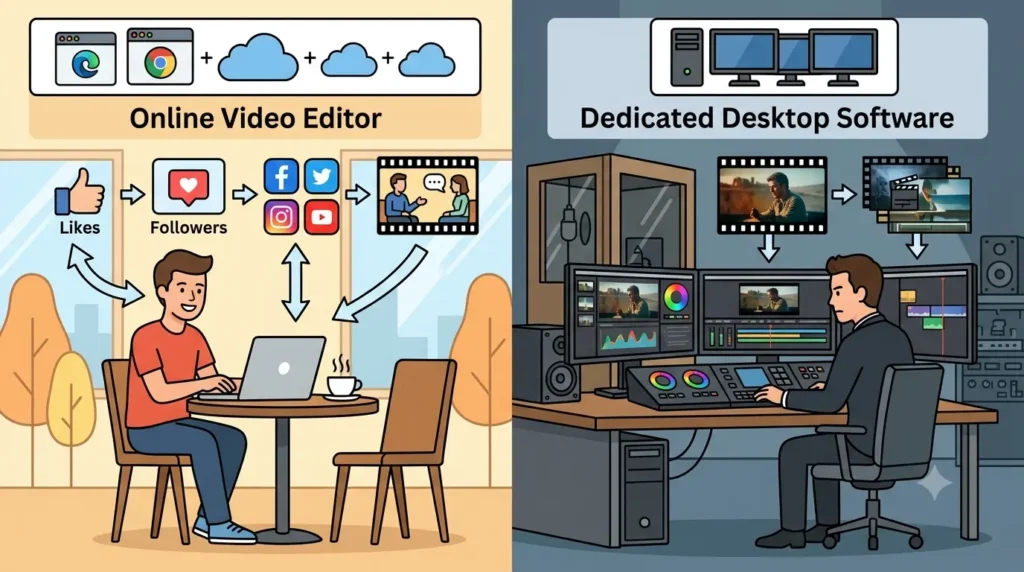
Online editors can handle a surprisingly broad range of projects, including social videos, interviews, tutorials, marketing content, podcasts, presentations, and other forms of digital content.
However, not every production has the same requirements. Feature films, advanced color grading projects, complex visual effects work, and specialized post-production may still benefit from dedicated professional desktop software.
For creators who prioritize speed, accessibility, and straightforward workflows, an online editor can provide everything needed for many everyday projects.
How to Make an Online Editing Workflow More Efficient
The easiest way to speed up editing is to reduce unnecessary decisions and repetitive work.
Start with a clear structure before placing clips on the timeline. Keep only useful footage, create reusable templates for recurring formats, and organize assets so they are easy to find.
AI can also help with repetitive tasks, but creators should give clear instructions and review the results. Automation works best when it supports a defined creative goal.
Most importantly, do not over-edit. A clear sequence with good pacing will usually perform better than a video filled with unnecessary transitions and effects.
The Future of Online Video Editing
Online video editing is moving toward workflows where creators can manage more of the production process from a single browser-based workspace. AI is adding another layer by helping with footage review, timeline assembly, captions, audio cleanup, and content versioning.
This does not mean complex editing software will disappear. Professional editors will continue to need detailed control for demanding productions. But for creators who want to turn raw footage into polished content without learning every feature of a traditional editing application, online and AI-assisted workflows offer a simpler path.
The most effective approach is ultimately a balance: let the software handle repetitive production tasks, keep creative decisions with the creator, and use the timeline as the place where the final story takes shape.