
Preparing for technical interviews can be overwhelming, especially when operating system concepts come into play. Linux remains one of the most important skills for developers, system administrators, and DevOps professionals. Whether you’re a fresher or an experienced candidate, mastering commonly asked linux interview questions can significantly boost your confidence and performance.
As part of broader technical interview preparation, these questions also complement other essential topics covered in our guide on Top 50 Technical Interview Questions , helping you build a strong foundation across multiple domains.
In this blog, we’ve compiled the most frequently asked Linux questions along with clear explanations to help you crack your next interview.
What is Linux?
Linux is an open-source operating system based on the Unix architecture that manages hardware and software resources efficiently. It is widely used in servers, desktops, and embedded systems due to its flexibility, security, and performance. Linux supports multiple users and tasks simultaneously, making it ideal for both personal and enterprise use.
Key Characteristics of Linux
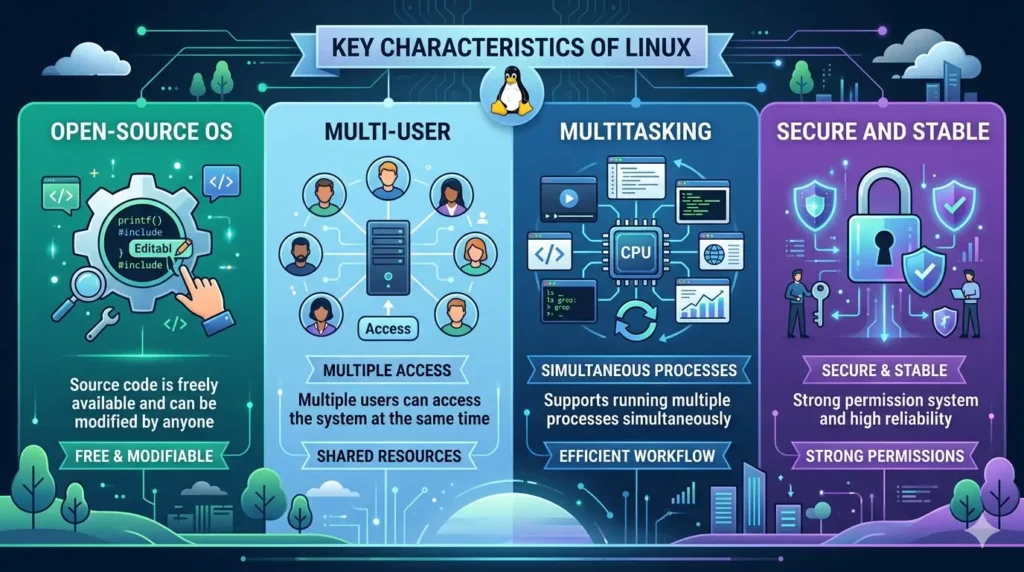
- Open-source OS: Source code is freely available and can be modified by anyone
- Multi-user: Multiple users can access the system at the same time
- Multitasking: Supports running multiple processes simultaneously
- Secure and stable: Strong permission system and high reliability
Types of Linux Interview Questions
When preparing for linux interview questions, it’s important to understand the different categories based on difficulty and real-world application:
1. Basic Linux Interview Questions
These questions focus on fundamental concepts and commands. They are commonly asked for freshers and entry-level roles.
2. Intermediate Linux Interview Questions
These cover deeper concepts like processes, file systems, permissions, and networking. Suitable for candidates with some hands-on experience.
3. Advanced Linux Interview Questions
These include complex topics such as kernel management, system performance, security, and advanced administration tasks.
4. Scenario-Based Questions
These questions test your practical knowledge by presenting real-world problems, such as troubleshooting system errors or optimizing performance.
Basic Linux Interview Questions (Q1–Q15)
Q1. What is the Linux kernel?
The Linux kernel is the core component of the Linux operating system that manages hardware resources and enables communication between software and hardware. It handles processes, memory, and device management.
Q2. What is the difference between Linux and Unix?
Linux is an open-source operating system, while Unix is a proprietary system developed earlier. Linux is more flexible and widely used, whereas Unix systems are typically used in enterprise environments.
Q3. What are the basic Linux commands?
Basic Linux commands are used to perform everyday tasks such as file management and navigation. Examples include ls, cd, pwd, mkdir, rm, and cp.
Q4. What is a shell?
A shell is a command-line interface that allows users to interact with the Linux system. It interprets user commands and executes them.
Q5. What is the root user?
The root user is the superuser or administrator with full access to all commands and files in the system.
Q6. What is CLI?
CLI (Command Line Interface) is a text-based interface used to interact with the system by typing commands instead of using a graphical interface.
Q7. What is a file system in Linux?
A file system is the method used by Linux to organize and store files on a disk. It defines how data is stored, accessed, and managed.
Q8. What is the pwd command?
The pwd (print working directory) command displays the current directory path in the terminal.
Q9. What is the difference between absolute and relative paths?
An absolute path specifies the complete path from the root directory, while a relative path specifies the path relative to the current directory.
Q10. What is the use of ls command?
The ls command is used to list files and directories in the current directory.
Q11. What is a directory?
A directory is a container used to organize files and other directories in a hierarchical structure.
Q12. What is the use of cd command?
The cd (change directory) command is used to navigate between directories.
Q13. What is chmod?
chmod is a command used to change file or directory permissions in Linux.
Q14. What is chown?
chown is used to change the ownership of a file or directory.
Q15. What is grep?
grep is a command used to search for specific patterns or text within files.
Intermediate Linux Interview Questions (Q16–Q35)
Q16. What are Linux file permissions?
Linux file permissions define who can read, write, or execute a file. There are three types of users: owner, group, and others. Permissions are represented using symbols (r, w, x) or numeric values (e.g., 755). Proper permission management is essential for system security.
Q17. What is a process in Linux?
A process is a running instance of a program. Each process has a unique Process ID (PID) and goes through different states such as running, sleeping, or stopped. Linux manages processes efficiently using scheduling.
Q18. Difference between process and thread?
A process is an independent program with its own memory space, while a thread is a lightweight unit of execution within a process that shares memory with other threads. Threads are faster but less isolated compared to processes.
Q19. What is a cron job?
A cron job is a scheduled task in Linux used to automate repetitive commands or scripts at specific intervals. It is managed using the crontab file, which allows users to define timing (minute, hour, day, etc.).
Q20. What is SSH?
SSH (Secure Shell) is a network protocol used to securely connect to remote systems. It encrypts communication between client and server, making it safe for remote login and command execution.
Q21. What is piping in Linux?
Piping allows the output of one command to be used as input for another command using the | symbol. It helps in chaining commands to perform complex operations efficiently.
Q22. What is redirection?
Redirection is used to control the input and output of commands. For example, > redirects output to a file, >> appends output, and < takes input from a file.
Q23. What is a daemon?
A daemon is a background process that runs continuously without user interaction. It usually starts during system boot and handles tasks like printing, scheduling, or network services.
Q24. What is an inode?
An inode is a data structure that stores metadata about a file, such as its size, permissions, owner, and location on disk. It does not store the file name but uniquely identifies the file.
Q25. What is swap space?
Swap space is a portion of the disk used as virtual memory when RAM is full. It helps prevent system crashes but is slower than actual RAM.
Q26. What is the top command?
The top command provides a real-time view of running processes, CPU usage, memory usage, and system performance. It is commonly used for monitoring and troubleshooting.
Q27. What is the ps command?
The ps command displays information about active processes. It shows details like PID, CPU usage, and process status.
Q28. What is netstat?
netstat is used to display network connections, routing tables, and interface statistics. It helps in monitoring network-related issues.
Q29. What is awk?
awk is a powerful text-processing tool used for pattern scanning and data extraction. It is commonly used for processing structured data like logs or CSV files.
Q30. What is sed?
sed (stream editor) is used to perform text transformations such as search, replace, insert, and delete operations within files or streams.
Q31. What is tar command?
The tar command is used to archive multiple files into a single file and optionally compress it. It is commonly used for backups and file transfers.
Q32. What is an environment variable?
Environment variables are dynamic values that affect system behavior and processes. Examples include PATH, HOME, and USER.
Q33. What is alias command?
The alias command is used to create shortcuts for long or frequently used commands, improving productivity in the terminal.
Q34. What is vi editor?
vi is a powerful text editor used in Linux for editing files directly in the terminal. It has different modes such as insert mode and command mode.
Q35. What is find command?
The find command is used to search for files and directories based on criteria like name, size, type, or modification date. It is widely used for file management and automation.
Advanced Linux Interview Questions (Q36–Q50)
Q36. What is kernel panic?
Kernel panic is a critical system error that occurs when the Linux kernel encounters a situation it cannot recover from. It results in system halt and requires a reboot. Common causes include hardware failures, driver issues, or memory corruption.
Q37. What is load balancing in Linux?
Load balancing is the process of distributing workloads across multiple servers or resources to ensure optimal performance and avoid overload. Tools like Nginx or HAProxy are often used for this purpose.
Q38. What is LVM?
LVM (Logical Volume Manager) is a system for managing disk storage flexibly. It allows resizing, extending, and combining storage volumes without downtime.
Q39. What is RAID?
RAID (Redundant Array of Independent Disks) is a storage technology that combines multiple disks for improved performance, redundancy, or both. Common levels include RAID 0, RAID 1, and RAID 5.
Q40. Difference between soft link and hard link?
A hard link points directly to the file’s inode, while a soft link (symbolic link) points to the file path. Hard links cannot cross file systems, but soft links can.
Q41. What is systemd?
systemd is a system and service manager used in modern Linux distributions. It handles system startup, services, and processes efficiently.
Q42. What is SELinux?
SELinux (Security-Enhanced Linux) is a security module that enforces access control policies. It adds an extra layer of security beyond traditional permissions.
Q43. What is virtualization?
Virtualization allows multiple virtual machines to run on a single physical machine. It helps optimize resource usage and is widely used in cloud computing.
Q44. What is Docker in Linux?
Docker is a containerization platform that allows applications to run in isolated environments called containers. It ensures consistency across development and production.
Q45. What is memory management in Linux?
Memory management involves allocation and deallocation of memory to processes. Linux uses techniques like paging and segmentation to optimize performance.
Q46. What is process scheduling?
Process scheduling is the method by which the Linux kernel decides which process runs at a given time. It ensures fair CPU usage and efficient multitasking.
Q47. What is a zombie process?
A zombie process is a process that has completed execution but still has an entry in the process table. It occurs when the parent process fails to read its exit status.
Q48. What is I/O redirection?
I/O redirection allows controlling input and output streams of commands using operators like >, >>, and <, enabling efficient data handling.
Q49. What is bootloader?
A bootloader is a program that loads the operating system into memory during system startup. GRUB is a commonly used Linux bootloader.
Q50. Explain runlevels in Linux
Runlevels define the state of the machine, such as single-user mode, multi-user mode, or reboot. In modern systems, runlevels are replaced by systemd targets.
Scenario-Based Linux Interview Questions
Q51. How to troubleshoot high CPU usage?
To troubleshoot high CPU usage, first identify the processes consuming the most resources using commands like top or htop. Check the CPU percentage and note the Process ID (PID). You can then use ps -p <PID> -o %cpu,cmd to get more details about the process. If the process is unnecessary or stuck, you can terminate it using kill or kill -9. Additionally, analyze logs in /var/log to identify recurring issues and ensure no background services or scripts are causing excessive load.
Q52. How to find large files in a system?
You can find large files using the find command. For example:
find / -type f -size +100M
This command searches for files larger than 100MB. You can also use du -ah / | sort -rh | head -n 10 to list the largest files and directories. This helps in identifying storage-heavy files that may need cleanup.
Q53. How to check disk space issues?
To check disk space usage, use the df -h command, which shows available and used space in a human-readable format. For detailed usage by directories, use du -sh *. If a partition is full, identify large files or logs and clean unnecessary data. Regular monitoring helps prevent system crashes due to disk exhaustion.
Q54. How to kill a process?
First, identify the process using ps or top, then use the kill <PID> command to terminate it. If the process does not stop, use kill -9 <PID> to forcefully terminate it. Alternatively, pkill <process_name> can be used to kill processes by name. Always ensure that terminating the process will not affect critical system operations.
Q55. How to monitor system performance?
System performance can be monitored using tools like top, htop, vmstat, iostat, and free. These tools provide insights into CPU usage, memory consumption, disk I/O, and system load. For continuous monitoring, tools like sar or setting up monitoring systems (like Nagios or Prometheus) can help track performance over time and detect anomalies early.
Frequently Asked Questions (FAQs)
Q1. What are Linux interview questions?
Linux interview questions are commonly asked questions in technical interviews to assess a candidate’s understanding of the Linux operating system, including commands, file systems, processes, and system administration concepts.
Q2. Are Linux interview questions important for freshers?
Yes, linux interview questions are very important for freshers, especially for roles like system administrator, DevOps engineer, and backend developer, as Linux is widely used in servers and production environments.
Q3. How can I prepare for Linux interview questions?
You can prepare by practicing Linux commands daily, understanding core concepts, working on real-world scenarios, and revising frequently asked questions. Hands-on experience is key to mastering Linux.
Q4. What are the most commonly asked Linux commands in interviews?
Some commonly asked commands include ls, cd, pwd, grep, chmod, chown, ps, top, and find. Interviewers often ask both their usage and practical applications.
Q5. What is the best way to answer scenario-based Linux questions?
The best approach is to explain your thought process step-by-step, mention relevant commands, and demonstrate practical problem-solving skills rather than just giving theoretical answers.
Q6. Do companies ask advanced Linux questions in interviews?
Yes, for experienced roles, companies often ask advanced topics like kernel, memory management, process scheduling, security (SELinux), and system performance tuning.
Conclusion
Linux continues to be a critical skill in the tech industry, powering servers, cloud infrastructure, and modern applications. By preparing these linux interview questions, you build a strong foundation in operating system concepts as well as practical problem-solving skills.
Whether you are a fresher starting your journey or an experienced professional aiming to level up, consistent practice and hands-on experience with Linux will significantly improve your chances of success.