Power BI dashboards can show what happened in your business, but finding answers often takes more work. A manager may need to change several filters or ask an analyst to investigate a sudden drop in sales. Even a well-built dashboard cannot answer every question someone might ask.
Power BI AI agents offer another way to work with business data. Users can ask questions in plain English, explore performance changes, and receive answers based on their reporting data. Some agents can also generate DAX queries or create charts without requiring users to build reports themselves.
This article compares eight Power BI AI agents and AI reporting tools available in 2026. We’ll review their reporting capabilities, how they connect to Power BI, and the pros and cons of each.
8 Best Power BI AI Agents Compared
These tools take different approaches to AI reporting. Some offer configurable agents connected to Power BI semantic models, while others add AI chat directly to existing reports.
| Power BI AI Agent | Primary Use Case | Main Strength |
| 1. BI Genius | Governed AI reporting for businesses and customers | Configurable agents with transparent answers and access controls |
| 2. Microsoft Copilot for Power BI | Native AI reporting and analysis | Built-in AI assistance for Power BI reports |
| 3. Microsoft Fabric Data Agent | AI analysis across Fabric data sources | Natural-language queries across supported enterprise data |
| 4. AI Lens | Conversational AI inside Power BI reports | Customizable ChatGPT-style reporting interface |
| 5. PBI AI Agent | AI-assisted dashboard analysis | Multiple AI models and automatic chart generation |
| 6. chat Power BI AI | Embedded AI conversations | Flexible LLM provider options |
| 7. AI Buddy by iFour | AI explanations within existing dashboards | Branded conversational report visual |
| 8. Microsoft Copilot Studio | Custom business agents connected to Power BI | Low-code agent creation with wider business workflows |
1. BI Genius – Governed AI Agents for Power BI Business Reporting
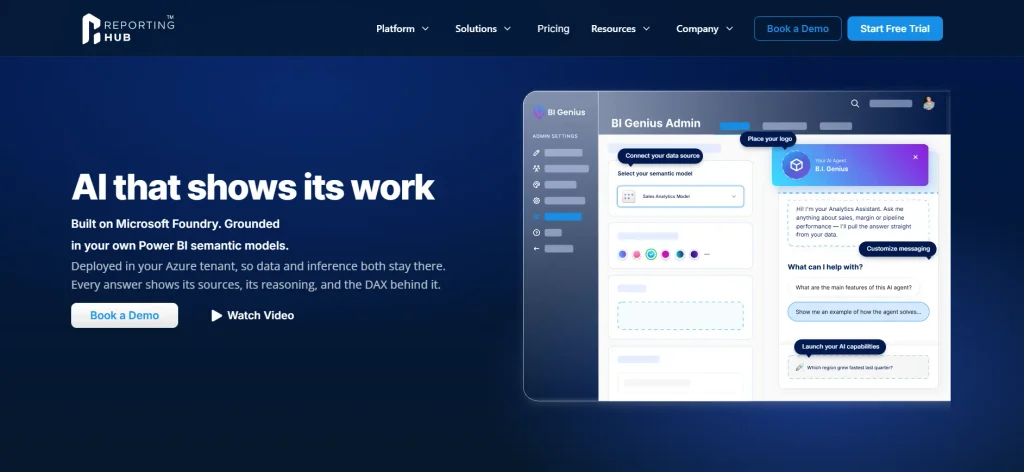
BI Genius from Reporting Hub takes the top spot for businesses that want more than a basic Power BI AI chatbot. It combines conversational analytics with the controls needed to manage AI agents across business teams and external customers.
Businesses can create no-code agents connected to existing Power BI semantic models and review the DAX behind generated answers. It supports branded AI reporting and customer-specific access controls, making it a strong choice for organizations that need to deliver trustworthy AI insights.
BI Genius runs inside the customer’s Azure environment and supports white-label delivery through customer portals or existing applications. Businesses can also use Reporting Hub to manage tenant access, with row-level security and multi-source agent capabilities available on the appropriate paid plans.
Pros:
- Creates configurable AI agents using existing Power BI semantic models without coding.
- Shows generated DAX, source information, and query logic for reviewing AI answers.
- Supports separate agents for customers or departments, with defined data permissions.
- Runs in the customer’s Azure environment and supports branded external delivery.
Cons:
- Primarily designed for organizations using Power BI and Microsoft Azure.
- Advanced capabilities, including semantic model RLS for agents and white-label AI, require higher-tier plans.
2. Microsoft Copilot for Power BI – Native AI-Powered Reporting
Microsoft Copilot for Power BI is Microsoft’s built-in AI assistant for creating and exploring Power BI reports. Business users can ask questions about their semantic models and receive written answers or generated visuals. Analysts can also use Copilot to explain DAX, work with measures, and make changes to report content.
Microsoft’s September 2026 updates added stronger reasoning through Fabric IQ, allowing supported Copilot experiences to show generated DAX and the data behind certain answers. Organizations already working inside Power BI may find this easier to adopt than a separate reporting application, although Copilot requires qualifying Microsoft capacity.
Pros:
- Works directly within supported Power BI experiences without a separate AI reporting platform.
- Answers business questions, generates visuals, and assists with DAX development.
Cons:
- Requires eligible Fabric or Power BI Premium capacity, beyond normal per-user licensing.
- Less suited to businesses needing independently branded AI agents for different external customers.
3. Microsoft Fabric Data Agent – AI Analysis Across Enterprise Data
Microsoft Fabric Data Agent allows organizations to create conversational agents that answer questions using data stored in Microsoft Fabric. Unlike tools focused on a single Power BI report, it supports semantic models alongside Fabric warehouses, lakehouses, and KQL databases.
A sales manager could ask about revenue from a Power BI model, while another department queries data stored in a Fabric warehouse. The agent uses existing data permissions, making it useful for organizations that already manage several reporting sources through Fabric.
Pros:
- Supports natural-language analysis across several types of Fabric data sources.
- Uses existing semantic model permissions and data security rules.
Cons:
- Requires a paid Microsoft Fabric capacity and supporting configuration.
- Conversational results have output limits and are not intended for returning large datasets.
4. AI Lens – Conversational AI Inside Power BI Dashboards
AI Lens adds a conversational interface to Power BI reports, letting users ask questions about data without leaving the report. It is available as a Power BI custom visual and supports AI-powered interactions through services such as OpenAI and Azure OpenAI.
Report creators can configure the AI connection and place the chat interface alongside existing dashboard visuals. However, AI Lens is mainly a report-level chat experience, not a platform for managing multiple independent agents across customer organizations.
Pros:
- Adds natural-language conversations directly to existing Power BI reports.
- Supports different AI connection options, including Azure OpenAI.
Cons:
- Primarily focused on conversations inside reports rather than wider agent management.
- Requires additional configuration of the chosen AI service and its data access.
5. PBI AI Agent – Multi-Model AI Analysis for Power BI Reports
PBI AI Agent is a Power BI custom visual that lets users analyze reporting data through natural-language conversations. It supports AI models from OpenAI, Anthropic, and Google, letting businesses choose the provider for each question.
Users can ask about performance trends, request explanations, and generate charts based on the visual’s available data. The platform also includes token usage monitoring and chat history, helping teams understand how often they use AI analysis.
Pros:
- Supports several AI model providers, giving businesses flexibility in model selection.
- Generates charts and written analysis inside existing Power BI dashboards.
Cons:
- It mainly operates within individual reports rather than offering centralized, multi-tenant agent management.
- Depending on the setup, businesses must manage their own AI API keys or pay for built-in AI credits.
6. chat Power BI AI – Embedded AI Reporting With Flexible LLMs
chat Power BI AI by Chartenza adds generative AI agents to Power BI reports through a custom visual. Users can ask questions about their data using normal language, while report developers control the AI service behind the conversation.
The tool supports providers such as OpenAI and Anthropic, with paid options for custom model connections and conversation records. It also provides usage controls, including token limits that administrators can assign to license keys.
Pros:
- Supports multiple AI providers, including custom model connections on eligible plans.
- Provides conversation records and token usage limits to manage AI consumption.
Cons:
- Requires developers to configure AI connections and maintain the report-level experience.
- Does not provide the same centralized customer and agent management as a dedicated AI reporting platform.
7. AI Buddy by iFour – Conversational Reporting With Custom Branding
AI Buddy by iFour is a Power BI custom visual that adds AI conversations directly to dashboards. It uses AI services such as Azure OpenAI to answer questions, summarize information, and explain reporting results. For example, an HR manager reviewing employee turnover could ask which department has the highest attrition rate instead of manually comparing several visuals.
The chat interface supports custom headers, colors, and layouts, making it easier to match an existing report’s design. It focuses on helping users understand dashboard data rather than building and managing independent AI agents.
Pros:
- Adds conversational explanations and data summaries within Power BI reports.
- Allows businesses to customize the chat interface to match their reporting design.
Cons:
- Focuses on report-level conversations rather than multi-agent business operations.
- Requires configuration and access to a supported AI model service.
8. Microsoft Copilot Studio – Custom AI Agents Connected to Power BI Data
Microsoft Copilot Studio is a low-code platform for building business AI agents that can work with company data and connected services. Organizations can connect a Fabric Data Agent to Copilot Studio, allowing an agent to answer questions using supported Power BI semantic models.
Businesses can publish agents through supported channels, including Microsoft Teams and websites, although each deployment needs the correct permissions and configuration. Copilot Studio offers more options for business workflows than a basic Power BI chat visual, but it takes additional work to connect and manage the reporting data.
Pros:
- Combines Power BI-based data questions with wider business agent capabilities.
- Offers low-code tools for creating and publishing custom AI experiences.
Cons:
- Connecting Power BI data may require setting up a Fabric Data Agent and additional configuration.
- Licensing and agent usage costs can become more complicated across Microsoft services.
How to Choose the Right Power BI AI Agent for Business Reporting
An AI agent may answer simple questions during a demonstration but struggle with real reporting data. Business metrics often depend on specific DAX measures, date rules, and permissions the agent must understand. The following factors matter when comparing AI reporting tools.
1. Connection to Power BI Semantic Models
Power BI semantic models contain the measures and relationships that define how a business calculates its results. An agent that can query these models can use existing calculations rather than creating its own definitions. That matters when teams depend on agreed metrics such as net revenue or customer retention.
Some AI tools connect directly to semantic models, while others work mainly with the data supplied to a report visual. Businesses should check what information the agent can access and how it generates answers.
2. AI Answer Accuracy and Transparency
Consider a finance director asking why profit fell in the last quarter. An AI agent might return a convincing explanation, but the director still needs to check the underlying figures. Access to generated queries and source data makes that review easier.
A Power BI agent also needs clear business definitions to interpret questions correctly. Missing measures or poorly named fields can lead to incorrect answers, even when the AI model performs well. Businesses should test agents with questions that already have verified answers.
3. Data Security and Agent Permissions
AI access should follow the same data restrictions businesses already apply to their Power BI reports. If a regional manager can only view sales from one territory, the agent must not return records from another. Organizations serving external customers also need controls that prevent one customer from accessing another customer’s data.
The important distinction is between controlling which agent someone can use and controlling which data that agent can query. Both need to be checked before making AI reporting available to a wider audience.
4. Power BI Licensing and AI Costs
AI reporting costs depend on the Microsoft services and third-party products involved. A standard Power BI license does not automatically provide access to every Copilot capability. Microsoft Copilot requires qualifying capacity, while other products may charge for agents, AI requests, or external model usage.
Businesses should calculate costs using their expected number of users and monthly questions. A platform that charges per agent can produce a different bill than one that charges per AI query. External customer reporting may also require a separate Power BI Embedded or Fabric capacity.
5. Internal Reporting vs. Customer-Facing AI
An internal reporting team may only need an AI assistant inside Power BI. Employees already have organizational accounts and can work through Microsoft’s existing reporting environment. In that case, Copilot or Fabric Data Agent may meet the requirement.
Customer-facing AI introduces different needs. Businesses may want branded agents for several customers, each with its own data permissions and reporting access. A platform such as BI Genius addresses this use case by connecting configurable agents to Power BI models and providing a separate delivery experience.
Conclusion
Power BI AI agents now support several types of business reporting, from natural-language data questions to AI-generated charts and custom business assistants. Microsoft Copilot provides a native experience, while Fabric Data Agent works with a wider range of Fabric data sources. AI Lens, PBI AI Agent, chat Power BI AI, and AI Buddy add conversational analysis to existing dashboards.
For businesses that need more control over how AI reporting reaches users, BI Genius stands out for its configurable agents, query transparency, and customer-facing delivery. It uses existing Power BI semantic models while allowing administrators to manage agent access and review the logic behind answers. Copilot Studio is another option when reporting needs to connect with broader business workflows.
The choice depends on how the business plans to use AI. Internal teams may need a simple way to explore reports, while companies serving external customers often need stronger access controls and a reporting experience they can manage themselves.