
Most job posts for ERP developers read like a wall of acronyms: SAP, ABAP, SuiteScript, Odoo, EDI, UAT. If you’re a student or a junior developer, it’s hard to picture the actual workday behind them. Do you write features? Fix reports? Sit in meetings with accountants?
The honest answer is all of those, at different points in the project. An ERP (enterprise resource planning) system runs a company’s finance, inventory, purchasing, sales and often HR in one database. Rolling one out takes months, and developers are involved from the first workshop to the weeks after go-live. This article walks through what you’d really do at each stage, which skills matter most, and how the work can grow into a long-term career.
Discovery and Fit-Gap: Your First Weeks on the Project
ERP projects don’t start with code. They start with workshops, where consultants sit with the finance team, the warehouse lead and the sales manager and ask how work happens today. How does an order become an invoice? Who approves a purchase over a certain amount? Where does stock get counted?
As a developer, you’re often in those sessions to listen for one thing: gaps. The team compares each business process against what the ERP does out of the box. That comparison is called a fit-gap analysis. A “fit” means the standard system handles it. A “gap” means someone has to configure, extend or work around it.
Your job here is to estimate the gaps honestly. If the sales team wants a custom discount rule that depends on customer region and order history, you’ll be asked how long it takes and what could break. Junior developers who ask good questions in these meetings (“What happens when the customer returns half the order?”) get noticed fast, because those edge cases are exactly where projects go over time later.
How the Phases Fit Together, and Where You Fit In
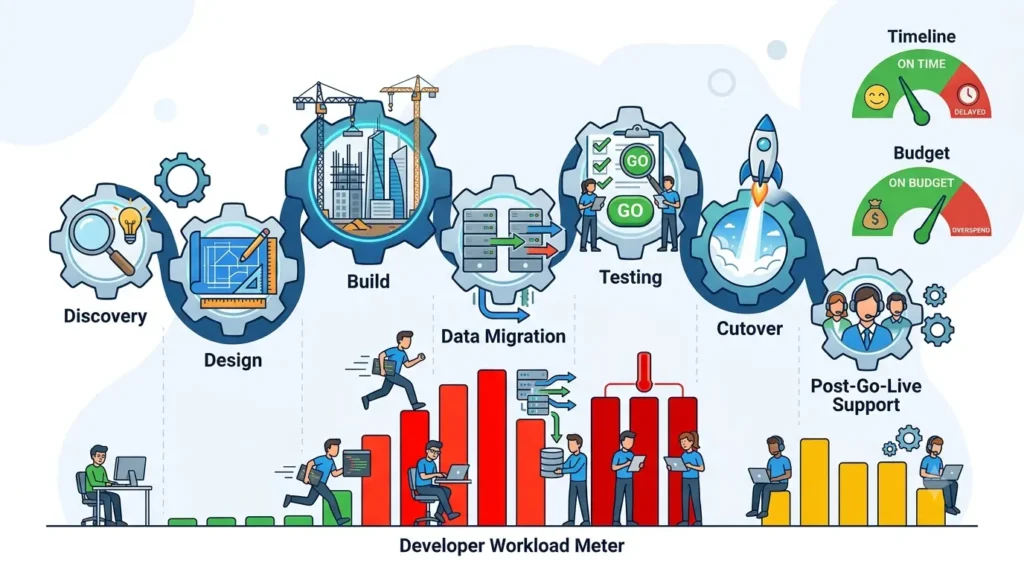
Every ERP rollout follows roughly the same arc: discovery, design, build, data migration, testing, cutover, and support after go-live. The names change between methods and vendors, but the order rarely does. A step-by-step erp implementation guide maps these phases in detail, and it’s worth reading one before your first project so the meeting vocabulary doesn’t catch you off guard.
What matters for you is that developer work isn’t evenly spread. You’ll be light during discovery, very busy during build and migration, under pressure during testing, and on call during cutover. Knowing the shape ahead of time helps you plan your own learning and avoid burning out in the busiest month.
It also explains why timelines are a constant topic. Panorama Consulting’s 2022 ERP report, which surveyed 140 organizations, found that nearly 60% of projects stayed on budget and more than 60% finished within the planned timeline. Read the other way, a large share of projects still slip. Developers who flag risks early, instead of quietly working late, are the ones teams want back on the next project.
Configuration First, Custom Code Second
Here’s the part that surprises many new ERP developers: a good chunk of the job isn’t writing code at all. Modern ERP systems ship with huge amounts of built-in configuration. You set up tax rules, approval workflows, numbering sequences, warehouse locations and user roles through settings screens, not source files.
Custom code comes in when configuration runs out, and that’s where platform-specific skills show up. Odoo is written in Python: its modules are Python classes plus XML views, with JavaScript on the front end. NetSuite uses SuiteScript, which is JavaScript-based, for custom logic, scheduled jobs and integrations. SAP has long relied on ABAP for custom reports, extensions and interfaces, and Microsoft Dynamics 365 Business Central uses AL, its own extension language. Different syntax, same idea: you extend a system that already works rather than building one from zero.
The rule experienced teams follow is simple: configure before you customize. Every line of custom code is something the company has to test again at each upgrade. So when you propose a customization, expect to defend it. “The standard approval flow can’t handle two signers from different departments” is a good reason. “I thought it would look nicer” is not.
Platform reach matters when choosing what to learn. Odoo, for example, says it is used by more than 5 million users, from one-person startups to enterprises with over 300,000 users. Since Odoo’s Community edition is open source, it’s one of the easiest platforms to install on your own laptop and practice with.
Data Migration Is Where Juniors Earn Trust
If there’s one task that lands on junior developers more than any other, it’s data migration. The old system (or a pile of spreadsheets) holds years of customers, suppliers, products, open orders and account balances. All of it has to move into the new ERP, cleanly, before go-live.
The work usually breaks down like this:
- Extract the data from the old system, often with SQL queries against a database you’ve never seen before.
- Clean the master data. You’ll find the same customer entered three times with slightly different spellings, products without units of measure, and suppliers with no tax ID.
- Map old fields to new ones. The chart of accounts is the big one here: finance may restructure it entirely, so every old account number needs a home in the new structure.
- Load the data with import tools or scripts, usually in Python or the platform’s own language.
- Reconcile the results. Do customer balances in the new system match the old one, down to the cent?
You’ll run this cycle several times, in test environments, before the real load. Each trial run surfaces new problems. That’s the point.
This is where you learn the business fastest. Nothing teaches you how a company sells things like discovering that, say, a few hundred products have no price because they’re sold only in bundles. It’s also where trust gets built: if your migration scripts are repeatable and your reconciliation reports are clear, the finance team starts asking for you by name.
Integrations, Testing, and Go-Live Weekend
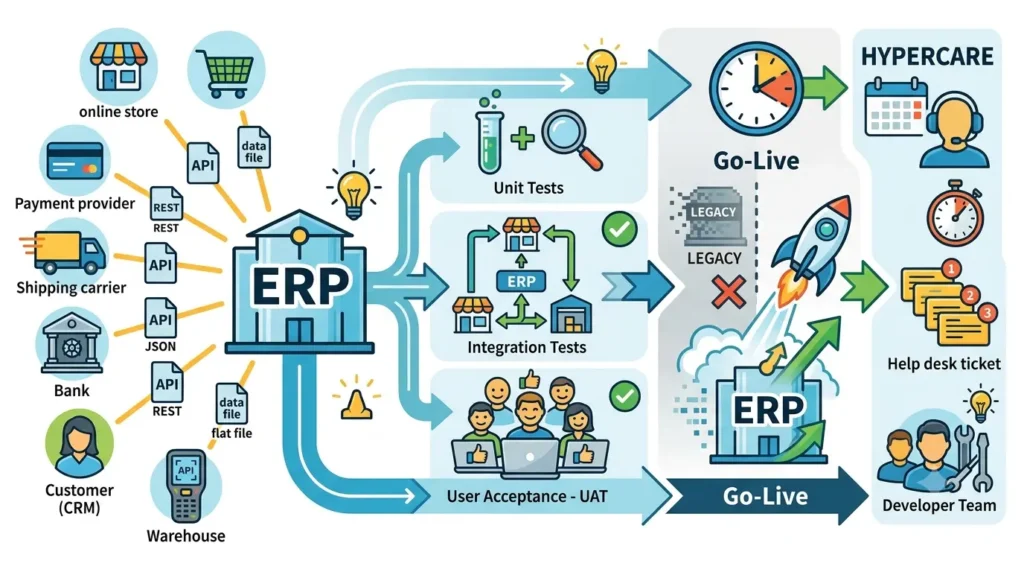
An ERP rarely lives alone. It has to talk to the online store, the payment provider, the shipping carrier, the bank, maybe a CRM or a warehouse scanner app. Building and maintaining those connections is classic developer work, and most of it now runs over REST APIs with JSON payloads. Older partners may still send flat files or EDI messages, so don’t be surprised to parse a fixed-width text file in your first year.
Integration work teaches you to think about failure. What happens when the shipping API is down for an hour? Do orders queue, retry, or vanish? Good integrations log every call, retry safely, and never create the same invoice twice.
Testing runs in layers. You write unit tests for your own custom code and scripts. Then come integration tests, which push a real order from the web store through the ERP to the warehouse and back. Finally there’s user acceptance testing (UAT), where actual employees run their daily tasks in a test copy of the system and decide whether it’s ready.
During UAT, developers mostly support. Users report that something “doesn’t work,” and you figure out whether it’s a bug, a configuration gap, a training issue or a process the team forgot to mention in discovery. That diagnostic skill is underrated, and it carries over to every software job you’ll ever have.
Then comes cutover, often over a weekend so the business loses as few working days as possible. The old system freezes, the final data load runs, balances are checked, integrations get switched over, and someone signs off before Monday morning. Developers are on call, watching logs and fixing load errors in real time. It’s stressful, and it’s also the moment most ERP people remember for years.
After go-live, the project moves into what teams call hypercare: a few weeks of close support while users settle in. Expect a spike in tickets, a handful of urgent report requests, and small fixes. A surprising amount of that early demand is about reports. The finance team needs the month-end close to look the way their auditors expect, the warehouse wants a picking list sorted by shelf, and the sales director wants yesterday’s numbers in her inbox at 8 a.m. None of it is glamorous, but report work forces you to understand how data flows through every module, and it’s a fast way to become the person who knows where things live in the database.
Many developers then stay on for ongoing support, upgrades and new modules, which is how a single rollout can turn into years of steady work.
The Skills to Learn and Where They Lead
You don’t need to master an ERP platform before applying for your first role. You do need a solid general base, and the good news is that it overlaps heavily with mainstream development. In the 2025 Stack Overflow Developer Survey, 66% of respondents said they used JavaScript, 58.6% used SQL and 57.9% used Python over the past year. Those three languages cover most of the ERP work described above.
A practical learning order looks like this:
- SQL first. Joins, grouping and aggregate functions are the backbone of migration, reconciliation and reporting work.
- Python or JavaScript. Python for scripting and Odoo, JavaScript for SuiteScript and web-facing pieces.
- REST APIs. Learn to call an API, handle authentication tokens, and deal with errors and retries.
- Basic accounting. Know what a ledger, an invoice, a credit note and a chart of accounts are. You’ll stand out immediately.
- One platform, hands-on. Install Odoo Community locally, or use a vendor’s free learning environment, and build a small custom module.
From there, ERP careers tend to split into two paths. Technical consultants (or ERP developers) write the customizations, integrations and migration scripts. Functional consultants focus on business processes and configuration: they run workshops, design workflows and train users. The lines blur on smaller teams, and plenty of people move from technical to functional roles as they learn the business side. If you enjoy both code and conversations with finance teams, you’ll have options either way.
Summary
ERP development is less about building something new from scratch and more about making a large system fit a real business without breaking it. Your workdays will move from listening in discovery, to configuring before coding, to writing migration scripts and integrations, to supporting testers and staying online during go-live weekend. If you want a starting point this month, pick up SQL and some accounting basics, install Odoo Community, and migrate a messy spreadsheet of fake customers into it. That one exercise covers more real ERP work than most tutorials.