
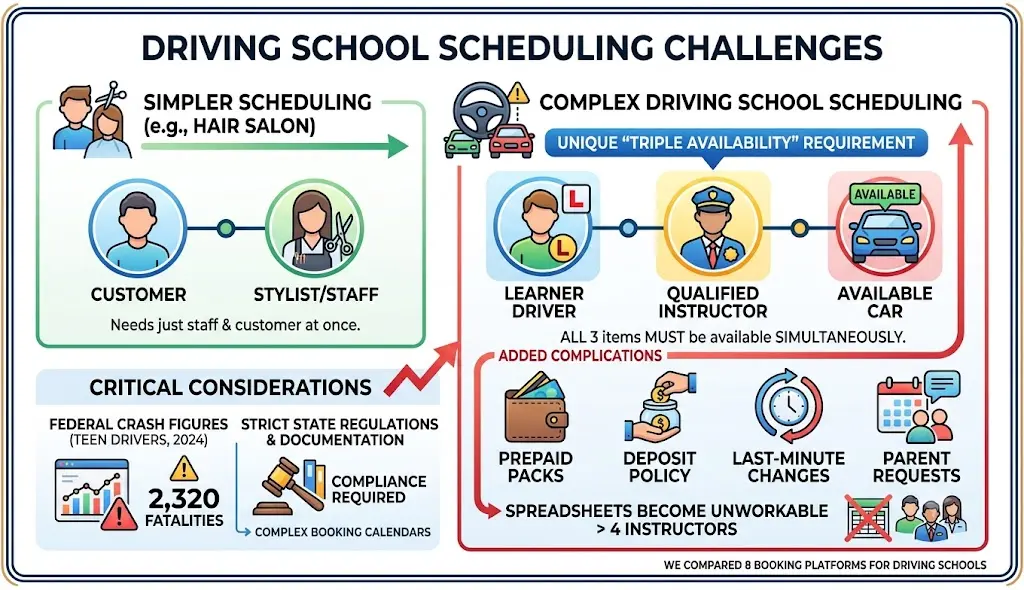
If you run a driving school, the scheduling problem you are dealing with is not the same problem a hair salon is dealing with, because every lesson requires three separate things to be available at the same time: a learner, a qualified instructor, and a car that is not already out on the road with somebody else. Once you add prepaid lesson packs, a deposit policy, and a parent who wants to move Saturday’s two-hour slot to Tuesday afternoon, most shared spreadsheets stop being workable at somewhere around the fourth instructor.
The consequences here are not purely administrative, either. Federal crash figures for teen drivers record that 2,320 people were killed in crashes involving a teen driver (aged 15 to 18) during 2024, which is a large part of the reason that states regulate how novice driver training is delivered and documented, and that regulation is what eventually shows up in the way your booking calendar has to be set up.
We compared eight booking and scheduling platforms that driving schools do actually sign up for. The pricing and the review scores below were checked on each vendor’s own pricing page and on Capterra. Where a platform is a poor fit for driver training, we have said so in that platform’s own entry rather than putting it somewhere less visible.
What Driving School Scheduling Software Actually Has To Do
Most of the tools that describe themselves as appointment scheduling software were developed for a single practitioner who is selling a single service. Driver training differs from that model in four fairly specific ways, and those four differences are usually what separates a system you will keep from a system you will abandon after about six months.
Instructor and resource scheduling. Instructor and resource scheduling means that both a person and a piece of equipment are assigned to the same slot. In a driving school, the person is the instructor, and the piece of equipment is normally a dual-control vehicle, and in some cases a classroom as well. A booking system that only tracks the availability of staff will quite happily double-book your one automatic-transmission car across two different instructors on a Saturday morning.
Lesson packages, also called class packs or passes. A lesson package is a prepaid bundle of lessons that a customer purchases up front and then draws down one booking at a time. The credits in a package normally carry a validity window, which means an unused package expires instead of sitting on your books indefinitely. Packages matter for driving schools because state requirements tend to arrive in blocks rather than as single lessons. California’s driver training school rules state that behind-the-wheel training “must consist of at least six hours of behind-the-wheel training with a professional driving instructor,” alongside 30 hours of classroom driver education. A requirement of that shape is really a product decision for your booking system, because six hours is a three-lesson or a six-lesson pack that has to be sold once and then consumed across several weeks.
Learner self-service. Students and their parents reschedule very frequently. Self-service means that they are able to move or cancel their own booking online, inside a policy window that you have set, without having to email an instructor who is currently out driving. In a small school, this is generally the single feature that reduces phone volume the most.
Deposits and no-show handling. An empty two-hour slot in a car is expensive in a way that an empty barber chair is not, because the instructor was paid for the time and the vehicle was reserved for it. Deposits, stored cards, and automated reminders are the standard defenses against this, and all of them depend on the booking system supporting them.
How We Evaluated These Tools
We looked past the booking calendar itself, on the basis that every one of these products has a calendar and all of those calendars work. The criteria that actually separated them were as follows:
- Whether the platform supports prepaid packages and memberships natively, including expiry and recurring billing, or expects you to track packs manually
- Whether pricing scales by staff, by location, or by booking volume, since those three models produce very different bills for a school with six instructors
- What the platform charges on top of the subscription, including payment processing and any per-booking cut
- Whether students can reschedule and cancel without staff involvement
- Publicly stated pricing. A vendor that will not publish a number is harder to budget against, and we say so where it applies
- Third-party review scores, taken from Capterra in September 2026 and quoted with their review counts, because a rating built on a handful of reviews is a much noisier signal than one built on thousands
One caution is worth stating before the list itself. In our own experience of putting vendor-supplied copy through review for comparison articles, the correction a software company makes most often to a draft is deleting a feature that the product does not actually have yet. Marketing pages and AI-generated shortlists both tend to run somewhat ahead of the shipped product. Support teams in this category also report customers arriving after an AI tool has told them to click a setting that does not exist in the software. If you are shortlisting from any of those sources, it is worth checking the specific feature page, and preferably the trial account, before you sign anything.
The Eight Tools Compared At A Glance
| Tool | Best for | Starting price (USD per month) | Capterra rating | Main limitation for a driving school |
|---|---|---|---|---|
| Bookeo | Schools selling prepaid lesson packs without a booking commission | 14.95 | 4.3 from 103 reviews | No fleet or vehicle records module |
| Acuity Scheduling | Solo and small instructor teams that want packages on a simple calendar | 16.00 | 4.8 from 5,758 reviews | Calendar count caps growth on lower plans |
| SimplyBook.me | Schools that want a free tier and a long menu of optional features | 0.00 | 4.6 from 1,287 reviews | Booking caps per plan, setup is fiddly |
| Square Appointments | Schools taking card payments in person with no monthly fee to start | 0.00 | 4.5 from 260 reviews | You are tied to Square for processing |
| Setmore | Small teams on a tight budget who mainly need a calendar and reminders | 0.00 | 4.6 from 959 reviews | No native prepaid lesson packs |
| Calendly | One-to-one lesson booking layered on an existing calendar | 0.00 | 4.7 from 4,140 reviews | Not a booking business system |
| Vagaro | Schools already running a wider service business on one platform | 23.99 promotional | 4.7 from 3,651 reviews | Built for salon, spa and fitness |
| Mindbody | Large multi-service operators needing class and membership tooling | 79.00 per location | 4.0 from 2,994 reviews | Wrong vertical, and priced accordingly |
The Best Driving School Booking And Scheduling Software
1. Bookeo
Best for: driving schools that sell prepaid lesson packages and do not want a per-booking cut taken out of them.
Bookeo sells three separate products that run on one platform, and the product that fits a driving school is the Classes & Courses one rather than the appointments one. That distinction matters in practice, because the class product is organised around a teacher, a bookable resource, a capacity limit, and a pack of credits, which is reasonably close to the way driver training is actually sold. The driving school page states that lessons are assigned “to instructors based on their availability and expertise” and that students are able to “select their preferred instructor.”
What it does well
- Prepaid packages work as virtual punch cards. A customer buys credits, for example, ten credits for ten lessons, and you can set a validity period that governs how long those credits last from the date of purchase
- Memberships can be billed once up front or as a recurring subscription with a set payment frequency, and can hand out prepaid credits automatically at every payment
- Payment flexibility on the booking itself: collect a partial deposit, store a card to secure a lesson, or allow the booking with no immediate payment
- Automated email and text reminders before lessons, plus online rescheduling and cancellation by the customer
Pricing: the Classes & Courses page shows five tiers in USD, from Solo at 14.95 per month to X-Large at 119.95. The middle Standard tier at 39.95 covers 20 teachers and rooms, 20 staff logins, and 1,000 bookings per month. Digital waivers are a paid add-on starting at 9.00 per month, and SMS credits start at 0.09 each. There is a 30-day free trial with no credit card and a 30-day money-back guarantee. Displayed currency varies by region, so check your local page. The company states that it does not charge commissions on payments processed through the system, with gateway fees paid separately to your processor.
Rating: 4.3 out of 5 from 103 reviews on Capterra, which is a smaller review base than most of the platforms below.
Where it falls short: there is no fleet module in the product. You will not find vehicle maintenance logs, mileage tracking, or printed state completion certificates, so a school that wants a single system covering both its bookings and its DMV paperwork is still going to need a second tool alongside it. The multi-branch product is also not a shared database, and it is worth being clear about what it actually is. It is a portal in which a customer searches the branches, and then books with one individual branch, and each branch operates as a standalone account with its own schedule, its own staff, its own customer records and its own reports. Customers, members, and gift vouchers are not shared between branches, which means a voucher bought at one location is only redeemable at that location. The portal manager is able to open each sub-account and pull portal-level booking and revenue summaries for each sub-account, so reporting is covered, but a single unified customer list across branches is not.
2. Acuity Scheduling
Best for: an owner-instructor or a small team that wants packages without a heavyweight system.
Acuity Scheduling is the tool that most small service businesses end up on, and the fit for driver training is reasonably good once you have moved up to the middle plan. Packages, memberships, gift certificates and a waitlist all sit on the Standard tier, and the Standard tier is therefore where a school that sells six-hour blocks is going to have to be.
What it does well
- Client self-scheduling with automatic time zone conversion, plus custom intake forms for learner permit details
- Payments through Stripe, Square, PayPal and Venmo rather than a single forced processor
- Text reminders, memberships and packages, and a waitlist on the Standard plan
- Unlimited services and appointments on every tier, including the entry plan
Pricing: Starter is 16.00 per month on annual billing or 20.00 month-to-month, Standard is 27.00 annually or 34.00 monthly, and Premium is 49.00 annually or 61.00 monthly. The free trial is seven days with no credit card.
Rating: 4.8 out of 5 from 5,758 reviews on Capterra.
Where it falls short: the plans are metered by the number of calendars, and one calendar per instructor is how a driving school is going to use them. Starter includes one calendar, Standard includes up to six, and Premium includes up to 36, so a five-car school is on Standard from the first day and a school that is growing is already looking at Premium. There is also no concept of a vehicle in the product, which means the car has to be modelled as if it were a staff calendar. That does work, but it is a workaround rather than a feature.
3. SimplyBook.me
Best for: schools that want to start free and bolt on only the features they need.
SimplyBook.me takes a slightly unusual approach, which is a small core booking system plus a library of custom features that are enabled individually. For a driving school, that means you switch on packages, deposits and intake forms, and then you ignore most of the remaining library. Reviewers describe the same trade-off fairly consistently, which is that the flexibility comes together with a setup process that is fiddly.
What it does well
- A genuine free plan with 50 bookings and one provider, useful for a single instructor testing the model
- Deposits, tips, and a point-of-sale module available from the Basic plan
- Provider counts scale sensibly, from five on Basic to 30 on Premium
- Client app and white-label options on higher tiers for schools that want their own branding
Pricing: Free at 0.00 for 50 bookings, Basic at 11.90 annually or 13.90 monthly for 100 bookings and five providers, Standard at 24.90 or 29.90 for 500 bookings and 15 providers, Premium at 49.90 or 59.90 for 2,000 bookings and 30 providers, and Enterprise on custom pricing.
Rating: 4.6 out of 5 from 1,287 reviews on Capterra.
Where it falls short: the monthly booking cap is the constraint that causes the trouble here. A school that is running approximately 40 lessons a week will clear the Basic allowance inside the first month and will be pushed up to Standard on booking volume alone, regardless of how few instructors it happens to employ. Reviewers also flag the payment handling as confusing, so it is worth testing that specifically before you start taking deposits through the system.
4. Square Appointments
Best for: schools that already take card payments in person and want the booking layer at no extra monthly cost.
Square Appointments is free at its entry tier because the revenue for Square is in the payment processing rather than in the subscription. If your school is already running its card payments through Square, then the booking calendar arrives at no additional subscription cost at all, and for a two-car operation that is a difficult offer to argue with.
What it does well
- Unlimited staff calendars and an online booking site on the free plan
- Cancellation policy and no-show fee enforcement on the Plus plan, which is directly useful when a learner skips a paid slot
- Resource management on the Premium plan, which is the closest thing here to booking a specific vehicle
- Appointment reminders included at every tier
Pricing: Free at 0.00 per location, Plus at 49.00 per location, Premium at 149.00 per location, and a custom-priced Pro tier. Processing on the free plan is 2.6% plus 15 cents in person and 3.3% plus 30 cents online, improving to 2.5% and 2.9% on paid plans. Paid plans include a 30-day trial.
Rating: 4.5 out of 5 from 260 reviews on Capterra.
Where it falls short: you are committed to Square for your processing, and the percentage is where the real cost sits rather than in the monthly fee. A school that is billing 20,000 in online lesson payments per month is paying approximately 660 in online processing on the free tier before any subscription is added at all. Resource management, which is the feature here that comes closest to booking a specific vehicle, only appears on the Premium plan at 149.00 per location.
5. Setmore
Best for: a budget-conscious school that mostly needs a shared calendar and reliable reminders.
Setmore is the cheapest credible option on this list once you have more than four people on the team, and it does not really present itself as anything more than a booking calendar. If you are running a small school in which the lesson packs are already tracked in a notebook and the actual problem is double-booking, a booking calendar may be all that you need.
What it does well
- Up to four users on the free plan with unlimited appointments, which covers a genuinely small school
- SMS and email reminders, recurring appointments, and two-way calendar sync on the Pro plan
- Branded booking page and payment acceptance included at the free tier
- Per-user pricing that stays low even as the team grows
Pricing: Free at 0.00 for up to four users, Pro at 5.00 per user per month on annual billing or 12.00 per user per month on month-to-month billing, and a custom Enterprise tier.
Rating: 4.6 out of 5 from 959 reviews on Capterra.
Where it falls short: there is no native prepaid package or lesson-pack feature in the product, and that mechanic is the commercial core of most driving schools. Selling a six-hour block through Setmore means taking the payment once and then tracking how many hours remain by hand, somewhere outside the system. That is workable at approximately 15 students and it is not workable at 150.
6. Calendly
Best for: a single instructor who wants clean one-to-one booking on top of a calendar they already use.
Calendly is the most polished scheduling link on this list, and it is also the one least suited to running a school. The product exists in order to remove the back-and-forth involved in arranging a meeting, and a one-hour driving lesson is, technically speaking, a meeting. Once you are past a single instructor, however, the model stops matching the way the business actually works.
What it does well
- Fast setup and a booking page that learners will not struggle with
- Automations and reminders plus multiple calendar connections on the Standard plan
- Round-robin and team scheduling on the Teams plan, which can distribute lessons across instructors
- Payment collection through Stripe and PayPal on paid plans
Pricing: Free for one event type, Standard at 10.00 per seat per month, Teams at 16.00 per seat per month, with annual billing discounts of 17% and 20%. Enterprise starts at 15,000 per year with a 50-seat minimum.
Rating: 4.7 out of 5 from 4,140 reviews on Capterra.
Where it falls short: there are no packages, there are no memberships, there is no student database that really deserves the name, and there is no way to represent a vehicle as a bookable resource. The per-seat pricing also means that a six-instructor school is paying six times over for a tool that will not track a single lesson pack for it.
7. Vagaro
Best for: an operator who already runs another appointment business on Vagaro and wants one login.
Vagaro is a capable appointment platform that is aimed fairly directly at salon, spa, barber, nail, tanning, medical spa, and fitness businesses, and driving schools do not appear anywhere on that list. It is included here because operators who run a mixed portfolio of businesses sometimes try to put everything on one system, and it is worth understanding what that decision actually costs.
What it does well
- Pricing scales by bookable calendar, from a single provider up to seven or more, so a small team pays a small bill
- Packages, memberships, and point of sale are core to the product because its target market runs on them
- Marketing tools including promotions and a consumer-facing marketplace listing
- No cancellation fee and month-to-month terms, described on the pricing page as cancel “at any time, for any reason, no questions asked, and no fee”
Pricing: from 23.99 per month as a promotional rate for the first six months, with a standard rate of 30.00 per month for one bookable calendar, rising with each additional calendar.
Rating: 4.7 out of 5 from 3,651 reviews on Capterra.
Where it falls short: both the vocabulary and the templates are wrong for driver training, so you will find yourself describing lessons as services, describing instructors as service providers, and having no way at all to describe the cars. The consumer marketplace listing, which genuinely does help a nail salon pick up walk-in customers, does very little for a business whose customers arrive by way of parents and high schools.
8. Mindbody
Best for: large fitness, wellness and beauty operators, which is why it is last here.
Mindbody is the most established platform on this list and it is also the least appropriate one for this particular use case. Its own pricing page frames the product around a “yoga studio, gym, or salon,” and its industry navigation runs through fitness, wellness and beauty categories. It gets recommended in generic scheduling roundups on the strength of brand recognition rather than on the strength of the fit.
What it does well
- Room and resource management on the Accelerate tier, which is real resource scheduling
- Class scheduling, memberships and packages at genuine scale, built for studios running dozens of sessions a week
- Integrated payments, branded booking widgets and a consumer app listing
- Automated email and text campaigns plus reporting on the top tier
Pricing: “Starting at $79 USD/month per location,” with three tiers named Starter, Accelerate and Ultimate. Tier-level prices are not published, so you will be quoted by a salesperson.
Rating: 4.0 out of 5 from 2,994 reviews on Capterra, the lowest score in this comparison and built on a large enough sample to be meaningful.
Where it falls short: the problem is the price and the fit together. The figure of 79.00 per location is the floor rather than the cost of the tiers that actually carry resource management, and the consumer marketplace, which is a real advantage for a yoga studio, will send a driving school no customers whatsoever. The sales-quote pricing model also makes budgeting difficult for a small operator who wants to know the annual number before booking a demonstration.
Pricing compared: solo instructor versus multi-location school
The headline prices above are not directly comparable with one another, because these platforms are metering three different things.
Per user or per calendar. Acuity Scheduling, Setmore and Calendly all price by seats or by calendars. That is inexpensive for a solo instructor and it becomes expensive in a fairly linear way as you hire people. A six-instructor school on Calendly Teams is paying 96.00 per month, while the same six-instructor school on Setmore Pro annual billing is paying 30.00.
Per booking volume. SimplyBook.me and Bookeo both cap the number of bookings per month by tier. That arrangement suits a school that has a lot of instructors and a moderate lesson volume, and it penalises an operation with high throughput. The number to check on these plans is the cap rather than the price.
Per location. Square Appointments and Mindbody both charge per location. For a school on a single site that is fine. For a three-branch operation, Square Premium at 149.00 per location comes to 447.00 per month before any processing is added, and Mindbody starts at 237.00 before you have found out what your actual tier costs.
For a solo instructor, the realistic bracket is 0.00 to 20.00 per month, and the free tiers on Setmore, SimplyBook.me, and Square Appointments are all genuinely usable rather than being demonstration accounts. For a school with four to eight instructors that is selling prepaid packs, the bracket is approximately 30.00 to 60.00 per month. For a multi-branch school, the per-location models are the ones that move the fastest, so it is worth modelling twelve months of cost rather than one.
Lesson Packs, Memberships And Automatic Billing
These two mechanics are confused with each other very frequently, and the difference between them determines which platforms are even candidates for a driving school.
A lesson pack, which is also called a prepaid package, is a fixed quantity of credits that is purchased once, so that ten credits buy ten lessons. The credits normally carry a validity period that is set from the purchase date, and that period is what prevents a pack bought in September from being redeemed three years later at the old price. Bookeo implements this as a virtual punch card with a validity window you can set yourself, and Acuity Scheduling, SimplyBook.me, Vagaro, and Mindbody all support some version of the same idea. Setmore and Calendly do not support it at all.
A membership is recurring rather than one-off. The customer pays on a schedule and in return receives either a discount, or access to services that are otherwise restricted, or an allocation of credits at each payment. On Bookeo a membership can be set up either as a one-time flat fee or as a recurring subscription with a chosen payment frequency and a set number of payments, and prepaid credits can be issued to the member automatically at every payment. That last arrangement is the closest thing to automatic billing available in this category, because the money recurs and the credits arrive along with it.
For most driving schools, the pack is the correct instrument and the membership is not, because learners are not really subscribers. A learner buys a block of hours, completes the block, passes a test, and then leaves. The exception is a school that also runs defensive driving or fleet training on retainer, where a monthly allocation of credits to a corporate account does genuinely fit.
There is one practical warning worth making about expiry. If your state requires a set number of behind-the-wheel hours, then a pack that expires before a learner has been able to complete those hours will generate refund arguments. The validity window should be set against your worst-case scheduling backlog rather than against your best case.
Switching Systems Without Losing Prepaid Lesson Packs
Migration is the point at which schools tend to lose money, and the loss is nearly always in the packs rather than in the calendar.
Future bookings normally export and import cleanly enough, because a booking is only an appointment with a date, a person and a service attached to it. Customer records usually move as well, although the phone number formatting will need cleaning up afterwards. The problem is the unconsumed credits. A learner who has bought a six-hour pack and used two of those hours is holding a liability on your books, and most exports represent that liability badly or do not represent it at all.
The approach that works here is not a sophisticated one. Before you touch anything, pull a report of every outstanding package balance, including the customer name, the credits remaining, the purchase date and the expiry date. Recreate those balances by hand in the new system as issued credits rather than as sales, so that your revenue reporting does not end up counting the same money twice. Run both systems in parallel for one billing cycle, taking new bookings only in the new system while the old system drains down. Then tell your customers in writing before the switch happens rather than afterwards, because when a booking link breaks the first thing a parent normally does is telephone you.
Gift vouchers deserve a separate check of their own. On platforms where each branch is a standalone account, the vouchers and the packages do not travel between locations, which means a multi-branch migration is really several separate migrations rather than one.
How To Choose, By The Shape Of Your School
The rules are not uniform across the country. A federal review of licensing systems counted forty-nine states and the District of Columbia running a three-stage graduated licensing system, with the specific provisions differing from one state to the next. Your pack sizes, your minimum hours and your paperwork all follow from those rules, so it makes sense to start there rather than starting with a feature list.
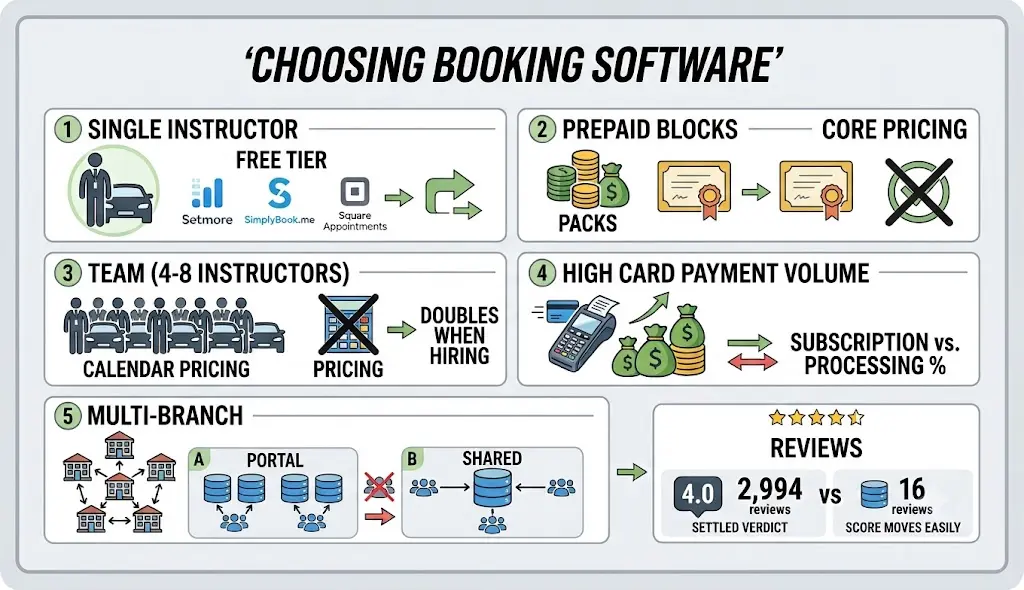
If you are a single instructor with one car, a free tier is normally enough, and you can stop there. Setmore, SimplyBook.me, and Square Appointments will all handle a calendar and reminders at no cost, and you can move to something else at the point where tracking the packs starts to hurt.
If prepaid blocks are the core of your pricing, the shortlist narrows quite quickly. What you need is native package credits that carry an expiry, and you need them without having to pay on a per-instructor basis.
If you are running a team of four to eight instructors, count the calendars before you count the features. Per-calendar pricing looks inexpensive on the pricing page and then doubles as soon as you hire two more people.
Schools that are processing a significant volume of card payments should model the processing percentage across a full year rather than modelling the subscription. On the numbers above, the processing spread between a free tier and a paid tier can exceed the subscription difference inside a single month.
Multi-branch operators should ask one fairly blunt question during the demonstration, which is whether the product is one database or several. Portal-style products give each branch its own account and then roll the reporting up, which is acceptable for reporting and awkward for a customer who books at two different locations. A genuinely shared database is a different architecture and it is normally a different price as well.
A note on the ratings is also worth adding, since every roundup of this kind quotes them. The star number matters considerably less than the review count sitting behind it. A score of 4.0 that is built on 2,994 reviews is a settled verdict. A score built on approximately sixteen reviews will move by several tenths of a point on the strength of a handful of new entries, which is why smaller vendors chase reviews and why you should read the recent reviews rather than the average.
Frequently Asked Questions
What is driving school scheduling software?
Driving school scheduling software is a booking system designed to manage driving lessons, instructors, vehicles, students, payments, and availability in one place. Unlike basic appointment software, it needs to coordinate multiple resources for the same lesson, such as a learner, instructor, and vehicle.
What features should driving school scheduling software have?
The most important features include instructor scheduling, vehicle or resource management, online student booking, lesson packages, payment processing, deposits, cancellation policies, automated reminders, and customer self-service. Schools may also need intake forms, recurring bookings, reporting, and support for multiple locations.
Can driving school software manage lesson packages?
Yes, some platforms support prepaid lesson packages natively. Bookeo, Acuity Scheduling, SimplyBook.me, Vagaro, and Mindbody offer package or credit-based functionality. Setmore and Calendly do not provide native prepaid lesson-pack management, so schools using them may need to track remaining lessons separately.
Can students book and reschedule driving lessons online?
Yes. Several scheduling platforms allow students or parents to book, cancel, and reschedule lessons through an online booking page. The school can usually define cancellation windows and other booking rules so students can make changes without contacting an instructor directly.
Can scheduling software manage driving school vehicles?
Some platforms provide resource-management features that can be adapted for vehicles, but most general appointment systems do not have a dedicated fleet module. Square Appointments, for example, offers resource management on its Premium plan. Other platforms may require each vehicle to be represented as a resource, calendar, or staff-equivalent rather than as a dedicated vehicle record.
Is there free scheduling software for driving schools?
Yes. Setmore, SimplyBook.me, Square Appointments, and Calendly offer free entry-level plans. However, free plans usually have limitations involving users, bookings, features, payment processing, or resources. A free plan can work for a solo instructor, but a growing school may need a paid tier once lesson volume or team size increases.
How much does driving school scheduling software cost?
Pricing varies based on how the software charges. Some platforms charge per user or calendar, others by booking volume, and some by location. Entry-level plans can cost nothing, while paid plans in this comparison range from roughly $5 per user per month to $79 or more per location, before considering payment processing and optional add-ons.
What is the best scheduling software for a small driving school?
The right option depends on how the school operates. A solo instructor may only need online booking and reminders, while a school selling prepaid lesson packages needs credit tracking and package expiry. Schools with multiple instructors should also check calendar limits and vehicle-resource management before choosing a platform.
How do I migrate prepaid lesson packages to a new scheduling system?
Start by exporting every learner’s outstanding package balance, purchase date, remaining credits, and expiry date. Recreate those balances in the new system as existing credits rather than new sales so the same revenue is not counted twice. Running the old and new systems in parallel during the transition can also reduce booking errors.
Conclusion
Driving school scheduling is more complicated than ordinary appointment booking because every lesson has to coordinate a learner, an instructor, and a vehicle. Once you add prepaid lesson packs, deposits, cancellations, reminders, and multiple locations, a basic shared calendar can quickly become difficult to manage.
The right software depends on the shape of your school. A solo instructor may be perfectly well served by a free scheduling platform, while a growing school selling prepaid packages needs native credit tracking and clear calendar limits. Schools processing significant card payments should also calculate annual processing costs rather than comparing subscription prices alone.
Before choosing a platform, test the workflows that affect your business most: booking a lesson, assigning an instructor and vehicle, using a package credit, rescheduling a learner, collecting a deposit, and handling a cancellation. If the system can handle those scenarios without spreadsheets or manual workarounds, it is much more likely to remain useful as your driving school grows.