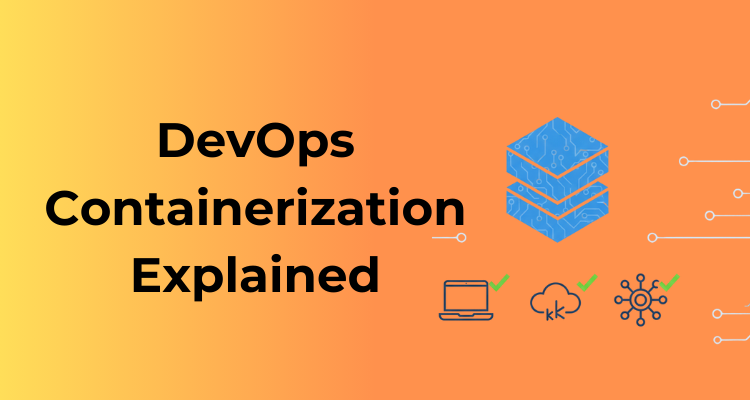
DevOps containerization refers to the practice of packaging applications and everything they need to run, such as libraries, dependencies, and configuration, into lightweight, isolated units called containers.
In a DevOps environment, containerization helps teams build, test, and deploy applications in a consistent way across development, testing, and production systems. Instead of worrying about differences between machines or environments, teams can rely on containers to run the same way everywhere.
At its core, containerization supports the DevOps goal of faster and more reliable software delivery. Containers act as a common unit of deployment that both developers and operations teams can trust. This shared approach reduces friction between teams and makes automation easier throughout the software lifecycle.
Why Containerization Became Essential in Modern DevOps Workflows
Modern DevOps workflows demand speed, consistency, and scalability, areas where traditional deployment methods often fall short. Containerization became essential because it directly addresses these challenges.
First, containers eliminate environment-related issues. Applications packaged in containers behave the same on a developer’s laptop, in CI/CD pipelines, and in production. This consistency removes a major source of deployment failures.
Second, containers enable faster deployments and rollbacks. Since containers are lightweight and start quickly, teams can release updates more frequently and recover from issues without long downtimes. This aligns perfectly with continuous integration and continuous delivery practices.
Third, containerization improves scalability and resource efficiency. Containers use fewer resources than virtual machines, allowing systems to scale up or down quickly based on demand. This makes them ideal for cloud-native and microservices-based architectures.
Finally, containerization fits naturally into automation. Containers integrate smoothly with CI/CD pipelines, infrastructure as code, and orchestration platforms, making it easier to automate builds, tests, deployments, and scaling.
Because of these advantages, containerization has become a foundational practice in DevOps, not just an optional tool. It enables teams to deliver software faster, with fewer errors, and with greater confidence in production environments.
What Is Containerization in DevOps?
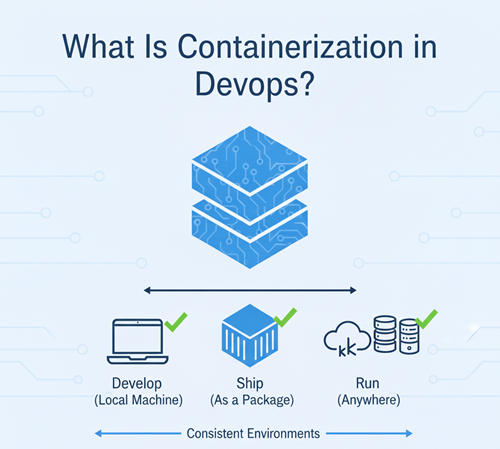
Containerization in DevOps is a method of packaging an application along with everything it needs to run, such as system libraries, runtime, configuration files, and dependencies, into a single, self-contained unit called a container. This approach ensures that the application behaves the same way across different environments, from a developer’s machine to production servers.
Unlike traditional deployments, containerization does not bundle an entire operating system with the application. Instead, containers share the host system’s operating system kernel, which makes them lightweight, fast to start, and efficient to run.
How Containers Package Applications and Dependencies
Containers solve a common problem in software delivery: differences between environments. With containerization, all required components are packaged together.
A container typically includes:
- Application code
- Required libraries and frameworks
- Runtime environment
- System-level dependencies
- Configuration settings
Because everything is bundled into the container image, the application does not rely on external system setups. This means the same container can run consistently in development, testing, staging, and production environments without modification.
This packaging model also makes containers easy to version, share, and reuse. Teams can store container images in registries and deploy identical versions whenever needed.
Role of Containerization Across the DevOps Lifecycle
Containerization plays a key role at every stage of the DevOps lifecycle:
- Development: Developers work in consistent environments, reducing setup time and environment-related issues.
- Testing: Automated tests run against the same container images that will be deployed later, improving reliability.
- CI/CD: Containers act as standardized build and deployment units within pipelines, enabling automation.
- Deployment: Applications are deployed quickly and consistently across different infrastructures.
- Operations: Containers support easy scaling, monitoring, and recovery in production systems.
By serving as a common deployment unit, containerization bridges the gap between development and operations. It enables faster releases, simpler automation, and more predictable behavior throughout the DevOps lifecycle, making it a core practice in modern DevOps environments.
Why Containerization Matters in DevOps
Containerization is not just a technical improvement, it directly supports the core goals of DevOps: speed, reliability, and automation. Below are the key reasons containerization has become essential in modern DevOps workflows.
Consistent Environments Across Dev, Test, and Prod
One of the biggest challenges in software delivery is environment mismatch. Code that works in development often fails in testing or production due to differences in system setup.
Containerization solves this by packaging the application and its dependencies into a single unit. The same container image runs unchanged in:
- Development environments
- Testing and staging setups
- Production systems
This consistency dramatically reduces deployment issues and removes the need for environment-specific fixes, making collaboration between teams much smoother.
Faster Deployments and Rollbacks
Containers are lightweight and start quickly, which allows DevOps teams to deploy applications much faster than traditional methods.
Key advantages include:
- Quick startup times
- Simple version-based deployments
- Easy rollback to a previous container image if something goes wrong
Instead of manually fixing broken deployments, teams can simply redeploy a stable container version, reducing downtime and risk.
Improved Scalability and Portability
Containers are designed to scale. Because they are lightweight and isolated, applications can scale up or down quickly based on demand.
Containerization also improves portability:
- Containers can run on local machines, cloud servers, or hybrid environments
- Applications are not tied to a specific operating system or infrastructure setup
- Moving workloads between cloud providers becomes easier
This flexibility is especially important for cloud-native and microservices-based systems.
Better CI/CD Integration
Containerization fits naturally into CI/CD pipelines. Containers act as a standardized unit that flows through the pipeline from build to deployment.
In CI/CD workflows, containers enable:
- Reproducible builds
- Automated testing in isolated environments
- Consistent deployments across stages
- Easier integration with orchestration and automation tools
Because containers work so well with automation, they help teams release updates more frequently while maintaining stability.
Containers vs Virtual Machines in DevOps
Both containers and virtual machines (VMs) are used to run applications, but they work very differently. Understanding this difference helps DevOps teams choose the right approach for performance, scalability, and automation.
Key Differences at a Glance
| Aspect | Containers | Virtual Machines |
|---|---|---|
| Startup time | Seconds | Minutes |
| Resource usage | Lightweight | Heavy |
| OS dependency | Shared OS kernel | Separate OS per VM |
| DevOps suitability | High | Moderate |
Why Containers Are Preferred in DevOps
Containers share the host operating system kernel and package only the application and its dependencies. This design makes them fast and efficient.
Benefits of containers in DevOps:
- Very fast startup and shutdown
- Better resource utilization
- Easy to scale and replicate
- Ideal for CI/CD pipelines and automation
- Consistent behavior across environments
Because DevOps focuses on speed, automation, and frequent releases, containers fit naturally into modern DevOps workflows.
When to Use Containers
Containers are the best choice when:
- You are building microservices-based applications
- Fast deployments and rollbacks are required
- Applications need to scale quickly
- CI/CD automation is a priority
- You want consistent environments across dev, test, and production
Most cloud-native DevOps systems today are container-first for these reasons.
When Virtual Machines Still Make Sense
Despite the popularity of containers, virtual machines are not obsolete. They are still useful in certain scenarios.
VMs are a better fit when:
- Applications require a full operating system
- Strong isolation is needed for security or compliance
- Running legacy or monolithic applications
- Different operating systems are required on the same host
VMs provide stronger isolation but at the cost of higher resource usage and slower operations.
Containers vs VMs in Real DevOps Environments
In practice, many DevOps teams use both:
- Virtual machines as the base infrastructure
- Containers to run applications on top of those VMs
This hybrid approach combines the isolation of VMs with the speed and flexibility of containers, making it common in real-world DevOps setups.
Core Components of DevOps Containerization
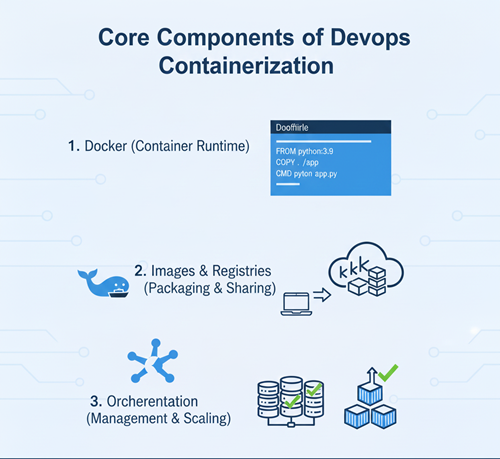
To understand DevOps containerization clearly, it’s important to break it down into its core building blocks. These components work together to ensure applications are packaged, deployed, and managed in a reliable and repeatable way.
Container Images
Container images are the foundation of containerization. An image is a read-only template that contains everything required to run an application.
What container images include:
- Application code
- Runtime environment
- Libraries and dependencies
- Configuration instructions
Images are created using build instructions (such as a Dockerfile) and are used to start containers. Because images are portable, the same image can be used across development, testing, and production environments.
Why Immutable Images Matter
In DevOps, container images are treated as immutable, meaning they are never modified after being built.
This approach matters because it:
- Ensures consistency across environments
- Makes deployments predictable
- Simplifies rollbacks by reverting to a previous image version
- Reduces configuration drift
Instead of updating a running system, DevOps teams build a new image and redeploy it, which aligns perfectly with automated CI/CD workflows.
Containers
A container is a running instance of a container image. While the image is static, containers are dynamic and represent the actual execution of the application.
Runtime Behavior of Containers
At runtime, containers:
- Start quickly
- Run in isolated environments
- Share the host operating system kernel
- Can be created, stopped, or destroyed easily
This makes containers ideal for scalable and automated DevOps systems.
Stateless vs Stateful Containers
Understanding the difference between stateless and stateful containers is critical:
- Stateless containers
Do not store data locally. They are easy to scale, replace, and restart, making them ideal for web services and APIs. - Stateful containers
Store or depend on persistent data. These require careful handling, such as external storage or volume management.
DevOps best practices usually favor stateless containers, as they simplify scaling and recovery.
Container Registries
A container registry is a centralized location where container images are stored, versioned, and distributed.
Registries play a key role in DevOps workflows by acting as the bridge between build and deployment stages.
Public vs Private Registries
- Public registries
Used to share images openly. Useful for learning, testing, and open-source projects. - Private registries
Restricted access and commonly used in production environments to protect proprietary code and configurations.
Most organizations rely on private registries for security and compliance reasons.
Image Versioning and Security
Proper image management is essential in DevOps containerization:
- Version images clearly using tags
- Avoid using “latest” in production
- Scan images for vulnerabilities
- Control access to registries
Strong versioning and security practices ensure that only trusted and tested images reach production.
Docker’s Role in DevOps Containerization
Docker plays a central role in DevOps containerization because it made containers simple, practical, and accessible for everyday development and operations work. Most DevOps workflows today introduce containerization through Docker before moving to orchestration and advanced platforms.
Why Docker Is Widely Used in DevOps
Docker is popular because it solves real problems DevOps teams face on a daily basis.
Key reasons Docker is widely adopted:
- Easy to learn and use compared to earlier container technologies
- Consistent behavior across environments
- Large ecosystem and strong community support
- Seamless integration with CI/CD tools and cloud platforms
Docker allows teams to package applications once and run them anywhere, which directly supports faster releases and reliable deployments.
Dockerfile Basics
A Dockerfile is a simple text file that contains instructions for building a container image. It defines how the application environment should be created.
A Dockerfile typically includes:
- Base image (for example, a Linux or language runtime image)
- Commands to install dependencies
- Steps to copy application code
- Instructions to run the application
Dockerfiles make builds repeatable and version-controlled, which fits perfectly with DevOps practices and automation.
Docker Build → Run → Push Workflow
Docker follows a clear and predictable workflow that aligns well with DevOps pipelines:
- Build
Create a container image from a Dockerfile. - Run
Start a container from the image to test or use the application. - Push
Upload the image to a container registry so it can be shared and deployed.
This workflow ensures that the same image tested locally is the one deployed in staging or production, reducing unexpected failures.
Docker in Local Development and CI Pipelines
In local development, Docker helps developers:
- Avoid complex environment setup
- Run databases and services easily
- Match production-like environments
In CI pipelines, Docker is used to:
- Build container images automatically
- Run tests in isolated environments
- Package applications consistently for deployment
Because Docker integrates smoothly with CI/CD tools, it acts as a bridge between development, testing, and production, making it one of the most important tools in DevOps containerization.
Container Orchestration in DevOps
As applications grow beyond a few containers, managing them manually becomes impractical. This is where container orchestration becomes a critical part of DevOps. Orchestration tools automate how containers are deployed, scaled, networked, and kept running in production environments.
Why Orchestration Is Needed
Running a single container is simple, but real-world DevOps systems involve:
- Dozens or hundreds of containers
- Multiple services communicating with each other
- Traffic that increases and decreases unpredictably
- Failures that must be handled automatically
Without orchestration, teams would need to manually restart containers, manage networking, and scale services—an approach that does not work at scale.
Container orchestration solves this by:
- Automatically restarting failed containers
- Scaling applications up or down based on demand
- Managing service discovery and networking
- Handling rolling updates and rollbacks
This automation is essential for reliable, always-on production systems.
Introduction to Kubernetes
The most widely used container orchestration platform today is Kubernetes. It has become the industry standard for running containerized applications in production.
Kubernetes provides a framework to:
- Deploy containerized applications
- Manage their lifecycle
- Ensure high availability
- Scale services automatically
Most cloud providers and DevOps tools integrate directly with Kubernetes, making it a core skill for modern DevOps engineers.
Core Kubernetes Concepts (High Level)
You do not need to master Kubernetes immediately, but understanding its basic building blocks is important.
- Pods
The smallest unit in Kubernetes. A pod runs one or more containers that share networking and storage. - Deployments
Define how many replicas of an application should run and how updates are rolled out safely. - Services
Provide stable networking and access to pods, even when containers are created or replaced.
These concepts allow Kubernetes to manage applications automatically instead of relying on manual control.
Containers at Scale in Production
In production environments, container orchestration enables:
- High availability through multiple replicas
- Zero-downtime deployments
- Automated recovery from failures
- Efficient resource usage across clusters
Instead of managing individual containers, DevOps teams manage desired state, Kubernetes continuously works to match the actual system state to that desired configuration.
Containerization in the DevOps CI/CD Pipeline
Containerization plays a key role in modern CI/CD pipelines by making builds, tests, and deployments consistent, automated, and repeatable. Instead of moving raw code through different environments, DevOps teams move container images, making the entire delivery process more reliable.
How Containers Fit into CI/CD
In a container-based CI/CD pipeline, containers act as the standard unit of delivery. Once an application is containerized, the same image flows through every stage of the pipeline.
Containers are used to:
- Build applications in isolated environments
- Run automated tests without environment conflicts
- Package applications with all dependencies
- Deploy identical artifacts across environments
This approach removes inconsistencies and ensures that what is tested is exactly what gets deployed.
Build → Test → Package → Deploy Using Containers
A typical container-based CI/CD pipeline follows these steps:
- Build
Application code is compiled or packaged, and a container image is created using a Dockerfile. - Test
Automated tests run inside containers, ensuring a clean and repeatable testing environment. - Package
The tested container image is tagged with a version and pushed to a container registry. - Deploy
The same image is pulled from the registry and deployed to staging or production using orchestration tools.
Because each step uses containers, the pipeline remains stable and predictable.
Container-Based Pipelines vs Traditional Pipelines
| Aspect | Container-Based Pipelines | Traditional Pipelines |
|---|---|---|
| Environment consistency | High | Often inconsistent |
| Deployment unit | Container image | Code or build artifacts |
| Scalability | Easy to scale | More complex |
| Rollbacks | Fast and reliable | Slower and manual |
| CI/CD reliability | High | Moderate |
Traditional pipelines often rely on environment-specific setups, which can lead to deployment issues. Container-based pipelines avoid this by packaging everything together.
Why Container-Based Pipelines Are Preferred
DevOps teams prefer container-based CI/CD pipelines because they:
- Reduce environment-related failures
- Speed up releases and rollbacks
- Simplify automation across stages
- Integrate smoothly with orchestration platforms
DevOps Containerization Workflow (Step-by-Step)
The DevOps containerization workflow follows a clear and repeatable process. Each step builds on the previous one, ensuring applications move smoothly from development to production with minimal risk.
Step 1: Write Application Code
The workflow begins with writing application code. This could be a web app, API, background service, or microservice.
At this stage:
- Developers focus on functionality and logic
- Code is stored in a version control system
- Dependencies and runtime requirements are identified
Clear and well-structured code makes containerization much easier later in the pipeline.
Step 2: Create a Dockerfile
A Dockerfile defines how the application should be packaged into a container image.
It typically includes:
- A base image
- Instructions to install dependencies
- Commands to copy application code
- The command to start the application
The Dockerfile ensures that every build uses the same setup, removing environment inconsistencies.
Step 3: Build the Container Image
Using the Dockerfile, a container image is built.
During this step:
- Application code and dependencies are bundled together
- The image becomes a versioned, immutable artifact
- The same image can be reused across environments
This image represents a specific, deployable version of the application.
Step 4: Push the Image to a Registry
Once the image is built and tested, it is pushed to a container registry.
Why this step matters:
- The registry acts as a central storage for images
- Teams can track versions and changes
- CI/CD pipelines can pull the same image for deployment
Both public and private registries are commonly used depending on security needs.
Step 5: Deploy the Container to an Environment
The container image is then pulled from the registry and deployed to a target environment, such as testing, staging, or production.
At this stage:
- Containers are started using orchestration or runtime tools
- Multiple instances can be deployed for scaling
- Configuration is applied through environment variables or external services
This step turns the packaged image into a running application.
Step 6: Monitor and Update
After deployment, monitoring becomes critical.
Teams monitor:
- Application performance
- Resource usage
- Errors and failures
Based on feedback, updates are made by:
- Changing application code
- Building a new container image
- Repeating the same workflow
This continuous loop supports reliable updates, quick fixes, and steady improvement.
Security in DevOps Containerization
Security is a critical part of DevOps containerization. Because containers move quickly through CI/CD pipelines and scale easily, security controls must be built in, not added later. Secure container practices reduce risk while keeping delivery fast.
Common Container Security Risks
Containerized environments introduce unique security challenges if not handled carefully.
Some common risks include:
- Using outdated or vulnerable base images
- Running containers with excessive privileges
- Exposed ports or misconfigured networking
- Hardcoded secrets inside images or code
- Lack of image version control and auditing
Because containers are easy to create and deploy, insecure practices can spread quickly across environments.
Image Scanning and Vulnerability Checks
Container images should always be scanned before deployment. Image scanning tools analyze images for known vulnerabilities in operating systems, libraries, and dependencies.
Best practices include:
- Scanning images during CI/CD pipelines
- Blocking deployments if critical vulnerabilities are found
- Regularly rebuilding images with updated base layers
- Keeping vulnerability databases up to date
Automated image scanning helps catch security issues early, when they are easier to fix.
Secrets Management in Containers
One of the most common security mistakes is storing secrets directly inside container images or source code.
Instead of hardcoding secrets:
- Use environment variables securely
- Store secrets in dedicated secrets management systems
- Rotate secrets regularly
- Limit access to only the services that need them
Proper secrets management prevents accidental exposure of sensitive data such as API keys, tokens, and passwords.
Least-Privilege Access
The principle of least privilege means giving containers and services only the permissions they absolutely need, nothing more.
Applying least privilege involves:
- Running containers as non-root users
- Restricting access to files, networks, and APIs
- Limiting permissions for container runtimes and registries
- Applying role-based access controls in orchestration platforms
This approach reduces the impact of potential security breaches.
Benefits of Containerization in DevOps
Containerization brings clear and measurable benefits to DevOps teams by improving speed, reliability, and collaboration. Below are the key advantages that explain why containers have become a core part of modern DevOps practices.
Faster Release Cycles
Containers are lightweight and quick to start, which allows teams to release updates more frequently.
With containerization:
- Applications are packaged once and deployed everywhere
- CI/CD pipelines run faster and more reliably
- Rollbacks are quick by redeploying a previous image
This speed supports continuous delivery and helps teams respond faster to business and user needs.
Reduced Environment Issues
One of the most common causes of deployment failures is environment mismatch. Containers eliminate this problem by bundling everything the application needs to run.
As a result:
- The same container runs in development, testing, and production
- Fewer “works on my machine” issues
- Less time spent fixing environment-specific bugs
This consistency leads to more stable and predictable deployments.
Easier Scaling
Containerized applications are designed to scale efficiently.
Containers:
- Start and stop quickly
- Use system resources efficiently
- Can be replicated easily to handle increased load
With orchestration tools, scaling can happen automatically based on demand, improving availability without manual intervention.
Better Collaboration Between Teams
Containerization creates a shared delivery model that both development and operations teams can rely on.
It improves collaboration by:
- Standardizing how applications are built and run
- Reducing handoffs and misunderstandings
- Making automation easier across teams
When everyone works with the same container images, communication improves and deployments become smoother.
Tools Commonly Used for DevOps Containerization
DevOps containerization relies on a set of well-defined tools, each handling a specific part of the container lifecycle. Understanding what each tool does and where it fits helps you design efficient and scalable DevOps workflows.
DevOps Containerization Tool Stack
| Category | Tools | Purpose |
|---|---|---|
| Container Runtime | Docker | Build and run container images |
| Orchestration | Kubernetes | Manage containers at scale |
| CI/CD | Jenkins, GitHub Actions | Automate build, test, and deploy |
| Registry | Docker Hub, Amazon Elastic Container Registry | Store and version container images |
| Monitoring | Prometheus, Grafana | Monitor performance and health |
How These Tools Work Together
In a typical DevOps containerization workflow:
- Docker is used to build container images from application code.
- Images are pushed to a registry like Docker Hub or ECR, making them available for deployment.
- Jenkins or GitHub Actions automate image building, testing, and deployment through CI/CD pipelines.
- Kubernetes pulls images from the registry and runs them in production, handling scaling and recovery.
- Prometheus collects metrics, while Grafana visualizes system health and performance.
This toolchain creates a fully automated, repeatable delivery pipeline.
Tool Selection Tips for Beginners
- Start with Docker before moving to orchestration
- Learn one CI/CD tool well instead of many
- Use managed registries for better security
- Add monitoring early, not after problems occur
Conclusion
DevOps containerization has become a core practice in modern software delivery because it brings speed, consistency, and reliability to the entire DevOps lifecycle. By packaging applications and their dependencies into containers, teams eliminate environment-related issues, simplify deployments, and create a strong foundation for automation.
Throughout this article, we explored what containerization means in DevOps, why it matters, how it compares to virtual machines, and how tools like Docker and Kubernetes fit into real-world workflows. We also covered CI/CD integration, security best practices, monitoring, and the complete containerization workflow, from writing code to running applications in production.
The real value of containerization lies in how it connects development and operations. Developers gain consistent environments, operations teams get predictable deployments, and both sides benefit from faster releases and easier scaling. When combined with CI/CD pipelines, infrastructure as code, and monitoring, containerization enables teams to deliver software with confidence.
If you are learning DevOps or improving existing workflows, containerization is not optional, it is a foundational skill. Start small, focus on understanding the concepts, practice with real projects, and gradually build toward production-ready systems. With the right approach, DevOps containerization can transform how software is built, deployed, and maintained.