
An exception in Java is simply an event that disrupts the normal flow of a program. It could be a file that is missing, a network call that fails, or a line of code that tries to divide a number by zero. Java gives developers a structured way to detect these problems and respond to them instead of letting the program crash without warning.
This is where the java exception hierarchy comes in. Every exception and error in Java belongs to a family tree that starts at a single root class. Once you understand how that tree is organized, reading stack traces, writing catch blocks, and designing your own exceptions becomes far more intuitive.
Java organizes exceptions under the Throwable class, and everything that can be thrown or caught in Java, whether it is a checked exception, an unchecked exception, or a serious system error, descends from it. Understanding this hierarchy helps you identify, catch, and handle the right type of problem instead of writing overly broad or overly narrow catch blocks.
In this guide, we will walk through Throwable, Exception, RuntimeException, Error, checked exceptions, and unchecked exceptions. We will also cover common exception classes, custom exceptions, exception propagation, and practical best practices you can apply right away.
What Is the Java Exception Hierarchy?
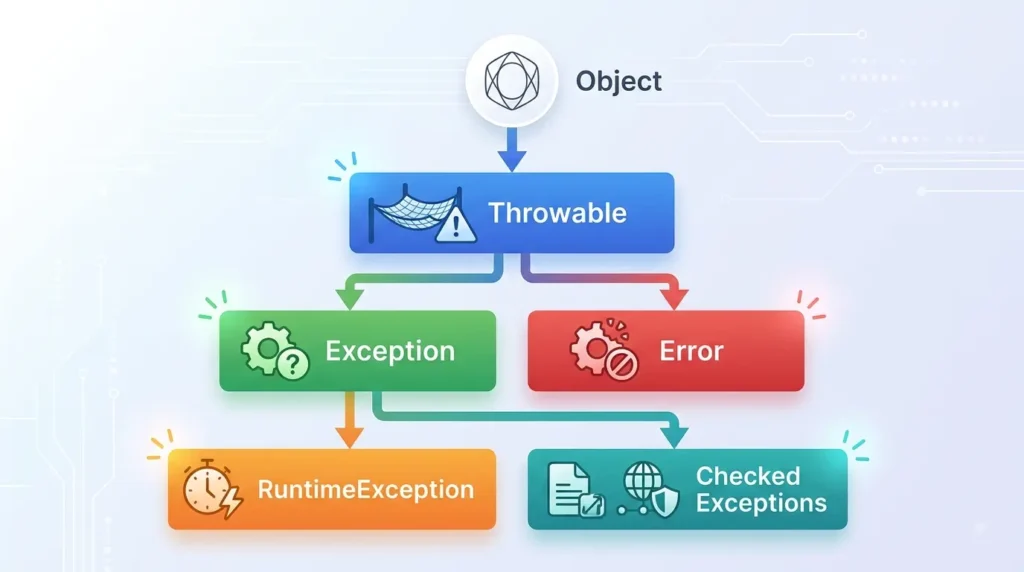
In simple terms, the java exception hierarchy is a tree of classes that describes every kind of problem a Java program can encounter at runtime. Java is an object oriented language, so it uses inheritance to organize these throwable conditions, meaning every exception class is built on top of a more general parent class.
At the very top of this tree sits the Object class, since everything in Java is ultimately an object. Below that comes Throwable, which is the parent of both Exception and Error. Exception then branches further into RuntimeException, which covers unchecked problems, and a large group of checked exceptions that must be explicitly handled.
Suggested hierarchy diagram
The diagram below is one of the fastest ways to understand how these classes relate to one another, so keep it close as you read through the rest of the guide.
Object

   |

Throwable

   |

   +------------------+

   |                  |

Exception           Error

   |

   +----------------------+

   |                      |

RuntimeException      Checked Exceptions

   |                      |

   |                  IOException

   |                  SQLException

   |                  ClassNotFoundException

   |

   +-- NullPointerException

   +-- ArithmeticException

   +-- ArrayIndexOutOfBoundsException

   +-- ClassCastException
This single picture answers most of what people are searching for when they look up the java exception hierarchy, so it is worth spending a minute tracing each branch before moving on.
Understanding Throwable in Java
Throwable is the root class for every error and exception in Java. If an object cannot be traced back to Throwable, it simply cannot be thrown or caught using try and catch. This is what makes it the true starting point of the entire hierarchy.
Throwable sits at the top because Java’s designers wanted one unified type that represents anything abnormal, whether that is a recoverable exception in your own application code or a serious problem in the Java Virtual Machine itself.
Oracle documents Exception as a subclass of Throwable, describing it as a class that represents conditions a reasonable application would want to catch. You can read the full reference on the Oracle Java 8 Exception documentation page.
Throwable has two main subclasses that you will work with constantly:
- Exception, which represents conditions your application can often anticipate and recover from.
- Error, which represents serious problems that are usually outside the control of application code.
Throwable also provides a handful of methods that get inherited all the way down the tree, which is why they work the same way regardless of which specific exception you are dealing with.
- getMessage(), which returns a description of what went wrong.
- printStackTrace(), which prints the full call stack at the point the exception was created.
- getCause(), which returns the underlying exception that triggered this one, if any.
- toString(), which returns a short summary combining the class name and the message.
Exception Class in Java
The Exception class represents problems that a well written application can reasonably expect and recover from. This might be a missing file, an invalid user input, or a database connection that briefly drops. These are everyday situations rather than catastrophic system failures.
In the hierarchy, Exception sits directly below Throwable and directly above RuntimeException. Because so many different situations can go wrong in a program, Java gives Exception a large number of subclasses, each representing a fairly specific kind of failure.
The reason exceptions are treated as generally recoverable is that they usually stem from conditions your code can plan for in advance, such as validating input before it causes a bigger problem downstream.
Common Exception subclasses
A few subclasses of Exception show up constantly in real Java code, so it helps to know what each one typically signals.
- IOException: thrown when an input or output operation fails, such as reading a file that has been deleted mid read.
- SQLException: thrown when something goes wrong while interacting with a database, such as an invalid query or a lost connection.
- ClassNotFoundException: thrown when code tries to load a class by name and the class cannot be found on the classpath.
- InterruptedException: thrown when a thread that is sleeping, waiting, or otherwise paused is interrupted by another thread.
RuntimeException and Unchecked Exceptions
RuntimeException is a subclass of Exception that represents problems the compiler does not force you to handle. These are typically bugs in the code itself rather than conditions caused by the outside world, such as a network being unavailable.
RuntimeException and everything beneath it in the hierarchy are called unchecked exceptions. The Java compiler will not complain if you forget to catch them or declare them with throws, which is exactly what separates them from checked exceptions.
Because the compiler does not enforce handling for these exceptions, it is common (and often correct) to prevent them through good coding practices, such as null checks and input validation, rather than wrapping every line in a try and catch block.
Common RuntimeException subclasses
| Exception | Common cause |
| NullPointerException | Using a null reference as if it pointed to a real object |
| ArithmeticException | Invalid arithmetic operation, such as dividing an integer by zero |
| ArrayIndexOutOfBoundsException | Accessing an array index that does not exist |
| ClassCastException | Casting an object to a type it is not actually an instance of |
| IllegalArgumentException | Passing an invalid or unexpected argument to a method |
| NumberFormatException | Trying to convert a string that is not a valid number into a numeric type |
GeeksforGeeks also identifies RuntimeException as the superclass for runtime exceptions and lists common examples including NullPointerException, ArrayIndexOutOfBoundsException, and ArithmeticException. See their guide on handling runtime exceptions in Java for more examples.
Checked vs. Unchecked Exceptions in Java
This distinction is one of the most important ideas in the entire java exception hierarchy, since it decides how strict the compiler will be about the errors you write code for.
What Are Checked Exceptions?
Checked exceptions are verified by the compiler at compile time. If a method can throw one, you generally must either catch it in a try and catch block or declare it in the method signature using throws.
- IOException
- SQLException
- ClassNotFoundException
Oracle specifically states that subclasses of Exception that are not also subclasses of RuntimeException are checked exceptions, as explained on the Oracle Exception class reference.
What Are Unchecked Exceptions?
Unchecked exceptions are RuntimeException and all of its subclasses. The compiler does not require you to catch or declare them, and they usually point to a logic mistake in the program rather than a condition outside your control.
- NullPointerException
- ArithmeticException
- IllegalArgumentException
Checked vs. Unchecked Exceptions: Key Differences
| Feature | Checked | Unchecked |
| Checked by compiler | Yes | No |
| Parent class | Exception | RuntimeException |
| Must handle or declare | Yes | No |
| Common cause | External conditions | Programming errors |
| Example | IOException | NullPointerException |
Error Class in Java
Error is the other major subclass of Throwable. It represents problems that are usually well beyond the reach of application code, such as the Java Virtual Machine running out of memory or a critical library failing to load.
The key difference between Error and Exception is intent. Exceptions are conditions your application is expected to handle. Errors, on the other hand, typically signal something so severe that the running program cannot reasonably continue in a safe or predictable way.
According to GeeksforGeeks on Errors vs Exceptions in Java, errors generally represent serious problems tied to the JVM or the surrounding environment, and they are not normally meant to be recovered from at the application level.
Common Types of Errors
- OutOfMemoryError: the JVM cannot allocate any more memory for new objects.
- StackOverflowError: the call stack has grown too deep, often because of unbounded recursion.
- NoClassDefFoundError: a class that was available at compile time cannot be found at runtime.
- ExceptionInInitializerError: an unexpected exception occurred while running a static initializer.
Should You Catch Errors in Java?
As a general rule, application code should avoid catching Error. These problems usually indicate that something has gone wrong at a level your code cannot meaningfully fix, so catching them can hide serious issues instead of resolving them.
There are specialized situations, such as certain frameworks or monitoring tools, where catching specific errors makes sense. For everyday application development, though, your energy is better spent handling the exceptions your application can actually recover from.
Java Exception Hierarchy Diagram Explained
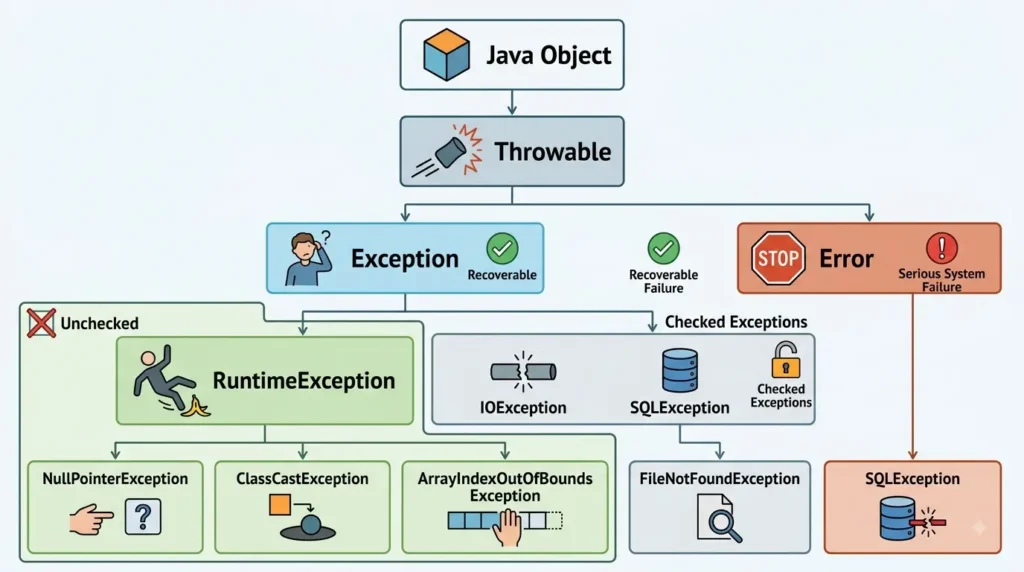
Now that we have looked at each class individually, it helps to walk back through the diagram from top to bottom so the full picture clicks into place.
- Object sits at the very top, since every class in Java, including Throwable, ultimately extends it.
- Throwable is the root of everything that can be thrown, and it splits into Exception and Error.
- Exception and Error branch off from Throwable, with Exception covering recoverable situations and Error covering serious system level failures.
- RuntimeException branches off from Exception and represents the unchecked side of the tree.
- Checked exception subclasses, such as IOException and SQLException, sit under Exception but outside RuntimeException.
- Specific exception classes, like NullPointerException or ClassCastException, sit at the bottom as the most precise, most commonly thrown types.
This layered view is useful whenever you search for related terms such as exception hierarchy in java, hierarchy of exceptions in java, or java exception class hierarchy, since they are all describing this same structure from slightly different angles.
How Exception Handling Works in Java
Java gives you five keywords to work with exceptions, and once you know what each one is responsible for, reading and writing exception handling code becomes much easier.
- try: wraps the code that might throw an exception.
- catch: defines what should happen if a specific exception type occurs.
- finally: runs cleanup code regardless of whether an exception was thrown.
- throw: manually raises an exception from within your code.
- throws: declares that a method might throw a checked exception, so callers know to handle it.
Example of Handling a Checked Exception
Here is a simple example that shows how a checked IOException is typically handled with try and catch.
try {

    FileReader reader = new FileReader("data.txt");

} catch (IOException e) {

    System.out.println("File could not be read: " + e.getMessage());

}
Example of Handling an Unchecked Exception
Unchecked exceptions can be caught the same way, even though the compiler does not force you to do so.
try {

    int result = 10 / 0;

} catch (ArithmeticException e) {

    System.out.println("Cannot divide by zero: " + e.getMessage());

}
Using Multiple Catch Blocks
When a block of code can fail in more than one way, you can stack multiple catch blocks so each exception type gets its own specific response.
try {

    riskyOperation();

} catch (IOException e) {

    System.out.println("IO problem: " + e.getMessage());

} catch (SQLException e) {

    System.out.println("Database problem: " + e.getMessage());

}
Using Finally
The finally block runs no matter what happens in the try block, whether an exception was thrown, caught, or never occurred at all. It is the natural place to close files, release database connections, or free other resources.
Throw vs. Throws
| Keyword | Purpose |
| throw | Used inside a method body to actually raise an exception instance |
| throws | Used in a method signature to declare that the method might raise a checked exception |
Custom Exceptions in Java
A custom exception is simply a class you create yourself, usually by extending Exception or RuntimeException, so that your error handling can describe problems specific to your own application rather than relying only on generic built in types.
Creating custom exceptions is worth doing when a generic exception like IllegalArgumentException would not clearly explain what actually went wrong. A well named custom exception makes your code far easier for other developers, including future you, to understand at a glance.
- Extend Exception when you want a checked custom exception that callers must explicitly handle or declare.
- Extend RuntimeException when you want an unchecked custom exception that behaves like the built in unchecked exceptions.
Simple Custom Exception Example
class InvalidAgeException extends Exception {

    public InvalidAgeException(String message) {

        super(message);

    }

}
Once defined, this exception can be thrown from any method that needs to reject an invalid age, and it can be caught the same way as any built in checked exception.
public void setAge(int age) throws InvalidAgeException {

    if (age < 0) {

        throw new InvalidAgeException("Age cannot be negative");

    }

    this.age = age;

}
Exception Propagation in Java
When an exception is thrown and there is no matching catch block in the current method, Java does not simply give up. It passes, or propagates, the exception up through the chain of method calls that led to that point.
This means an exception can travel from a deeply nested method all the way back up to the method that first started the chain, and it will keep moving until it either finds a catch block that matches its type or reaches the top of the program, at which point the program terminates and prints a stack trace.
methodA()

   |

   v

methodB()

   |

   v

methodC()

   |

   v

Exception occurs

   |

   v

Searches for a matching catch block
Exception propagation is a core part of understanding how Java exception handling actually behaves at runtime, and it is covered in more depth in GeeksforGeeks’ guide to exception propagation in Java.
Best Practices for Handling Exceptions in Java
Understanding the hierarchy is only half the job. Applying it well in real projects is what actually makes your code more reliable, so here are a few practices worth building into your habits.
Catch Specific Exceptions
Avoid catching a broad type like Exception when a more specific class, such as IOException or NumberFormatException, would let you respond to the actual problem more precisely.
Do Not Use Exceptions for Normal Program Flow
Exceptions should represent genuinely abnormal situations. Using them to control everyday logic, such as checking whether a value exists, tends to make code slower and much harder to follow.
Preserve the Original Cause
When you wrap one exception inside another, always pass the original exception along using exception chaining, typically through a constructor that accepts a cause. This keeps the full picture available for debugging later.
Write Useful Error Messages
A message like data error tells almost nobody anything. A message that explains what value was invalid and why it failed saves enormous time when something eventually goes wrong in production.
Do Not Ignore Exceptions
An empty catch block quietly swallows problems and makes them nearly impossible to trace later. At the very least, log what happened, even if you have decided the situation does not require immediate action.
Log Exceptions Properly
Use a proper logging framework rather than plain print statements, and include enough context, such as the operation being performed, so that logs are actually useful during an incident.
Create Custom Exceptions When They Add Meaning
Using specific, well named exception classes is recommended in current Java guidance because it improves readability and lets different errors be handled appropriately, as noted in GeeksforGeeks’ best practices for handling exceptions in Java.
Exception vs. Error in Java
| Exception | Error |
| Usually an application level problem | Usually a serious JVM or system level problem |
| Can often be handled | Generally not meant to be handled |
| Includes checked and unchecked types | Generally unchecked |
| Examples: IOException, NullPointerException | Examples: OutOfMemoryError, StackOverflowError |
Common Questions About Java Exception Hierarchy
What is the root class of the Java exception hierarchy?
Throwable is the root class. Every exception and every error in Java descends from it, either directly or through one of its many subclasses.
Is Throwable an exception?
No. Throwable is the parent class of both Exception and Error, so it sits one level above exceptions in the hierarchy rather than being an exception itself.
What is the difference between Exception and RuntimeException?
Exception is the broader parent class covering both checked and unchecked problems. RuntimeException is a more specific subclass of Exception that represents only the unchecked side of that family.
Is RuntimeException checked or unchecked?
RuntimeException and all of its subclasses are unchecked, meaning the compiler does not require you to catch them or declare them with throws.
Is Error part of the exception hierarchy?
Yes, in the sense that Error is part of the wider Throwable hierarchy. However, it is separate from Exception, and it is generally treated very differently in practice.
Which exceptions are checked in Java?
Checked exceptions are subclasses of Exception that are not also subclasses of RuntimeException, such as IOException, SQLException, and ClassNotFoundException.
Which exceptions are unchecked in Java?
Unchecked exceptions are RuntimeException and its subclasses, including NullPointerException, ArithmeticException, and IllegalArgumentException.
Can we catch Throwable in Java?
Technically yes, since catch (Throwable t) is valid Java. In practice, this is rarely recommended because it catches both exceptions and serious errors that your code usually cannot meaningfully recover from.
Why should Error usually not be caught?
Errors typically represent conditions, like running out of memory, that are outside the normal control of application code, so attempting to catch and continue past them can leave a program in an unpredictable state.
Conclusion
The java exception hierarchy starts simply: Object leads to Throwable, and Throwable branches into Exception and Error. From there, Exception splits further into RuntimeException, which covers unchecked problems, and a set of checked exceptions that the compiler holds you accountable for.
Keeping the difference between checked and unchecked exceptions clear in your mind makes it much easier to decide when to catch a problem, when to declare it, and when to simply let it propagate. Understanding inheritance in this way turns exception handling from a confusing set of rules into a logical, predictable system.
As a practical takeaway, always reach for the most specific exception type available, and only handle the conditions your application can genuinely recover from. Everything else, particularly serious errors, is usually better left alone.