
Artificial intelligence is changing the way we make software really fast. Things that used to need a team of people like developers and designers and testers can now be done with tools that use artificial intelligence.
If you are someone who starts a company or you work for yourself or you own a business, artificial intelligence makes it easier and faster and cheaper to make an app.
The good thing about this is that you do not have to be super good, at coding to make an app
In this guide you will learn how to make an app using intelligence, which tools you should use, how much money it will cost and the best ways to make a successful app that uses artificial intelligence in 2026.
What Does It Mean to Create an App with AI?
Creating an app with AI means using artificial intelligence tools to assist with or automate parts of the app development process.
Instead of writing every line of code manually, developers can use AI-powered tools to speed up development, improve efficiency, and reduce repetitive work.
AI can help with many aspects of app creation, including:
- Generating code
- Designing user interfaces (UI)
- Writing app content
- Creating prototypes
- Detecting bugs and errors
- Automating software testing
- Building AI chatbots
- Predicting user behavior
- Generating technical documentation
These capabilities allow developers to focus more on solving business problems and creating better user experiences rather than spending time on routine tasks.
Whether you’re a professional developer or a beginner, AI tools can simplify the app development process and help bring ideas to life much faster. As AI technology continues to evolve, it is becoming an essential part of modern app development.
Why Businesses Are Using AI for App Development
AI development tools are becoming essential for businesses looking to build applications faster, reduce costs, and improve efficiency. By automating many aspects of the development process, AI helps organizations bring products to market more quickly while maintaining high quality.
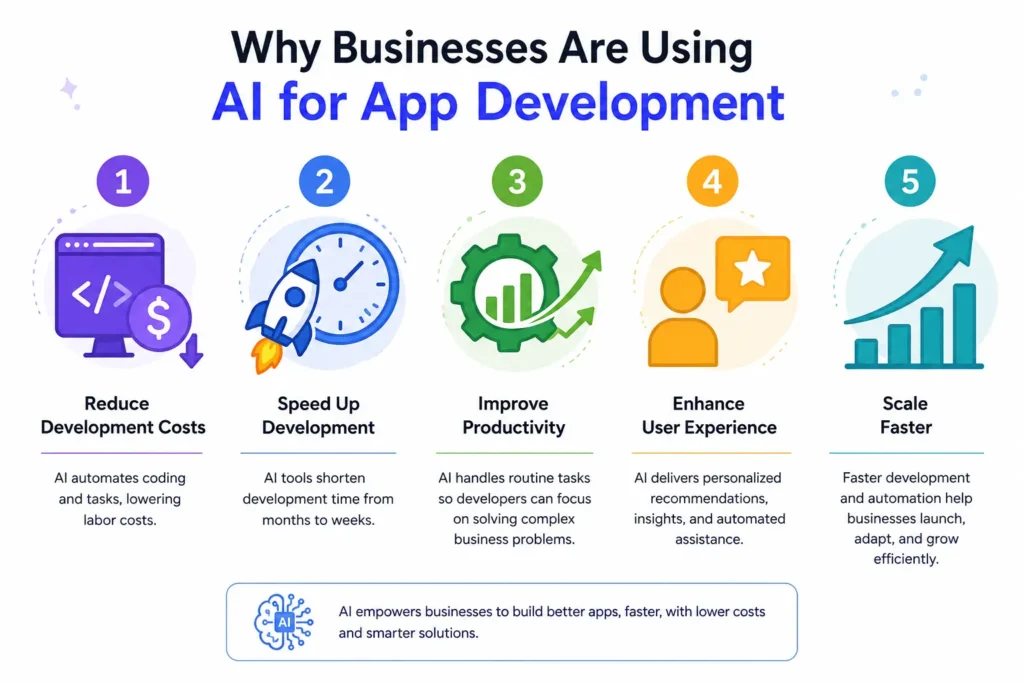
Here are some of the main reasons businesses are adopting AI for app development:
1. Reduce Development Costs
AI can automate repetitive coding and development tasks, reducing the amount of manual work required. This helps businesses lower labor costs and make better use of their development resources.
2. Speed Up Development
AI-powered tools can dramatically shorten development timelines. Projects that once took several months to complete can often be built, tested, and launched in just a few weeks.
3. Improve Productivity
By handling routine tasks such as code generation, debugging, and documentation, AI allows developers to focus on solving complex business challenges and creating innovative solutions.
4. Enhance User Experience
AI helps businesses deliver more personalized and engaging user experiences. Features such as intelligent recommendations, predictive insights, and automated assistance can improve customer satisfaction and retention.
5. Scale Faster
With faster development cycles and greater automation, companies can launch products more quickly and adapt based on user feedback. This flexibility enables businesses to grow and scale more efficiently.
As AI technology continues to evolve, it is becoming a valuable tool for organizations seeking to innovate, improve productivity, and stay competitive in a rapidly changing digital landscape.
Step 1: Define Your App Idea
Before touching any AI tool, clarify exactly what problem your app will solve.
Ask yourself:
- Who is the target audience?
- What problem does the app solve?
- What features are essential?
- How will users interact with it?
- How will the app generate revenue?
Example
Instead of saying:
“I want to build a fitness app.”
Define it as:
“I want a fitness app that creates personalized workout plans using AI based on a user’s goals, fitness level, and available equipment.”
Specific ideas produce better AI-generated results.
Step 2: Choose the Right AI App Builder
The AI platform you choose depends on your technical skills and project complexity.
No-Code AI App Builders
Best for beginners and entrepreneurs.
Popular options include:
- Glide
- Softr
- Adalo
- Bubble
- Appy Pie AI
These platforms allow users to build apps through visual interfaces with minimal coding.
AI Coding Assistants
Best for developers.
Popular tools include:
- GitHub Copilot
- ChatGPT
- Cursor
- Replit AI
- Amazon CodeWhisperer
These tools help generate code, debug issues, and accelerate development. For developers working on Mac, exploring the best apps for Mac through a curated subscription platform can surface additional coding, productivity, and project management tools that complement these AI assistants without requiring separate individual subscriptions.
Full AI Development Platforms
Suitable for advanced projects.
Examples:
- Firebase AI integrations
- Microsoft Azure AI
- Google Vertex AI
- OpenAI APIs
- Anthropic APIs
These platforms enable advanced AI functionality within applications.
Step 3: Create the App Structure
Once the concept is clear, outline the app architecture.
Core Components
Most apps include:
User Authentication
Users create accounts and log in securely.
Dashboard
The primary interface where users access features.
Database
Stores user information and application data.
Backend
Handles business logic and server-side operations.
Frontend
Displays content and user interactions.
AI tools can generate initial architecture recommendations based on your requirements.
Step 4: Design the User Interface with AI
Design traditionally requires extensive expertise. Today, AI significantly simplifies the process.
AI design tools can generate:
- Wireframes
- Landing pages
- Mobile interfaces
- Design systems
- User flows
Best Practices
Focus on:
Simplicity
Avoid cluttered screens.
Consistency
Use consistent colors, typography, and layouts.
Mobile Optimization
Most users access applications through mobile devices.
Accessibility
Ensure the app is usable for all audiences.
A clean user experience often matters more than complex functionality.
Step 5: Generate Code Using AI
This is where AI delivers its biggest productivity gains.
Modern AI coding assistants can generate:
- Frontend code
- Backend code
- APIs
- Database queries
- Authentication systems
- Integrations
Example Prompt
You might ask:
“Build a React dashboard for a fitness app that displays workout plans, progress tracking, and user statistics.”
The AI can generate an initial working version in seconds.
Important Note
AI-generated code should always be reviewed by a human developer before production deployment.
AI accelerates development but does not replace quality assurance.
Step 6: Add AI Features to Your App
Many businesses want AI inside their applications—not just during development.
Popular AI-powered features include:
AI Chatbots
Provide instant customer support and assistance.
Use Cases
- Customer service
- Sales support
- Internal help desks
Personalized Recommendations
Recommend products, content, or services based on user behavior.
Examples
- E-commerce recommendations
- Video suggestions
- Learning platforms
Content Generation
Generate:
- Blog posts
- Product descriptions
- Social media captions
- Marketing copy
Voice Recognition
Enable users to interact through speech.
Common applications include:
- Virtual assistants
- Accessibility tools
- Smart devices
Image Recognition
Analyze photos and visual content.
Applications include:
- Healthcare
- Retail
- Security
- Manufacturing
Step 7: Test Your Application
Testing is a critical part of app development, even when AI is used to help build the software. While AI can speed up development and automate many tasks, thorough testing is still necessary to ensure the application works as intended.
When testing your application, there are several key areas you should evaluate:
Functionality
Make sure every feature and function of the application works correctly. Users should be able to complete tasks without encountering errors or unexpected behavior.
Performance
Test how well the application performs under different levels of traffic and usage. A well-designed app should remain responsive and reliable, even when many users access it simultaneously.
Security
Protecting user accounts and sensitive data should be a top priority. Security testing helps identify vulnerabilities that could expose information or compromise the application.
User Experience
Evaluate whether the interface is intuitive and easy to navigate. A positive user experience can significantly impact customer satisfaction and retention.
Compatibility
Ensure the application works properly across different devices, operating systems, screen sizes, and web browsers. This helps provide a consistent experience for all users.
AI-powered testing tools can further improve the quality assurance process by automatically identifying bugs, performance issues, and usability problems. These tools can help developers detect issues earlier and resolve them more efficiently. Leveraging specialized capabilities like Rocket’s solve feature can further streamline this debugging workflow by automatically diagnosing errors and fixing code anomalies before deployment.
No matter how advanced your AI development tools are, testing remains essential. Thorough testing helps ensure your application is reliable, secure, and ready to deliver the best possible experience for users.
Step 8: Launch Your App
After testing, prepare for launch.
Launch Checklist
- Secure hosting
- Analytics setup
- Error monitoring
- Backup systems
- Privacy policy
- Terms of service
- App store optimization
For mobile apps, submit to:
- Apple App Store
- Google Play Store
For web applications, deploy using cloud platforms.
Set Up Mobile App Analytics
Implement mobile app analytics to track user behavior, measure app performance, and understand how users interact with different features. These insights help you identify areas for improvement, optimize the user experience, and make data-driven decisions after launching your app.
How Much Does It Cost to Create an App with AI?
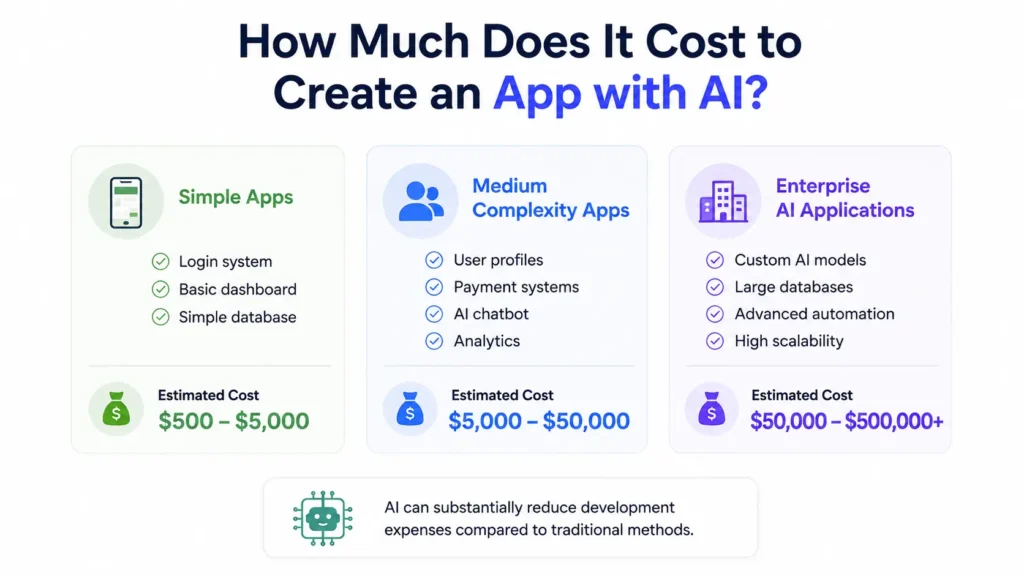
The cost varies significantly based on complexity.
Simple Apps
Features:
- Login system
- Basic dashboard
- Simple database
Estimated Cost:
$500–$5,000
Medium Complexity Apps
Features:
- User profiles
- Payment systems
- AI chatbot
- Analytics
Estimated Cost:
$5,000–$50,000
Enterprise AI Applications
Features:
- Custom AI models
- Large databases
- Advanced automation
- High scalability
Estimated Cost:
$50,000–$500,000+
AI can substantially reduce development expenses compared to traditional methods.
Common Mistakes to Avoid
Many app creators make the same errors.
Building Without Market Validation
Validate demand before investing heavily.
Overcomplicating Features
Focus on solving one core problem first.
Ignoring User Feedback
Early users provide critical insights.
Neglecting Security
Protect user data from the beginning.
Relying Entirely on AI
Human review remains essential for quality, compliance, and business strategy.
Best AI Tools for App Development in 2026
Here are some of the most widely used AI tools today.
| Tool | Primary Purpose |
| ChatGPT | Code generation and ideation |
| GitHub Copilot | AI coding assistance |
| Cursor | AI-powered development |
| Replit AI | Rapid application development |
| Bubble | No-code app creation |
| Glide | Mobile app building |
| Firebase AI | Backend services |
| OpenAI API | AI-powered features |
| Claude API | Conversational AI |
| Gemini API | Multimodal AI capabilities |
Choosing the right combination depends on your project goals and technical requirements.
The Future of AI App Development
Artificial intelligence is rapidly transforming the way software and applications are developed. What once required large development teams and lengthy coding processes can now be accomplished much faster with the help of AI-powered tools.
As AI technology continues to evolve, several exciting trends are shaping the future of app development, including:
- AI coding agents that can write and optimize code
- AI-generated user experiences tailored to individual users
- Real-time personalization based on user behavior and preferences
- Voice-first interfaces that enable hands-free interaction
- Multimodal applications that combine text, voice, images, and video
- AI-powered software maintenance that automatically detects and fixes issues
These advancements are making app development more efficient, scalable, and accessible than ever before.
In the coming years, building an application may become less about writing code and more about defining business goals and user needs. Developers and business owners will increasingly be able to describe what they want to achieve, while AI handles much of the design, development, testing, and optimization process.
Although human creativity, strategy, and decision-making will remain essential, artificial intelligence is expected to play a central role in how software is built, maintained, and improved in the future.
Frequently Asked Questions (FAQ)
Can I create an app with AI without coding?
Yes. No-code AI app builders such as Bubble, Glide, and Softr allow users to create applications without traditional programming knowledge.
How long does it take to build an app with AI?
Simple applications can be built in days or weeks, while more complex platforms may take several months depending on features and testing requirements.
What is the best AI tool for app development?
The best tool depends on your needs. ChatGPT and GitHub Copilot are excellent for coding assistance, while Bubble and Glide are popular for no-code development.
Can AI build an entire app by itself?
AI can generate significant portions of an application, but human oversight is still necessary for design decisions, testing, security, and business requirements.
Is AI app development cheaper?
In most cases, yes. AI reduces manual work, shortens development timelines, and lowers overall project costs.
Can AI apps be published on the App Store?
Yes. Apps developed with AI can be published on the Apple App Store and Google Play Store as long as they meet platform guidelines.
conclusion
Creating an app with Artificial Intelligence is not something that will happen in the future, it is happening now. A lot of people are using Artificial Intelligence to make apps. You can use Artificial Intelligence to start a company, make your work easier or create a new digital product. Artificial Intelligence can help you make your app quickly. It can also help you work better.
The important thing is not just to use Artificial Intelligence but to use it in a way. First you need to know what problem you are trying to solve. Then you need to make sure your idea is one. After that you need to choose the tools to help you. You should use Artificial Intelligence to make your work easier and also use the skills of a human to make it even better.
Companies and people who start using Artificial Intelligence to make apps now will be ahead of others in the future. They will be able to come up with ideas to grow their business and compete with other companies in the digital world of 2026 and after that.